
A dealership’s IT estate looks small on an asset list and behaves like a distributed retail chain: a vendor-controlled DMS that owns the trading day, sales desks and workshop bays on branch networks of uneven quality, tablets carried across a yard, phones that hold customer conversations, payment and finance terminals, CCTV, digital signage, and a festive week in which all of it has to work at once. When any part fails, the business does not lose a ticket – it loses a delivery.
The support model that works in this sector is therefore not a break-fix arrangement with a local vendor. It is managed IT infrastructure and AMC with a named escalation path into every vendor that touches the trading day, helpdesk and end-user support that a branch will actually call, backups with timed restore tests, and security controls sized to the fact that the estate holds customer identity, finance documents and payment data across several sites.
What an engagement includes, at a glance
| Component | What We Deliver |
|---|---|
| Estate inventory and risk audit | Every system, device, network, vendor and contract named with an owner, a criticality and a failure consequence – the artefact that turns support from reactive to planned. |
| DMS uptime and vendor management | Escalation paths, SLA terms, version drift across brands, maintenance windows that do not collide with trading, and a single throat to choke when the vendor and the ISP disagree. |
| Branch network, Wi-Fi and connectivity | Sales desks, workshop bays, yard coverage and payment paths on a monitored network with failover, rather than on whatever the last installer left behind. |
| Endpoint and device management | Tablets, phones, desk terminals and kiosks enrolled, patched, encrypted and remotely wipeable, with a standard build per role. |
| Identity, access control and MFA | One account per person, role-based access by branch, MFA on everything that holds customer data, and leaver accounts closed on the day somebody leaves. |
| Backup, recovery and restore testing | Backups of the DMS, CRM, finance and files, with restore tests timed and evidenced – a backup that has never been restored is a hope. |
| Monitoring, alerting and incident response | Uptime, latency, patch state and security events monitored with thresholds, plus a documented response path for a breach, ransomware or a lost device. |
| Physical systems: CCTV, access control, signage | The endpoints customers and staff actually touch – cameras, door access, displays and peripherals – which are IT assets with network connections and firmware. |
| Peak readiness and cost governance | Festive and launch weeks prepared in advance, contracts consolidated, and support cost measured against the downtime it prevents. |
Why dealership IT support is not office IT support
An office IT team supports people who use software. A dealership IT function supports a trading floor: systems that take payment, book a test drive, raise a job card, print a registration document and record a delivery, all of them dependent on a vendor somewhere else, all of them used by staff who cannot stop and wait. The failure modes are different too – a network outage does not delay an email, it stops an invoice – and the peak is not quarter end but a festive weekend when the branch is at three times normal load with the same connectivity.
| Office IT assumption | Dealership reality | What support has to do differently |
|---|---|---|
| Users sit at desks on one network | Staff move across a showroom, a yard and workshop bays, often outdoors | Wi-Fi and cellular coverage designed per zone, with roaming tested where work happens |
| Software is licensed and administered in-house | The DMS is vendor-hosted or vendor-controlled, with its own release calendar | Vendor SLAs, escalation contacts and maintenance windows managed as contracts |
| Downtime delays work | Downtime stops trading – no invoice, no payment, no delivery | Priority order driven by revenue at risk, with failover for the top systems |
| One site, one security perimeter | Several branches, each with its own installer history and consumer equipment | A standard build per site, centrally monitored, with per-branch ownership |
| Devices are company property | Customer conversations happen on personal phones and branch WhatsApp numbers | Business messaging on managed numbers, with enrolment and a leaver process |
| Backups protect documents | Backups protect a trading system, a customer database and a finance ledger | Timed restore tests per system, with recovery objectives agreed with the business |
| Support is a ticket queue | A branch manager needs an answer in ten minutes on a Saturday | A rota, a WhatsApp escalation path and a named owner per branch |
| Change is scheduled | A vendor patch can arrive mid-month and break an integration | A test path, a rollback plan and a change calendar shared with operations |
| Physical security is the guard’s job | CCTV, access control and displays are networked endpoints with firmware | They are inventoried, patched and segmented like any other device |
| Cost is a licence count | Cost is downtime, vendor fees, connectivity, devices and support hours | Consolidated contracts and a cost-per-branch view with the downtime it prevents |
- Support priority should follow the money, which is why the first deliverable in any dealership engagement is a criticality ranking with a rupee consequence per hour of outage rather than a device list.
- The estate spans brands and cities in a group, so standardisation is a management decision before it is a technical one – the kind taken in unified top-level management and then enforced by a build standard.
- Where the group is acquiring branches or opening new ones, IT readiness is on the critical path of the opening date: market expansion consulting with a branch build checklist attached.
- The comparison with other physical-estate sectors is useful – hotels run property systems and guest-facing devices under the same constraints, and retail runs point-of-sale estates with the same festive peaks.
The estate audit: naming every system, device and vendor
Nothing can be supported, secured or budgeted until it is named. The audit is a short, physical exercise – walk each branch, list every system and device, record who supplies it, what it costs, what happens when it fails, and who currently fixes it – and it consistently finds three things: vendor-managed systems nobody escalates, a large band of endpoints nobody owns, and consumer-grade equipment holding business data. Those three findings shape the whole programme.
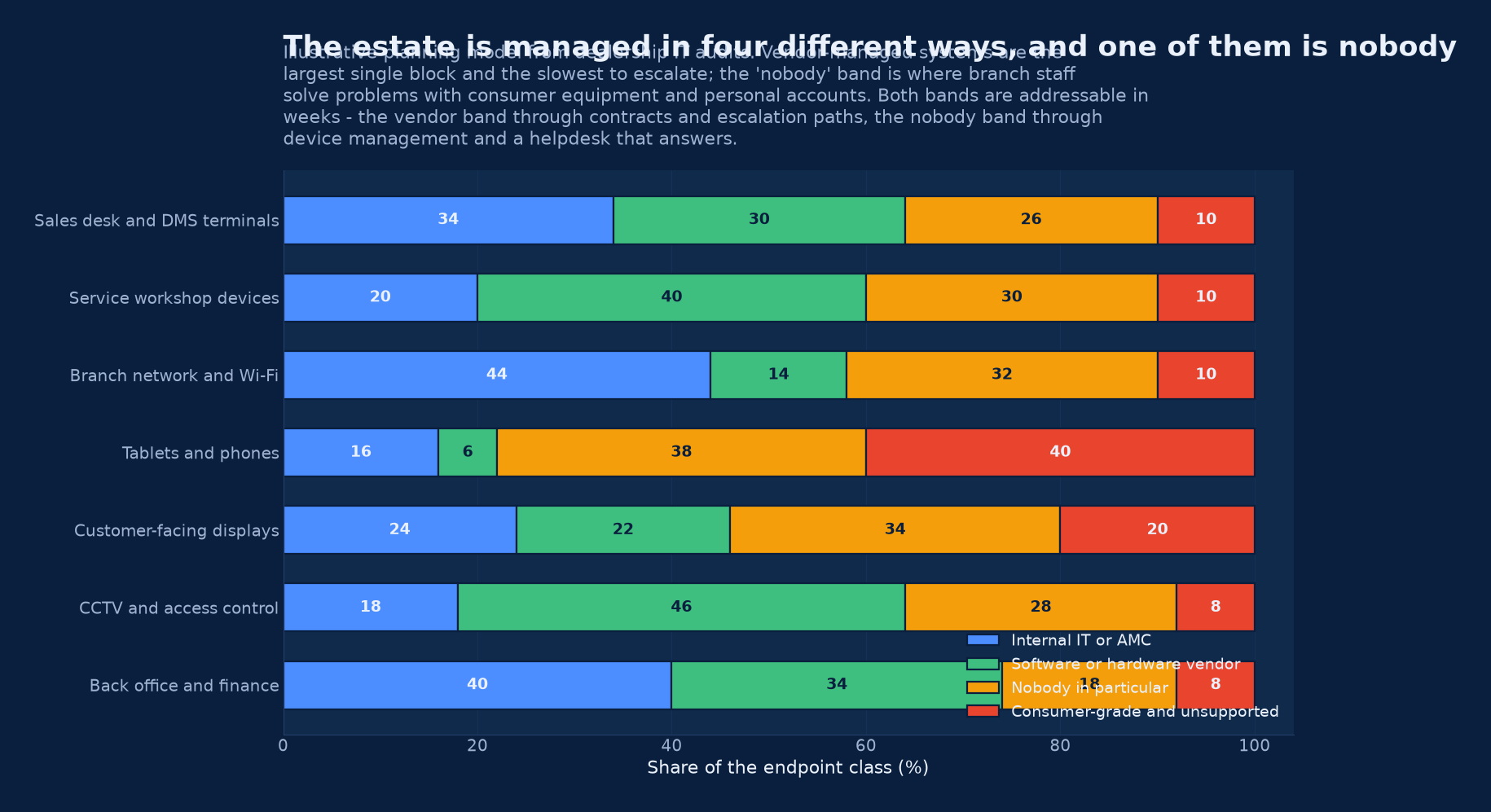
Chart values are an illustrative planning model based on typical UMC engagements and published industry benchmarks. They are not a guarantee of results on any specific project.
| Estate layer | What is inventoried | Owner named | Criticality question | Common finding |
|---|---|---|---|---|
| Trading systems | DMS or ERP, finance, stock, invoicing, registration tools | Vendor plus an internal owner | What stops if this is down for an hour? | Version drift between branches of the same brand |
| Demand systems | Website, booking, CRM, telephony, WhatsApp, chat | Marketing plus IT | Can an enquiry still be captured? | A form or number that fails silently |
| Branch network | Routers, switches, access points, firewalls, ISP links, failover | IT or the installer | Is there a second path when the first fails? | One broadband link with no failover |
| Endpoints | Desk terminals, laptops, tablets, phones, printers, scanners | IT | Is it enrolled, patched, encrypted, wipeable? | Personal devices holding customer records |
| Payment and finance | Card terminals, lender interfaces, document scanners | Finance plus vendor | Can we take money and submit an application? | Terminals tied to one ISP or one power circuit |
| Workshop systems | Job cards, diagnostics tools, parts catalogue, bay scheduling | Aftersales plus vendor | Can a job be opened and closed? | Diagnostic licences nobody can renew |
| Physical and customer-facing | CCTV, access control, digital signage, displays, kiosks | Facilities or nobody | Is it networked, patched and segmented? | Cameras on default credentials, on the office network |
| Cloud and SaaS | Email, storage, collaboration, marketing platforms, analytics | IT or the individual who signed up | Who owns the account and the recovery contact? | Accounts owned by a departed employee’s inbox |
| Data and backups | Backup jobs, retention, restore tests, archives | IT | Has a restore been timed and evidenced? | Backups running to the same site as the data |
| Contracts and costs | Vendor agreements, SLAs, connectivity, licences, device leases | Procurement or nobody | What are we promised, and what does it cost per branch? | Overlapping contracts and auto-renewals unnoticed |
- The audit output is an estate register with a criticality and an owner per row – the same register that an IT audit and compliance review will ask for, produced once and reused.
- Where systems need to talk to each other – DMS to CRM to accounting – the audit identifies the integration points and their failure modes, which is systems integration scoping done properly.
- Where AI or automation is on the roadmap, the audit doubles as the readiness baseline: an AI and data readiness assessment needs the same inventory plus the access routes.
- The register is also the honest input to a cost conversation, because it shows which contracts overlap – the IT equivalent of cost rationalisation.
DMS uptime, vendor management and the escalation path
The DMS is the dealership’s trading system and almost never its own software: it is supplied, hosted or licensed by a vendor whose support hours, release calendar and priorities are set elsewhere. The support task is therefore largely contractual – knowing what you are promised, who to call at eleven on a Saturday, what a maintenance window may touch, and how to prove an outage when the vendor says the problem is your connectivity. Groups with several brands carry several of these relationships at once, usually with different terms.
| Vendor issue | How it presents | Control to install | Evidence to keep |
|---|---|---|---|
| Unclear SLA terms | A response promised in four hours arrives in four days | SLA restated per system with severity definitions and credit terms | Contract extract plus a severity matrix |
| No out-of-hours path | A Saturday outage waits until Monday | Named escalation contacts with phone numbers, tested quarterly | Escalation test log |
| Connectivity blame loop | Vendor and ISP each point at the other | Monitoring on both sides with timestamps, plus a joint call rule | Incident timeline with independent measurements |
| Unannounced maintenance | A patch lands during trading hours | Maintenance windows agreed, published and enforced | Change calendar with notifications |
| Version drift | Two branches of one brand run different releases | A version register per branch with upgrade scheduling | Version report per site |
| Integration breakage | A release silently breaks the CRM or accounting feed | A test path before production, with a rollback plan | Release test results and rollback records |
| Data ownership ambiguity | An exit or migration is blocked by data access | Contractual right to a full data export in a usable format | Export clause plus a tested export |
| Support knowledge loss | The one person who understood the setup leaves | Configuration documentation held by you, not only by the vendor | As-built documentation per branch |
| Licence and user creep | Costs rise with headcount nobody reviews | Quarterly licence reconciliation against the estate register | Licence report versus active users |
| Replacement risk | A vendor is acquired, sunset or repriced | An exit assessment with migration cost and data portability | Exit plan reviewed annually |
- Vendor management is the discipline that keeps a trading system available, and it is mostly documentation and escalation rather than engineering – which is why it belongs in managed IT services with a named account owner.
- Where the DMS holds customer identity and finance documents, the vendor is a processor of your data and needs terms to match – a security and compliance requirement, not a procurement detail.
- The integration surface between the DMS and everything else is where most outages are actually felt, so it needs monitoring of its own: freshness and row counts on every feed, which is ERP and CRM integration operations in practice.
- Where a group is standardising across brands, the vendor landscape is a strategic decision with a multi-year cost attached – business strategy territory rather than an IT preference.
Branch network, Wi-Fi and connectivity that survives a Saturday
Everything a branch does runs over a network that was usually installed by whoever was cheapest at the time. Sales desks need the DMS, tablets need Wi-Fi across a yard, payment terminals need a path that does not share a switch with the office, and CCTV needs bandwidth that does not starve the trading systems. The fixes are unglamorous and decisive: a second link with automatic failover, segmentation between trading, guest and physical-security traffic, coverage measured where work actually happens, and monitoring that alerts before a branch manager calls.
| Requirement | What good looks like | Failure mode | How it is verified |
|---|---|---|---|
| Primary and failover links | Two ISPs with automatic failover and a tested switch time | One broadband link; an outage closes the branch | A failover test with a recorded switch time |
| Segmentation | Trading, workshop, guest and CCTV traffic separated | A guest device or a camera on the same broadcast domain as the DMS | A network diagram plus a segmentation test |
| Wi-Fi coverage | Access points placed for the showroom floor, yard and bays | Dead zones where tablets are actually used | A coverage survey per zone, repeated after changes |
| Bandwidth planning | Sized for peak Saturday traffic, CCTV and updates together | Video updates saturating the link during trading | Peak utilisation measured over a festive week |
| Power resilience | Router, switch and access points on protected power | A power dip restarting the network mid-invoice | A pull-the-plug test per branch |
| Firewall and remote access | Managed rules, VPN for support, no open remote desktop | Port forwarding left behind by an installer | A rule review and an external port scan |
| Monitoring and alerting | Uptime, latency, packet loss and device state alerting to a rota | An outage discovered by a customer complaint | Alert tests plus a monthly alert-quality review |
| Standard build | One documented configuration per branch type | Every site configured differently by a different installer | Configuration comparison against the standard |
| New branch readiness | A build checklist with a connectivity test before opening | Opening day with untested Wi-Fi and one link | A signed readiness checklist per site |
| Cost visibility | Connectivity cost per branch with contract end dates | Auto-renewals at unfavourable rates | A contract register reviewed quarterly |
- Network monitoring is the same discipline as service monitoring elsewhere in the estate – thresholds, alert routing, error budgets – which is SRE and observability applied to a branch rather than a cluster.
- Where cloud services carry the CRM, the warehouse or the website, connectivity and cloud architecture become one reliability question: cloud services and migration with deployment pipelines that do not surprise a trading day.
- A tablet that cannot reach the network in the yard is not a device problem, and a booking that fails on a phone is not a marketing problem – mobile experience and coverage are the same failure seen from two ends.
- Bandwidth is a cost line that grows quietly with CCTV and signage, which is where cost optimisation thinking applies to connectivity as much as to compute.
Endpoints, devices and the personal-phone problem
Dealership work happens on devices that leave the building: tablets carried across a yard, phones held by executives who take customer calls, laptops used for finance documents, kiosks and displays facing the public. In most estates a large share of these are personal or unmanaged, which means customer data sits on devices nobody can patch, locate or wipe. Device management is the control that ends this – enrolment, a standard build per role, encryption, patching, and remote wipe – plus a rule that customer conversations happen on business numbers.
| Device class | What it is used for | Risk if unmanaged | Control |
|---|---|---|---|
| Sales desk terminals | DMS access, quotations, finance applications, printing | Shared logins, unpatched browsers, documents on the desktop | Standard build, named accounts, disk encryption, patch policy |
| Executive tablets | Walkaround, configurator, digital catalogue, signatures | Loss with customer data, no remote wipe | Enrolment, container for business data, remote wipe, kiosk mode |
| Executive phones | Calls, WhatsApp with customers, photographs of documents | Conversations and documents on a personal device that leaves with the employee | Business numbers on a managed platform, consent and retention rules, leaver process |
| Workshop devices | Job cards, diagnostics, parts lookup, bay scheduling | Vendor software with old runtimes, no patching route | Vendor-supported inventory, isolated network segment, documented update path |
| Finance and back office | Accounting, banking, documents, payroll | The highest-value target in the building | MFA, endpoint protection, restricted access, monitored backups |
| Reception and kiosk | Enquiry capture, visitor logs, feedback | A public device on the internal network | Locked-down build, guest network, no local data retention |
| Digital signage and displays | Offers, model content, brand video | Internet-exposed management consoles | Segmented network, vendor console secured, firmware patched |
| CCTV and access control | Security recording, door and gate access | Default credentials, exposed ports, unpatched firmware | Credential change at install, segmentation, firmware schedule, access review |
| Printers and scanners | Registration documents, finance packs, invoices | Stored jobs and documents on device memory | Secure print, device encryption, retention settings, network isolation |
| Test and demo equipment | Loan vehicles, demo devices, telematics units | Assets that move between sites without records | Asset register with custody, plus a return and wipe routine |
- Enrolment and patching are the controls; the operating discipline is a standard build per role documented once and applied everywhere – managed IT infrastructure with an asset register behind it.
- Business messaging has to move off personal phones for the record to be usable and lawful: WhatsApp business numbers with routing, consent and retention, which also feeds the CRM programme with a source.
- Where an estate wants a customer-facing app – service booking, ownership documents, loyalty – that is a product decision with device and platform implications: mobile application development supported by the same endpoint standards.
- A lost device is an incident with a defined response: locate, suspend access, wipe, notify if customer data was present – part of security operations rather than an IT inconvenience.
Identity, access control and MFA
Access is the cheapest control with the largest effect. A dealership’s data is spread across a DMS, a CRM, finance systems, marketing platforms, cloud storage and messaging, and in most estates the same handful of shared logins reaches several of them. Moving to one named account per person, role-based permissions by branch, MFA everywhere customer or financial data lives, and a leaver process that closes accounts on the day removes most of the risk that antivirus cannot.
| Control | What it prevents | How it is implemented | How it is verified |
|---|---|---|---|
| Named accounts | Actions attributed to ‘admin’ or a shared desk login | One account per person, shared logins retired | Account list versus HR roster |
| Role-based access | A branch executive browsing another branch’s customers | Roles per branch and function, permissions by data class | Access matrix reviewed quarterly |
| MFA | A stolen password becoming a customer data breach | MFA on email, cloud storage, DMS, CRM, finance and marketing platforms | Coverage report by system |
| Privileged access | Unrestricted admin rights used for daily work | Separate admin accounts, just-in-time elevation, logged sessions | Privileged account review and session logs |
| Leaver process | Accounts of departed staff staying active for months | Offboarding checklist with same-day deactivation and device return | Leaver log with timestamps |
| Joiner and mover process | Permissions accumulating across role changes | Access granted from a role template, reviewed on transfer | Access recertification per quarter |
| Vendor and contractor access | Third parties holding standing admin access | Time-boxed accounts, scoped permissions, named contact | Vendor access register with expiry |
| Password and secret handling | Credentials in spreadsheets, chats and email | A managed password vault, secrets out of code and documents | Vault usage and periodic secret rotation |
| Session and device trust | Data accessed from unmanaged devices | Conditional access where supported, device compliance as a condition | Access logs with device state |
| Audit logging | No answer to ‘who exported the customer list’ | Logging of access, exports and permission changes, retained and protected | Log review and an export alert rule |
- Access control is also the precondition for trustworthy reporting – if three people share a login, no behavioural metric in the dashboard set can be attributed, and coaching conversations become arguments.
- MFA and logging are the controls an assessor looks at first: IT audit and compliance work turns them into evidence rather than intention.
- Where AI tools are given access to the CRM or DMS, the same rules apply to the model’s service account, with scope, logging and a review path – AI governance, risk and compliance as an extension of access control.
- Identity work is unglamorous and it is what makes every other control enforceable; it belongs early in the programme because device enrolment without access control only distributes the risk.
Backup, recovery and the restore test nobody runs
Dealerships back up more often than they restore, which is the whole problem. A backup is a promise and a restore test is the evidence; without the test, recovery time is a guess and the guess is usually optimistic by a factor of ten. The estate that matters is wider than files – the DMS database, the CRM, finance and accounting, messaging history, documents, and the configuration that would let a branch rebuild. Recovery objectives should be set by the business per system, in hours, with the rupee consequence of missing them written next to the number.
| System or data | Recovery objective worth setting | Backup approach | Restore test | Failure if untested |
|---|---|---|---|---|
| DMS or ERP database | Two to four hours, agreed with the vendor | Vendor backup plus an independent copy where the contract allows | Quarterly, timed, to a test environment | A trading halt of unknown length |
| CRM and lead history | Four hours, with no loss of the current day | Platform export plus incremental jobs | Quarterly restore into a sandbox | Enquiries and follow-up history lost |
| Finance and accounting | Same day, before the next close | Nightly full plus transaction logs | Monthly reconciliation restore | A month of ledger work repeated |
| Documents and finance packs | Twenty-four hours | Versioned cloud storage with retention | Half-yearly sampled restore | Registration and loan documents unavailable |
| Messaging history | Twenty-four hours where the platform allows | Business API export on a schedule | Half-yearly export verification | Customer conversations and consent evidence lost |
| Website and booking | Two hours | Code repository plus database and media backup | Quarterly rebuild to a staging environment | Demand capture down with no rebuild path |
| Branch configuration | Same day for a rebuild | Network, firewall and device configuration exported | On any hardware replacement | A branch rebuilt from memory |
| CCTV recordings | Per policy retention, usually thirty to ninety days | On-device plus off-device for critical areas | Monthly playback verification | An incident with no footage |
| Stock and yard data | Same day | Included in the DMS or a separate extract | Quarterly | Physical stock disagreed with the system |
| Email and collaboration | Twenty-four hours | Platform retention plus an independent archive | Half-yearly sampled restore | Vendor correspondence and approvals lost |
- Backup and recovery is a designed service with tested objectives, not a nightly job with a green tick: backup and disaster recovery covering systems, configuration and the people who run the restore.
- Where systems run in the cloud, the recovery design has to include identity, networking and the deployment path – cloud services with repeatable deployment so a rebuild is a pipeline run rather than a weekend.
- Ransomware makes an untested backup a business-ending event, which is why recovery testing sits inside security operations rather than beside it.
- Recovery objectives are also a cash question: an unrecoverable trading system converts an IT incident into a working capital event within days.
Monitoring, alerting and incident response
Support quality is decided before anybody calls. Monitoring is what converts an outage from a branch manager’s discovery into an alert with a timestamp, and incident response is what decides whether the next hour is spent fixing or blaming. A dealership needs a modest set monitored well: trading systems, connectivity, backup success, patch state, certificate expiry, and security events – each with a threshold, an owner, an escalation path and a post-incident note that changes something.
| What is monitored | Threshold worth setting | Alert route | Response expectation |
|---|---|---|---|
| DMS and trading system availability | Any unavailability during trading hours | On-call engineer plus branch manager notification | Acknowledged in fifteen minutes, vendor escalated in thirty |
| Branch connectivity | Latency, loss and failover events per site | Network on-call | Failover confirmed automatically, root cause same day |
| Website, booking, forms and any dealer portal | Uptime, response time, form submission success | Web on-call | A broken capture route treated as a trading outage |
| Integration and feed freshness | Any feed older than its schedule | Data on-call | Replayed or fixed before the next reporting cycle |
| Backup success | Any failed or incomplete job | IT operations | Same-day investigation, restore test if in doubt |
| Patch and endpoint state | Devices out of compliance for more than seven days | IT operations | Remediation task per device, escalation for repeat offenders |
| Certificate and domain expiry | Thirty days before expiry | IT operations | Renewed with a change record |
| Security events | Failed logins, impossible travel, mass exports, new admin rights | Security on-call | Investigated within an hour, contained where indicated |
| Physical systems | CCTV offline, access controller faults, signage failures | Facilities plus IT | Same-day repair for security devices |
| Payment and finance terminals | Terminal offline or settlement failure | Finance plus IT | Immediate, with a manual fallback route rehearsed |
- Monitoring is an engineering practice with alert-quality discipline: thresholds, dedupe, routing and a monthly review of false positives – SRE and observability scaled to a branch estate.
- The web estate needs its own watch, because a form that stopped submitting is invisible to network monitoring: web application maintenance with synthetic checks on every capture route.
- Where an assistant or automation handles enquiries out of hours, its failures need the same alerting as a human queue – AI agents and automation operated as a monitored service, not a demo.
- Every incident ends with a short note: what happened, what it cost, what changes. Without it, the same outage recurs annually and the estate never learns.
Physical systems: CCTV, access control, signage and peripherals
The devices customers and staff physically touch are network endpoints with firmware, default credentials and a support contract somebody has forgotten. CCTV and access control are security assets whose failure is discovered during an incident; digital signage is a marketing surface whose failure is visible to every visitor; printers and scanners hold registration and finance documents. Treating them as IT assets – inventoried, segmented, patched and monitored – costs little and removes a category of breach that is embarrassingly common.
| System | Business job | Typical exposure | Control set |
|---|---|---|---|
| CCTV and recording | Incident evidence, yard and showroom security | Default credentials, exposed management ports, retention nobody checks | Credential change at install, segmentation, firmware schedule, retention policy, playback tests |
| Access control | Door, gate and key-cabinet control, staff attendance | Standalone controllers with vendor remote access nobody reviews | Access review per quarter, vendor access time-boxed, log retention |
| Digital signage and displays | Offers, model content, brand video, service pricing | Internet-exposed content consoles, stale content, one player per branch | Secured console, a content schedule with an owner, players patched and monitored |
| Public Wi-Fi | Customer connectivity in the lounge | Guest traffic sharing the trading network | Separated guest SSID with client isolation and bandwidth limits |
| Printers, scanners and MFDs | Registration, finance packs, invoices, job cards | Stored jobs on device memory, unpatched firmware | Secure print release, device encryption, retention settings, network isolation |
| Payment terminals | Card and UPI acceptance at the desk | Terminals on a shared circuit or an unmonitored link, no fallback | Dedicated path, monitored connectivity, a rehearsed manual fallback |
| Diagnostic and workshop tools | Vehicle diagnostics, coding, telematics | Vendor laptops with old runtimes and no patch route | Isolated segment, documented update path, licence register |
| Kiosks and configurator screens | Self-service exploration and enquiry capture | A public browser on the internal network with no kiosk lockdown | Locked-down build, guest network, capture wired to the CRM |
| Vehicle telematics and connected stock | Stock location, demo fleet tracking | Fleet accounts shared between staff, data exported informally | Named accounts, export logging, retention rules |
| Facilities systems | Lighting, climate, power monitoring in the showroom | Building systems bridged onto the office network | Separate segment, vendor access reviewed, no internet exposure without need |
- Segmentation is the single highest-value control here: a camera or a kiosk on the trading network converts a weak device into a route to customer data.
- Signage is a marketing surface with an operations dependency – content that is stale or wrong is visible to every visitor, so it needs an owner and a schedule like any other channel, the same discipline the social programme applies to its calendar.
- Physical security devices hold footage and access logs that are personal data, so retention and access rules apply to them exactly as they do to the CRM record.
- Firmware on these devices is patched rarely and exploited routinely, which makes the patch schedule part of security operations rather than a facilities task.
Helpdesk, SLAs and how a branch actually gets help
A branch will use the support route that is fastest, which is usually a personal phone call to somebody who once fixed something. That habit is not a discipline failure; it is evidence that the official route is slow or unknown. A helpdesk that works in a dealership answers on the channel the branch already uses, publishes a response target by severity, has a rota for weekends and festive days, and reports what it fixed – so that recurring problems get solved rather than re-ticketed.
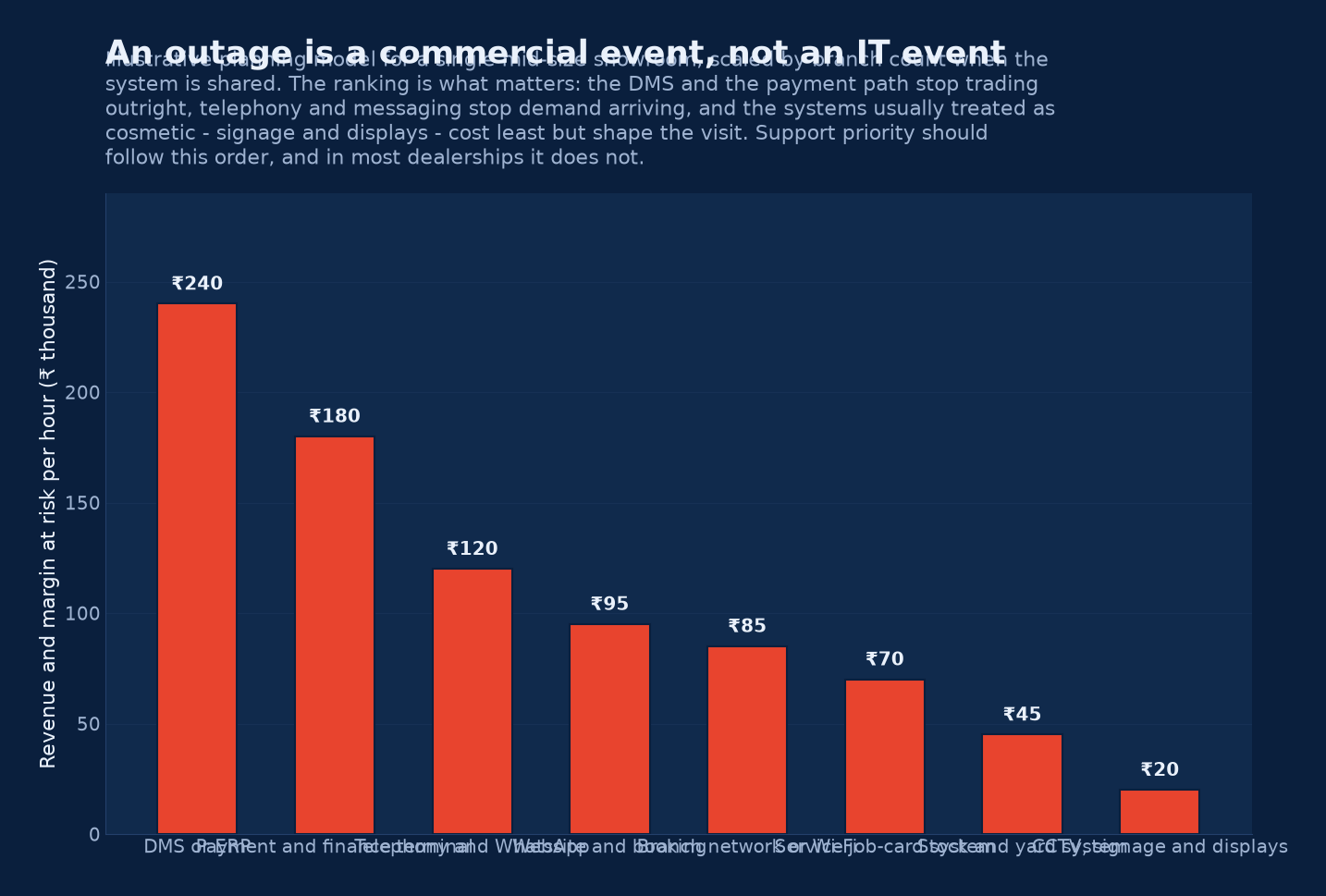
Chart values are an illustrative planning model based on typical UMC engagements and published industry benchmarks. They are not a guarantee of results on any specific project.
| Severity | Definition in a showroom | Response target | Resolution target | Escalation |
|---|---|---|---|---|
| One – trading stopped | DMS down, payment failing, all branches offline, a suspected breach | Fifteen minutes | Continuous until restored, with hourly updates | Immediate: IT lead, operations head, vendor escalation |
| Two – branch impaired | One branch offline, workshop system down, booking failing | Thirty minutes | Four hours | IT lead after one hour, vendor after two |
| Three – user blocked | An executive cannot access a system, a printer or scanner fails | Two hours | Same working day | Team lead if unresolved at four hours |
| Four – degraded | Slow performance, an intermittent fault, a display issue | Same working day | Three working days | Reviewed in the weekly queue meeting |
| Five – request | New device, access change, software install, a new branch setup | One working day to acknowledge | Per the published schedule | Escalated only by exception |
| Out of hours | Any severity one or two outside trading support hours | Thirty minutes via the rota | Continuous until stable | On-call engineer, then IT lead |
| Festive peak | Elevated cover during scheme and festive windows | Fifteen minutes for severity one and two | Priority queue with pre-agreed vendor cover | Dedicated peak commander per day |
- The channel matters more than the tool: a WhatsApp escalation path with a rota behind it gets used, a portal nobody logs into does not – helpdesk and end-user support designed around how a branch actually asks for help.
- Recurring tickets are a design signal. When the same fault appears weekly across branches, the fix is a standard build change or a vendor escalation, not a faster queue – which is what managed IT services should be judged on.
- The helpdesk is also the data source for estate reporting: ticket volume, resolution time and recurring faults belong in the warehouse alongside the trading data so forecasting can size support cover for a festive week.
- Staff who cannot get help route around the system, and every workaround becomes an unmanaged device or a shared login – so helpdesk quality is a security control, not a comfort.
Festive and launch peak readiness
Dealership demand is not flat, and neither is IT load. A festive window or a model launch multiplies footfall, test drives, quotations, finance applications and payments inside a few days, on a network and vendor support arrangement sized for a normal week. Peak readiness is planned work with a date: capacity checked, vendor cover confirmed, failover tested, spares on site, a rota published, and a fallback for each trading system rehearsed before the window opens.
| Preparation | When | What is checked | Fallback if it fails |
|---|---|---|---|
| Capacity review | Four weeks before | Bandwidth, Wi-Fi coverage, terminal count, licence seats against the forecast | Temporary link uplift, additional devices, loan licences |
| Vendor cover confirmation | Three weeks before | DMS, payment, lender and ISP support hours during the window | A named escalation contact and an agreed out-of-hours path |
| Failover and restore test | Two weeks before | ISP failover, backup restore to a test environment, power resilience | Manual procedures documented per branch |
| Patch and change freeze | One week before | No releases or configuration changes during the window | Emergency change path with approval |
| Spare parts and devices | One week before | Spare terminals, printers, access points, cables, a spare tablet per branch | A courier route between branches |
| Rota and escalation | One week before | Named cover per day, including weekends, with phone numbers | A standby engineer and a decision-maker on call |
| Fallback procedures | One week before | Manual invoicing, offline booking capture, paper job cards, a phone-based enquiry log | Rehearsed once with the branch team |
| Monitoring uplift | During | Lower thresholds, faster alert routing, a live status view | Hourly manual checks per branch |
| Daily stand-up | During | Incidents, near misses, capacity, queue depth | Same-day fixes rather than post-window reviews |
| Post-window review | One week after | Incidents, resolution times, cost, what changes for the next window | A written change list with owners and dates |
- Peak load should be forecast rather than guessed: enquiry and footfall predictions from the metric layer size the cover, which is forecasting applied to an IT rota.
- The fallback procedures are the part most estates skip, and they are what keeps a branch trading through a vendor outage – a manual capture route still has to land in the CRM afterwards, or the leads are lost twice.
- A launch window is also a demand-capture event, so the website, booking path and messaging need the same readiness as the branch: the showroom website, the search programme and the paid programme all assume the estate can absorb what they generate.
- Peak readiness is a recurring operational cost that should be budgeted, not absorbed – the same logic as cost rationalisation applied to a support function.
Contracts, cost and the AMC model that fits a dealership
Dealership IT spend is spread across many small contracts – an ISP per branch, a DMS vendor, a CCTV installer, a signage supplier, a device reseller, a cloud subscription, a security tool or two – and almost nobody holds the total. Consolidating them into a governed support arrangement with one accountable owner is usually cheaper than the sum of the parts, and it converts support from a series of arguments into a service with targets. The cost view that matters is per branch per month, next to the downtime it prevents.
| Cost line | What it usually hides | How to govern it | What better looks like |
|---|---|---|---|
| Connectivity per branch | Auto-renewals, unused secondary lines, over-specified bandwidth | A contract register with end dates and a per-branch cost | Two links sized to measured peak, reviewed annually |
| DMS and vendor licences | Seat creep, dormant users, modules nobody uses | Quarterly reconciliation against the estate register | Licences matched to active named users |
| Devices and replacements | Ad-hoc purchases at retail price, no standard build | A device standard per role with a refresh cycle | Bulk purchase, enrolment at handover, planned refresh |
| Cloud and SaaS subscriptions | Duplicate tools, orphaned accounts, unused seats | A subscription register with an owner per tool | Consolidated tools with named owners |
| Security tooling | Point solutions overlapping, none fully operated | A control map against actual risks | Fewer tools, fully operated, with alert coverage |
| Support hours | Break-fix billing that rewards recurrence | A managed arrangement with targets and reporting | Fixed cost per branch with SLAs and a review |
| Projects and change | Unplanned work funded from the support budget | A separate change budget with approval | Planned work scheduled outside peak windows |
| Physical systems | CCTV and signage maintenance nobody budgets | Included in the estate register with a maintenance plan | Firmware and hardware refresh scheduled |
| Training and adoption | Repeat tickets caused by staff workarounds | Role-based onboarding and refresher training | Fewer severity-three tickets per branch |
| Downtime cost | Never measured, so never prioritised | A rupee consequence per system per hour | Support priority driven by revenue at risk |
- The AMC model that fits a dealership covers trading systems, connectivity, endpoints, physical systems and the helpdesk under one accountable owner, with vendor management included rather than excluded – managed IT infrastructure and AMC.
- Cost governance is a finance conversation with an IT vocabulary: a per-branch monthly cost against the downtime prevented is the number a general manager will act on, and it belongs in the dashboard set.
- Where subscriptions and cloud usage drift upward, the same discipline applies as in any cloud estate – cost optimisation with a monthly review.
- A support arrangement is also a data source: ticket and incident history priced against downtime is the evidence for whether to insource, outsource or consolidate – a strategy question answered with numbers.
- For groups buying or opening branches, the IT cost per site should be a standard figure in the model, so expansion decisions carry the real operating cost.
The ninety-day showroom IT support programme, and what we need from you
The programme below is the shape we run for a dealership group or showroom chain: three weeks to audit the estate and consolidate the vendor picture, overlapping network, identity and endpoint work, restore tests before any SLA is promised, monitoring and the helpdesk from week ten, and peak readiness and handover at the end. The dependency that decides the timeline is vendor cooperation and one person empowered to retire a shared login – both management decisions.
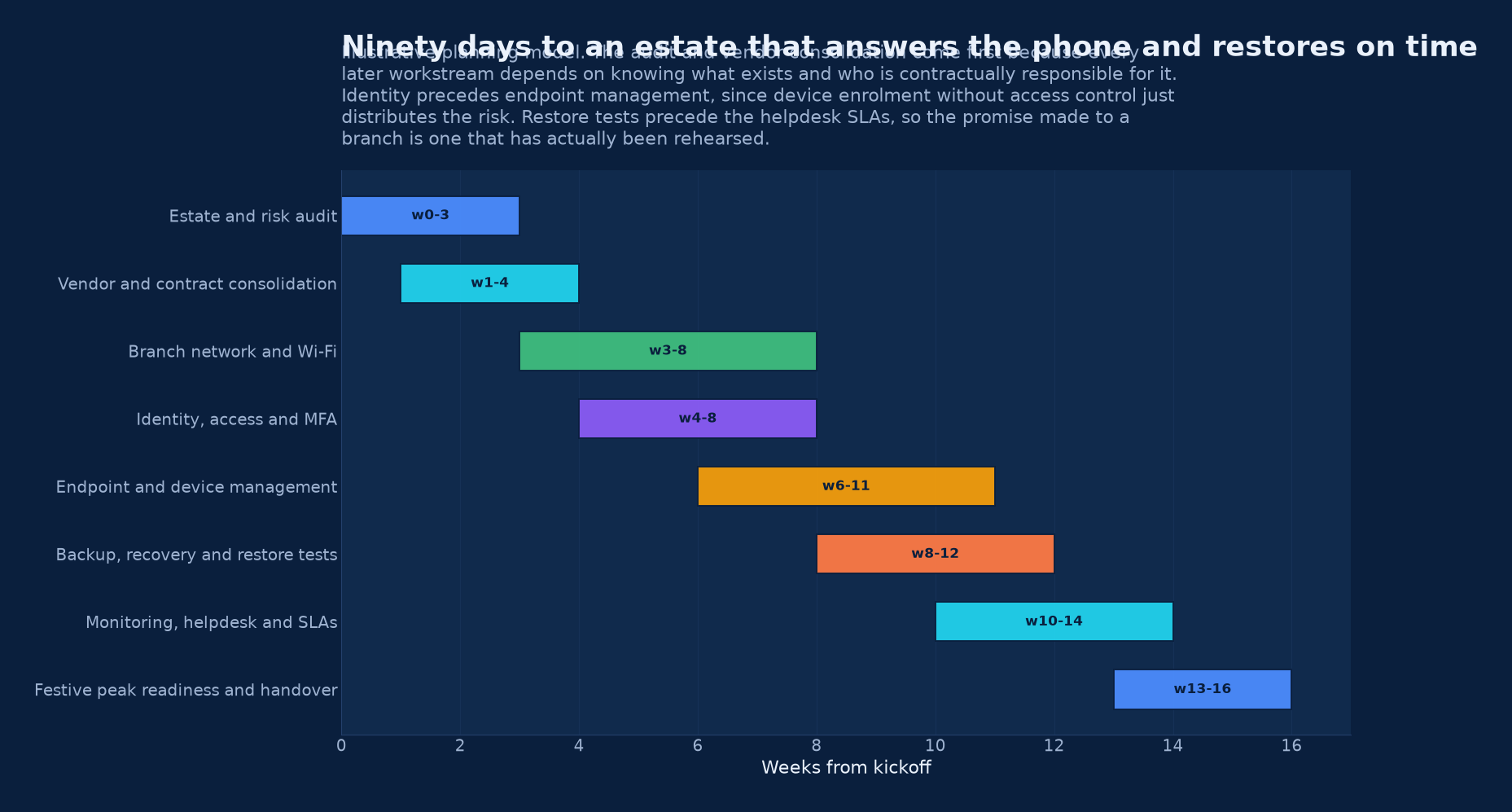
Chart values are an illustrative planning model based on typical UMC engagements and published industry benchmarks. They are not a guarantee of results on any specific project.
| Weeks | Workstream | Deliverable | Decision it enables |
|---|---|---|---|
| Zero to three | Estate and risk audit | Estate register with criticality and owners, risk ranking, downtime cost per system | What gets protected first and what is tolerated |
| One to four | Vendor and contract consolidation | Contract register, SLA restatement, escalation paths, cost per branch | Which vendors are managed and which are replaced |
| Three to eight | Branch network and connectivity | Standard build, failover, segmentation, coverage survey, monitoring per site | Whether a branch survives a link or power failure |
| Four to eight | Identity, access and MFA | Named accounts, role matrix, MFA coverage, leaver and joiner process, vault | Whether access can be controlled and evidenced |
| Six to eleven | Endpoint and device management | Enrolment, standard builds per role, encryption, patch policy, remote wipe | Whether customer data sits on manageable devices |
| Eight to twelve | Backup, recovery and restore tests | Backup design per system, recovery objectives, timed restore evidence | How long a real outage would actually last |
| Ten to fourteen | Monitoring, helpdesk and SLAs | Monitored set with thresholds, severity matrix, rota, escalation, reporting | Whether a branch gets help in time and on what promise |
| Thirteen to sixteen | Peak readiness and handover | Peak checklist, fallback procedures, spares, documentation, training, review calendar | Who runs it, and how the next festive window is prepared |
- What we need: administrative access to the network, cloud tenancy and key systems, the vendor and contract list with contact names, the branch list with a named manager per site, twelve months of incident and ticket history if any exists, the DMS vendor’s support terms, and one decision-maker empowered to retire shared logins and enforce a standard build.
- What you keep regardless: the estate register, the risk ranking, the network and device standard, the access matrix, the backup design with restore evidence, the severity matrix and rota, the peak checklist and the documentation. They are yours.
- What we will tell you plainly in week three: which systems cannot be monitored because the vendor will not allow it, which branches cannot be standardised without capital, and whether the real risk is technical or contractual – usually contractual.
- What follows naturally once the estate is stable: the data and automation work that reads it – the CRM and integration layer, and an adoption programme so staff use the systems rather than routing around them.
Showroom IT support by city, and worked examples
Dealership IT support is shaped by local conditions: connectivity quality and ISP choice per city, branch density and distance between sites, vendor presence and response times, power reliability, and the festive calendar that sets the peak. The engagements below are dealership, showroom, store and infrastructure projects where the estate, support model and security controls were built as one programme.
- Get more automobile sales leads in Lucknow
- Digital marketing company for automobile dealers in Lucknow
- Website development company for automobile dealers in Lucknow
- Get more jewellery customers in Lucknow
- Digital marketing company for jewellery stores in Lucknow
- Digital marketing and IT services in Lucknow
- Services across Indian cities
- Case study: IT infrastructure management for an IT company
- Case study: Hyundai group showroom full-service social advertising contract
- Case study: a fashion retail showroom
- Case study: WordPress and WooCommerce online mobile store
- The showrooms and dealerships industry hub – all eight disciplines
- Retail and e-commerce: store systems, POS estates and peak readiness
- Manufacturing: plant networks, OT devices and vendor systems
- Hotels and hospitality: property systems, guest Wi-Fi and endpoints
- All industry verticals we build programmes for
- All digital marketing services
- About Unified Management Consulting
- Contact us about IT support for showrooms and dealerships
Where this page sits in our showrooms programme
IT support is the seventh discipline of our showrooms and dealerships programme. The hub page explains how the eight disciplines fit together, each discipline has its own page as it is published, and the generic service page for every discipline stays listed below alongside the vertical pages. A discipline that is not listed is not published yet – the list is generated from live pages and refreshes automatically as each spoke lands.
- Showrooms – the vertical main page
- Website development for showrooms and dealerships
- SEO for showrooms and dealerships
- Google Ads for showrooms and dealerships
- Social media marketing for showrooms and dealerships
- CRM and lead management for showrooms
- Business intelligence for showrooms
- AI for showrooms and dealerships
- Website development services – the generic service page
- SEO services – the generic service page
- Google Ads management – the generic service page
- Social media management – the generic service page
- Custom CRM development and integration – the generic service page
- BI dashboards and executive reporting – the generic service page
- AI agent deployment and automation – the generic service page
Frequently asked questions about IT support for showrooms and dealerships
Our DMS vendor already provides support. Why do we need anything else?
A vendor supports its own product within its own hours and definitions. Nobody is accountable for the branch network that carries it, the payment terminal beside it, the backup of its database, the tablet an executive uses to quote from it, or the argument about whether an outage was connectivity or software. An AMC layer owns the whole trading day and manages the vendor inside it.
What should we monitor first if we currently monitor nothing?
The trading systems and the connectivity that carries them: DMS availability, branch link state and failover, payment terminal health, website and booking uptime, backup job success, and certificate expiry. Those six catch most revenue-stopping failures before a branch manager calls.
How do we stop customer data living on executives’ personal phones?
Make the business route easier and mandatory: WhatsApp business numbers on a managed platform with routing and retention, device enrolment with a business container, a leaver process that suspends access and wipes business data, and an incentive rule that a lead not in the CRM does not count.
Do we really need MFA everywhere?
Everywhere that holds customer, financial or trading data – email, cloud storage, the DMS, the CRM, accounting, marketing platforms and any vendor console. MFA is the cheapest control with the largest effect on breach risk, and it is the first thing an auditor or an insurer asks about.
How often should we test a restore?
Quarterly for the DMS and CRM, monthly for finance during a close period, and half-yearly for documents and messaging exports – each timed and evidenced. A backup that has never been restored has an unknown recovery time, and the unknown is always longer than the business assumes.
What does an outage actually cost us?
It depends on the system: a DMS or payment outage stops trading outright, telephony and messaging stop demand arriving, and a network failure at one branch stops that branch. We put a rupee consequence per system per hour in the estate audit, because that ranking – not ticket volume – should decide support priority and where failover is worth buying.
Are CCTV and digital signage really IT responsibilities?
They are networked endpoints with firmware, management consoles and credentials, which makes them IT assets with a security exposure. Cameras on default credentials, signage consoles exposed to the internet and kiosks on the trading network are among the most common routes into a dealership estate.
How do we prepare for a festive or launch window?
With a dated checklist: capacity and licence review four weeks out, vendor support cover confirmed three weeks out, failover and restore tests two weeks out, a change freeze and spares one week out, a published rota, rehearsed manual fallbacks, lowered monitoring thresholds during the window, and a written review afterwards.
We have several brands and several DMS versions. Is that a problem?
It is normal and manageable, but it has to be named: a version register per branch, upgrade scheduling, integration testing before any release, and a standard for everything the vendors do not control. What is not manageable is discovering the drift during an outage.
Should we insource IT or use an AMC?
Most dealership groups are best served by a small internal owner plus an AMC that carries the rota, the vendor escalations and the engineering depth. Fully insourcing a multi-site estate is expensive and hard to keep skilled; fully outsourcing without an internal owner produces an estate nobody can explain.
How does IT support relate to our CRM and reporting projects?
It is the platform they run on. Integration feeds, capture routes, device availability and access control all determine whether the CRM record is complete and whether reporting can be trusted. Sequencing IT readiness before or alongside those projects is cheaper than rebuilding them after an estate change.
What does showroom IT support cost?
It scales with branch count, estate size, vendor complexity and whether physical systems and peak cover are included. We quote per branch per month after the estate audit, with the downtime cost it prevents alongside, so the comparison is against lost trading rather than against doing nothing.
Start with the estate audit and the vendor picture
Give us three weeks with administrative access to your network, cloud tenancy and key systems, the vendor and contract list with contact names, the branch list with a named manager per site, twelve months of incident or ticket history if it exists, your DMS vendor’s support terms, and one decision-maker empowered to retire shared logins, and we will return an estate register with a criticality and owner per row, a rupee consequence per hour of downtime by system, a consolidated contract and cost view per branch, a network and device standard with failover and segmentation, an access and MFA plan with a leaver process, a backup design with timed restore evidence, a severity matrix with a rota and escalation path, and a festive peak checklist with rehearsed fallbacks – including which vendors will not let you monitor what you depend on. Yours to keep either way.
Contact Unified Management Consulting to arrange a confidential first conversation.