
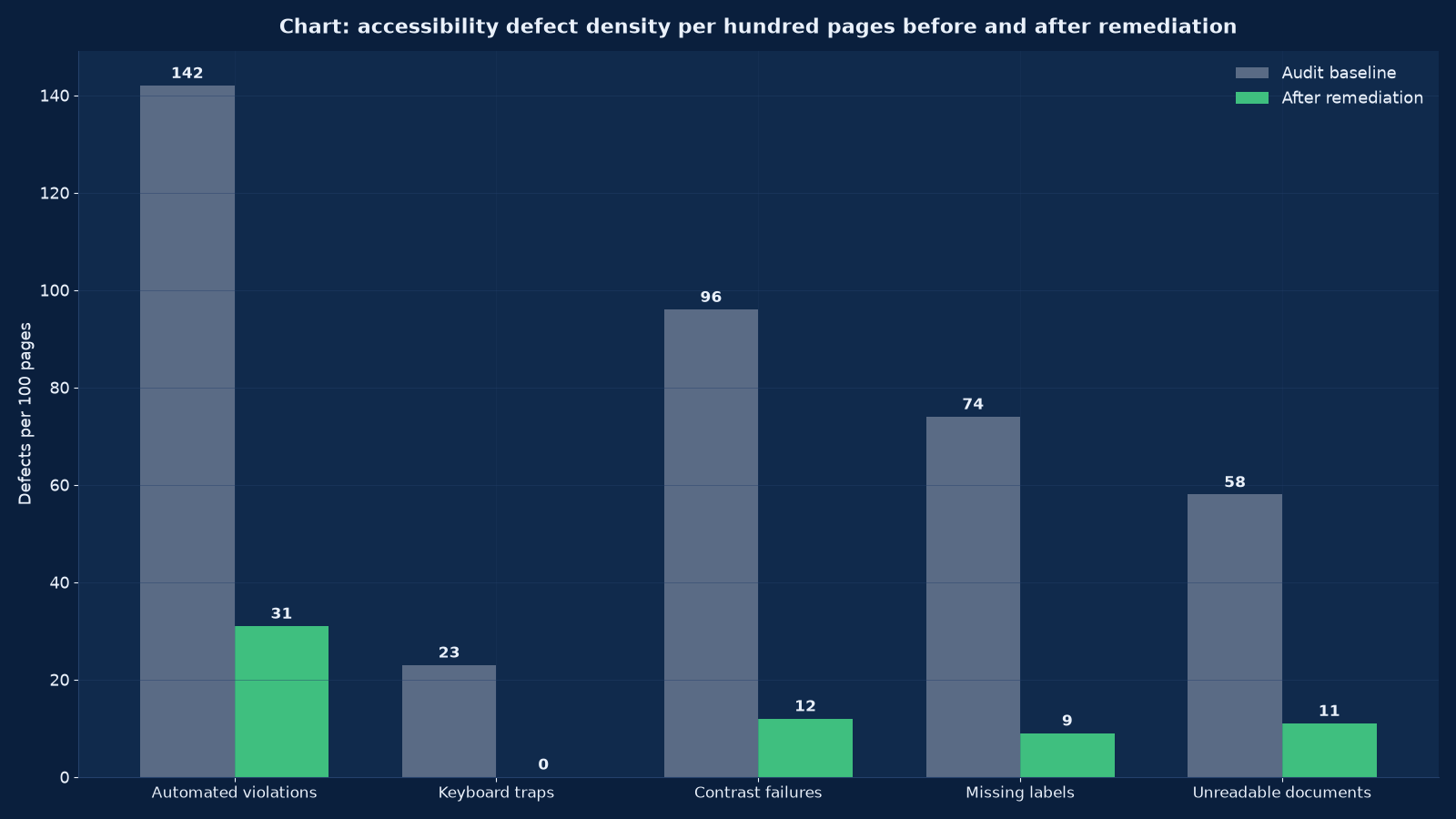
Chart values are an illustrative planning model based on typical UMC engagements and published industry benchmarks. They are not a guarantee of results on any specific project.
Accessibility is not a compliance sticker you apply at the end. It is a property of the design system, and if the tokens, components and templates are accessible, most pages are accessible without anybody trying.
Accessibility remediation is the work of making an existing digital estate usable by people who navigate with a keyboard, a screen reader, magnification, voice control or a switch device, and of making that state provable. Unified Management Consulting audits against WCAG 2.2 Level AA — the level that Indian and international procurement, most public-sector tenders and the European Accessibility Act all reference — then remediates at the design-system layer rather than page by page, verifies with assistive technology rather than with a scanner alone, and hands you an accessibility statement, a conformance record and a regression gate that stops the estate drifting backwards.
We work on healthcare and hospital groups, universities and examination bodies, banks and NBFCs, government and public-sector undertakings, insurers, large retailers and any organisation that sells to them. The commercial driver is usually one of three: a tender requirement, a legal or regulatory notice, or a customer complaint that turned out to be legitimate. All three are better answered with evidence than with assurance, which is why every engagement here ends in artefacts a third party can check.
♿ Accessibility (WCAG) Remediation & Compliance — Quick Summary
| Component | What We Deliver |
|---|---|
| Conformance audit | WCAG 2.2 Level AA assessment across every template and a representative sample of content, with automated, manual and assistive-technology testing recorded separately. |
| Defect register | Every issue logged against its success criterion, its severity, the templates it affects, the estimated effort and the owner who can fix it. |
| Remediation plan | A sprint-by-sprint plan ordered by reach and severity — design tokens first, then components, then templates, then content and documents. |
| Design system fixes | Colour tokens with contrast headroom, focus styles, spacing and target-size rules, typography scale and typographic component states delivered as code. |
| Component and template engineering | Keyboard operability, focus order, ARIA used correctly or removed, form labelling and error handling, tables, modals, carousels, menus and media players fixed at source. |
| Documents and media | Accessible PDF and Office remediation, captioning and transcripts, audio description where required, and alt-text standards for image libraries. |
| Assistive-technology verification | Testing with NVDA, JAWS, VoiceOver and TalkBack, plus keyboard-only, magnification and voice control passes on the priority journeys. |
| Accessibility statement | A published statement that is accurate about what conforms, what does not and what the route to an accessible alternative is. |
| Regression gate | Automated checks in the build pipeline, a definition of done that includes accessibility, and a component-level test suite so defects cannot return silently. |
| Training and handover | Role-specific training for designers, developers, editors and QA, with the checklists they will actually use. |
| Procurement and vendor clauses | Accessibility requirements and acceptance criteria written into contracts, so third-party widgets and agencies stop reintroducing defects. |
| Ongoing conformance monitoring | Scheduled re-audits, sampling of new templates and an exception register for known issues with review dates. |
What WCAG 2.2 Level AA actually obliges you to do
WCAG is organised as testable success criteria under four principles — perceivable, operable, understandable and robust. Level AA is the contractual standard almost everywhere; Level AAA is aspirational and rarely required in full. The table below is how the criteria translate into work on a real estate, and where the effort actually sits.
| Principle | Criteria that fail most often | What the fix looks like | Where the effort sits |
|---|---|---|---|
| Perceivable | 1.4.3 contrast minimum, 1.4.11 non-text contrast, 1.1.1 non-text content, 1.4.12 text spacing, 1.4.10 reflow, 1.2.x time-based media | Accessible colour tokens, focus and control borders at 3:1, alt text standards, reflow at 320 pixels without horizontal scrolling, captions and transcripts | Design system, then a document and media backlog that is always larger than expected |
| Operable | 2.1.1 keyboard, 2.1.2 no keyboard trap, 2.4.3 focus order, 2.4.7 focus visible, 2.4.11 focus not obscured, 2.5.8 target size (new in 2.2), 2.5.3 label in name | Every interactive element reachable and operable by keyboard, visible focus rings that are not suppressed by a CSS reset, 24 by 24 pixel minimum targets, accessible names that match the visible label | Components: modals, menus, carousels, date pickers, data tables, media players |
| Understandable | 3.1.1 language of page, 3.2.2 on input, 3.3.1 error identification, 3.3.2 labels and instructions, 3.3.8 accessible authentication (new in 2.2) | Correct lang attributes including per-paragraph changes, error messages tied to fields and announced, no unexpected context changes on input, authentication that does not rely on memory or a cognitive test without an alternative | Forms, checkout, login and any multi-step journey |
| Robust | 4.1.2 name, role, value, 4.1.3 status messages, plus valid and semantic markup | Correct native elements instead of div-with-onclick, ARIA only where HTML has no equivalent, status messages announced without stealing focus, no duplicate IDs | Legacy markup and third-party embeds, which are the two hardest sources |
Two of the 2.2 additions cause most of the surprises: 2.4.11 focus not obscured, because sticky headers and cookie banners routinely cover the focused element, and 2.5.8 target size minimum, because icon-only controls in dense toolbars and tables were designed at 16 pixels. If your last audit predates WCAG 2.2, it did not test either.
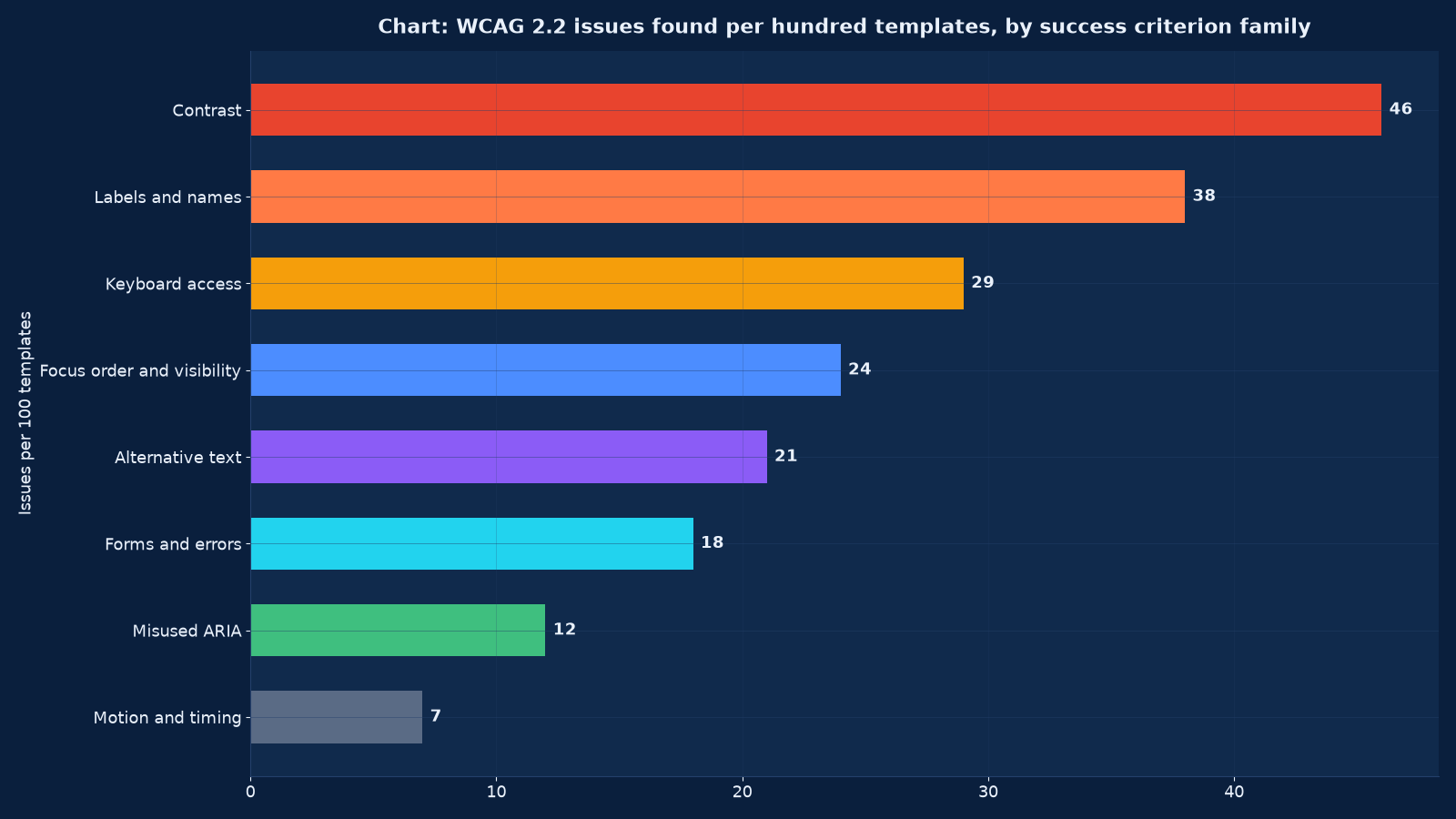
Chart values are an illustrative planning model based on typical UMC engagements and published industry benchmarks. They are not a guarantee of results on any specific project.
Why scanning tools are not an audit
Automated scanners are genuinely useful and genuinely misunderstood. They reliably detect a subset of issues — missing alt attributes, absent form labels, empty buttons, duplicate IDs, some contrast failures — and they cannot judge the rest. Publishing a scanner report as a conformance claim is the single most common way organisations end up with an accessibility statement they cannot defend.
| Method | What it can prove | What it cannot prove | Share of issues it surfaces |
|---|---|---|---|
| Automated scanning | The presence or absence of specific machine-detectable defects, at scale, on every page | Whether a control is operable by keyboard, whether a focus order makes sense, whether an alternative is equivalent, whether an ARIA use is correct | Roughly 30 to 40 per cent of WCAG failures |
| Manual code and markup review | Semantic structure, ARIA correctness, duplicate IDs, landmark regions, heading hierarchy | The lived experience of using the page with an assistive technology | A further 25 to 30 per cent |
| Keyboard-only pass | Reachability, focus order, focus visibility, traps, obscured focus, skip links | Whether the announced name is meaningful to a screen-reader user | A further 15 to 20 per cent |
| Assistive-technology testing | Name, role and value as announced; status messages; reading order; table navigation; form error recovery | Coverage of every page — it is slow, so it is sampled on priority journeys | The remaining issues, including most of the severe ones |
| User testing with disabled participants | Whether the journey is actually achievable, and where the workarounds are | Conformance against a numbered criterion | Not a conformance method, but the only one that reveals real exclusion |
Our audit reports separate these five columns explicitly. When a client is told “412 violations found” by a scanner, the useful number is how many of them are severe, which templates they live in, and whether a human confirmed them. We report the confirmed set and the method that confirmed each one.
Severity: what makes an issue blocking
Not every defect is equal, and a remediation plan that treats them equally will spend its budget on the wrong things. We classify on two axes — whether the user can complete the task at all, and how many people and pages it affects — and we publish the reasoning so your team can challenge it.
| Severity | Definition | Typical examples | Remediation rule |
|---|---|---|---|
| Blocking | A user with a disability cannot complete a core task, or cannot reach it | Keyboard trap in a modal, checkout button unreachable, login form fields unnamed, PDF application form that cannot be read, video with no captions on a statutory process | Fixed first, in the current sprint, regardless of the plan |
| Serious | The task is achievable but with significant difficulty, confusion or workaround | Focus not visible on a light background, focus obscured by a sticky header, reading order broken in a data table, error messages not announced, target size below 24 pixels in a dense toolbar | Fixed in the next two sprints; tracked to closure |
| Moderate | Usability is degraded for some assistive technologies or the failure is partial | Inconsistent heading levels, landmark regions missing, ambiguous link text such as “read more” repeated, alt text present but unhelpful | Fixed at template level during the component pass |
| Minor | A best-practice deviation with little measurable impact on task completion | Language attribute missing on a single foreign phrase, redundant ARIA on a native element, spacing below the recommended text-spacing tolerance in one component | Batched into a hygiene sprint; recorded in the exception register if deferred |
| Enhancement | Not a WCAG requirement but improves access — often Level AAA | Audio description, sign-language interpretation, extended contrast, reading-order simplification, plain-language summaries | Recommended, prioritised against cost, never presented as a conformance obligation |
A useful discipline: if an issue is blocking on a journey that carries revenue, statutory obligation or patient and student services, it is fixed this sprint and the plan is adjusted around it. Plans that cannot accommodate that rule are not plans.
Remediation at the design-system layer
Page-by-page remediation is why accessibility budgets run out. Roughly seventy per cent of the defects in a typical estate originate in a handful of places: colour tokens, the focus style, a button and input component, a modal, a table, a media player and a document template. Fixing those fixes thousands of pages at once and prevents recurrence.
| Layer | What we change | Reach | Evidence produced |
|---|---|---|---|
| Colour and contrast tokens | Text, non-text and state colours redefined with contrast headroom, dark and light variants, plus a rule that no new colour enters the palette without a computed ratio | Every page and every future page | Token table with computed ratios at normal and large text sizes |
| Focus and interaction styles | A visible, high-contrast focus indicator that survives CSS resets, a focus-visible strategy, and an offset so sticky headers cannot obscure focus | Every interactive element | Component states captured across themes and breakpoints |
| Typography and spacing | A scale that meets text-spacing tolerance, line height and paragraph spacing, target-size rules for touch and pointer controls, and reflow behaviour at 320 pixels and 400 per cent zoom | Every template | Reflow and zoom test records per breakpoint |
| Core components | Buttons, links, inputs, selects, checkboxes, radios, error summaries, modals, accordions, tabs, menus, carousels, data tables, pagination, date pickers, file upload, media player | Every page that uses them — usually all of them | Per-component keyboard and screen-reader test matrix |
| Page templates | Landmark structure, heading hierarchy, skip links, breadcrumb and pagination semantics, language attributes, metadata and schema | Every page rendered by the template | Template conformance record with sampled pages |
| Content patterns and documents | Alt-text standards, link-text rules, table authoring rules, accessible PDF and Office remediation, caption and transcript workflow | The long tail — thousands of items, addressed by rule plus a prioritised backlog | Editor checklist, document remediation log, caption coverage report |
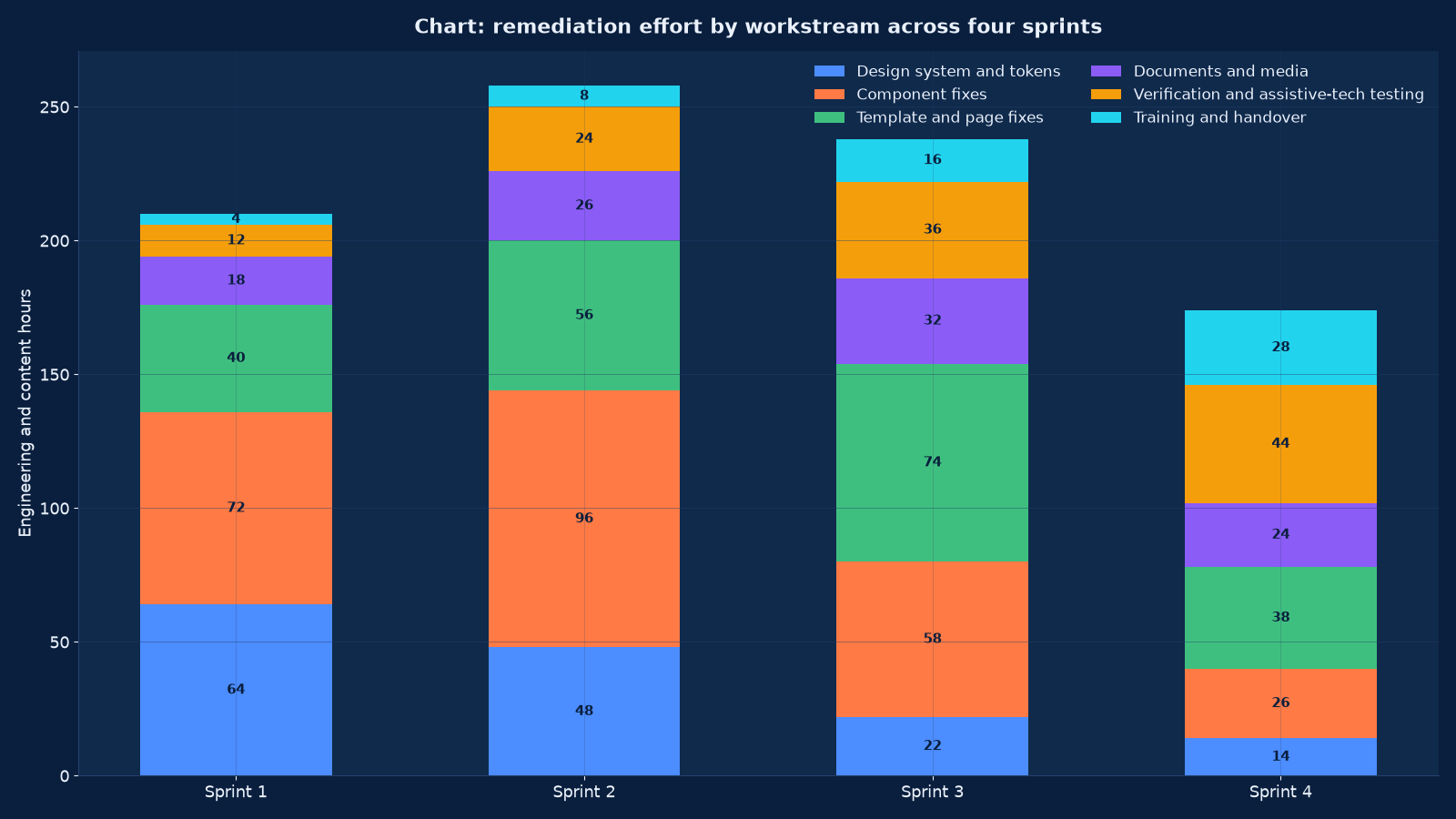
Chart values are an illustrative planning model based on typical UMC engagements and published industry benchmarks. They are not a guarantee of results on any specific project.
The four-sprint remediation programme
A typical estate of a few hundred templates and a few thousand pages is remediated in four two-week sprints after the audit, with verification running throughout rather than at the end. Larger estates add sprints to the template and document phases; the order does not change.
| Sprint | Focus | Exit criteria |
|---|---|---|
| 1 — Foundation | Colour and contrast tokens, focus styles, typography and spacing rules, target sizes, and the blocking issues on revenue and statutory journeys | Zero blocking issues open; token table published; focus visible on every component in both themes |
| 2 — Components | The core component set fixed at source: forms, modals, menus, tabs, carousels, tables, media players, date pickers, file uploads | Component keyboard and screen-reader matrix complete; serious issues on components closed |
| 3 — Templates and pages | Landmarks, heading hierarchy, skip links, language attributes, template-specific failures, and the prioritised page backlog | Every template has a conformance record; sampled pages pass a manual and assistive-technology check |
| 4 — Documents, verification and handover | PDF and Office remediation, captions and transcripts, full verification pass, accessibility statement, regression gate, training | Statement published and accurate; automated gate in the pipeline; training delivered per role |
Verification is not a phase, it is a parallel activity. Every sprint ends with an assistive-technology pass on what changed, because a fix that passes a scanner and fails a screen reader is a defect that has been moved rather than removed.
Testing protocol: what we run, on what, and how often
The protocol is published with the report so your QA team can repeat it. Reproducibility is the point: an accessibility claim your own team cannot re-verify is a claim you cannot maintain.
| Test | Configuration | Applied to | Frequency |
|---|---|---|---|
| Keyboard-only navigation | No pointer device; Tab, Shift-Tab, arrow keys, Enter, Space, Escape; focus order recorded | Every template and every priority journey | Every sprint and before every release |
| Screen reader — Windows | NVDA with Firefox and Chrome, JAWS where the client environment requires it | Priority journeys, forms, tables, modals, media | Every sprint |
| Screen reader — Apple | VoiceOver with Safari on macOS and iOS | Priority journeys and the mobile layout | Every sprint |
| Screen reader — Android | TalkBack with Chrome | Mobile templates and the checkout or booking journey | Each release |
| Magnification and zoom | 200 and 400 per cent zoom, 320-pixel viewport, OS-level magnifier | All templates; reflow and obscured-focus checks | Each release |
| Voice control | Dragon or built-in voice control, using visible labels as commands | Forms, navigation, interactive controls | Each release and after any label change |
| Automated scanning | Axe-core in the build pipeline plus a full-estate crawl | Every page on every build; full crawl monthly | Continuous |
| Documents and media | Accessibility checker plus manual reading-order and tag-tree review; caption accuracy spot check | PDF, Word, PowerPoint, Excel, video and audio assets | Per document batch |
| Colour and contrast | Computed ratios for every token pair at normal and large text sizes, including states and disabled variants | The design system | Whenever a token changes |
We do not test with an emulator or a browser extension alone. Extensions are a triage tool; the conformance record is built from the rows above.
Accessible documents and media: the forgotten half
On most estates we audit, the document and media backlog contains more severe failures than the website itself, because documents are authored by hundreds of people with no template and no check. A statutory form published as a scanned PDF is a blocking failure regardless of how accessible the page around it is.
| Asset type | Common failures | Remediation | Prevention |
|---|---|---|---|
| PDF forms and notices | Scanned images with no text layer, no tags, no reading order, no form field names, no document language | Optical character recognition, tag-tree construction, reading-order correction, field naming, metadata and language | Tagged source templates exported from Word or InDesign with a house standard |
| Word and PowerPoint | Styling by hand instead of by style, images without alt text, tables without header rows, colour used alone to convey meaning | Style-based reformatting, alt text, header rows, accessible table structure, reading order | Accessible template library and a one-page authoring rule set |
| Excel and data files | Merged cells, colour-only signalling, no header row, inaccessible charts | Structure repair, text alternatives for colour signalling, chart data tables | Standard reporting templates reviewed with the BI reporting standard |
| Video | No captions, captions that are auto-generated and uncorrected, no transcript, no audio description where information is visual-only | Human-verified captions, transcripts, audio description for content that cannot be understood from audio alone | Captioning in the production brief, not as a post-production afterthought |
| Images and charts | Decorative images announced, informative images with empty or vague alt text, complex charts with no text equivalent | Alt-text decision rules, long descriptions for complex graphics, data tables behind charts | Alt-text fields made mandatory in the CMS with a character guide |
| Downloads and attachments | Unlabelled file type and size, inaccessible formats offered without an alternative | Link text that states format and size, accessible alternative offered or a contact route | Publishing checklist enforced in the editorial workflow |
Prevention is cheaper than remediation by roughly an order of magnitude, which is why every engagement includes a template library and an authoring rule set rather than only a cleanup.
Accessibility statements and conformance records
The statement is a public document and it is read by procurement teams, regulators and disabled users. It must be accurate, dated, specific about what does not conform, and give a route to an accessible alternative and to feedback. Overclaiming is the most common failure and the most damaging.
| Element | What it must contain | The mistake to avoid |
|---|---|---|
| Conformance status | One of: conforms, partially conforms, does not conform — against a named standard and level, with the date of assessment | “WCAG compliant” with no level, no date and no scope |
| Scope | Which sites, subdomains, apps and document types the statement covers, and which it does not | A statement on the main domain silently read as covering the portal and the mobile app |
| Known non-conformities | The specific criteria that fail, on which pages or components, with the reason and the planned remedy date | Omitting them, which converts an honest statement into a misrepresentation |
| Third-party content | Named embeds, widgets, payment and chat providers, with their own conformance position | Claiming conformance for a checkout you do not control |
| Accessible alternatives and feedback | A contact route, a response commitment, and what the alternative is — phone, email, assisted service | A feedback form that is itself inaccessible |
| Assessment method | Self-evaluation, third-party audit or both, with the testing environment and assistive technologies used | Describing an automated scan as an audit |
| Review cadence | When the statement will next be reviewed and after which changes | A statement dated three years ago on an estate that ships weekly |
We draft the statement, but the client publishes and owns it, and we recommend legal review where the estate carries statutory obligations. The conformance record behind it — the audit report, the defect register, the test evidence — is what makes the statement defensible.
Legal and procurement exposure in India and abroad
The obligations differ by jurisdiction and by who your customer is, but the practical effect is the same: accessibility is increasingly a condition of doing business rather than a moral preference. We do not give legal advice; we give the technical evidence your counsel and your tender response need.
| Context | What is typically required | What we provide |
|---|---|---|
| Rights of Persons with Disabilities Act, 2016 and related guidelines | Accessibility of websites and documents for public-facing services, with prescribed standards for government and public-sector bodies | A conformance record against the referenced standard, a remediation plan with dates, and an accessible document set |
| Government and PSU tenders | WCAG 2.1 or 2.2 Level AA stated as a technical requirement, often with an accessibility audit certificate at acceptance | Audit report in the format the tender specifies, an accessibility statement, and acceptance testing evidence |
| European Accessibility Act and EN 301 549 | Applicable to specified products and services sold into the EU, referencing EN 301 549 which incorporates WCAG 2.1 AA plus additional requirements | Mapping of our WCAG 2.2 findings to EN 301 549 clauses, including the non-WCAG chapters |
| US Section 508 and ADA-related claims | Federal procurement conformance, and in the private sector a documented good-faith remediation programme | VPAT-style reporting support from our audit data, and a dated remediation programme with closure evidence |
| Regulated Indian sectors — banking, insurance, healthcare, education | Sector circulars and customer-service obligations that reference accessibility and digital inclusion | Conformance evidence, a customer-facing accessible alternative route, and staff training records |
| Private enterprise selling to the above | Accessibility clauses flowing down through the supply chain, including from your own enterprise customers | Vendor-facing conformance summary, plus contract language for your own suppliers |
Where an accessibility clause has already been breached, the fastest route to reduced exposure is a dated, credible plan with blocking issues closed and evidence of progress. That is a two-week sprint, not a six-month programme, and we have run it as a standalone engagement.
Keeping it accessible: the regression gate
Estates drift. A new component, a marketing embed, an agency landing page or a dependency update can reintroduce a blocking failure in an afternoon. Conformance is therefore maintained by a gate in the delivery process, not by an annual audit alone.
| Control | How it works | Who owns it |
|---|---|---|
| Automated scan in the pipeline | Axe-core run against changed templates and a nightly crawl of the estate; a threshold that fails the build on new serious or blocking issues | Engineering, with the rule set supplied by us |
| Accessibility in the definition of done | No story is accepted without keyboard operability, visible focus, correct labelling and a contrast check on any new visual treatment | Delivery lead |
| Component test suite | Per-component keyboard and screen-reader scripts for the core set, re-run on any component change | QA |
| Template conformance register | Every template has a current conformance status and an assessment date; new templates cannot ship without an entry | Digital lead |
| Editorial checklist and CMS guardrails | Mandatory alt-text fields, heading-level validation, link-text guidance, table authoring rules | Content owner |
| Third-party clause | Accessibility requirements and acceptance criteria written into agency and widget contracts, with the right to reject non-conforming embeds | Procurement with legal |
| Scheduled re-audit and sampling | Full audit annually, sampled audit of new and changed templates quarterly | Us, or your team trained to the same protocol |
| Exception register | Known deferred issues with severity, reason, owner and review date — published internally and reflected honestly in the statement | Digital lead |
Where the estate is supported under a retainer, these controls are operated for you. That is the natural pairing: accessibility remediation ends with a gate, and the gate needs somebody running it every week.
Costs, models and what we will not do
Pricing depends on estate size, the number of templates, the document and media backlog, and whether remediation is delivered by us or supervised into your team. The models below are the four we run.
| Model | Typical duration | Included | Best for |
|---|---|---|---|
| Accessibility diagnostic | Two to three weeks | Sampled audit across all templates, automated full-estate scan, severity-ranked defect register for the sample, a costed remediation plan and the statement draft | Establishing the true size of the problem before committing a budget |
| Full audit and remediation | Eight to fourteen weeks | Complete WCAG 2.2 AA audit, design-system and component fixes, template and page remediation, document and media backlog, verification, statement, regression gate, training | A tender, a notice or a launch deadline with a defined conformance date |
| Audit only, remediation by your team | Three to five weeks | Full audit, defect register with owners, fix guidance per component, and a verification pass at closure | Organisations with engineering capacity who need the specification and the evidence |
| Conformance retainer | Twelve months | Quarterly sampled audits, pipeline rule maintenance, statement upkeep, new-template reviews, editor training refresh and an exception register | Large estates that ship continuously and must stay conformant |
What we will not do: issue a certificate of conformance we cannot evidence, report an automated scan as an audit, sign an accessibility statement that overclaims, or quote a fixed price for a document backlog we have not sampled. If a vendor offers full WCAG AA certification for a large estate at a price that implies automation only, the deliverable is a PDF and not a conformance position.
Common misconceptions, corrected
These are the beliefs that most often delay a programme, and the evidence that displaces them.
| Misconception | Correction |
|---|---|
| “Our theme is accessible, so the site is accessible.” | Themes ship accessible defaults that custom CSS, page builders and third-party embeds override. We have audited estates on accessible themes with 96 contrast failures per hundred pages, almost all from custom colour overrides. |
| “An overlay widget fixes accessibility.” | Overlays do not repair the underlying markup, frequently conflict with a user’s own assistive technology, and have themselves been the subject of litigation. We recommend against them and record the recommendation. |
| “Accessibility is only about screen readers.” | Motor, cognitive, low-vision, deaf and hard-of-hearing, and situational users all depend on different criteria. Keyboard access, target size, captions, plain language and predictable behaviour matter to far more people than screen-reader support alone. |
| “It makes the design worse.” | The constraints are contrast, focus visibility, target size and semantic order. Good design systems absorb them; the estates where accessibility “hurt” the design are the ones where the palette was already too low-contrast for daylight and small screens. |
| “We can fix it at the end of the rebuild.” | Retrofit cost is typically three to ten times the cost of specifying it in the design system, and the rebuild inherits every content and document defect regardless. |
| “Our automated report says 98 per cent accessible.” | Automated tools detect roughly a third of WCAG failures and cannot assess operability, focus order, ARIA correctness or equivalence. The percentage describes the checks run, not the conformance achieved. |
| “Accessibility and performance are in tension.” | They mostly reinforce each other: semantic HTML is smaller than script-driven equivalents, fewer third-party embeds improves both, and captions help in low-bandwidth and sound-off contexts. See the performance work for the shared wins. |
The one genuine tension is with marketing embeds — chat widgets, social feeds, A/B testing scripts and advertising tags. Those are usually third-party failures on your pages, and they are addressed contractually rather than technically.
Who depends on which criteria: the audience map
Accessibility programmes go wrong when the criteria are treated as a checklist divorced from people. Mapping the criteria to the audiences who depend on them is what makes severity arguments stick in a steering committee, and it is also how you prioritise sensibly when the budget does not cover everything.
| Audience | Assistive approach | Criteria they depend on most | Failure they experience |
|---|---|---|---|
| Blind users | Screen reader with keyboard: NVDA, JAWS, VoiceOver, TalkBack | 1.1.1 non-text content, 4.1.2 name role value, 2.4.3 focus order, 3.3.1 error identification, 1.3.1 info and relationships | Unnamed buttons and fields, tables read as an unstructured list of numbers, form errors that are never announced, modals that trap focus |
| Low-vision users | Magnification, high contrast settings, custom colours, screen readers for some | 1.4.3 and 1.4.6 contrast, 1.4.10 reflow, 1.4.12 text spacing, 1.4.11 non-text contrast, 2.4.11 focus not obscured | Text that will not reflow without horizontal scrolling, focus indicators that vanish against a light background, controls obscured by a sticky header |
| Motor and dexterity-impaired users | Keyboard only, switch access, head pointer, voice control, stylus | 2.1.1 keyboard, 2.1.2 no keyboard trap, 2.5.8 target size, 2.5.1 pointer gestures, 2.5.2 pointer cancellation, timing adjustments | Click-only interactions, drag-to-reorder with no alternative, 16-pixel icons, session timeouts that discard a half-completed form |
| Deaf and hard-of-hearing users | Captions, transcripts, sign-language interpretation, visual alerts | 1.2.2 captions, 1.2.3 and 1.2.5 audio description and interpretation, 1.4.2 audio control | Uncaptioned training and marketing video, audio-only notifications, autoplaying sound with no control |
| Cognitive, learning and neurodivergent users | Plain language, predictable navigation, extended time, reduced motion, assistive reading tools | 3.1.5 reading level, 3.2.x predictable behaviour, 3.3.x input assistance, 2.3.3 animation from interactions, 2.2.x time limits | Context changes without warning, error messages that describe the problem but not the remedy, carousels that move and cannot be paused, jargon-heavy eligibility rules |
| Speech-impaired users | Text-based channels instead of voice, alternative input | Accessible contact routes, 1.3.1 relationships, no voice-only verification | Phone-only verification steps, CAPTCHAs that require spoken responses, no text channel for a service that assumes a call |
| Situational and temporary impairment | Bright sunlight, one-handed use, a broken arm, a noisy room, slow connection, an older device | Contrast, target size, captions, reflow, performance | The same failures as permanent impairment, experienced by a much larger share of sessions — which is the commercial argument for the whole programme |
| Ageing users | Combination of low vision, motor tremor, hearing loss and reduced working memory | Contrast, target size, text spacing, predictable behaviour, clear error recovery | Dense toolbars, small grey text, multi-step flows with no progress indicator |
The situational row is the one to put in front of a finance director. On a mobile-first Indian estate, a large share of sessions happens in bright light, on a mid-tier device, one-handed, on a patchy connection, with the sound off. Every criterion in that row improves the experience for those sessions as well as for disabled users, which is why accessible estates tend to convert better rather than worse.
Assessing maturity: where your organisation sits
We score every client against a five-stage maturity model at the start and at the end of an engagement. The score is not the deliverable — the defect register is — but it tells you whether the problem in front of you is a cleanup, a process change or a governance failure, and those need different budgets.
| Stage | What it looks like | Typical defect profile | What moves you to the next stage |
|---|---|---|---|
| 1 — Unaware | No accessibility policy, no owner, no testing; the subject appears only when a tender or a complaint forces it | Blocking failures on core journeys, hundreds of issues per hundred pages, no accessible documents | Name an owner, run a diagnostic, publish a plan with dates |
| 2 — Reactive | Issues are fixed when reported; an overlay widget or an annual scan is treated as the programme | High variance between templates, repeated regressions, an inaccurate statement | Audit properly, fix at the design-system layer, correct the statement |
| 3 — Systematic | A remediation programme with sprints, severity ranking and verification; accessibility appears in QA checklists | Defect density falling, blocking issues closed, component-level fixes holding | Put the gate in the pipeline and the criteria in the definition of done |
| 4 — Embedded | Accessibility is a property of the design system and the delivery process; new templates are assessed before they ship; documents are born accessible | Low and stable defect density, few regressions, honest exception register | Add continuous monitoring, third-party contract clauses and user testing with disabled participants |
| 5 — Leading | Disabled users are involved in research and testing, accessibility informs product decisions, conformance is reported to the board alongside security and performance | Near-zero blocking failures, measured improvements in task success for assistive-technology users | Sustain it — the failure mode at this stage is drift during reorganisation or vendor change |
Most organisations we meet are between stage one and stage two and believe they are at stage three, because a scanner report was purchased. The diagnostic closes that gap in two to three weeks, and it is the reason we recommend starting there rather than with a remediation contract. For how the same maturity logic applies to information quality and document governance, see the E-E-A-T framework, which assesses whether content can be trusted by people and by machines — a question that overlaps with accessibility more often than either team expects.
Frequently Asked Questions About Accessibility and WCAG Remediation
Which version and level do you audit against?
WCAG 2.2 Level AA by default, because that is what current tenders, EN 301 549 and most regulatory references require. We can audit to 2.1 AA where a contract specifies it, and we report 2.2-only criteria separately so you can see exactly what the newer version adds — principally focus not obscured, target size minimum, accessible authentication, dragging movements and consistent help.
How long does a full remediation take?
Eight to fourteen weeks for a typical estate of a few hundred templates and a few thousand pages, with four two-week remediation sprints after the audit. The variable is almost always the document and media backlog, which can exceed the website work on content-heavy estates.
Can you remediate a site we did not build?
Yes, and that is the majority of our work. We need repository or CMS access, a staging environment and the ability to deploy. Where we cannot get code access, we deliver a defect register with fix guidance per component and a verification pass, and your vendor implements — supervised by our engineering team if you want that capacity.
Do you fix third-party widgets, payment pages and embedded chat?
We test them, document the failures and attribute them, and we draft the contract language to put the obligation on the supplier. We cannot patch code we do not control. Where a supplier cannot conform, we recommend replacement or an accessible alternative route, and we say so in the statement rather than leaving the reader to discover it.
What assistive technologies do you test with?
NVDA and JAWS on Windows with Firefox and Chrome, VoiceOver on macOS, iOS and Safari, and TalkBack on Android with Chrome, plus keyboard-only, 200 and 400 per cent zoom, 320-pixel reflow and voice control passes. The exact configuration is listed in the report so your team can reproduce it.
Will remediation change how our site looks?
Somewhere between barely and noticeably, depending on how far your current palette sits from contrast requirements. The changes are contrast ratios, visible focus indicators, slightly larger touch targets and clearer error states. We deliver the tokens with light and dark variants so the brand survives intact, and we work with our UX and UI designers where a palette needs redesigning rather than adjusting.
How do we keep the site accessible after you leave?
With the regression gate: automated scanning in the pipeline with a build-failing threshold, accessibility in the definition of done, a component test suite, a template conformance register, CMS guardrails for editors, third-party contract clauses, and quarterly sampled audits. The training in sprint four is role-specific so designers, developers, editors and QA each get the checklist they will use.
Can you support a tender or a legal notice?
Yes. We produce audit reports in the format a tender specifies, support VPAT-style reporting, map findings to EN 301 549 clauses, and where a notice has already been served we run a focused two-week sprint that closes blocking issues and produces a dated remediation plan with evidence of progress. We do not provide legal advice and we recommend counsel review any public statement.
What about our mobile app?
We audit native and hybrid apps against the mobile-relevant criteria using VoiceOver and TalkBack, and we treat the app and the responsive web estate as one programme where they share a design system. Native app work is quoted separately because the component fixes land in different code.
How do you handle PDFs at scale?
By triage rather than blanket remediation. We identify which documents carry statutory, application or revenue functions and remediate those first, publish accessible templates so new documents are born accessible, and offer an accessible alternative plus a contact route for the long tail — which is the honest and defensible position. Remediation itself is tag-tree construction, reading order, field naming and language, not a converter setting.
Is there an ongoing cost?
Yes, and it should be budgeted. Continuous estates need the pipeline rules maintained, new templates assessed, documents remediated and the statement kept current. Our conformance retainer covers that with quarterly sampled audits; clients who prefer to self-operate get the runbook and the training instead, and we re-audit annually.
Commission a WCAG 2.2 Accessibility Diagnostic
Send us the URL, the number of templates you believe you have, and any tender clause, notice or complaint you are responding to. Within ten working days you will have a sampled conformance audit with severity-ranked findings, a full-estate automated scan, the true size of your document and media backlog, a costed remediation plan, and a draft accessibility statement that says what is actually true today.
Contact Unified Management Consulting to arrange a confidential first conversation.
Related Services
Accessibility remediation touches every layer of the estate, and we deliver it alongside:
- UX & UI Design Services — accessible design systems, contrast-safe palettes and component states designed in rather than patched
- Website Development Services — semantic markup and component engineering at source
- Full-Stack WordPress Development — where the estate is WordPress and the fixes land in themes, blocks and editor guardrails
- Full-Stack React Development — component-library remediation with accessible primitives
- Cybersecurity Services — secure and accessible authentication, including WCAG 2.2 accessible authentication requirements
- IT Audit, Compliance & ISO 27001 / SOC 2 Readiness — the assurance and evidence discipline a conformance record depends on
- Mobile App Development — VoiceOver and TalkBack conformance for native and hybrid apps
- Risk, Governance & Business Continuity Support — where accessibility exposure is a contractual or regulatory risk to be registered and owned
- Website Strategy & Information Architecture — task analysis, full content inventory, card sorts and tree tests, content model, navigation and governance
- Core Web Vitals & Performance Engineering — field instrumentation, LCP, INP and CLS engineering, third-party governance, performance budgets and a pipeline regression gate
- Web Application Maintenance & Support — patching, monitoring, verified backups, defect management, committed change capacity and monthly service reporting
- PHP & Laravel Development — legacy assessment, domain modelling, strangler-fig modernisation, APIs, test automation and CI/CD on modern PHP
- Headless & Composable Commerce — readiness assessment, capability mapping, storefront engineering, integration layer, migration rehearsals and cost governance
- Website Migration & Replatforming — full estate inventory, one-to-one redirect maps, functional parity, dry-run rehearsals, staged cutover and tested rollback
- Portal Development & Self-Service Platforms — entitlement modelling, single sign-on, source-system integration, self-service journeys and adoption instrumentation