
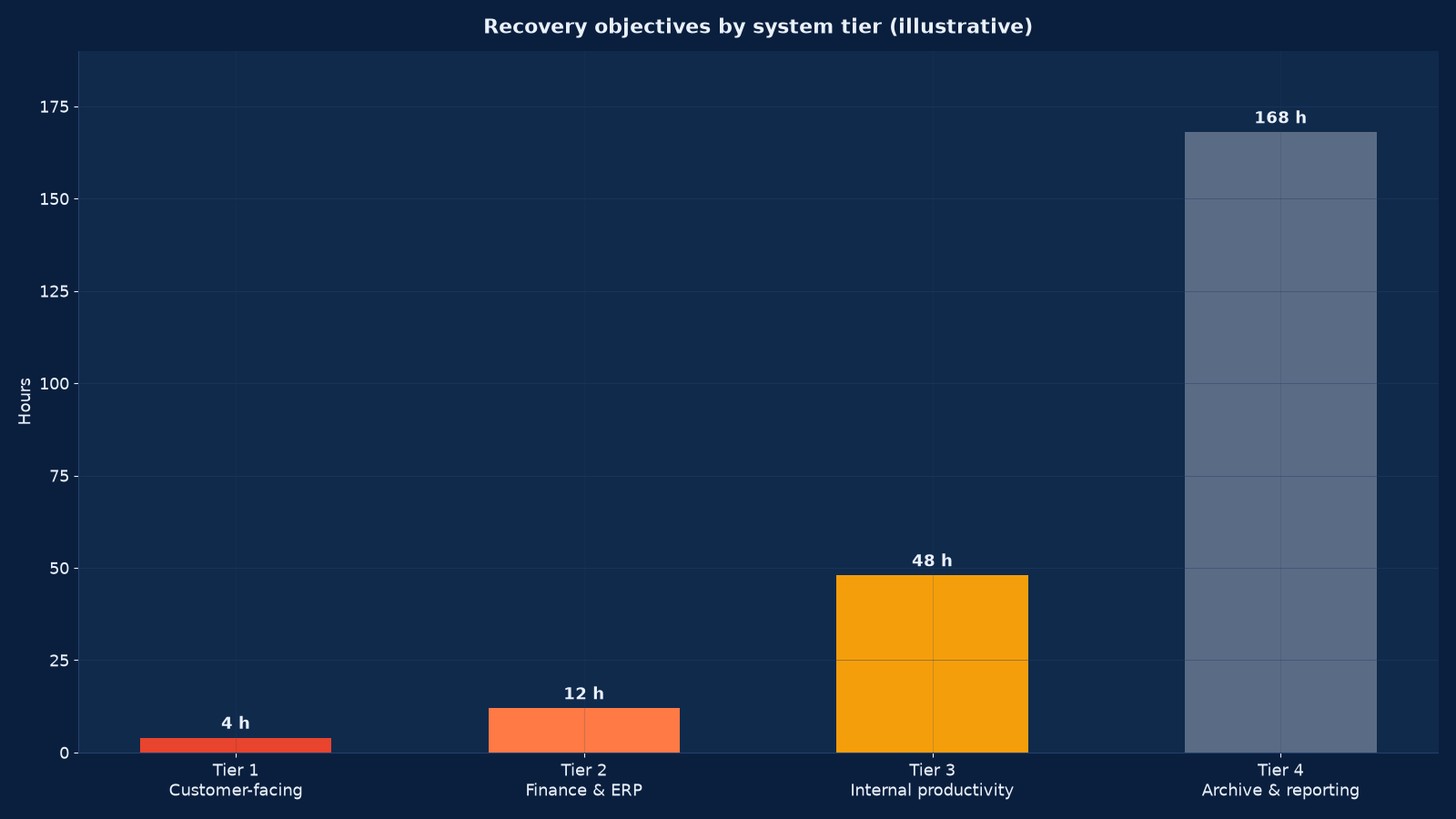
Chart values are an illustrative planning model based on typical UMC engagements and published industry benchmarks. They are not a guarantee of results on any specific project.
A backup strategy is an opinion. A restore test is a fact. The distance between them is where organisations discover, on the worst possible day, that the green tick in the backup console meant the job ran — not that the data can be recovered.
Backup, disaster recovery and business continuity are three different disciplines that get sold as one. Backup protects data. Disaster recovery restores systems. Business continuity keeps the organisation operating while that happens. Unified Management Consulting designs and builds all three against recovery objectives your business owners have actually agreed to, then proves them with a full failover test — because an untested plan is a hypothesis.
💾 Backup, Disaster Recovery & Business Continuity — Quick Summary
| Component | What We Deliver |
|---|---|
| Business impact analysis | Every process and system assessed for the cost of downtime over time, producing agreed tiers with a named business owner per tier. |
| RTO & RPO definition | Recovery time and recovery point objectives set per tier by the business, not by IT, and recorded with the rationale and the cost of meeting them. |
| Backup architecture | The 3-2-1-1-0 model implemented: three copies, two media, one off-site, one immutable or air-gapped, zero errors on verification. |
| Replication & failover | Continuous or scheduled replication for Tier 1 and 2, with failover procedures built and documented rather than improvised. |
| Ransomware resilience | Immutability, logical air-gap, recovery environment isolation, credential separation and a recovery path that does not depend on the compromised identity platform. |
| Runbooks | Step-by-step recovery procedures per system, tested, with decision points, contact trees and fallbacks written down. |
| Business continuity plans | The non-IT half: manual workarounds, communication plans, site alternatives, supplier dependencies and staff procedures. |
| Failover testing | A full or partial recovery exercise against the agreed objectives, with results, gaps and remediation recorded. |
| Test calendar & assurance | A standing schedule of restore tests, tabletop exercises and full failovers, with evidence retained for audit and insurance. |
This service pairs with Risk, Governance & Business Continuity Support for the enterprise view, with Cybersecurity Services for the ransomware control set, and with Computing, Server, Storage & Data Centre Engineering for the underlying platform.
Backup, DR and BC Are Not the Same Thing
Conflating them is the most common structural error, and it produces a programme that spends heavily on one discipline while leaving the others unaddressed.
| Discipline | Question it answers | Failure looks like | Owner |
|---|---|---|---|
| Backup | Can we get the data back? | A job marked successful whose restore fails, or whose only copy sat on the same array | IT operations |
| Disaster recovery | Can we get the systems running again, and how fast? | Data exists but there is no environment to restore it into, or the runbook is one person’s memory | IT with infrastructure |
| Business continuity | Can the organisation keep operating while recovery happens? | Systems come back in three days while the business had no manual workaround for three hours | Business units with risk |
| Crisis management | Who decides what, and who tells whom? | No declared authority, no contact tree, and communications improvised under pressure | Executive |
The practical test: if your site became unavailable tomorrow, backup tells you whether the data survives, DR tells you when the systems return, BC tells you whether anyone could take an order in the meantime, and crisis management tells you who is allowed to decide. A mature programme answers all four with evidence.
Tiering: Where the Money Should Go
Recovery objectives should be set by the business per process, then inherited by the systems that support it. Assigning everything to Tier 1 is not caution — it is a budget failure that usually results in nothing being properly protected.
| Tier | Examples | RTO | RPO | Recovery approach | Relative cost |
|---|---|---|---|---|---|
| Tier 1 — Mission critical | Customer-facing services, payment processing, clinical systems, core network | 1–4 hours | Minutes | Continuous replication with automated or one-step failover to a second site or region | Highest |
| Tier 2 — Business critical | ERP, finance, email and collaboration, production databases, file services | 8–24 hours | 1–4 hours | Frequent snapshots plus replication, documented failover, pre-built recovery environment | High |
| Tier 3 — Important | Internal applications, reporting, non-production environments, most endpoints | 2–5 days | 24 hours | Daily backup with rebuild-from-image recovery | Moderate |
| Tier 4 — Deferrable | Archives, historical data, development sandboxes, non-urgent tooling | 1–2 weeks | 7 days | Periodic backup to low-cost storage, restore on request | Low |
Two rules make tiering stick. The business owner signs it, because an RTO chosen by IT is an opinion about someone else’s process. The cost is stated against each tier, so the conversation is about value rather than about fear. Most organisations find that fewer than ten per cent of their systems genuinely belong in Tier 1, and that the savings fund proper protection for the rest.
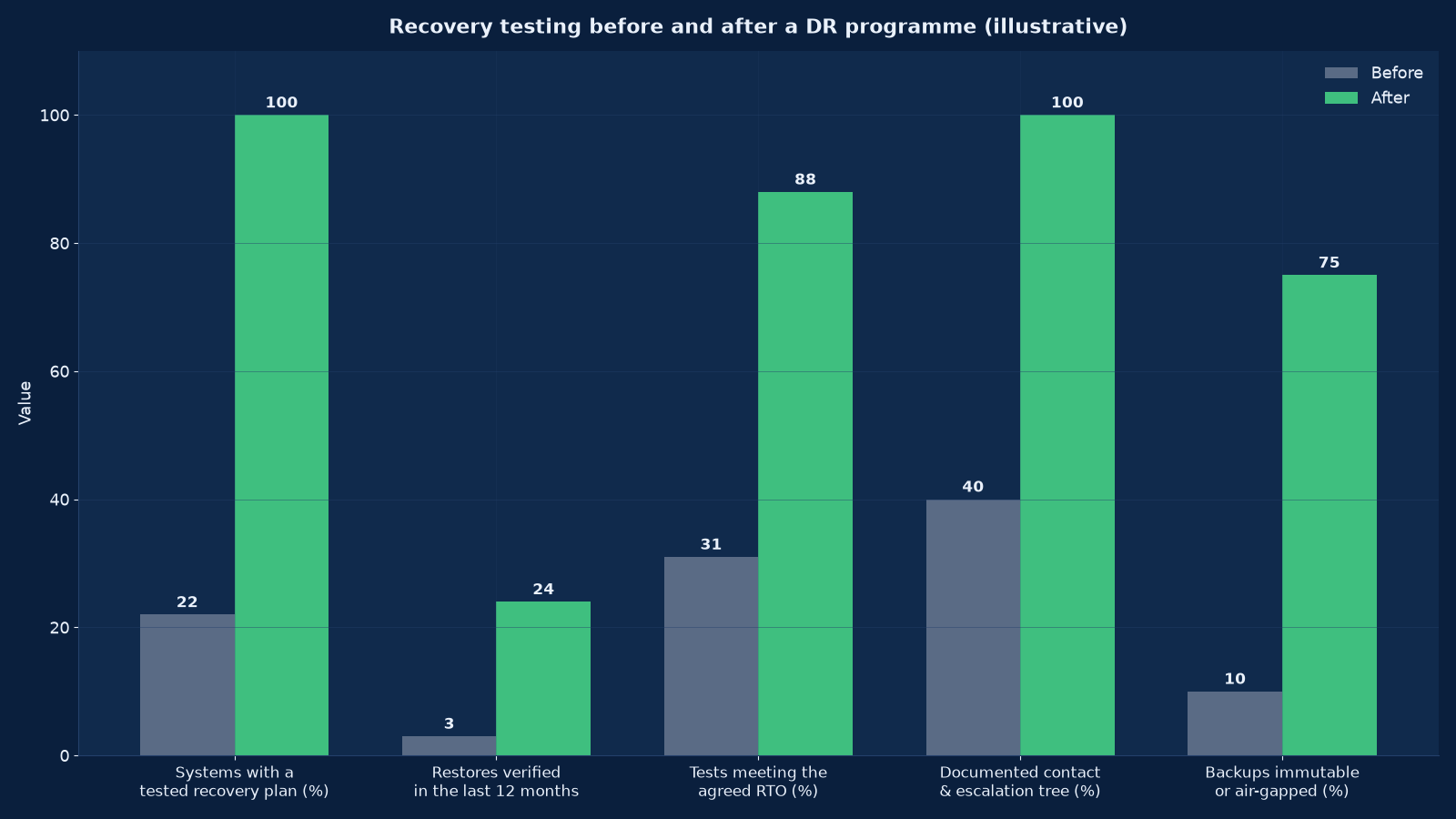
Chart values are an illustrative planning model based on typical UMC engagements and published industry benchmarks. They are not a guarantee of results on any specific project.
The 3-2-1-1-0 Backup Model
The two additions to the classic 3-2-1 rule are what make backup meaningful in a ransomware environment. Both concern the attacker rather than the disk.
| Principle | What it means | Why it matters |
|---|---|---|
| Three copies | Production data plus two backup copies | A single copy on the production array is not a backup |
| Two media | Two different storage types — for example disk and object storage, or disk and tape | Protects against a fault class affecting one medium |
| One off-site | At least one copy at a different physical location or region | Site loss, fire and flood are real, if infrequent, causes |
| One immutable or air-gapped | One copy that cannot be altered or deleted by any credential an attacker could hold | The control that makes ransomware recovery possible rather than theoretical |
| Zero errors | Automated verification confirming each backup is complete and restorable | Silent corruption is discovered at restore time otherwise |
Immutability deserves specific attention. A backup repository that an administrator can delete is a repository an attacker with stolen administrator credentials can delete, and that is now the standard ransomware play: encrypt production, then destroy the backups. Object-lock storage, WORM targets or a physically separated copy are the answers, and the credential separation behind them matters as much as the technology.
Ransomware: Designing Recovery Against a Deliberate Adversary
Traditional DR assumes an accident. Ransomware assumes an opponent who has read your documentation and holds your administrator credentials. The design consequences are specific.
| Attack step | What it defeats | Required control |
|---|---|---|
| Encrypt production systems | Naive single-copy backups | Multiple copies on separate media |
| Delete or encrypt backup repositories | Backup admin credentials shared with production admin | Immutable storage plus separated backup credentials and MFA |
| Delete snapshots and shadow copies | Snapshot-only protection on the same array | A copy outside the production storage platform |
| Lie dormant to age out backups | Short retention windows | Retention long enough that a dormant period is still recoverable, plus anomaly detection |
| Compromise the identity platform | Recovery procedures that depend on that platform to authenticate | An out-of-band recovery path: break-glass accounts, offline contact tree, documented manual procedures |
| Destroy the recovery environment | A DR site on the same tenancy or credentials | Isolated recovery environment with separate credentials and network path |
| Exfiltrate before encrypting | Backup and recovery alone | Detection, egress monitoring and the incident response capability in our cybersecurity service |
The identity-platform dependency is the one most often missed. If your recovery runbook begins with logging into the directory service that the attacker controls, the runbook is unusable. Every recovery path needs an out-of-band entry point: offline documentation, break-glass credentials held under dual control, and a contact tree that does not live in the compromised email system.
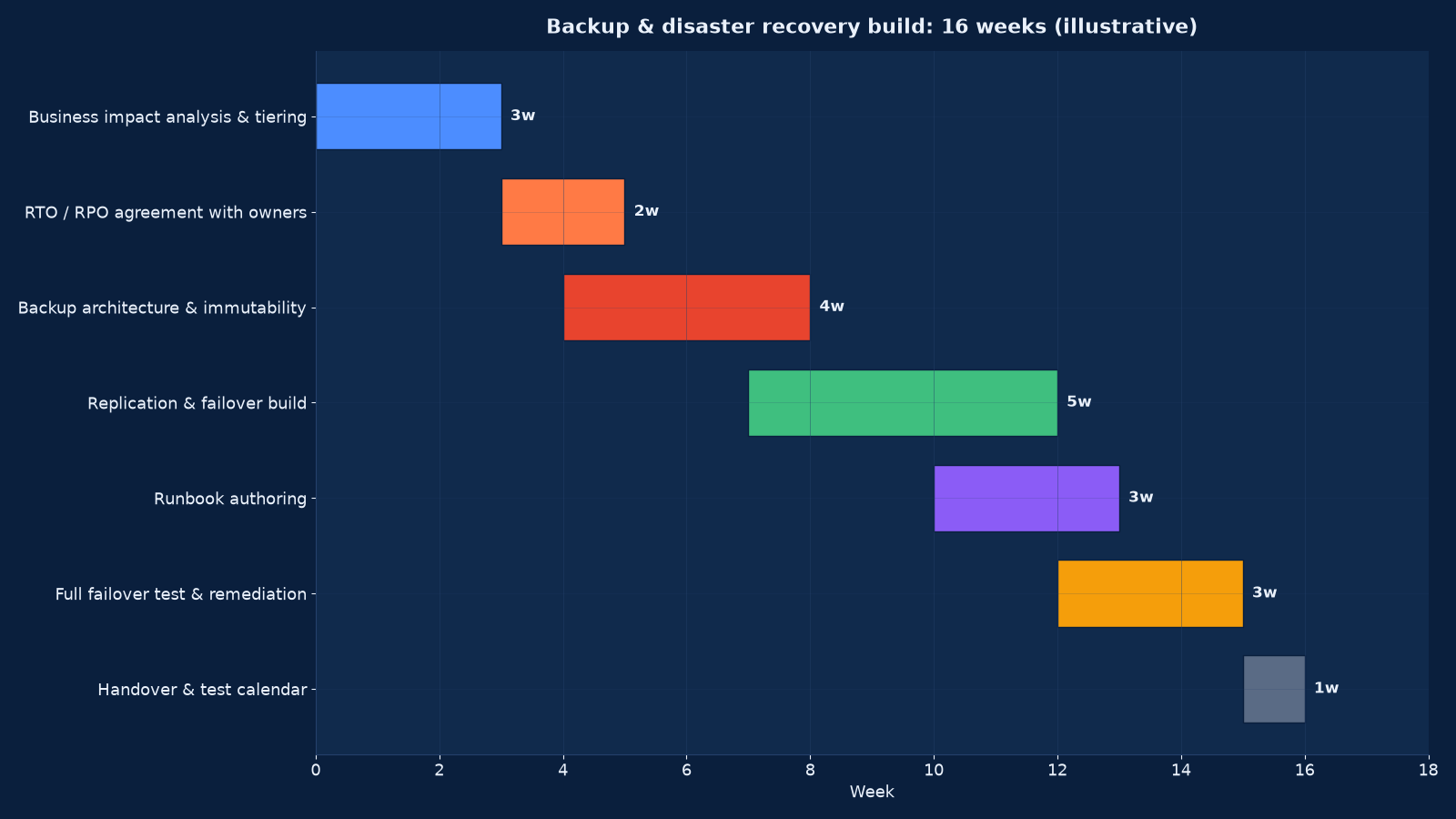
Chart values are an illustrative planning model based on typical UMC engagements and published industry benchmarks. They are not a guarantee of results on any specific project.
Delivery Programme: Sixteen Weeks
| Phase | Weeks | Activities | Output |
|---|---|---|---|
| Business impact analysis | 1–3 | Process interviews, downtime cost modelling over time, dependency mapping, system inventory | Signed process and system tiers with a business owner each |
| Objective agreement | 3–5 | RTO and RPO per tier, cost of meeting them, gap against current state | Approved RTO/RPO schedule and a costed gap list |
| Backup architecture | 4–8 | Backup platform design, immutability, retention, off-site or cross-region copy, verification automation | Implemented backup with verified restores |
| Replication & failover build | 7–12 | Recovery environment provisioning, replication for Tier 1 and 2, failover automation or documented procedure | A recovery environment that can actually host the workloads |
| Runbook authoring | 10–13 | Step-by-step procedures per system, decision points, contact tree, out-of-band access | Tested runbooks with named owners |
| Business continuity plans | 11–14 | Manual workarounds, communication plan, site alternatives, supplier dependencies | BC plans owned by the business, not by IT |
| Full failover test | 12–15 | Recovery exercise against the agreed objectives, timed, observed and measured | Test report with results, gaps and remediation actions |
| Remediation & handover | 15–16 | Gaps closed, test calendar agreed, ownership transferred, evidence pack assembled | Operating capability with a standing test schedule |
Testing: The Discipline That Makes It Real
Testing is where DR programmes are usually under-resourced, and it is the only part that produces evidence. A test calendar with named owners is worth more than an elaborate plan that has never been exercised.
| Test type | What it proves | Cadence | Disruption |
|---|---|---|---|
| File-level restore | An individual file or mailbox can be recovered intact | Monthly, sampled across systems | None |
| Verification and integrity check | Backups are complete and uncorrupted | Automated, every job | None |
| System rebuild from image | A full server or VM can be restored to a working state | Quarterly, rotating across Tier 2 and 3 | None if restored to an isolated environment |
| Database restore to a point in time | Transaction logs are intact and the recovery point is achievable | Quarterly | None |
| Failover to the recovery environment | Replication and the recovery site actually work | Semi-annually for Tier 1 and 2 | Planned window required |
| Full failover exercise | The whole plan, including people, communications and business workarounds | Annually | Significant; schedule deliberately |
| Tabletop walkthrough | Decision-making, authority and communication under a scenario | Semi-annually | None |
| Ransomware recovery simulation | Recovery from immutable copies with the identity platform assumed compromised | Annually | Planned window; the most valuable test |
Record every test with date, scope, participants, elapsed times against the objective, problems found and actions raised. That record is what an auditor samples, what an insurer asks for, and what tells you whether the capability is improving or decaying.
The Non-IT Half: Business Continuity Planning
Recovery objectives are usually missed not because the technology failed but because nobody had decided what the business would do in the meantime. Five elements belong in a BC plan.
- Manual workarounds. How orders are taken, invoices raised and customers served with the systems down. Written in advance, with the forms and spreadsheets prepared rather than improvised.
- People procedures. Who is called, in what order, with what authority, and how they are told what to do. Include the out-of-band contact tree.
- Communication. Internal updates, customer notification, supplier notification and, where applicable, regulatory notification with its legal clock.
- Site and supplier alternatives. Where people work if the site is unavailable, and which suppliers you depend on who may fail at the same time you do.
- Resumption and reconciliation. How data captured manually during the outage is entered back into the systems, and who checks it.
The last item is the one that gets forgotten and causes the second incident: a three-day outage produces three days of paper records that then have to be reconciled, often by the same people who are catching up on the backlog. Risk, Governance & Business Continuity Support covers this at enterprise level, where it belongs alongside operational risk and insurance.
Recovery Architecture Options
| Option | RTO achievable | RPO achievable | Cost profile | Use it when |
|---|---|---|---|---|
| Backup and rebuild | Days | Hours to a day | Lowest — storage and licences only | Tier 3 and 4 systems, and any estate starting from nothing |
| Cold standby | Hours to a day | Hours | Low — an idle environment plus storage | Tier 2 systems where a same-day return is acceptable |
| Warm standby / pilot light | Minutes to hours | Minutes to an hour | Moderate — a scaled-down running environment | Tier 1 and 2 where budget does not allow full active-active |
| Active-active across sites or zones | Seconds to minutes | Near zero | Highest — duplicate running capacity | Genuine Tier 1: customer-facing or regulated systems where downtime is unacceptable |
| Managed DR service | Per contract | Per contract | Subscription — converts capital into operating cost | Organisations without the internal skill or capacity to build and test |
Cloud Changes the Options, Not the Obligations
Cloud makes some recovery patterns much cheaper and introduces new failure modes at the same time. Four points matter.
Regions are not automatic redundancy. Replicating across regions or availability zones has to be configured, and it costs money. A single-region deployment with no cross-region copy has the same site-loss exposure as a single server room.
Immutability is available but not default. Object-lock and versioning have to be enabled explicitly, and the retention and legal-hold settings have to survive credential compromise.
Configuration is part of the backup. Infrastructure-as-code definitions, network rules, identity configuration and key material are all things you need to rebuild — and they are frequently not backed up at all. DevOps & CI/CD Engineering Services is where that discipline lives.
Egress and restore cost is real. Recovering terabytes from cold storage incurs retrieval and transfer charges that can dwarf the storage cost. Model the recovery cost, not just the retention cost — which is the same discipline as our FinOps offering in this category.
Where workloads are moving to cloud as part of the recovery strategy, Cloud Services & Migration is the delivery route, and the Nscale infrastructure capacity story is a useful reminder that capacity availability itself is a planning assumption worth testing.
Common Failures We Are Called In To Fix
- Backups on the same platform as production. Snapshots on the primary array are a convenience feature, not a backup, and they fail in exactly the scenarios backups exist for.
- No restore test in the last year. The single most common finding, and the one that turns an incident into a catastrophe.
- Retention too short for a dormant attacker.Thirty days of retention means an attacker who waits thirty-one days has aged out your clean copy.
- Backup credentials shared with production admin. Defeats immutability entirely.
- A runbook that assumes a working directory service. Unusable in the scenario it was written for.
- No recovery environment. Data exists, but nowhere to restore it into, so the RTO is whatever it takes to procure hardware.
- BC plans owned by IT. They describe system restoration and say nothing about how the business operates meanwhile.
- Contact trees stored in email. Inaccessible in precisely the incident where email is down.
- Dependencies unmodelled. A Tier 1 service depending on a Tier 3 database inherits the slower objective, and nobody notices until the test.
Almost all of these are found by a business impact analysis and a restore test. Neither is expensive; both are routinely deferred.
Measuring Recovery Readiness
Figure 2 uses a subset of these. The full set is what we report at handover and on the standing test calendar, and it is the evidence an insurer or an auditor will ask for.
| Measure | Definition | Target |
|---|---|---|
| Restore test coverage | Tier 1 and 2 systems with a verified restore in the last twelve months | 100% |
| Test success against objective | Share of tests completed inside the agreed RTO | 90%+, with failures actioned |
| Backup verification rate | Jobs automatically verified as complete and restorable | 100%, with errors raised as incidents |
| Immutable copy coverage | Critical data with an immutable or air-gapped copy | 100% of Tier 1 and 2 |
| RPO attainment | Measured data loss in tests against the agreed RPO | Inside objective on every test |
| Runbook currency | Runbooks reviewed or tested in the last twelve months | 100% |
| BC plan ownership | Plans with a named business owner and a current review date | 100% |
| Time to declare | Elapsed time from incident detection to a formal recovery declaration | Agreed in advance and rehearsed |
| Manual workaround readiness | Workaround documents prepared and staff briefed | Every Tier 1 process |
Reporting these on the same executive view as the rest of IT performance is what keeps the budget alive between incidents. Our AI ROI Measurement & Executive Scorecards service applies the same measurement discipline — baseline, owner, cadence, evidence — and the pattern transfers directly.
Engagement Models
| Model | Duration | Deliverables | Best when |
|---|---|---|---|
| DR readiness assessment | 2–3 weeks | Business impact analysis, current-state gap against objectives, restore test, costed remediation plan | Before committing budget, or to satisfy an insurer or auditor |
| Full DR build | 14–18 weeks | Backup architecture, immutability, replication, recovery environment, runbooks, BC plans, full failover test and handover | There is no recovery capability, or it has never been tested |
| Ransomware recovery hardening | 6–10 weeks | Immutable copy implementation, credential separation, out-of-band recovery path, isolated recovery environment, simulation test | Backups exist but would not survive a deliberate attack |
| Business continuity planning | 6–10 weeks | BIA, BC plans with manual workarounds, communication and crisis management plans, tabletop exercise | IT recovery exists but the business has no plan |
| Test as a service | Per exercise | Designed and observed recovery exercise, timed against objectives, with a findings report and remediation actions | You have a plan and need independent evidence that it works |
| Managed DR | Ongoing | Continuous monitoring of backup health, scheduled testing, runbook maintenance and annual exercise | You want the capability operated rather than merely built |
What Good Looks Like a Year After the Build
The programme has worked when recovery stops being a special event. Concretely:
- Every Tier 1 and Tier 2 system has been restored successfully in the last twelve months, with the record available.
- An immutable copy exists for all critical data, held under credentials separated from production administration.
- A full failover exercise has run at least once, with timings measured against the agreed objectives and the gaps closed.
- Business continuity plans have named business owners, prepared manual workarounds and a contact tree that does not depend on the systems being recovered.
- The test calendar runs itself, with results reported monthly alongside the rest of IT performance.
- Someone other than the original author has executed a runbook successfully.
That last point is the real test of documentation quality, and it is the same test the managed IT service applies to recovery at three in the morning. Where the estate is operated under an AMC, the test calendar should be part of that contract rather than a separate initiative — and where certification is planned, the test records become business continuity evidence for the audit described in our IT audit and compliance service.
Frequently Asked Questions About Backup, Disaster Recovery & Business Continuity
What is the difference between RTO and RPO?
RTO is how long you can be without the system — the time from failure to restored service. RPO is how much data you can afford to lose — the gap between the last good copy and the moment of failure. A four-hour RTO with a one-hour RPO means the system is back within four hours and at most one hour of transactions is lost. They drive different technology choices and different costs, so they have to be set separately per system.
How do we decide what our RTO and RPO should be?
Through a business impact analysis, owned by the business rather than by IT. For each process, model the cost of downtime at one hour, four hours, one day and one week, then choose the point where the cost of downtime exceeds the cost of faster recovery. Most organisations find that fewer than ten per cent of systems justify a Tier 1 objective, and that the savings elsewhere fund proper protection for those.
We have backups. Do we need disaster recovery?
Backups are one input to DR, not a substitute for it. DR also requires somewhere to restore into, a tested procedure, people who can execute it, and an out-of-band path if the identity platform is compromised. The commonest finding in our assessments is a solid backup position with no recovery environment and no tested runbook — which means the RTO is however long it takes to procure hardware.
How often should we test?
File-level restores monthly on a rotating sample; system rebuilds and point-in-time database restores quarterly; failover to the recovery environment semi-annually for Tier 1 and 2; a full exercise including business continuity and communications annually; and a ransomware simulation annually. Record every test with timings and findings — the record is the evidence an auditor or insurer asks for.
What does immutability actually protect against?
Against an attacker who holds your administrator credentials, which is the normal ransomware position. An immutable copy cannot be altered or deleted within its retention window by any credential, so it survives the attack that destroys everything else. It only works if the retention and hold settings are configured correctly and if the backup administration credentials are separated from production administration.
Is cloud backup enough?
Cloud is an excellent off-site copy and often the immutable one, but it is not sufficient on its own if all copies sit in the same tenancy under the same credentials. You also need to back up the configuration — infrastructure definitions, identity, network rules and key material — which is what most organisations omit, and to model the retrieval and egress cost of a large restore before you need one.
How long should we retain backups?
Long enough to cover both your operational needs and the dormant-attacker scenario. Thirty days is common and inadequate: an attacker who establishes access and waits thirty-one days has aged out your clean copy. Retention is usually set by a combination of regulatory requirement, business need and detection capability — if you can reliably detect compromise within two weeks, a shorter window is defensible; if you cannot, retain longer.
Who owns the business continuity plan?
The business, not IT. IT owns system recovery; the business owns how it operates while systems are unavailable, including manual workarounds, customer communication and staff procedures. A BC plan written and owned by IT almost always describes system restoration and says nothing about the business, which is why the objective is missed even when the technology succeeds.
What does a disaster recovery programme cost?
It is driven by tiering rather than by estate size. Protecting a properly tiered estate with a handful of Tier 1 systems costs a fraction of attempting active-active recovery for everything. The assessment produces the costed options per tier, which is the only way to answer this honestly — a quote given before the business impact analysis is guesswork in both directions.
Can this be part of a managed IT contract?
Yes, and it usually should be. Backup monitoring, restore verification on a schedule, runbook maintenance and the annual exercise fit naturally into an AMC, and they produce the evidence continuously rather than in a scramble before an audit. Where you have no managed service, the alternative is a standing test calendar with a named internal owner — which is the thing that usually lapses.
What should we do first?
Commission a DR readiness assessment that includes an actual restore test. It produces the business impact analysis, the gap against realistic objectives, and proof of whether your current backups can be recovered. Most organisations learn more from that single restore test than from any amount of planning, and it is the evidence base for every decision afterwards.
Book a Disaster Recovery Readiness Assessment
We will run the business impact analysis with your process owners, attempt an actual restore of your most critical system, and tell you plainly whether your current position would survive a site loss or a ransomware attack. The restore test alone usually settles the budget conversation.
Contact Unified Management Consulting to arrange an initial assessment of your environment.
Related Services
Backup, DR and business continuity depends on most of our infrastructure services:
- Computing, Server, Storage & Data Centre Engineering — the storage and compute platforms recovery is built on
- Routing, Switching, Firewall & Network Engineering — the connectivity and segmentation a failover depends on
- Cybersecurity Services & Solutions — detection and incident response, the disciplines that precede recovery
- Cloud Services & Migration (AWS, Azure, GCP) — cross-region replication and cloud-native recovery patterns
- DevOps & CI/CD Engineering Services — infrastructure-as-code and configuration backup
- Risk, Governance & Business Continuity Support — the enterprise continuity and insurance view
- Technology Services — the wider infrastructure portfolio this service operates within
- Managed IT Infrastructure & IT AMC — 24×7 monitoring, patching, backup verification and monthly SLA reporting at a fixed cost
- Enterprise Systems Integration & Tech-Stack Consolidation — application inventory, integration architecture, decommissioning and measured savings
- IT Audit, Compliance & ISO 27001 / SOC 2 Readiness — Annex A gap analysis, control design, evidence automation and certification support
- Cloud Cost Optimisation & FinOps — tagging, allocation, showback, right-sizing, commitments and a monthly cadence
- IT Helpdesk & End-User Support — tiered service desk, published SLAs, knowledge management and shift-left automation
- Web Application Maintenance & Support — patching, monitoring, verified backups, defect management, committed change capacity and monthly service reporting
- Website Migration & Replatforming — full estate inventory, one-to-one redirect maps, functional parity, dry-run rehearsals, staged cutover and tested rollback