
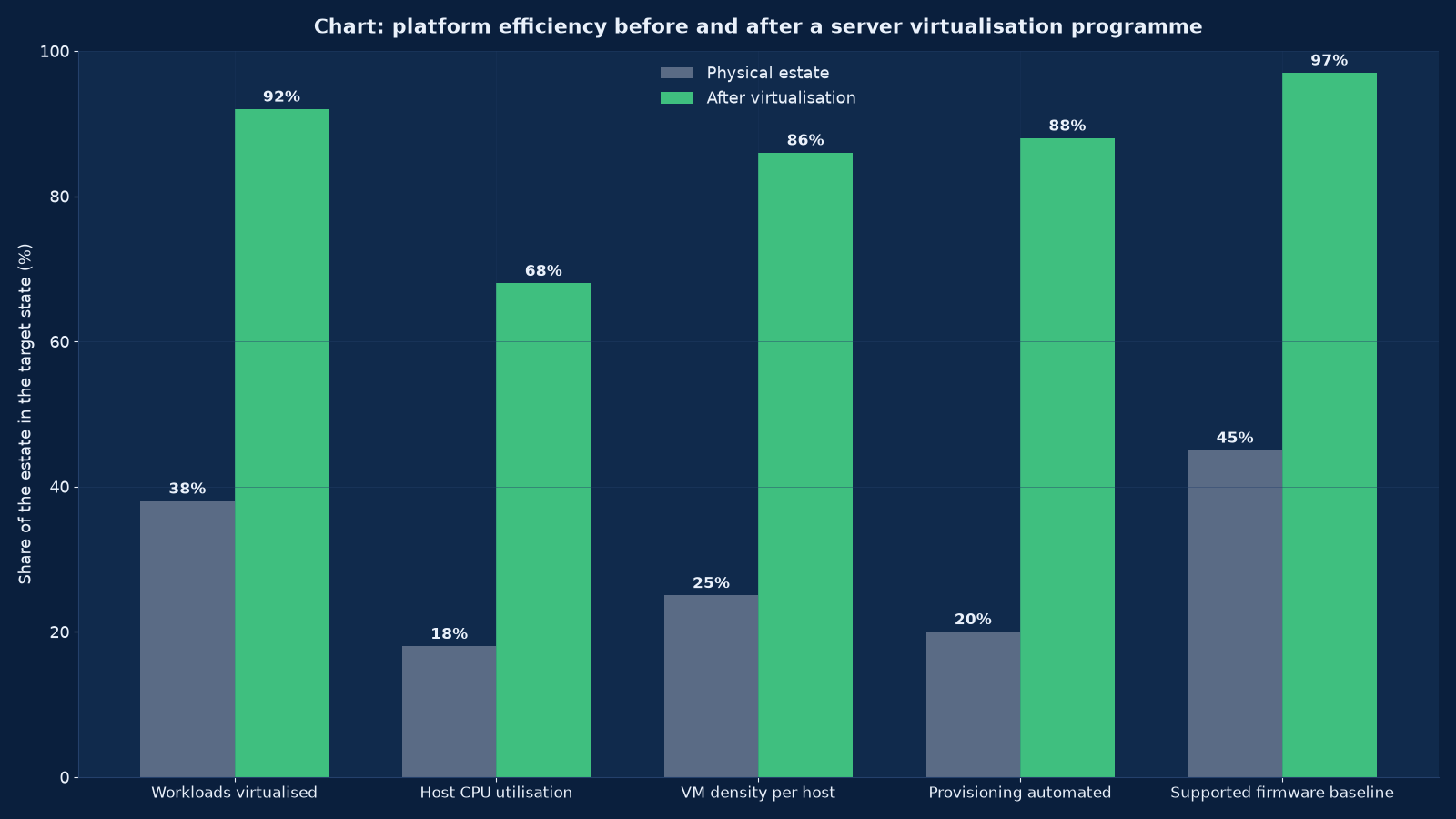
Chart values are an illustrative planning model based on typical UMC engagements and published industry benchmarks. They are not a guarantee of results on any specific project.
Most enterprises do not have a server problem. They have forty-eight servers that are each eleven per cent busy, four of which matter, and a licensing position that was negotiated against a hardware estate which no longer exists. Virtualisation is not a technology purchase. It is the decision to stop buying capacity by the box and start managing it as a pool — and the platform you choose to hold that pool now costs more than the hardware it replaced.
Server virtualisation at Unified Management Consulting covers the whole programme: the inventory that establishes what you actually run, the platform decision that follows from it rather than from a renewal notice, the cluster design that decides what happens when a host fails, the migration waves that move production without stopping it, and the operating model that keeps the estate honest afterwards. We work across VMware vSphere, Microsoft Hyper-V, Proxmox VE, Nutanix AHV and KVM-based platforms, and we are equally willing to recommend consolidating onto the platform you already own.
The commercial context has changed enough that the platform question can no longer be deferred. Perpetual hypervisor licensing has largely given way to subscription bundles sold against per-core minimums, which means the cost of a virtualisation estate now tracks the number of physical cores you carry rather than the number of virtual machines you run. That inverts a decade of behaviour: the discipline that used to reduce hardware cost while increasing licensing cost is now the discipline that reduces both, because fewer, denser hosts carry fewer licensed cores. An estate that was consolidated to 2019 assumptions can be paying for cores it does not need, and a platform evaluation that ignores this is evaluating the wrong thing.
🖥️ Server Virtualisation (VMware / Hyper-V) — Quick Summary
| Component | What We Deliver |
|---|---|
| Estate inventory and assessment | Every physical and virtual machine catalogued with measured utilisation, dependencies, operating system support status and criticality — not nameplate ratings, and not whatever the last migration spreadsheet claimed. |
| Platform recommendation | A written comparison of VMware vSphere, Hyper-V, Proxmox VE, Nutanix AHV and KVM against your workload profile, skills, licensing exposure and five-year cost, with a recommendation and the reasoning behind it. |
| Cluster and host design | Cluster sizing, HA admission control, DRS or equivalent scheduling, anti-affinity rules, failure domains, and the blast radius each decision creates. |
| Host build and firmware baseline | Hypervisor installation, management and production network separation, multipathing, a documented firmware and driver baseline, and secure boot where the platform supports it. |
| Storage attachment | Shared storage, vSAN or hyperconverged storage, or local storage with replication — chosen against the workload’s latency and recovery needs rather than habit. |
| Migration execution | P2V and V2V waves sequenced by dependency and risk, with rollback plans, cutover windows and post-migration verification per workload. |
| Licensing and right-sizing | Core counts rationalised, entitlement evidence assembled, and the subscription position modelled against the consolidated estate. |
| Operations handover | Patching and lifecycle process, backup integration, monitoring thresholds, capacity reporting in three units, and the runbooks the operations team will actually use. |
| Decommissioning | Physical hosts retired with data sanitisation certificates, licences surrendered or reassigned, and rack space, power and cooling reclaimed and reported. |
What Virtualisation Actually Changes
Virtualisation is the substitution of a scheduling problem for a procurement problem. Instead of buying capacity in fixed units and stranding most of it, capacity becomes a pool that is allocated to workloads on demand and reclaimed when they do not need it. The technology is mature and well understood; what separates a good programme from a bad one is whether the inventory was honest, whether the cluster was designed for failure rather than for capacity, and whether anyone planned what happens after the last physical server is switched off.
| What virtualisation changes | Before | After | The catch |
|---|---|---|---|
| Capacity procurement | Per server, with each workload owning its peak | Per pool, sized to the aggregate peak | An undersized pool fails all at once rather than one workload at a time |
| Hardware utilisation | Typically 8-15 per cent of CPU on distributed servers | Typically 55-75 per cent on a consolidated cluster | Measurement has to be real: a quarterly average hides the month-end peak |
| Provisioning time | Weeks, gated by procurement and racking | Minutes, from a template | Templates that are never updated become a patching liability |
| Recovery from hardware failure | Manual rebuild, hours to days | Automatic restart on a surviving host, minutes | Only for workloads that were designed to be restarted, and only within HA admission limits |
| Patch and lifecycle work | Per machine, with per-machine windows | Per cluster, with rolling evacuation | Requires enough spare capacity to evacuate a host, which costs money |
| Licensing exposure | Per server or per socket in the old models | Per core against minimums in current subscription models | Consolidation reduces cores only if the hosts are actually retired, not repurposed |
The catch column is the one worth reading twice. Every benefit of virtualisation is also a concentration of risk: capacity that fails together, a patching process that depends on spare headroom, and a licensing model that rewards decommissioning rather than migration. A programme that delivers the benefits and ignores the catches produces a smaller, cheaper estate that is more fragile than the one it replaced.
Assessment: Measured Inventory Before Any Platform Decision
We assess before we recommend, and the assessment is measured rather than surveyed. Nameplate specifications and the opinions of application owners are both systematically wrong in the same direction: owners overstate what their workload needs, because understating it once caused an outage they would rather not repeat. Measured utilisation over a period that includes the worst week — month end, quarter end, the seasonal peak — is the only defensible basis for a sizing decision.
| Assessment output | How we produce it | What it decides |
|---|---|---|
| Machine inventory with dependency map | Agent-based collection where permitted, agentless or hypervisor-level where not, plus network flow analysis for dependencies nobody documented | Migration wave order, and which workloads cannot be separated |
| Measured CPU, memory, disk and network utilisation | At least four weeks of collection, including the worst week, at a granularity fine enough to show peaks | Host sizing, memory overcommit ratio, and the storage tier each workload needs |
| Operating system and application support status | Version census against vendor support matrices | What must be upgraded before it can be migrated, and what cannot be virtualised at all |
| Physical-to-virtual suitability | Driver, licensing, hardware dongle, clustering and latency review per machine | The short list of workloads that stay physical, and why |
| Recovery requirement per workload | Agreed RPO and RTO with the business owner, not with IT | Cluster design, backup schedule, and whether a second site is needed |
| Licensing position | Entitlement evidence collected against the actual estate | Whether consolidation reduces or increases cost, and which platform is affordable |
| Capacity headroom requirement | Modelled from the consolidated peak plus N+1 host failure plus growth | How many hosts the cluster needs, which is more than the arithmetic suggests |
Two findings appear in almost every assessment. The first is that the estate is larger than anyone believed, because machines accumulate without an owner and without a decommission process. The second is that a small number of workloads — typically fewer than ten per cent — account for most of the resource consumption, which means the migration sequence should start with the easy majority and handle the demanding minority deliberately rather than accidentally.
Platform Choice Under Current Licensing Realities
Platform choice is now a commercial decision with a technical constraint attached, rather than the reverse. All the mainstream hypervisors are technically capable of running an enterprise estate; what differs is the licensing model, the management tooling, the skills your team already has, and the cost of leaving. We model five-year cost including subscription, support, training and the migration labour itself, because a platform that is cheap to license and expensive to leave is not cheap.
| Platform | Licensing model | Management and ecosystem | Best suited to | What to weigh |
|---|---|---|---|---|
| VMware vSphere / ESXi | Subscription bundles with per-core minimums; perpetual licensing largely withdrawn | vCenter with mature DRS, HA, vMotion and the widest third-party ecosystem | Large mixed estates that need proven scheduling and broad vendor support | Current bundle pricing against your core count, and the cost of the features you actually use |
| Microsoft Hyper-V | Included with Windows Server licensing, plus System Center or Azure-based management | Failover Clustering with live migration; strongest where the estate is already Microsoft | Windows-dominant estates, organisations with existing Microsoft agreements, and Azure-hybrid designs | Whether your team can operate clustering without the VMware tooling it is used to |
| Proxmox VE | Open-source core with optional paid subscription for support and the enterprise repository | Web-based management, KVM hosts with LXC containers, built-in backup and clustering | Small and mid-size estates, cost-sensitive consolidations, and teams comfortable operating Linux | Support arrangements and in-house Linux depth, since the ecosystem is narrower |
| Nutanix AHV | Subscription per node or per core, sold with the hyperconverged stack | Prism management across compute and storage in one plane | Estates that want compute and storage converged and simplified to operate | That the platform and the storage layer are bought together, which changes the exit cost |
| KVM and OpenStack-based platforms | Open source, with support from a distributor or built in-house | Varies widely; powerful but requires real engineering ownership | Organisations with platform-engineering capability, and cloud-style internal offerings | The operating cost of the team, which is where the saving is spent |
The question that decides it
Not “which hypervisor is better” — they are all adequate — but “which platform can our team operate at three in the morning, at a cost we can forecast for five years, without a second migration in the middle of that period?” A platform the team cannot operate produces an estate nobody patches. A platform whose cost cannot be forecast produces a budget conversation every renewal. Both failures are more expensive than the licensing difference that prompted the evaluation.
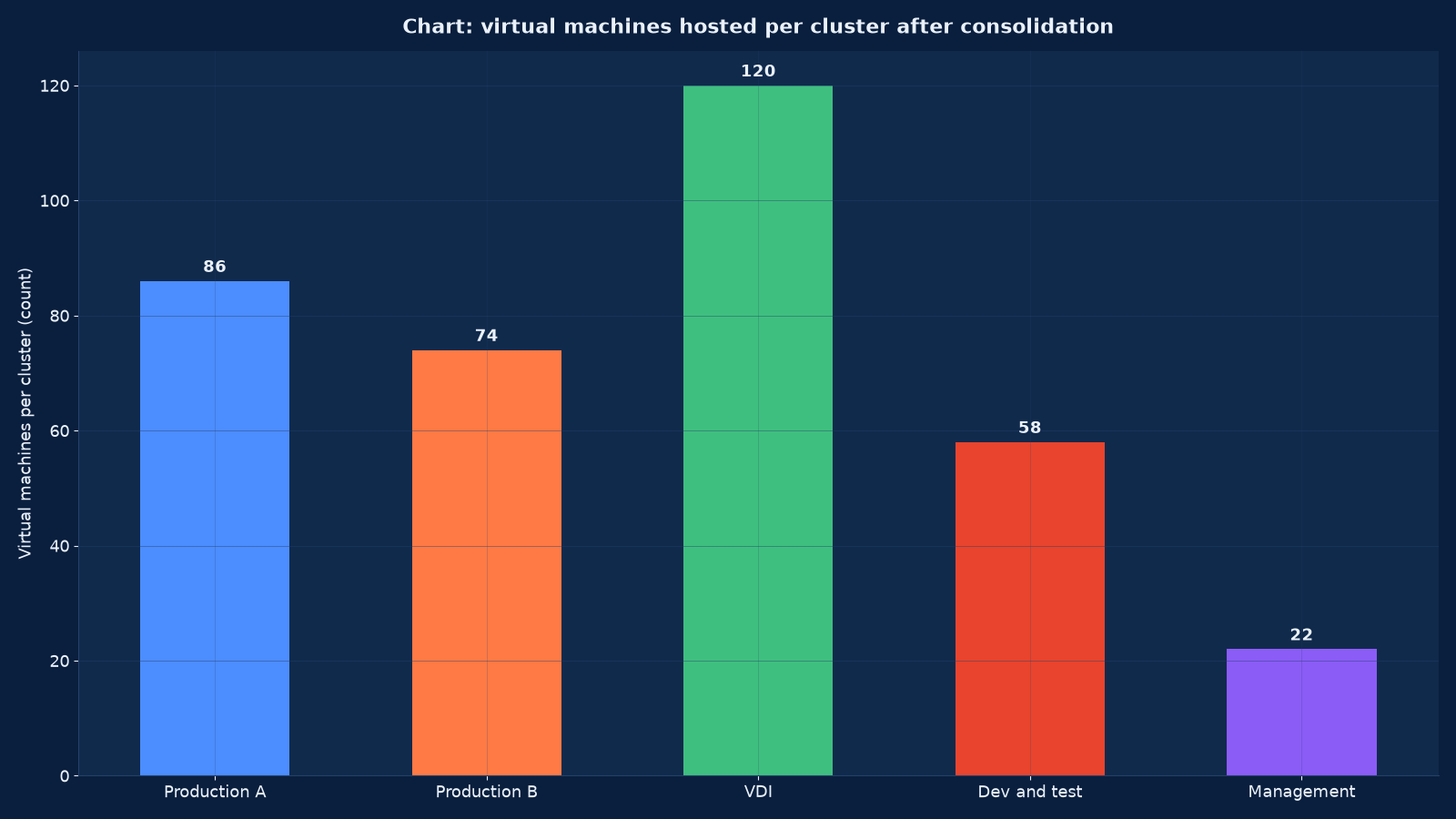
Chart values are an illustrative planning model based on typical UMC engagements and published industry benchmarks. They are not a guarantee of results on any specific project.
Cluster Design: HA, Scheduling and the Blast Radius
Cluster design is where availability is actually decided, and it is decided by arithmetic rather than by intention. High-availability admission control reserves capacity so that the surviving hosts can absorb the workload of a failed host; if the cluster is sized without that reservation, HA will restart what fits and leave the rest down, which is not the behaviour anyone expected when they bought it.
| Design decision | What we set | Why it matters |
|---|---|---|
| Cluster size | Enough hosts that losing one leaves the aggregate peak served, with the growth horizon included | A cluster sized to today’s load fails over into an overcommit that produces latency rather than an outage — which is worse, because it is hard to diagnose |
| HA admission control | Host failures tolerated set explicitly, with the reservation measured against real memory demand | Determines whether failover is complete or partial, and it is the setting most often left at default |
| Scheduling policy (DRS or equivalent) | Automation level chosen per cluster, with affinity rules for clustered workloads | Fully automated movement is wrong for workloads with licensing or latency constraints |
| Anti-affinity | Applied to the two halves of any clustered application, and to management components | Otherwise a single host failure takes both nodes of a cluster that was bought for resilience |
| Failure domain separation | Management, production and VDI on separate clusters or separate storage where the budget allows | A shared failure domain turns a platform incident into a total outage |
| Memory overcommit | Set from measured demand, not from a ratio copied from a reference architecture | Overcommitment beyond measured headroom causes swapping, which users experience as an unexplained slowdown |
| Blast radius | Documented per cluster: what stops if this cluster is lost | The number the business needs in order to fund the right level of redundancy |
We publish the blast radius of every cluster as part of the design, in plain language: if this cluster is lost, these applications stop for this long. It is the single most useful document in a virtualisation design, because it converts an engineering decision into a business decision that can be funded or accepted knowingly.
Storage and Networking Underneath the Cluster
A hypervisor cluster is only as good as the storage and network underneath it, and both are routinely under-specified because they are invisible to the people approving the budget. Storage decides whether a live migration completes in ninety seconds or times out; the network decides whether a host failure produces a graceful restart or a storm of retries.
| Layer | Design rule we apply | Common failure we are designing against |
|---|---|---|
| Host networking | Management, vMotion or live-migration, storage and production traffic on separate VLANs with dedicated physical uplinks, teamed with an explicit load-balancing policy | Migration traffic sharing uplinks with production, so maintenance windows take four times as long |
| Switch configuration | Jumbo frames consistently enabled end to end or consistently disabled, with MTU verified on every hop | An MTU mismatch that breaks storage traffic intermittently and only under load |
| Storage attachment | Multipathing configured and tested, with the failover policy matched to the array’s capabilities | A single path that nobody noticed because it never failed during working hours |
| Storage tier | Latency-sensitive workloads on flash with measured IOPS headroom; archives on capacity tiers | Database workloads placed by convenience rather than by latency requirement |
| Converged storage (vSAN or equivalent) | Only where the failure domain, witness and capacity model are understood, and where the team can operate it | A converged cluster whose usable capacity is consumed by its own resilience policy |
| Backup path | Backup traffic isolated from production, with a target that is not on the same storage as the source | Backups that read from and write to the same array, and therefore fail together with it |
| Firmware and driver baseline | One documented baseline per cluster, tested before rollout, with a rollback path | A driver update applied host by host that changes behaviour halfway through a cluster |
Where storage is converged onto the compute cluster, the design has to account for the fact that the storage layer now shares the failure domain of the hosts it serves. That is a legitimate architecture with real operational advantages, and it changes the capacity and resilience arithmetic in ways that must be modelled before purchase rather than discovered at eighty per cent full.
Hardening the Platform: The Management Plane Is Tier Zero
A virtualisation cluster concentrates value, and it therefore concentrates attack. The management plane is the single most valuable credential set in the estate: whoever controls it controls every workload on the platform, can read the memory of any machine, and can make the whole cluster unavailable. Ransomware campaigns have targeted hypervisor management interfaces specifically, because encrypting the hosts is more effective than encrypting the guests and does not require touching any of them.
| Control | What we implement | Why it is not optional |
|---|---|---|
| Management plane isolation | Management interfaces on a dedicated, non-routable network segment with jump-host access only, never reachable from the production VLAN | An exposed management interface is an invitation, and it is how hypervisor-targeting ransomware gets in |
| Administrative access | Named accounts with role-based permissions, no shared root-style credentials, and multifactor authentication on the management console | A shared administrative password cannot be rotated after a leaver, and cannot be attributed in an incident |
| Host hardening baseline | A documented baseline per platform: shell access disabled, unnecessary services off, secure boot and TPM attestation where supported, lockout policies set | Drift from the baseline is invisible until an audit or an incident makes it visible |
| Firmware and hypervisor patching | Advisories tracked against the cluster baseline, with a defined window for out-of-band security fixes | Hypervisor vulnerabilities are patched by attackers faster than by most enterprises |
| Virtual machine isolation | Device access restricted, copy-paste and shared virtual disks disabled between trust zones, and sensitive workloads on separate clusters | These are the settings that turn a guest compromise into a platform compromise |
| Encryption | Encryption at rest for datastores where the workload warrants it, and encryption in flight for migration traffic | Live migration carries entire machine memory across the network in the clear unless it is configured otherwise |
| Snapshot and template integrity | Templates and snapshots stored on paths with restricted write access, and reviewed for age | A compromised template propagates to every machine built from it |
| Audit logging | Management actions logged to a store the platform administrators cannot alter, with retention agreed for audit purposes | Without it there is no way to establish what an administrator account did, or who used it |
We treat the hypervisor as a tier-zero system: the layer whose compromise defeats every control above it. That classification changes how it is patched, who may administer it, where its interfaces are reachable from, and how its logs are retained — and it is the reason a virtualisation programme that ignores security produces a smaller, cheaper and materially more dangerous estate than the one it replaced.
Migration Waves: The Order That Keeps Production Alive
Migration is sequenced by dependency and risk, not by convenience. The first wave is deliberately unimportant: it exists to prove the process, the tooling, the cutover window and the rollback path on workloads whose failure costs nothing. The last wave is the workload everybody cares about, and by then the process has been executed enough times that the cutover is routine.
| Wave | Contents | Purpose | Exit criteria |
|---|---|---|---|
| Wave 0 — pilot | Two to four non-critical machines with representative operating systems and storage profiles | Prove the tooling, the cutover window and the rollback path | Migration, verification and rollback all executed successfully and documented |
| Wave 1 — development and test | The largest group by count and the least risky | Build repetition and train the operations team on real work | Runbook stable, verification automated, no manual steps left undocumented |
| Wave 2 — departmental production | Workloads with a single owner and a tolerable window | Extend the process to production change control | Change records clean, business owners signed off per workload |
| Wave 3 — clustered and stateful workloads | Database clusters, application clusters, anything with shared storage or quorum | Handle the migrations that cannot be treated as a copy operation | Quorum preserved, replication healthy, failover re-tested after migration |
| Wave 4 — critical and regulated | The workloads whose outage is a business event | Complete the estate with the most rehearsal behind the least risk | Recovery tested on the new platform, evidence retained for audit |
| Wave 5 — decommission | Physical hosts retired once nothing depends on them | Realise the licensing, power, cooling and space saving | Data sanitisation certificates issued, licences surrendered or reassigned, capacity reclaimed and reported |
Physical-to-virtual conversion is the easy part of a wave; the hard part is everything around it. Drivers must be injected or the machine will not boot. Machine identity must survive — hostnames, IP addresses, service principal names, certificate bindings and licensing that is tied to hardware. Clustered applications must keep quorum. And the rollback path must be tested, because an untested rollback is not a plan, it is a hope.
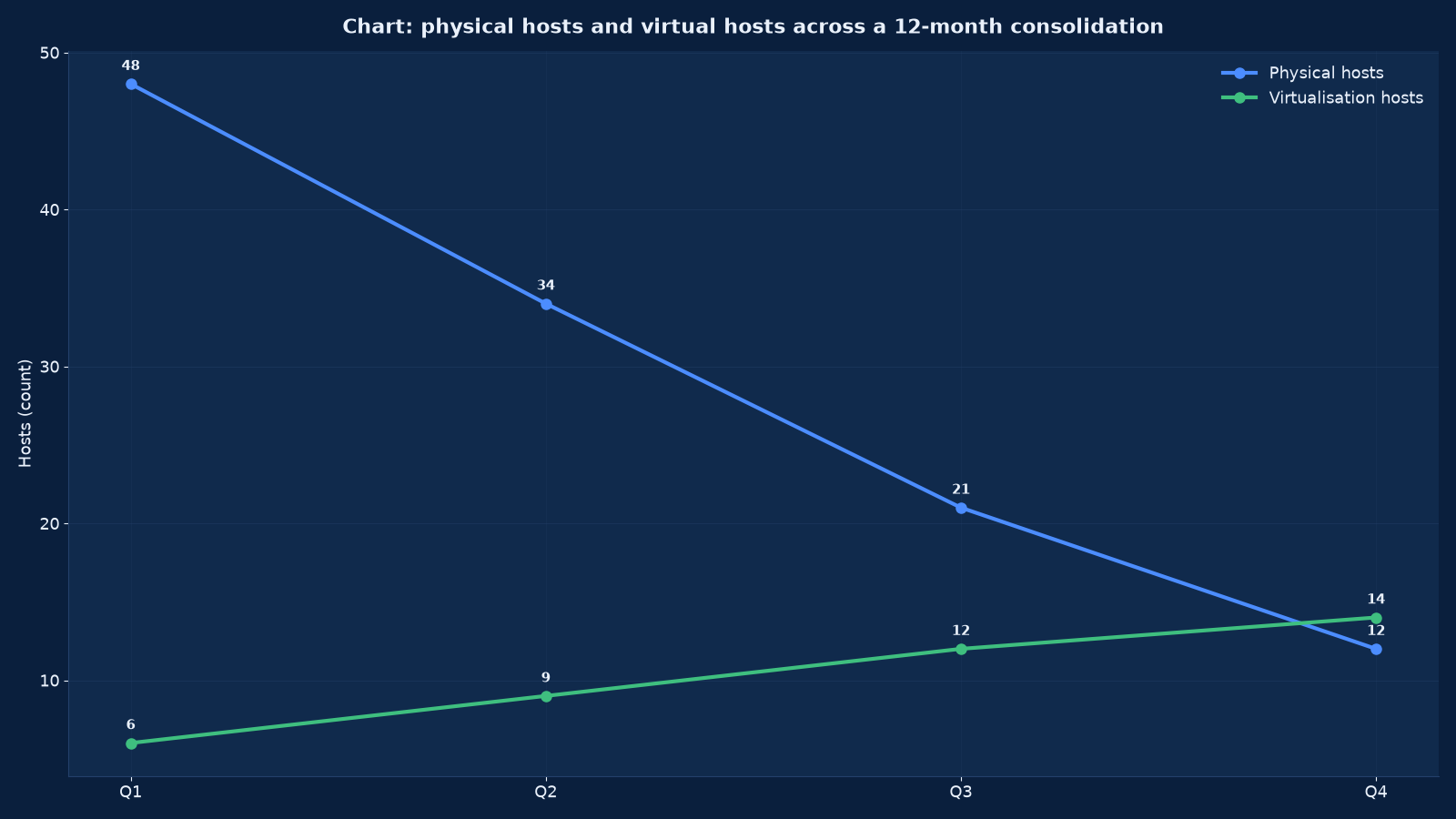
Chart values are an illustrative planning model based on typical UMC engagements and published industry benchmarks. They are not a guarantee of results on any specific project.
Licensing and Cost: Where the Programme Pays for Itself
Licensing is where a virtualisation programme either pays for itself or quietly becomes more expensive than the estate it replaced. Three mechanisms drive the outcome, and all three are decided by the design rather than by the procurement team.
| Cost lever | How the design controls it | Typical effect |
|---|---|---|
| Licensed core count | Fewer, denser hosts carry the same workloads; core minimums per processor and per contract mean host count matters as much as utilisation | Consolidation from 48 hosts to 14 can reduce licensed cores substantially — but only if the old hosts are retired |
| Feature tier | Only the features actually operated are purchased; advanced scheduling and automation are worth paying for only where the team uses them | Avoids paying for capabilities that sit unused, which is common after a platform change |
| Operating system and application licensing | Virtual machine counts, affinity and host assignment reviewed against the software vendors’ own virtualisation terms | Frequently larger than the hypervisor cost, and frequently overlooked |
| Support and subscription term | Term length aligned to the refresh cycle rather than to the fiscal year | Avoids paying for support on hosts that are being decommissioned |
| Decommissioning discipline | Retired hosts removed from the entitlement record with evidence, not left on the asset register | The saving that is most often lost, because nobody owns the paperwork |
| Growth headroom | Headroom bought as a modelled quantity rather than as spare hardware | Prevents an emergency purchase at list price in year three |
We assemble the entitlement evidence as part of the programme rather than leaving it to renewal time: which cores are licensed, on which hosts, under which agreement, with the measurement that supports it. An organisation that cannot answer that question quickly is negotiating from a weak position every year, and the answer is a by-product of a properly run consolidation.
Operations After the Last Migration
A migration ends on the day the last physical host is switched off. An operating model starts the next day, and it is what determines whether the estate is still healthy in three years. The five disciplines below are the ones that lapse first, and each has a measurable signal that shows it has lapsed.
| Discipline | What good looks like | The signal that it has lapsed |
|---|---|---|
| Patching and lifecycle | A tested baseline rolled cluster by cluster on a published cadence, with evacuation capacity reserved for it | Hosts running three different firmware baselines, and a cluster that cannot evacuate a host without overcommitting |
| Capacity management | Weekly reporting in three units — CPU, memory and storage — with a forecast against the growth horizon | Capacity discovered by a failed migration or a latency incident |
| Backup integration | Every virtual machine in a backup policy by default, with restore tests scheduled and evidenced | New machines provisioned outside the policy, and a restore test nobody can date |
| Monitoring thresholds | Alerts derived from the design intent: admission control headroom, datastore latency, host memory pressure, snapshot age | Alerts set at vendor defaults, so the estate runs red permanently and nobody reads it |
| Snapshot hygiene | Snapshots treated as a maintenance tool with an expiry, not as a backup | Snapshots older than the last quarterly review, consuming datastore capacity and degrading performance |
| Template and image control | Gold images patched on a cadence and versioned | New machines built from an image whose patch level nobody can state |
The reporting we hand over is deliberately boring: host count, virtual machine count, utilisation against admission-control headroom, datastore free space, backup success, patch level per cluster, and the licensed core count. Six numbers, weekly, on one page. An estate whose health is described by six numbers that somebody reads is an estate that does not surprise anyone.
How This Differs From Our Neighbouring Pages
Our Computing, Server, Storage and Data Centre Engineering page covers the compute estate as a whole — servers, storage and the facility that houses them. This page is the virtualisation programme within it: the platform decision, the cluster design, the migration waves and the licensing exposure. If your question is what the estate should look like in three years, start there. If your question is which hypervisor to standardise on and how to move four hundred machines without stopping the business, this is the engagement.
| Your question | Right starting point | What it produces |
|---|---|---|
| Which hypervisor should we standardise on, and what will it cost over five years? | This page | A measured platform recommendation with a costed migration programme |
| What should our whole compute estate look like in three years? | Computing, Server, Storage and Data Centre Engineering | An estate roadmap covering servers, storage, virtualisation and the facility |
| Our storage estate is the constraint, not the servers | Computing, Server, Storage and Data Centre Engineering | A storage architecture with tiering, replication and the capacity plan behind it |
| We want compute and storage converged into one platform | Our hyperconverged infrastructure offering, built in this same programme | A converged design with the failure-domain and capacity arithmetic modelled before purchase |
| Our recovery cannot meet the RTO the business agreed | Backup, Disaster Recovery & Business Continuity Services | A recovery architecture and the test regime that proves it |
| The workloads should leave our hosts entirely | Cloud Services & Migration — AWS, Azure and Google Cloud | A migration and landing-zone design, with the cost model compared against staying |
| Containers rather than virtual machines | Kubernetes & Container Platform Engineering Services | A container platform with the underlying virtual or bare-metal layer designed beneath it |
| Who runs the estate once it is built? | Managed IT Infrastructure & IT AMC Services | A managed service with published SLAs against the platform we designed |
Virtualisation and container platforms are not alternatives at the level most enterprises operate at: containers run on something, and that something is usually a virtual machine on a cluster designed here. Getting the layer below right is what makes the layer above possible.
Evidence From Our Work
The engagements below are the closest evidence we can publish, and they show the two halves of a virtualisation programme that clients rarely buy together but always need: the consolidation and platform work, and the operations discipline that keeps it alive afterwards.
- IT Infrastructure Management for an IT Company — Case Study — a twenty-four month renewable contract delivering twenty-four-by-seven proactive monitoring, remote and on-site support, preventive maintenance and security management for a media and broadcasting company. Broadcast estates are consolidated under continuous load, which is the hardest place to run a migration wave.
- Global Hospitals — Case Study — a multi-location healthcare network’s server room built out over a six-to-nine month implementation with twenty-four months of support. Clinical workloads are the clearest case for anti-affinity and blast-radius planning, because a shared failure domain is a patient-safety issue rather than an inconvenience.
- Marriott Hotel Hyderabad — Case Study — twenty-four-by-seven managed services, monitoring and maintenance across multi-property operations, where property management systems and telephony run on infrastructure nobody designed for hospitality.
- Apollo Hospitals — Case Study — an eight-to-twelve week assessment across multiple hospital campuses, which is the same discipline a virtualisation assessment applies to compute: measure first, recommend second, and publish the assumptions.
- Tech Stack Consolidation: The Business Case for Unified Systems — why consolidation programmes are approved, and the load and licensing assumptions that decide whether the saving arrives.
- AI Infrastructure Capacity and Capital Intensity: What the Nscale Story Reveals — the density and capital pressure that is pushing estates toward converged and accelerated platforms, and what that does to a five-year virtualisation plan.
- Enterprise Computer Networks: Trends, Operations, and Careers — the operational context, including the monitoring and skills depth a consolidated estate depends on.
- our Technology archive — further writing on infrastructure consolidation, operations and platform strategy.
Frequently Asked Questions About Server Virtualisation
Should we stay on VMware or move to something else?
Neither answer is correct in the abstract, and any adviser who gives one without seeing your estate is selling something. The decision turns on four measurable things: the licensed core count your consolidated estate will actually carry, the features your team genuinely operates, the migration labour and risk of leaving, and whether your organisation can operate the alternative at three in the morning. We model all four over five years and give you a written recommendation with the arithmetic attached. Frequently the honest answer is to consolidate harder on the platform you already own, because the licensing saving comes from host count rather than from a change of vendor.
How many virtual machines can one host carry?
It is decided by memory and by failure tolerance, not by CPU. A host with 512 GB of memory and a measured average of 6 GB per machine could hold eighty, but the cluster must still absorb that host’s load when it fails, so the practical density is set by admission control and by the largest machines rather than the average. We size from measured demand including the worst week, and we publish the blast radius per cluster so the density decision is a funded choice rather than an accident.
What stays physical?
Usually fewer machines than expected, but the list is real: workloads with hardware dongles or licence terms tied to physical hardware, latency-sensitive systems that cannot tolerate hypervisor overhead, some high-frequency and real-time control applications, and anything whose vendor explicitly does not support virtualisation. We identify these in the assessment with a reason per machine, because “it has always been physical” is not a reason.
Can you migrate a clustered application without breaking quorum?
Yes, but not with a simple conversion. Clustered workloads are migrated as a unit with a documented sequence: the storage path is established first, nodes are moved one at a time with quorum preserved, replication is verified at each step, and failover is re-tested after the migration rather than assumed to still work. This is why clustered and stateful workloads are a separate wave with their own exit criteria.
What happens to our backups during and after migration?
Backup policy has to be re-attached deliberately, and this is where programmes leak. Machines migrated outside the normal provisioning path frequently arrive with no backup policy, or with a policy pointing at a datastore that no longer exists. We verify backup coverage per machine as a migration exit criterion, and we schedule an evidenced restore test on the new platform before the physical source is decommissioned.
How long does a consolidation programme take?
For a few hundred machines, three to nine months from assessment to decommission, with the assessment itself taking three to six weeks. The variables are dependency complexity, change control maturity and how many clustered workloads exist. Programmes that appear faster usually achieve it by skipping the assessment, which is where the surprises are stored.
Will virtualisation reduce our licensing cost?
It can, and it can also increase it. Under per-core subscription models, consolidation reduces cost only if hosts are genuinely retired — a migration that leaves the old hardware in service as spares reduces hardware cost and leaves licensing untouched. Operating system and application licensing often moves the other way, because virtual machine counts and affinity rules change the exposure. We model the whole position, not just the hypervisor line.
Do we need shared storage, or can we use local disks?
It depends on what you need live migration and HA to do. Shared storage or converged storage makes evacuation and restart straightforward; local storage with replication can work well for specific designs and reduces capital, but it constrains movement and changes the recovery model. We decide it from the workload’s latency requirement and recovery objective, and we document the consequence either way.
What utilisation should we target?
Typically 55 to 75 per cent of CPU across a consolidated cluster, with memory as the binding constraint and enough headroom to survive a host failure without overcommitting. Above about 80 per cent, a single failure produces latency rather than an outage, which is harder to diagnose and harder to explain to the business. Targets set from annual averages are meaningless; they have to be set against the measured peak week.
Can you virtualise our VDI estate as well?
VDI is a distinct design with its own storage and boot-storm characteristics, and we treat it as its own cluster rather than as more virtual machines. It is usually the largest cluster by machine count and the most latency-sensitive, so it gets its own failure domain, its own storage profile and its own capacity model.
What evidence do we get at the end?
The assessment report with measured utilisation and the dependency map, the platform recommendation with five-year cost model, the cluster design with published blast radius, the migration record per machine with verification and rollback evidence, the licensing position with entitlement evidence, the operating runbooks, and decommissioning certificates for every retired host including data sanitisation.
Is a hyperconverged platform a better answer than a traditional cluster?
Sometimes, and the decision is about operations rather than technology. Converged platforms simplify day-two work and reduce the number of vendors, at the cost of coupling compute and storage into one failure domain and one purchase. Where the estate is small or medium and the team is thin, converged usually wins. Where storage requirements are extreme or the estate is large and heterogeneous, a traditional cluster with separate storage often does. We model both and say which we would fund.
Start With a Measured Assessment, Not a Platform Brochure
A virtualisation decision made from a renewal notice is a decision made by somebody else. We will measure what you actually run, model the platform options against your core count and your team’s ability to operate them at three in the morning, and tell you whether the saving is in consolidation, in a platform change, or in both — including when the honest answer is that your current platform is fine and your host count is not.
Contact Unified Management Consulting to arrange a confidential first conversation.
Related Services
Virtualisation rarely stands alone. These are the engagements it most often runs alongside:
- Computing, Server, Storage and Data Centre Engineering — the estate this programme consolidates, and the facility that has to carry the resulting density.
- Backup, Disaster Recovery & Business Continuity Services — the recovery architecture a consolidated estate needs, and the restore tests that prove it.
- Managed IT Infrastructure & IT AMC Services — running the cluster afterwards against published SLAs, with the patching and capacity disciplines this page describes.
- Kubernetes & Container Platform Engineering Services — the container platform that usually runs on top of the clusters designed here.
- Cloud Services & Migration — AWS, Azure and Google Cloud — for the workloads that should leave the estate rather than be consolidated within it, and for hybrid designs.
- Enterprise Systems Integration & Tech-Stack Consolidation — the application consolidation that usually justifies the platform work, and changes the sizing if it happens afterwards.
- IT Audit, Compliance & ISO 27001 / SOC 2 Readiness — the access, change and availability controls an auditor tests on a virtual platform.
- Backup & Disaster Recovery Infrastructure — backup estates, immutability, replication, documented RPO and RTO and the restore tests that prove them
- Data Centre Design & Build Services — design and build for halls, racks, power, cooling and the acceptance tests that prove them
- Hyperconverged Infrastructure (HCI) Services — hyperconverged clusters where compute, storage and availability are one licensing and one failure domain
- Storage & SAN Engineering Services — SAN and NAS design, tiering, replication and the recovery evidence behind the capacity plan