
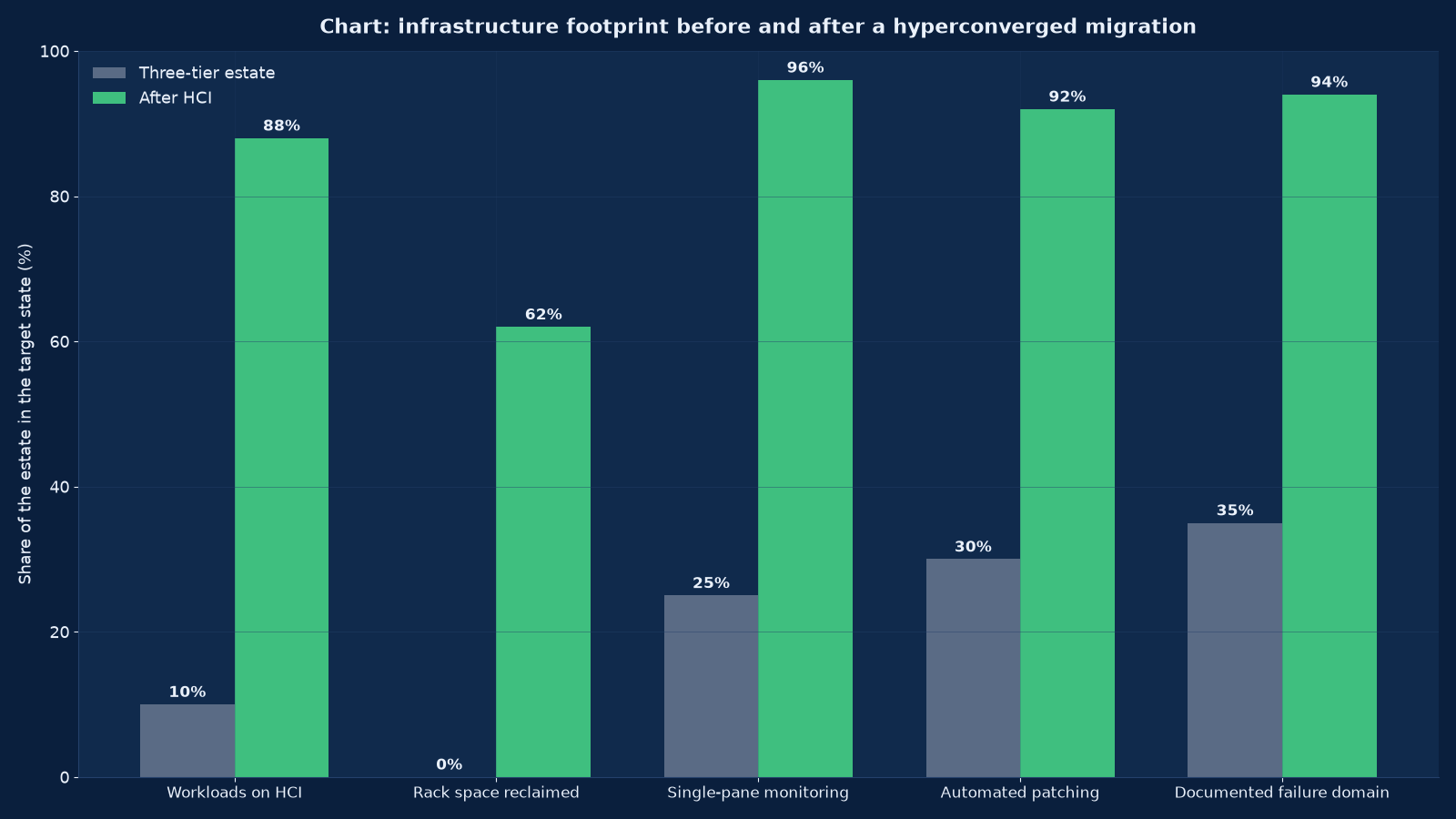
Chart values are an illustrative planning model based on typical UMC engagements and published industry benchmarks. They are not a guarantee of results on any specific project.
Hyperconverged infrastructure is not a cheaper way to buy servers. It is a decision to stop operating three separate failure domains and start operating one, which buys enormous simplicity and creates a single thing that can be wrong. Organisations that understand that trade get a platform their small team can actually run. Organisations that do not discover, at eighty per cent full, that compute and storage now grow at the same rate whether they want them to or not.
Hyperconverged infrastructure at Unified Management Consulting is designed as what it actually is: a distributed storage system and a virtualisation platform sold as one appliance, where the nodes are simultaneously the compute and the storage, and the resilience that used to live in a SAN now lives in software replicating data between nodes. That single fact explains every advantage and every trap. It is why one vendor, one firmware baseline and one support call replace three of each. It is why adding capacity means adding nodes, which adds compute whether you need it or not. And it is why the sizing arithmetic — usable capacity after the resilience policy, node failure tolerance, and the growth path — has to be done properly before purchase, because there is no separate storage array to extend later.
We design, build and migrate onto hyperconverged platforms across the estates where they genuinely win: small and medium data centres with thin infrastructure teams, branch and edge estates where a two- or three-node cluster replaces a rack of separate equipment, virtual desktop deployments with brutal boot storms, and organisations consolidating a three-tier estate they can no longer staff. We will also tell you when it is the wrong answer, which is often enough to be worth saying: where storage and compute grow at very different rates, where the workload needs storage performance beyond what a converged node can deliver, or where the exit cost of a single-vendor stack is higher than the operating saving.
🧊 Hyperconverged Infrastructure (HCI) — Quick Summary
| Component | What We Deliver |
|---|---|
| Suitability assessment | A written recommendation on whether hyperconvergence fits your workload profile, growth rates and team — including the cases where a traditional cluster with separate storage is the better purchase. |
| Node and cluster sizing | Usable capacity after the resilience policy, CPU and memory headroom for node failure, boot-storm and peak-load modelling, and the growth path in whole nodes. |
| Storage policy design | Replication factor or erasure coding chosen per workload class, with the usable-capacity consequence stated rather than discovered. |
| Network design | Separation of storage, management, virtual-machine and replication traffic, with the bandwidth arithmetic per node and the lossless or congestion-managed configuration the platform requires. |
| Failure domain planning | Rack and switch awareness, witness or arbiter placement for small clusters, and a documented statement of what stops when a node, a rack or a switch fails. |
| Platform selection | Comparison across the mainstream hyperconverged stacks on licensing model, storage efficiency, supportability and five-year cost — not on datasheet performance. |
| Migration execution | Waves sequenced by dependency and risk, with storage migration paths, cutover windows, rollback and post-migration verification per workload. |
| Recovery integration | Backup targets, replication between clusters and the recovery tier each workload lands in, designed against the platform’s own snapshot and clone behaviour. |
| Lifecycle operations | One-click upgrade processes tested in a staging cluster first, node addition and removal procedures, and the firmware baseline the whole cluster runs. |
| Cost and capacity governance | The five-year model including the compute you buy with storage you did not need, and the reporting that shows the cluster approaching full before it is full. |
What Hyperconvergence Actually Converges
A traditional three-tier estate has three things that fail independently and three things to patch, monitor, licence and call support about: servers, a storage array, and a storage network. Hyperconvergence collapses them into one platform where each node contributes compute, memory and local disks, and a software layer aggregates those disks into a single resilient pool shared across the cluster.
| Dimension | Three-tier estate | Hyperconverged estate | What changes for you |
|---|---|---|---|
| Failure domains | Server, SAN and fabric fail independently | Node failure is absorbed by the cluster; the cluster is the failure domain | Fewer incidents, but a single platform outage has a wider blast radius |
| Procurement | Three vendors, three quotations, three support contracts | One platform, one support path, one firmware baseline | Faster purchasing, and a stronger lock-in position to negotiate from |
| Scaling compute | Add servers, storage unaffected | Add nodes, which brings storage whether you need it or not | Capacity grows in steps, and the steps can be the wrong shape |
| Scaling storage | Add disks or shelves to the array | Add nodes — or capacity-only nodes where the platform offers them | The cheapest path depends on whether your compute and storage grow together |
| Performance ceiling | Set by the array controllers | Set by the aggregate of the nodes, and grows as nodes are added | Scales well for many workloads; poorly for a few very demanding ones |
| Resilience mechanism | RAID in the array plus multipathed fabric | Replication or erasure coding between nodes over the cluster network | The network becomes the storage fabric, so its design is critical |
| Operations skills | Server, storage and SAN skills, separately | One platform to learn, with more automation built in | The main reason thin teams choose it |
| Recovery properties | Array snapshots plus external backup | Platform snapshots and clones plus external backup, with different consistency behaviour | Backup design has to account for the platform’s own mechanisms |
The row that matters most is the network one. In a three-tier estate the storage network is a purpose-built fabric whose only job is storage. In a hyperconverged cluster the storage traffic runs over Ethernet alongside management, replication and virtual machine traffic, and a network designed casually produces a cluster whose performance is unpredictable under load. We treat the network design as part of the storage design, because on these platforms it is.
When Hyperconvergence Is the Right Answer, and When It Is Not
Hyperconverged infrastructure is sold as a universal answer and it is not one. The honest test is whether your compute and storage grow at similar rates, whether your team is thin enough that operating one platform is worth a premium, and whether any workload has a performance profile the platform can serve. Where all three are favourable, it is usually the right purchase. Where the first is not, the economics degrade slowly and expensively.
| Situation | Verdict | Why |
|---|---|---|
| Small or medium data centre with a team of fewer than five infrastructure staff | Usually right | The operating saving exceeds the licensing premium, and one support path matters more than flexibility |
| Branch and edge estates with many small sites | Usually right | Two- and three-node clusters replace a rack of separate equipment and can be managed centrally |
| Virtual desktop infrastructure with a boot storm | Often right | Distributed storage parallelises the read load across nodes better than a single array controller does |
| Consolidating an ageing three-tier estate with mixed vendors | Often right | Removes three lifecycle processes and replaces them with one |
| Storage growing much faster than compute — imaging, video, analytics | Usually wrong | Every capacity addition buys compute you do not need, and the premium compounds |
| Compute growing much faster than storage — GPU and AI workloads | Usually wrong | Node-for-node growth wastes capacity, and accelerator workloads often need storage profiles the platform does not suit |
| A single workload needing extreme IOPS or very low latency | Careful, and measure | Aggregated node performance can be excellent, but the ceiling is per-node network and CPU, not a dedicated controller |
| Very large estates with a mature platform team | Depends | The automation advantage shrinks when the team already automates everything, and flexibility becomes more valuable |
| Regulated estates requiring strict separation of storage administration | Careful | Convergence merges the administrative planes, which some control frameworks do not like |
We publish this assessment as a document with a recommendation and a stated alternative, including the case where the recommendation is to keep your existing array and consolidate the servers around it. A supplier whose only answer is the product they sell is not performing an assessment.
Sizing: Three Arithmetic Problems Solved at Once
Sizing a hyperconverged cluster is three arithmetic problems solved simultaneously, and getting any of them wrong produces a cluster that is full, slow or unable to survive a failure — usually within eighteen months of handover.
| Constraint | The arithmetic | Common error |
|---|---|---|
| Usable storage capacity | Raw node capacity, divided by the resilience policy (replication factor or erasure coding), minus the reserve the platform holds for rebuilds and snapshots | Quoting raw capacity as usable, which overstates it by a factor of two or three |
| Node failure tolerance | The cluster must serve the aggregate peak load with N minus one (or N minus two) nodes, including the rebuild traffic | Sizing to today’s load, so a single node failure causes an outage or a performance collapse |
| Rebuild headroom | Room to reconstruct a failed node’s data without filling the cluster | A cluster that cannot rebuild because it is too full — the most dangerous state in hyperconverged operations |
| CPU and memory per node | Aggregate demand divided across nodes, plus the hypervisor’s own overhead and the storage services running on the same cores | Forgetting that storage services consume CPU, which reduces what is left for workloads |
| Network bandwidth per node | Storage, replication, management and virtual-machine traffic summed at peak, with redundancy halving the available bandwidth during a failure | Sizing the network for steady state and discovering rebuild traffic saturates it |
| Growth path | Whole nodes added at intervals, with the date each addition is needed | Assuming capacity can be added in smaller increments than a whole node |
| Boot-storm and peak concurrency | For virtual desktop and similar workloads, the simultaneous read demand at logon | Sizing on average load and finding the cluster unusable at nine in the morning |
The reserve is not optional
Hyperconverged platforms hold back capacity for rebuild operations, snapshots and thin provisioning overhead, and the platform’s own documentation states a maximum recommended utilisation — commonly around 70 to 80 per cent. A cluster operated above that threshold cannot rebuild a failed node, which converts a hardware failure into data loss. We size to the platform’s recommended maximum with the growth horizon included, and we report utilisation against that ceiling rather than against raw capacity.
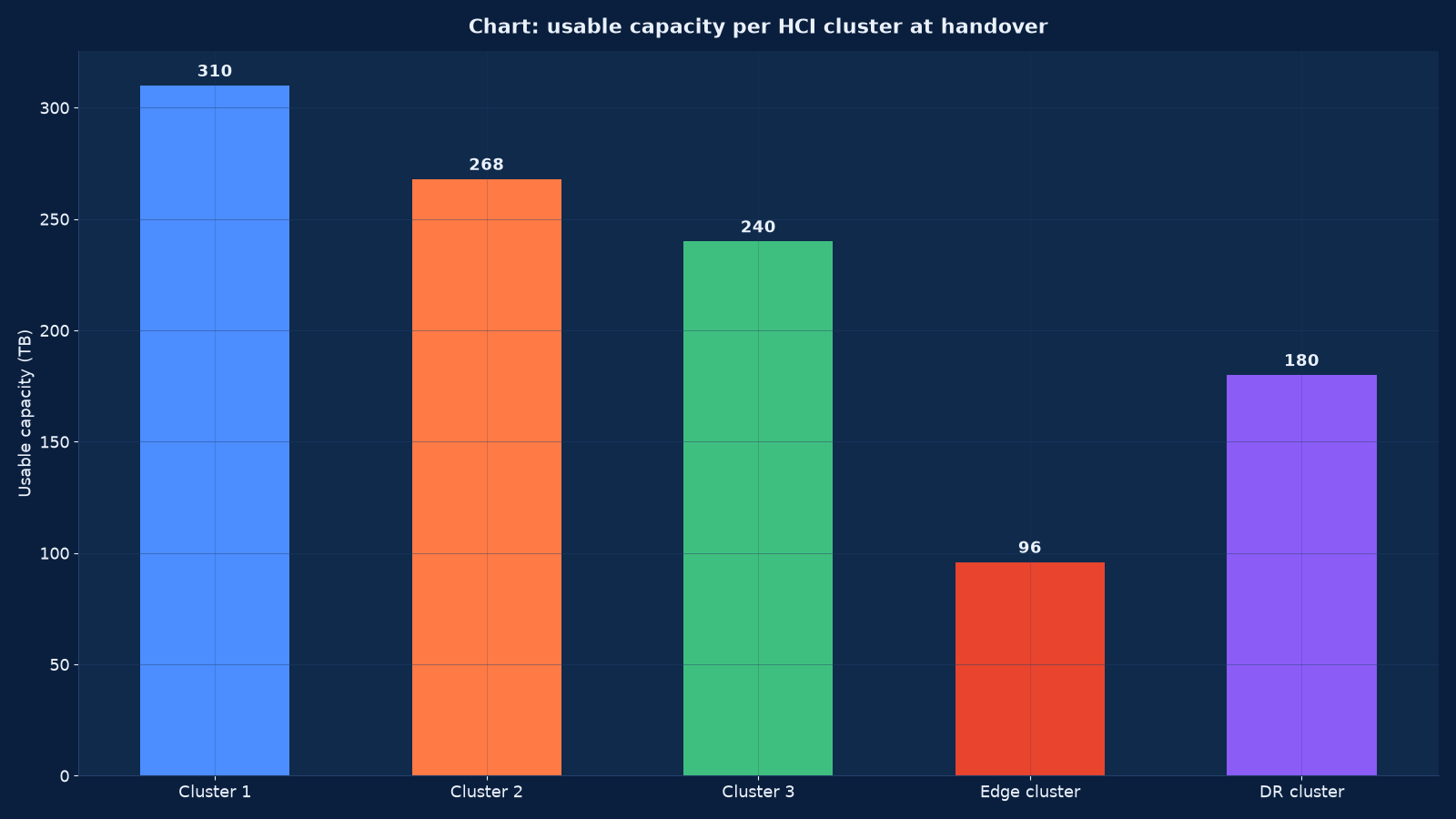
Chart values are an illustrative planning model based on typical UMC engagements and published industry benchmarks. They are not a guarantee of results on any specific project.
Storage Policy: Replication, Erasure Coding and Usable Capacity
The storage layer is the part of a hyperconverged platform that is least visible and most consequential. Each node’s local disks are aggregated into a distributed datastore, and every write is protected by either replication to other nodes or erasure coding across them. The policy chosen per workload decides usable capacity, rebuild time and performance, and it is the single largest lever on cost.
| Policy | How it protects | Capacity efficiency | Rebuild behaviour | Best for |
|---|---|---|---|---|
| Two-way replication | Every write mirrored to one other node | 50 per cent of raw | Fast, but doubles the write load on the surviving nodes | Latency-sensitive workloads and small clusters |
| Three-way replication | Every write held on three nodes | 33 per cent of raw | Slower, with more rebuild traffic | Critical data where two simultaneous failures must be survivable |
| Erasure coding | Data striped with parity across nodes | 65 to 80 per cent of raw depending on the scheme | Computationally heavier and slower to rebuild | Capacity-oriented workloads in clusters large enough to support the stripe width |
| Local or no resilience | Data held on one node only | Close to 100 per cent of raw | No rebuild — the data is lost with the node | Re-creatable data such as caches, and nothing else |
| Platform snapshots and clones | Point-in-time views within the cluster | Consumes reserve capacity while held | Not a resilience mechanism | Development clones and short-term recovery points, with expiry enforced |
We set policy per workload class rather than per cluster wherever the platform allows it, because a single cluster commonly holds both a database that needs two-way replication and an archive volume that would be far cheaper erasure-coded. Applying one policy to everything is the most common way a hyperconverged estate becomes expensive, and it is a decision made at design time rather than discovered afterwards.
Networking for HCI: The Network Is the Storage Fabric
On a hyperconverged cluster the network carries the storage, so its design is a storage design. Traffic separation is not a best practice here; it is the difference between a cluster that performs predictably and one that degrades whenever anything else is busy.
| Traffic type | What it carries | Design requirement | Failure behaviour to plan |
|---|---|---|---|
| Storage or data-plane | Reads and writes between nodes and to the distributed datastore | Dedicated physical NICs, high bandwidth, low latency, jumbo frames consistent end to end | Loss of a path must not pause I/O; multipathing or teaming configured accordingly |
| Replication | Data moving between clusters or to a recovery site | Bandwidth sized for the recovery point objective at worst-case change rate | Lag must be monitored against the objective, not assumed |
| Rebuild and rebalance | Reconstruction after a node or disk failure | Headroom reserved, and throttling understood | A rebuild that saturates the network takes production performance with it |
| Management | Platform APIs, orchestration, monitoring | Isolated, authenticated, and unreachable from user networks | Management loss must not affect running workloads |
| Virtual machine traffic | The workloads themselves | Separated from storage traffic with its own bandwidth allocation | A virtual-machine flood must not starve storage I/O |
| Backup | Copies leaving the cluster | Isolated path so backup does not contend with production or storage traffic | A backup window that consumes storage bandwidth produces latency users can feel |
Two configuration details cause most of the problems we are called to fix. The first is jumbo frames enabled on the hosts and switches but not consistently across every hop, which produces intermittent failures that are almost impossible to diagnose under low load. The second is a teaming or bonding policy that does not distribute storage traffic across both physical links, so half the purchased bandwidth is unused and the cluster saturates early. Both are verified with measurement during handover, not assumed from the configuration screen.
Failure Domains: What Stops When Something Breaks
Convergence means the failure domain gets bigger, so the failure domain has to be designed rather than inherited. The question to answer for every cluster is not “what happens if a node fails” — the platform handles that — but “what happens if a rack, a switch or a whole site fails, and what does the business lose while it recovers”.
| Failure | What the cluster does | What you must have designed | What is lost if you did not |
|---|---|---|---|
| Single disk | Rebuilds from the replicas or parity elsewhere in the cluster | Rebuild headroom in capacity, and rebuild traffic throttled appropriately | A cluster too full to rebuild, which is one disk away from data loss |
| Single node | Workloads restart on surviving nodes; data is reconstructed | N-minus-one capacity for compute and storage, and a documented recovery order | Performance collapse or an inability to restart everything at once |
| Rack or switch | Depends on rack awareness and switch redundancy | Nodes distributed across racks and switches, with the platform told about the topology | A cluster whose replicas were all in the same rack, which is a total loss |
| Small-cluster quorum loss | Two-node and three-node clusters need a witness or arbiter to avoid split brain | A witness placed on a separate failure domain and a separate network path | A cluster that stops rather than fails over, or one that splits |
| Whole site | Requires a second cluster and a replication or backup relationship | Recovery tiers, a bring-up sequence and a tested recovery time | An unplanned outage of whatever length the rebuild takes |
| Platform software fault | A bad upgrade can affect every node simultaneously | A staging cluster, a tested upgrade path and a rollback plan | A cluster-wide incident caused by maintenance |
We write the blast radius of every cluster into the design in one sentence: if this cluster is lost, these workloads stop for this long. It is the sentence that decides whether the second cluster, the witness and the recovery site get funded, and it is much easier to write before purchase than after an incident.
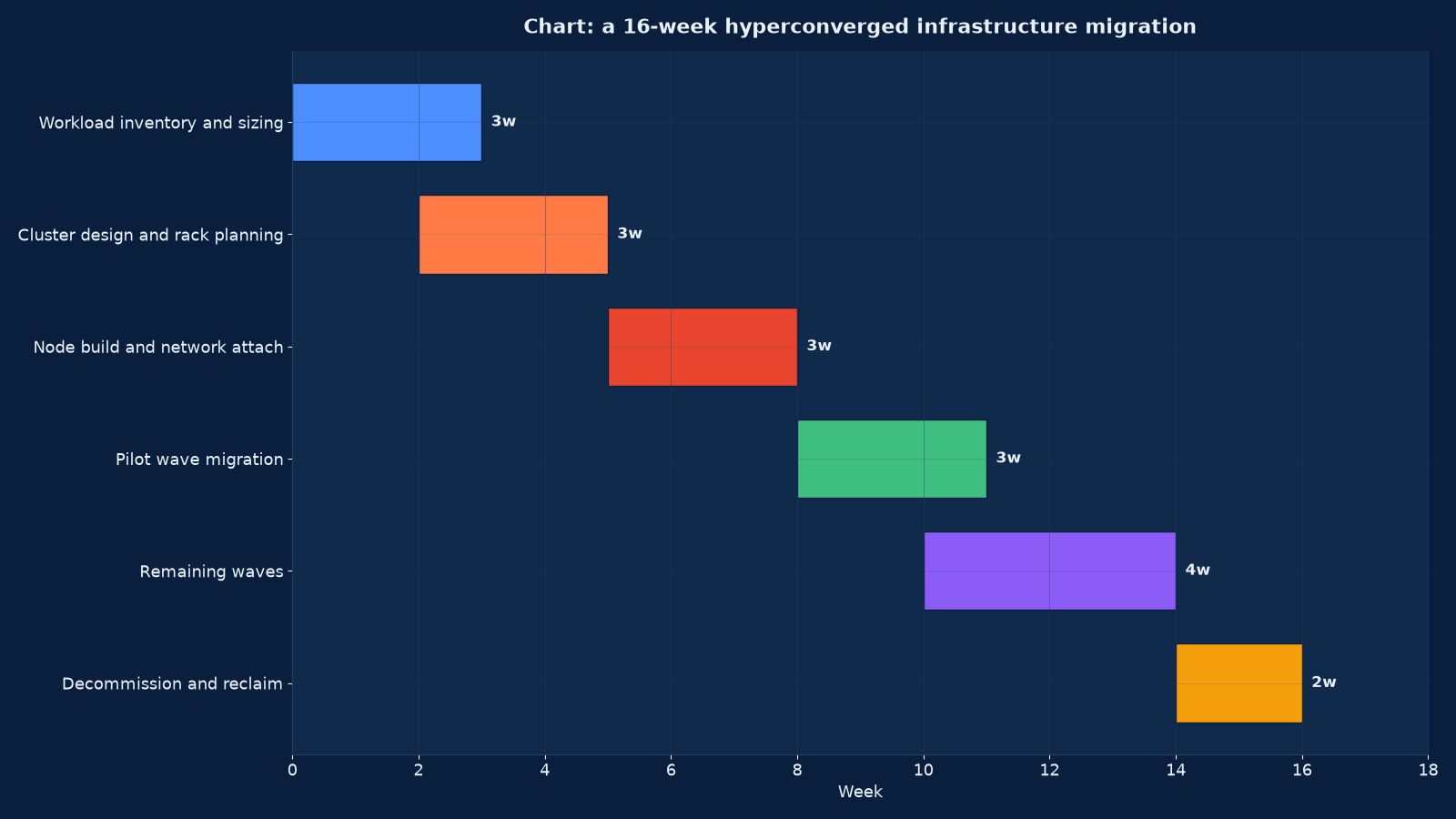
Chart values are an illustrative planning model based on typical UMC engagements and published industry benchmarks. They are not a guarantee of results on any specific project.
Migration onto the Platform: The Sequence That Works
Migration onto hyperconverged infrastructure is a storage migration wearing a server migration’s clothes. Moving a virtual machine between hypervisors is routine; moving it between storage architectures with different consistency and snapshot behaviour is where programmes acquire their surprises.
| Wave | Contents | Purpose | Exit criteria |
|---|---|---|---|
| Wave 0 — platform proof | A staging cluster with representative workloads, network configuration and a full upgrade rehearsal | Prove the sizing arithmetic and the lifecycle process before production data moves | Measured performance against the workload profile, and a completed upgrade and rollback |
| Wave 1 — development and test | The least risky machines, largest by count | Build repetition in the migration and verification process | Runbook stable, verification automated, no undocumented manual steps |
| Wave 2 — departmental production | Single-owner workloads with a tolerable window | Extend the process to production change control | Business owner sign-off per workload, backup re-attached and verified |
| Wave 3 — stateful and clustered workloads | Databases, application clusters, anything with quorum or shared state | Handle the migrations that cannot be treated as a copy | Consistency verified, replication healthy, failover re-tested on the new platform |
| Wave 4 — critical and regulated | The workloads whose outage is a business event | Complete the estate with the most rehearsal behind the least risk | Recovery tested on the new platform, evidence retained for audit |
| Wave 5 — decommission and reclaim | Old servers, arrays and fabric retired | Realise the power, cooling, space and licence saving | Data sanitisation certificates, licences surrendered or reassigned, capacity reclaimed and reported |
The wave that is most often skipped is wave 0, and it is the one that pays for itself. A staging cluster with real workloads is where the sizing arithmetic is tested against reality, where the upgrade process is rehearsed, and where the network configuration problems appear — all of which are cheap to fix in week three and expensive to fix in week twelve with production data on the platform.
Lifecycle Operations: One Process, Applied to Everything
The operational promise of hyperconvergence is that lifecycle work becomes one process instead of three. That promise is real, and it is also conditional: the automation applies the same change to every node, so a bad change is applied to everything at once. The discipline that makes it safe is staging, cadence and rollback — none of which the platform provides for you.
| Lifecycle activity | How it works on a converged platform | The discipline required |
|---|---|---|
| Platform upgrade | One process updates the hypervisor, storage services and firmware across the cluster, usually node by node with evacuation | Rehearsed on a staging cluster first, with a rollback path tested and enough capacity headroom to evacuate a node |
| Node addition | A new node joins and contributes compute and capacity, with data rebalancing automatically | Rebalance traffic scheduled outside production peaks, and the cluster’s utilisation ceiling respected |
| Node removal or replacement | Data evacuates or rebuilds, then the node leaves | Rebuild headroom confirmed before the operation starts, not during it |
| Disk replacement | The cluster tolerates it and rebuilds | Spares held on site, and the rebuild monitored to completion rather than assumed |
| Firmware and driver baseline | One baseline per cluster, validated by the platform vendor | Version drift between clusters documented and closed, because mixed baselines break supportability |
| Capacity monitoring | Utilisation reported against the platform’s recommended maximum | Alerting at the ceiling that matters, with a forecast date for the next node purchase |
| Snapshot hygiene | Platform snapshots are easy to create and easy to forget | Expiry enforced automatically; snapshots consume the same reserve that rebuilds need |
Snapshot discipline deserves its own sentence because it is the quiet failure mode of converged platforms. Snapshots are one click away, they consume the capacity reserve that a rebuild needs, and they are rarely expired by whoever created them. An estate with eighteen months of accumulated snapshots is an estate that cannot survive a disk failure, and nothing in the platform’s dashboard will tell you so unless you have configured it to.
Cost, Licensing and the Five-Year View
Hyperconverged pricing is usually subscription per node or per core, sold with the storage layer included, which makes the five-year comparison against a three-tier estate genuinely difficult and frequently done badly. The comparison has to include the compute bought alongside storage you did not need, and the operating cost that convergence removes.
| Cost element | How it behaves on a converged platform | What to model |
|---|---|---|
| Platform subscription | Per node or per core, recurring for the life of the estate | The five-year total, not the annual figure, and the renewal assumptions behind it |
| Compute bought with capacity | Every capacity addition brings cores you may not use | The ratio of your compute growth to your storage growth over five years |
| Support and spares | Usually bundled, which is the point | What the bundled support actually covers, and the response commitment |
| Network investment | Converged clusters need more, better network than a three-tier estate with a dedicated SAN | Switch capacity, port counts and the redundancy the storage traffic requires |
| Power, cooling and space | Materially lower per workload than a three-tier estate | The reclaimed kilowatts and rack units, priced at your actual rates |
| Operating labour | Lower: one platform, one process, fewer vendors | The staff hours actually released, and whether they are released or redirected |
| Exit cost | Higher than a three-tier estate, because the storage layer is proprietary | The migration cost at the end of the subscription term, which belongs in the five-year model |
We build the comparison against the alternative you would actually buy — a specific server, array and fabric configuration with its own support costs — rather than against a generic three-tier estimate. A converged platform frequently wins on operating cost and loses on capacity efficiency, and which of those dominates depends entirely on your growth ratio.
Edge, Branch and the Two-Node Question
Edge and branch estates are where hyperconvergence is least arguable. A branch office that needs local compute and storage cannot justify a server, an array and a fabric, and cannot staff them; a two- or three-node cluster delivered as one appliance, managed from the centre, is a different proposition entirely.
| Edge pattern | Node count | Quorum solution | Recovery model | Suits |
|---|---|---|---|---|
| Two-node cluster with a witness | Two, plus a lightweight witness elsewhere | Witness or arbiter on a separate network path | Central backup, and rebuild or replacement from the centre | Small branches with local applications that cannot tolerate a WAN outage |
| Three-node cluster | Three, self-quoruming | Native quorum | Local resilience plus central backup | Larger branches and regional sites with real local workload |
| Single node with central recovery | One | None — no local resilience | Frequent replication or backup to the centre, with a rapid replacement path | Sites where a day without local compute is acceptable |
| Hub-and-spoke with a central cluster | Central cluster plus edge nodes | Each site independent, centrally managed | Workload mobility between edge and centre where the platform supports it | Retail, healthcare and manufacturing estates with many small sites |
The design question at the edge is rarely performance; it is what happens when the site loses connectivity, when a node fails with no local engineer, and when the replacement hardware has to arrive by courier. We design edge estates around those three scenarios explicitly, with spares holding and a replacement process that does not depend on someone who has left the company.
How This Differs From Our Neighbouring Pages
Hyperconvergence sits between the virtualisation programme it usually replaces and the facility that has to power and cool it. These are the engagements it most often connects to.
| Your question | Right starting point | What it produces |
|---|---|---|
| Should we converge, or keep separate compute and storage? | This page | A suitability assessment with a recommendation and a costed alternative |
| What should the whole compute estate look like in three years? | Computing, Server, Storage and Data Centre Engineering | An estate roadmap, of which a converged platform may or may not be part |
| Our storage tiers and fabric are the real constraint | Our storage and SAN engineering offering, built in this same programme | A tiering and fabric design, and an honest view of whether convergence helps it |
| We need the virtualisation programme done first | Our server virtualisation offering, built in this same programme | A platform recommendation and migration — which sometimes concludes that hyperconvergence is the right target |
| Recovery has to work on the new platform | Backup, Disaster Recovery & Business Continuity Services | A recovery design accounting for the platform’s snapshot and clone behaviour |
| The containers will run on top of it | Kubernetes & Container Platform Engineering Services | A container platform with the converged layer designed beneath it |
| Part of the estate should leave for cloud instead | Cloud Services & Migration — AWS, Azure and Google Cloud | A hybrid design comparing converged on-premises against cloud consumption |
| The facility cannot power what we are about to buy | Our data centre design and build offering, built in this same programme | A facility design whose power and cooling budget matches the converged estate |
| Who runs it once it is built? | Managed IT Infrastructure & IT AMC Services | A managed service with the lifecycle disciplines this page describes |
| Is the subscription actually cheaper? | Cloud Cost Optimisation & FinOps Services | A cost governance model covering consumption, commitment and the exit position |
Evidence From Our Work
Converged platform work is confidential in detail, but the estates it serves are instructive: they are the multi-site, continuously-operating environments where a thin team has to run infrastructure across locations it rarely visits.
- Global Hospitals — Case Study — a multi-location healthcare network whose server room was built out with high-performance switching and a routing architecture over a six-to-nine month implementation with twenty-four months of support. Multi-site clinical estates are the clearest case for converged edge clusters with central management.
- Marriott Hotel Hyderabad — Case Study — twenty-four-by-seven managed services, monitoring and maintenance across multi-property operations, where each property needs local compute that nobody on site can maintain.
- IT Infrastructure Management for an IT Company — Case Study — a twenty-four month renewable contract for continuous monitoring, preventive maintenance and operations at a media and broadcasting company, where a boot-storm-like concurrent load appears every time a production system restarts.
- Apollo Hospitals — Case Study — a measured multi-campus feasibility assessment, which is the same method a suitability study applies: measure, model, recommend, publish the assumptions.
- Tech Stack Consolidation: The Business Case for Unified Systems — the consolidation argument that usually prompts a convergence evaluation, and the sizing error it introduces if the growth ratio is never measured.
- AI Infrastructure Capacity and Capital Intensity: What the Nscale Story Reveals — why accelerator-driven estates commonly grow compute far faster than storage, which is the growth ratio that makes convergence expensive.
- Enterprise Computer Networks: Trends, Operations, and Careers — the network operations depth a converged cluster depends on, since the network is the storage fabric.
- our Technology archive — further writing on platform consolidation, infrastructure operations and the economics behind them.
Frequently Asked Questions About Hyperconverged Infrastructure
Is hyperconverged cheaper than a traditional three-tier estate?
On operating cost, usually yes — one platform, one support path, one lifecycle process, and less power, cooling and floor space. On capacity efficiency, often no, because every storage addition brings compute you may not need and the storage layer is licensed per node or per core. Which of those dominates depends on your growth ratio, so we model both over five years against the specific alternative you would otherwise buy rather than a generic estimate.
What does usable capacity actually mean on these platforms?
Raw capacity minus the resilience policy, minus the reserve the platform holds for rebuilds and snapshots, and constrained by the platform’s recommended maximum utilisation — commonly 70 to 80 per cent. Two-way replication halves raw capacity; three-way replication reduces it to a third; erasure coding typically delivers 65 to 80 per cent. A quotation that does not state its policy is not comparable to one that does.
What happens when a node fails?
Workloads restart on the surviving nodes and the failed node’s data is reconstructed from replicas or parity elsewhere in the cluster — provided you sized for it. That proviso is the whole design: the cluster must have compute and storage headroom for N-minus-one operation, and enough free capacity to rebuild without exceeding the utilisation ceiling. A cluster too full to rebuild is one disk failure away from data loss.
Can we add capacity without adding compute?
Sometimes. Some platforms offer capacity-only or storage-only nodes, which changes the economics considerably if your storage grows faster than your compute. Others do not, and every addition is a full node. This is one of the first things we establish in a suitability assessment, because it decides whether convergence remains affordable in year three.
Do we still need a SAN?
Usually not for the workloads that move onto the cluster, which is the point. Some estates keep an array for workloads with extreme performance requirements, for physical servers that cannot be virtualised, or for a capacity tier that would be expensive to hold on converged nodes. A hybrid estate is a legitimate design and we will recommend it where the arithmetic supports it.
How do backups work on a converged platform?
The platform provides snapshots and clones, which are excellent for development copies and short recovery points and are not backups — they share the cluster’s failure domain and its credentials. External backup still has to exist, on targets the cluster cannot delete, and the backup design has to account for the platform’s own snapshot behaviour, including the reserve capacity snapshots consume.
Can a two-node cluster work at a branch?
Yes, with a witness. Two nodes cannot form a quorum between themselves, so a lightweight witness or arbiter on a separate network path and failure domain is required — otherwise a network partition can produce a split brain or a total stop. We design the witness placement explicitly, because a witness on the same switch as the nodes provides no protection at all.
Is hyperconverged right for virtual desktop infrastructure?
Frequently, yes. Boot storms are a massive concurrent read load, and distributed storage parallelises that across every node rather than funneling it through one array controller. The sizing has to be done against the boot-storm peak rather than the steady state, and the desktop cluster should generally be separate from production so that a nine-o’clock logon wave does not compete with your databases.
What about GPU and AI workloads?
Careful, and measure. Accelerator estates typically grow compute far faster than storage, which is the growth ratio that makes node-based capacity expensive. Some platforms handle accelerator nodes well and some do not, and the storage profile of training data — very high sequential throughput — is not what converged platforms are optimised for. We assess it against the workload rather than against the brochure.
How do upgrades work, and what can go wrong?
One process updates the hypervisor, storage services and firmware across the cluster, typically evacuating one node at a time. What goes wrong is a bad version applied to every node, or an evacuation that fails because the cluster lacks headroom. The discipline is a staging cluster, a rehearsed upgrade with a tested rollback, and enough capacity to evacuate a node — which is why wave 0 of our migration programme exists.
Can we mix hyperconverged clusters from different vendors?
Technically each cluster is independent, so a mixed estate will run. Operationally it defeats the purpose: convergence is bought to reduce the number of platforms a thin team has to understand, and two vendors means two lifecycle processes, two support relationships and two sets of behaviour to learn. We recommend one platform per estate unless there is a specific workload reason not to.
What evidence do we get at the end of an engagement?
The suitability assessment with a recommendation and a costed alternative, the sizing model showing usable capacity, failure tolerance and rebuild headroom, the storage policy design per workload class, the network design with measured bandwidth arithmetic, the failure-domain and blast-radius statement, the migration record per wave with verification evidence, the five-year cost model, and the lifecycle runbooks including the upgrade rehearsal results.
Ask Whether Convergence Is the Right Purchase, Not Which Vendor
The expensive mistake in this market is buying a converged platform because it was recommended by the supplier of it, and then discovering in year three that your storage grows twice as fast as your compute. We will measure your growth ratio, model usable capacity against the platform’s own utilisation ceiling, and give you a written recommendation — including when the honest answer is to keep your array and consolidate the servers around it.
Contact Unified Management Consulting to arrange a confidential first conversation.
Related Services
Converged platform work connects to most of the estate. These are the engagements it most often runs alongside:
- Computing, Server, Storage and Data Centre Engineering — the estate a converged cluster replaces or joins, and the roadmap it belongs to.
- Backup, Disaster Recovery & Business Continuity Services — the recovery design that has to account for the platform’s snapshot and clone behaviour, and the immutable copies that are not snapshots.
- Managed IT Infrastructure & IT AMC Services — operating the cluster afterwards, with the lifecycle disciplines and snapshot hygiene this page describes.
- Kubernetes & Container Platform Engineering Services — the container platform that commonly runs on top of the converged layer.
- Cloud Services & Migration — AWS, Azure and Google Cloud — for the workloads where cloud consumption beats node-based capacity, and for hybrid recovery.
- Cloud Cost Optimisation & FinOps Services — the cost governance discipline that keeps a subscription platform affordable across its whole term.
- Enterprise Systems Integration & Tech-Stack Consolidation — the application consolidation that usually justifies convergence, and changes the sizing if it happens afterwards.
- Backup & Disaster Recovery Infrastructure — backup estates, immutability, replication, documented RPO and RTO and the restore tests that prove them
- Data Centre Design & Build Services — design and build for halls, racks, power, cooling and the acceptance tests that prove them
- Server Virtualisation (VMware / Hyper-V) Services — VMware and Hyper-V clusters, host sizing, cluster policy and the runbook that survives a host failure
- Storage & SAN Engineering Services — SAN and NAS design, tiering, replication and the recovery evidence behind the capacity plan