
A restaurant is a business whose entire revenue passes through machines it rarely manages: a POS terminal, a kitchen display or a printer, a card machine or a UPI QR, an aggregator’s tablet, a router, a booking widget, a loyalty app. When one of them fails at eight on a Saturday night there is no workaround – guests are standing at the counter, orders are queuing, and every minute is revenue and reputation. The failure is also invisible to head office until somebody calls.
IT support for food service is therefore not a helpdesk with a ticket queue; it is an estate designed so that a single failure does not stop a service. Redundant connectivity, offline-capable terminals, a spare device at every outlet, a payment path with a fallback, monitored integrations, documented recovery, and an SLA written per system and per service hour rather than as one number for everything. That is managed IT infrastructure and AMC delivered against a hospitality calendar, with helpdesk and end-user support that knows what a kitchen display system is.
What an engagement includes, at a glance
| Component | What We Deliver |
|---|---|
| Outlet stack: POS, kitchen display, printers and devices | A standard device specification per format, an asset register with serial numbers and locations, spares held at the outlet, offline capability, and a replacement route that does not need head office approval at nine in the evening. |
| Connectivity and network engineering | A primary and a fallback link per outlet, guest Wi-Fi separated from operations, firewall and VLAN design, monitored uptime, and a network standard that a new outlet is built to. |
| Payments, settlement and PCI discipline | Card, UPI, wallet and settlement reliability, a fallback path, reconciliation between gateway, bank and POS, and cardholder-data handling that does not depend on a terminal’s default settings. |
| Aggregator tablets, interfaces and third-party dependencies | Devices and accounts you do not control, monitored interfaces, a vendor register with support contacts, and an escalation path per platform. |
| Helpdesk, SLAs and the service desk model | A rota that covers service hours, severity definitions tied to revenue impact, response and resolution targets per severity, and a first-line that can fix a printer without a site visit. |
| Security for a distributed, high-turnover estate | Device hardening, least-privilege accounts, MFA on every administrative surface, endpoint protection, patching, Wi-Fi and payment segmentation, and a leaver process that works at turnover rates restaurants actually have. |
| Backup, disaster recovery and continuity | Backups of POS, accounts and guest data with tested restores, a documented offline procedure per outlet, and a recovery time objective that a service can survive. |
| Cloud, hosting and the digital estate | Where the website, booking, ordering, loyalty and reporting run, autoscaling for peak evenings, monitoring, release discipline and a maintenance owner. |
| Vendor, licence and cost management | One register of every subscription and vendor with renewal dates, data export rights and support terms, and a per-outlet IT cost that finance can forecast. |
| Governance, rollout and multi-outlet standards | An IT standard for a new outlet, an access model by role, change control, a compliance and audit position, and a franchise split that says who buys what and who supports it. |
What IT support means in a restaurant, and how it differs
Restaurant IT differs from office IT in four ways that change the whole service model. Failure is immediate and public – a terminal down during service loses revenue in minutes, not in a monthly report. The estate is distributed across outlets with unreliable connectivity and non-technical staff. Turnover is high, so access and training churn constantly. And the working day is backwards: the busiest hours are evenings and weekends, when most vendors’ support is closed. An IT model designed for a nine-to-six office will fail a restaurant in the first month.
| Dimension | Office IT assumption | Restaurant reality | What the service must do differently |
|---|---|---|---|
| Failure impact | A user is blocked; work resumes later | A service stops; revenue and reputation are lost immediately | Severity defined by revenue impact, with a response target tied to service hours |
| Support hours | Business hours with an on-call rota | Peak demand is evenings, weekends and festivals | Coverage across service hours, including festival peaks |
| User skill level | Office workers with basic device literacy | Service staff, often young, often new, under time pressure | Scripts, visual guides, remote control, and a first line that can actually fix things |
| Estate location | One or two sites with controlled environment | Many outlets with heat, grease, humidity and public access | Device specifications for the environment, spares on site, hardened configs |
| Connectivity | Reliable leased line or fibre | Variable broadband, sometimes mobile-only, sometimes shared | A primary and a fallback link, offline-capable terminals |
| Change control | Scheduled maintenance windows | No window – the restaurant is open | Changes tested in staging, deployed outside service hours, reversible |
| Access and identity | A stable employee base with SSO | High turnover, shared counters, seasonal staff | Named accounts, immediate revocation, role-based POS permissions |
| Payment data | Handled by finance systems | Handled at the counter on a terminal, with QR codes and wallets | Segmentation, hardening, reconciliation and a leaver process |
| Third parties | A short vendor list | POS vendor, payment gateway, aggregators, booking widget, loyalty, delivery partners | A vendor register with support contacts, escalation paths and exit terms |
| Measurement | Ticket volume and resolution time | Service stoppages avoided, revenue protected, repeat failures eliminated | Reporting on incidents that stopped service, by outlet and system |
- What the estate should support – covers, channel mix, outlet growth – is a strategy question that sets the IT standard: business strategy consulting deciding the operating model before the device specification.
- Format matters enormously: a cloud kitchen, a fine-dining venue and a thirty-outlet QSR chain need three different estates, which is worth researching before standardising: market research and competitive analysis on your format and catchment.
- In a group or franchise, who buys, who supports and who owns the data has to be settled once: unified top-level business management defining the boundary between central IT and outlet responsibility.
The outlet stack: POS, kitchen display, printers and devices
The outlet stack is where restaurant IT is won or lost, and it is more fragile than it looks: a terminal, a cash drawer, a receipt printer, a kitchen display or a kitchen printer, a payment device, a tablet for aggregators, a router, and increasingly a screen showing a queue or a digital menu. Each depends on the others, each has a vendor, and a failure in any one stops the service. The standard answer is a documented device specification per format, an asset register with serial numbers and locations, spares held at the outlet, and offline capability so a network failure does not become a trading failure.
| Component | What it must do | Common failure | Standard and control |
|---|---|---|---|
| POS terminal | Take orders, apply discounts with a reason code, split bills, print or push to the kitchen, work offline for a stated period | A cloud-only terminal that stops when the link drops | Offline capability specified, tested quarterly, a documented manual procedure |
| Kitchen display or printer | Route items to the right station, in order, with modifiers visible | A jammed printer nobody knows how to clear, or routing errors | Station routing documented, spare printer on site, a one-page clearing guide |
| Payment device | Accept cards, UPI and wallets, settle to the right account, reconcile to the POS | Settlement mismatches, a device tied to one staff member’s account | Company-owned device IDs, a daily reconciliation, a fallback path |
| Aggregator tablet or interface | Receive and accept orders without manual re-entry | Manual re-entry causing errors, or a tablet logged into a personal account | Interface monitored, accounts company-owned, order volumes checked daily |
| Router, switch and access points | Segment guest Wi-Fi from operations, survive a power cut | One consumer router running everything, on no UPS | A network standard with segmentation and UPS on the critical path |
| Back-office device | Run purchasing, rostering, accounts and reporting | A personal laptop with no backup | A managed device with backup, endpoint protection and a named user |
| Customer-facing screens | Digital menus, queue displays, self-order kiosks where used | Content that cannot be updated centrally, or a stale price | Central content control with an approval step for anything showing a price |
| Handheld and mobile devices | Order at the table, stock counts, waste logging | Lost or unmanaged devices with cached credentials | Device management, remote wipe, session timeouts |
| Cash drawer and safe | Handle cash with an audit trail | Unrecorded voids and no reconciliation | Drawer assignment per user, blind reconciliation at close |
| Spares and consumables | A spare terminal, printer, cable and receipt stock at the outlet | A site visit needed for a ₹500 cable | A spares kit per outlet with a reorder threshold |
| Asset register | Serial number, location, owner, warranty, support contact, configuration | Nobody knows which terminal is at which outlet | A register reviewed quarterly, with disposals recorded |
- POS, kitchen, inventory, labour and accounting must exchange data reliably, and the failure mode is silent: enterprise systems integration with retries, an exception queue and an audit log.
- Where the stack has to reach finance, purchasing and HR as well, the integration pattern matters more than any single vendor: ERP, CRM and operations integration.
- Handheld ordering, waste logging and stock counts are used standing up, in a hurry, on a small screen: mobile app development and UX and UI design decide whether staff actually use them.
- The stack also needs ordinary maintenance – firmware, platform updates, certificate expiry, broken integrations – with a named owner: web application and platform maintenance support.
Connectivity and network engineering per outlet
Connectivity is the single most common cause of a restaurant service stoppage, and it is almost always preventable: one broadband link with no fallback, a consumer router with no segmentation, guest Wi-Fi sharing a broadcast domain with the POS, and no UPS on the equipment that keeps the payment path alive. The standard is unglamorous – a primary link, a fallback on a different technology, segmentation between guest and operations traffic, monitoring that alerts before a manager notices, and a UPS sized to finish a service.
| Element | Standard for an outlet | Failure mode | How it is verified |
|---|---|---|---|
| Primary link | Fibre or business broadband with a stated uptime and a support contact | A consumer plan with no support escalation | Contract terms recorded in the vendor register |
| Fallback link | A second link on a different technology or provider, with automatic failover | A mobile hotspot somebody remembers to switch on | A quarterly failover test with evidence |
| Segmentation | Guest Wi-Fi, operations and payment traffic on separate VLANs or SSIDs | One network for everything, so a guest device can reach a terminal | A network diagram and a configuration review |
| Firewall and filtering | Managed rules, blocked unused ports, logged changes | Default credentials on a router that has never been configured | A configuration baseline compared quarterly |
| Wi-Fi design | Coverage mapped to the floor plan, capacity for peak guest counts | One access point in the back office, dead zones in the dining room | A site survey at fit-out and after any layout change |
| Power protection | UPS on router, switch, POS, kitchen printer and payment device | A power cut that stops trading and corrupts a terminal | UPS health checks and a documented runtime |
| Monitoring and alerting | Uptime, latency and device health monitored with alerts to a rota | A manager discovering an outage from a guest’s failed payment | Alert-to-incident correlation reviewed monthly |
| Configuration management | A documented baseline per outlet, changes logged and reversible | Every outlet configured differently by whoever installed it | A baseline comparison across outlets |
| Remote access | A managed, logged route for support – not a shared AnyDesk password | Unlogged remote sessions on devices that take payments | An access log reviewed quarterly |
| New outlet build | A network standard applied at fit-out, tested before opening | Connectivity solved on opening night | A pre-opening IT checklist with sign-off |
| Cloud kitchen and delivery units | Connectivity sized for platform interfaces and rider coordination | A residential connection running four aggregator tablets | A load review at setup and after any platform change |
- Routing, switching, firewall and segmentation are network engineering, not procurement: routing, switching, firewall and network engineering applied per outlet with a documented baseline.
- Monitoring, patching and device health across a distributed estate is what an AMC is actually for: managed IT infrastructure and AMC with per-outlet coverage.
- Where operations run from cloud-hosted POS, reporting or ordering platforms, the link to the cloud is the critical path: cloud services and migration with a documented fallback behaviour.
- An unsegmented guest network that can reach a payment device is a security finding, not a convenience: cybersecurity services covering network design as well as endpoints.
Payments, settlement and cardholder-data discipline
Payments are where a restaurant’s IT failure becomes a financial one. The technical requirements are simple and the operational ones are not: card, UPI and wallet acceptance must work at peak, a fallback path must exist, settlement must reconcile against the POS daily, refunds and chargebacks must follow a documented route, and cardholder data must never sit on a device or in a spreadsheet because somebody needed to ‘check something’. In a cash-plus-digital business, the reconciliation is also the control against till leakage.
| Element | Requirement | Common failure | Control |
|---|---|---|---|
| Acceptance at peak | Card, UPI, wallet and QR working simultaneously across terminals | One device for a full dining room on a Saturday | Device count sized to peak covers, with spares |
| Fallback path | A second gateway or an offline capture procedure with a stated limit | A service stopped because one gateway was down | A documented fallback tested quarterly |
| Settlement reconciliation | Gateway settlement matched to POS sales and bank credit, daily | A monthly surprise when the numbers do not tie | A daily reconciliation with an exception queue |
| Refunds and chargebacks | A documented route with approval thresholds and an audit trail | Ad hoc counter refunds with no record | Reason codes, approval limits, a monthly review |
| Cardholder data | Never stored on devices, in screenshots, in spreadsheets or in emails | A card number written on a notepad for a refund | Tokenisation, staff training, a spot audit |
| Device ownership | Terminals and gateway accounts owned by the company, not an employee | A settlement account in a manager’s name | Ownership register with a change process |
| UPI and QR handling | QR codes verified as company-owned, soundbox or confirmation monitored | A replaced QR diverting payments | Physical QR checks in the opening routine |
| Split bills and tips | Supported by the POS with a clear settlement treatment | Tips lost between gateway and payroll | A stated treatment reconciled to payroll |
| Aggregator settlement | Commission, fees and refunds reconciled against your own order records | Platform statements accepted without checking | An independent reconciliation per platform |
| Gift cards and stored value | A ledger reconciled to finance, with fraud controls at the counter | An unlimited counter top-up with no audit | Transaction monitoring and role-based access |
| Cash handling | Drawer assignment, blind counts, a variance threshold, a deposit routine | Voids and comps netted off silently | Reason codes with a user-level review |
| Tax and invoicing | Correct tax treatment per channel, compliant invoices on request | Delivery orders invoiced inconsistently | A stated rule enforced in the POS configuration |
- Own-channel ordering introduces a full payment stack – baskets, modifiers, gateways, refunds, settlement – which is commerce engineering rather than a plugin: e-commerce development and marketing services.
- Settlement timing changes the cash cycle: an own-channel order settles at the point of sale while an aggregator settles weekly, so the payment estate is a working-capital question as well as a technical one: cash flow and working capital recovery.
- Gateway fees, terminal rentals and reconciliation costs scale with outlets and volume, and they belong in the margin arithmetic: cost rationalisation and margin recovery plus cloud and cost optimisation for the wider stack.
- Payment paths are the most attractive target in the estate, so segmentation, hardening and monitoring are security work with a payment scope: cybersecurity services and solutions.
- Whether cardholder-data handling meets the standard a lender, insurer or brand partner expects is an audit question with evidence: IT audit and compliance.
Aggregators, third-party interfaces and dependencies you do not control
A modern restaurant runs on systems owned by other people: delivery platforms, reservation widgets, payment gateways, loyalty vendors, review platforms, a menu QR provider. Each is a dependency with its own release schedule, its own support queue and its own commercial interests. The discipline is to enumerate them, monitor the interfaces, own the accounts, hold the data export rights in the contract, and know what happens when one of them fails on a Friday night – because it will, and it will not tell you first.
| Dependency | What it touches | Failure mode | Control |
|---|---|---|---|
| Delivery aggregators | Orders, menus, pricing, ratings, settlement, rider coordination | An interface outage, a menu sync error, a price mismatch, an account suspension | Interface monitoring, daily order-volume checks, a named account contact |
| Reservation and waitlist platforms | Bookings, capacity, deposits, guest data | A release that breaks confirmations or the source field | Version awareness, a synthetic booking test, an offline procedure |
| Payment gateway | Every transaction | An outage at peak, a settlement delay, a compliance change | A fallback path and daily reconciliation |
| POS vendor and cloud | The whole outlet stack | A vendor outage, a forced upgrade, an end-of-life product | Contract terms with export rights, a documented exit path |
| Loyalty and gift card platform | Balances, redemption, the stored-value liability | A ledger drift, a redemption failure at the counter | Monthly reconciliation to finance |
| Review and profile platforms | Reputation, hours, menus, the local click | An unclaimed outlet, inconsistent facts, a suspended listing | A claimed-outlet register with a quarterly consistency check |
| Website, hosting and CDN | Menu, booking, ordering, the marketing landing pages | A slow or failed page during a campaign | Monitoring, a maintenance owner, tested releases |
| Marketing platforms and pixels | Spend data, conversion tracking, audiences | A tag or consent change that silently breaks measurement | A tag inventory with an owner and a change log |
| Messaging providers | WhatsApp, SMS and email journeys | A rejected template, a throttled number, a provider outage | Delivery monitoring and a fallback channel |
| Accounting and payroll systems | Finance, statutory compliance, wages | A broken export, a period-end failure | Reconciliation and a documented manual route |
| Device and OS vendors | Terminals, tablets, routers | An OS update that breaks a peripheral | A staging test before any fleet update |
| Internet service providers | Every outlet’s connectivity | A fibre cut with no fallback | A second link on a different technology |
- Monitoring interfaces, retries and exception queues is integration engineering with an operations owner: enterprise systems integration treating a third-party outage as an expected condition.
- Contracts should carry data export rights, support response terms and an exit path – which is exactly what an audit reviews: IT audit and compliance including the vendor register in scope.
- Where a dependency fails during service, the outlet needs additional hands while it is fixed: IT staff augmentation as a surge resource rather than a permanent cost.
- Vendor concentration is a commercial risk as well as a technical one, and it should be reviewed alongside expansion plans: market expansion consulting with the IT dependency list attached.
- Where an interface is replaced with an internal build – own-channel ordering, a direct loyalty store – the decision is commercial and technical at once, and it belongs in the wider estate plan: website strategy and information architecture.
Helpdesk, SLAs and a service desk that covers service hours
A restaurant helpdesk has one unusual property: the customer is standing at the counter while the ticket is open. That makes severity definitions a commercial document rather than an IT one – a payment failure during service is severity one, a back-office printer is severity three – and it makes coverage across evenings, weekends and festivals the defining feature of the contract. The other requirement is a first line that can actually resolve things remotely, because a site visit for a paper jam is a failure of the model, not a service.
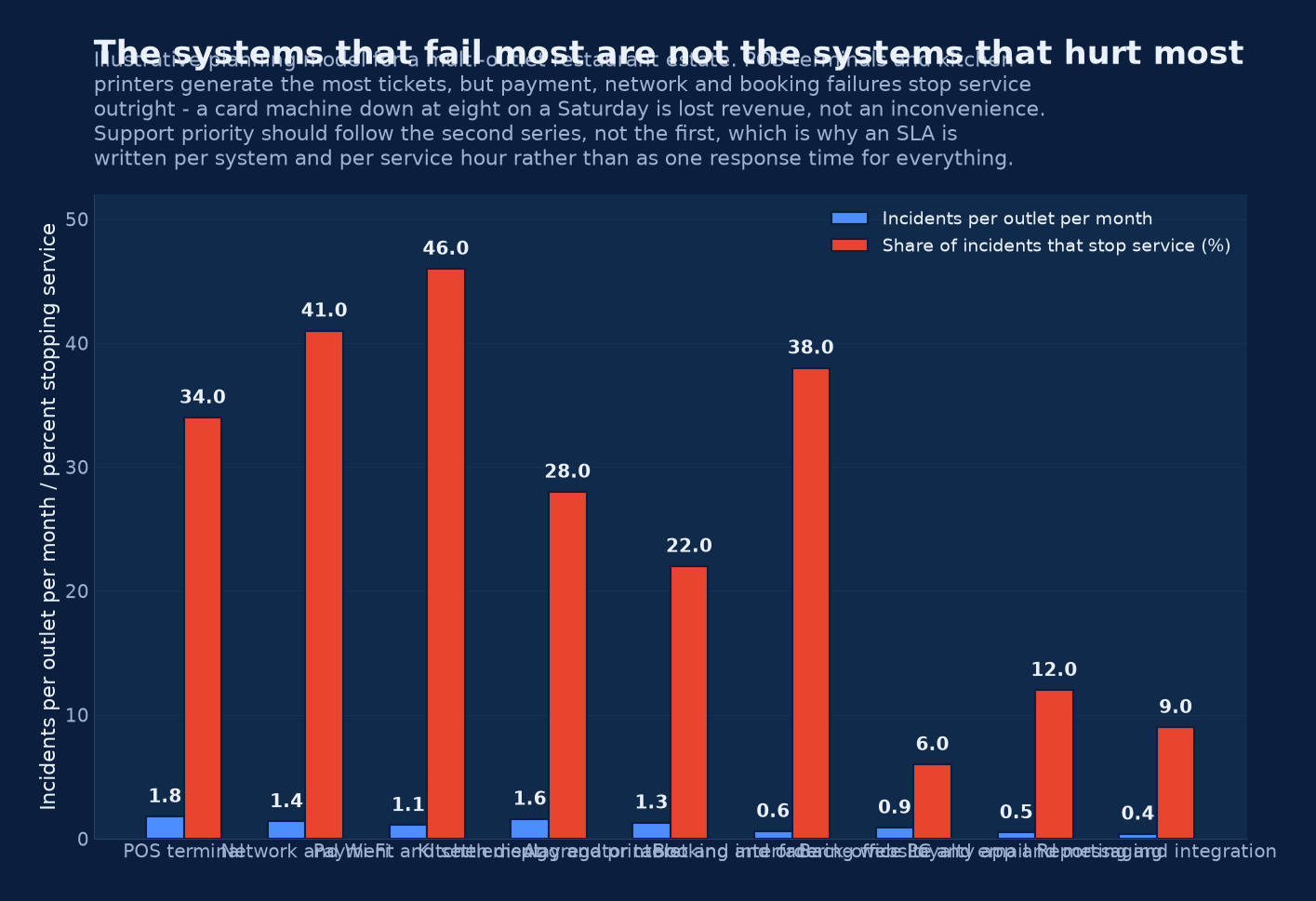
Chart values are an illustrative planning model based on typical UMC engagements and published industry benchmarks. They are not a guarantee of results on any specific project.
| Severity | Definition in a restaurant | Response target | Resolution or workaround target | Escalation |
|---|---|---|---|---|
| One – service stopped | No payments, no orders, no kitchen output, or the outlet cannot trade | Fifteen minutes, any service hour | Two hours to a workaround, same service where possible | Vendor and leadership immediately |
| Two – service degraded | One terminal down with others working, a slow link, one aggregator interface failing | Thirty minutes in service hours | Four hours | Vendor within the hour |
| Three – single user or back office | A back-office device, a report not running, a printer jam | Two hours | Next business day | Weekly review if recurring |
| Four – request or change | A new user, a device move, a configuration change | One business day | Agreed schedule | Change control |
| Coverage | Service hours including evenings, weekends and declared festival peaks | A published rota with a named on-call owner | Coverage evidence per period | Contract review if missed |
| First-line capability | Remote control, documented fixes for the top twenty issues, spares guidance | A resolution rate target per period | Site visits only where remote fails | Knowledge base updated per visit |
| Outlet runbook | A one-page procedure per outlet: who to call, what to restart, what to do offline | Reviewed at onboarding and after any incident | Printed at the counter and held digitally | Update after every severity one |
| Ticket quality | Outlet, system, symptom, time, who was affected, what was tried | Enforced at the point of logging | Sampling reviewed monthly | Retraining where quality drops |
| Repeat-failure review | The same outlet and system failing three times in a quarter | A root-cause investigation, not a fourth ticket | A permanent fix or a replacement decision | Leadership if it affects trading |
| Knowledge base | Documented fixes, device guides, vendor contacts, escalation paths | Updated per incident | Searchable by first line and outlet staff | Quarterly review for staleness |
| Reporting | Incidents by outlet and system, stoppages, response and resolution against target, repeat failures | Monthly | Read in the operations review | Contract review where targets are missed |
- The service desk model – rota, severity definitions, first-line capability, knowledge base and reporting – is the discipline itself: IT helpdesk and end-user support designed against service hours rather than office hours.
- Coverage across evenings, weekends and festival peaks usually needs a surge resource rather than permanent headcount: IT staff augmentation for declared peak periods.
- Most first-line work is remote, so remote access has to be managed, logged and least-privilege – which is a security control as much as a convenience: cybersecurity services.
- Ticket data is operational intelligence: incidents by outlet and system feed the asset replacement plan and the standards, which is a reporting exercise in its own right – dashboards and executive reporting applied to IT operations.
- Outlets raise issues from a phone during service, so the ticketing surface must work on one: mobile experience for the request and approval flow.
Managed IT and AMC: what the contract has to cover
An AMC is not a discount on break-fix; it is a transfer of responsibility for an estate the restaurant cannot manage itself. The contract that works states coverage per outlet, response and resolution targets by severity, what is included and excluded, who owns the vendor relationships, what happens during a festival peak, how spares are held, and what evidence arrives each month. The contract that fails lists a number of visits and leaves everything else to goodwill.
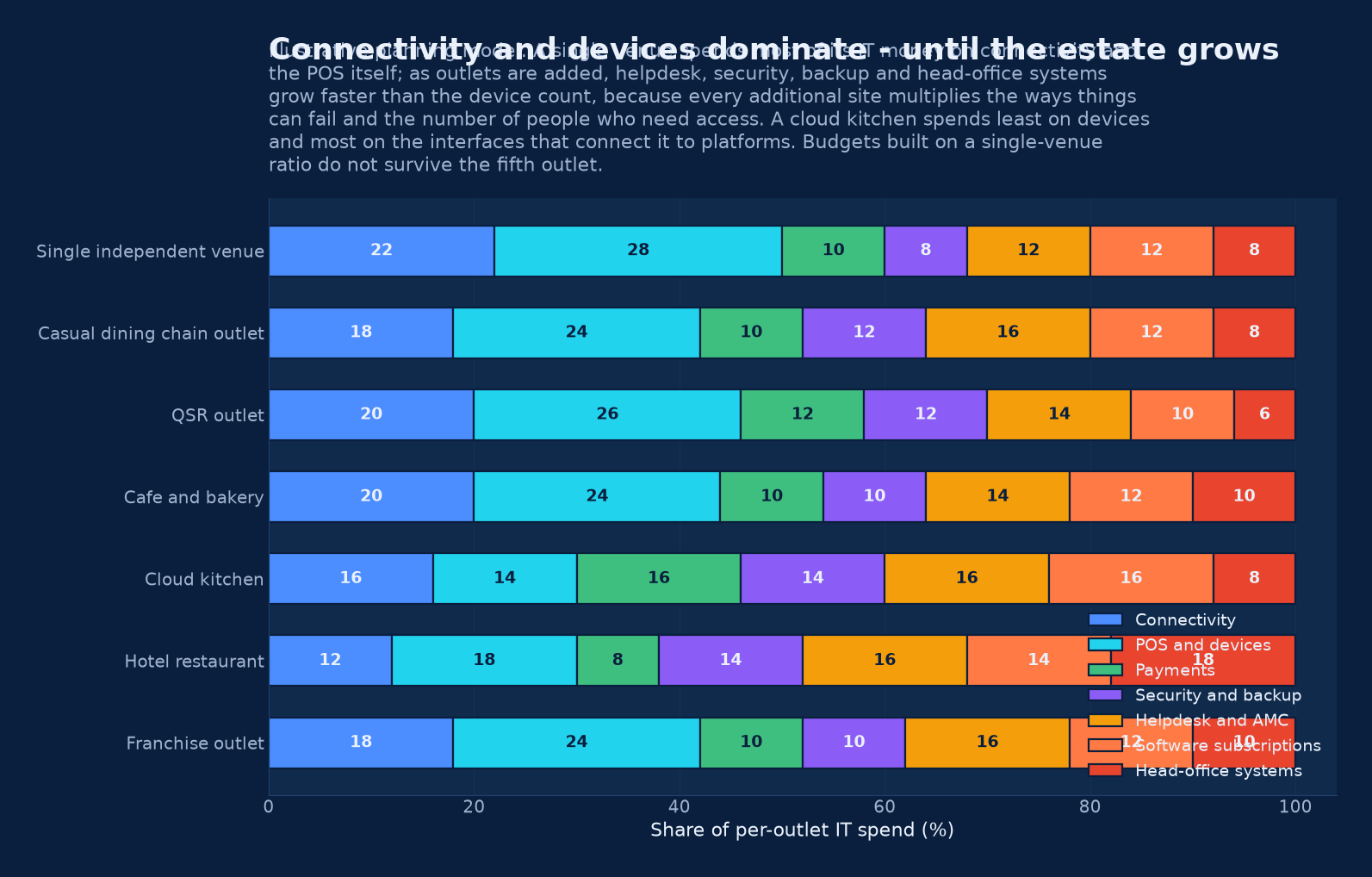
Chart values are an illustrative planning model based on typical UMC engagements and published industry benchmarks. They are not a guarantee of results on any specific project.
| Contract element | What it should state | What is usually missing | Why it matters |
|---|---|---|---|
| Scope per outlet | Devices, network, payments, interfaces and users covered at each site | A site count with no device inventory | Disputes about whether something is covered |
| Coverage hours | Service hours including evenings, weekends and declared peaks | Business hours only, when nothing breaks | The failure happens outside the contract |
| Severity and targets | Definitions tied to revenue impact, with response and resolution targets | One response time for everything | A printer jam and a payment outage treated alike |
| Included and excluded | Parts, consumables, vendor licences, site visits, after-hours calls | Consumables and third-party licences assumed included | Surprise costs at renewal |
| Spares holding | What is held at the outlet, what centrally, and the replacement time | No spares, so a failure waits for procurement | The difference between a two-hour and a two-day stoppage |
| Vendor management | Who raises and chases third-party support tickets | The restaurant manager chasing a POS vendor | Ownership of the escalation |
| Monitoring and reporting | Uptime, incident, patch and asset reporting with a monthly pack | A report only when something goes wrong | Whether the estate is improving |
| Change control | How updates and configuration changes are tested and scheduled | Changes applied during service | Self-inflicted outages |
| Security baseline | Patch levels, endpoint protection, MFA, access reviews, leaver process | Security treated as a separate product | A supported estate that is also an exposed one |
| Backup and recovery | What is backed up, how often, and a tested restore | Backup claimed, restore never tested | Whether a failure is recoverable |
| New outlet build | A standard IT build per new site with a pre-opening checklist | Each outlet built differently | Consistency and speed of expansion |
| Exit and data | Data export format, account transfer, notice period | No exit terms at all | Lock-in at renewal |
| Cost model | Per outlet per month, with a stated inflation and volume tier | A flat fee that ignores outlet growth | Whether the contract scales with the business |
- The AMC itself is the discipline: managed IT infrastructure and AMC with per-outlet coverage, monitoring and a monthly evidence pack.
- Network coverage inside the AMC has to be specified, because connectivity is the most common cause of a stoppage: network engineering with a documented baseline per outlet.
- Backup and recovery belong in the contract with tested restores rather than as an assumption: backup and disaster recovery.
- Security baseline, patching, MFA and access review are part of the same agreement: cybersecurity services and solutions.
- The AMC cost per outlet has to be forecastable and comparable across formats, which is a finance question as much as an IT one: cloud cost optimisation and FinOps applied to the whole technology stack.
- Where an estate spans several formats or cities, the AMC scope should follow the operating model rather than the org chart – which is settled at group level: unified top-level business management.
Security for a distributed estate with high staff turnover
Restaurants are attacked less often than banks and more often than they assume, and the losses are practical rather than dramatic: a compromised social or aggregator account, a terminal harvesting card data, a ransomware note on the back-office machine holding the purchase register, a departed manager retaining access to the POS and the business profile, a phishing email that diverts a supplier payment. The controls are standard and they fail for one reason – nobody owns them across thirty outlets with forty percent annual turnover.
| Threat | How it appears in a restaurant | Control | Evidence |
|---|---|---|---|
| Card and payment data theft | A compromised terminal, a skimming device, a number written down for a refund | Segmentation, tokenisation, device hardening, staff training, a no-storage rule | Configuration baseline, training records, spot audits |
| Account takeover | A social, aggregator or profile account accessed with a shared password | MFA everywhere, company-owned numbers and emails, named accounts, a password manager | MFA coverage report per account |
| Ransomware on back-office devices | An encrypted purchase register or accounts file | Endpoint protection, patching, offline backups, least privilege, no local admin | Patch levels, a tested restore |
| Leaver access | A departed manager still able to void bills or edit the menu | A leaver checklist executed on the last day, quarterly access review | Access review record with dates |
| Supplier payment fraud | A changed bank detail by email | A callback verification rule, dual approval above a threshold | Approval log per payment |
| Phishing and business email compromise | An invoice or a ‘vendor’ email to a finance mailbox | Filtering, MFA, a verification rule, staff training | Training completion and simulation results |
| Guest Wi-Fi abuse | A guest device reaching operations traffic | VLAN or SSID separation, client isolation, firewall rules | Network configuration review |
| QR and payment diversion | A company QR replaced at the counter | Physical checks in the opening and closing routine, soundbox confirmation | A checklist with a named signer |
| Device theft or loss | A handheld or tablet with cached credentials | Device management, encryption, remote wipe, session timeouts | An asset register with wipe evidence |
| Insider till and void fraud | Voids, comps and discounts used to extract cash | Reason codes, approval thresholds, a user-level variance report | A monthly exception review |
| Third-party and vendor exposure | A vendor’s support access retained indefinitely | Time-bound access, logged sessions, a vendor register | Access log and quarterly vendor review |
| Data exposure in exports | A guest list emailed as a spreadsheet | Export logging, least privilege, encryption, a retention rule | Export log reviewed monthly |
| Unpatched and end-of-life systems | An unsupported POS version on a terminal that takes payments | A patch standard, an end-of-life register with a replacement plan | Version report per outlet |
| Incident response | A discovered compromise with nobody knowing what to do | A documented plan with contacts, containment steps and a notification rule | A tabletop exercise per year |
- Endpoint, network, identity, payment and incident response are one programme rather than five products: cybersecurity services and solutions scoped for a distributed estate.
- Whether the controls meet the standard a lender, insurer, franchisor or brand partner expects is an audit with evidence: IT audit and compliance including ISO and SOC 2 style review.
- Segmentation, firewall rules and monitored access are network engineering with a security purpose: routing, switching, firewall and network engineering.
- Guest data held in a CRM and a loyalty ledger is personal data with consent, retention and access obligations: the sibling guest CRM and loyalty page covers the data side, IT covers the controls.
- Where AI tools are given access to the estate – an assistant that reads tickets, a model that prices a menu – the access itself is a risk surface: an AI readiness assessment then AI governance, risk and compliance.
Backup, disaster recovery and continuity for a service business
Continuity in a restaurant is measured in minutes, not days: the requirement is that a service can continue while a system is broken, and that the data behind it can be restored. That means two different things – an offline operating procedure per outlet, printed and rehearsed, and a backup and restore regime for the POS, accounts, purchase register and guest data with a stated recovery time and recovery point objective. A backup that has never been restored is a rumour.
| Scenario | Immediate continuity action | Recovery requirement | What must be documented |
|---|---|---|---|
| POS terminal failure | Switch to the spare, or take orders on paper with a manual bill | A replacement or repair within the SLA | The offline procedure and where the spare is kept |
| Payment gateway outage | Fall back to the second gateway, UPI QR, or cash with a stated limit | Reconciliation once the gateway returns | The fallback path and the cash-handling rule |
| Internet failure at an outlet | Failover link, offline POS mode, manual aggregator order taking | Sync and reconciliation when the link returns | Failover behaviour and the manual order procedure |
| Aggregator interface failure | Take orders by phone with a documented capture route | Order reconciliation and a platform escalation | The phone-order procedure and the escalation contact |
| Ransomware on back-office devices | Isolate, do not pay without advice, restore from a clean backup | A tested restore with a stated recovery time objective | The incident plan, contacts and the restore procedure |
| Data loss or corruption | Restore from the last good backup, reconcile against source documents | A recovery point objective stated in hours | Backup schedule, retention and restore evidence |
| Outlet damage – fire, flood, civil disruption | Relocate to a sister outlet or a cloud kitchen, notify platforms and guests | Insurance, a relocation plan, a communication route | A continuity plan per outlet with a named owner |
| Power failure | UPS keeps the critical path alive; a generator where the format needs it | A controlled shutdown procedure | UPS runtime and the shutdown order |
| Vendor outage – POS cloud, booking platform | Offline procedure, manual bookings, phone orders | Vendor status monitoring and a compensation claim | The vendor’s status page and support contact |
| Key person unavailable | A deputy with the same access and knowledge | Documented procedures rather than personal knowledge | A runbook per outlet and a deputy per role |
| Compromised account | Revoke, rotate credentials, review the access log | Restoration of correct data – menus, prices, hours | The revocation procedure and a post-incident review |
| Festival or peak overload | Capacity headroom tested before the peak, spares in place | No recovery – prevention | A pre-peak checklist signed off per outlet |
- Backups with tested restores, a stated recovery time and point objective, and an incident plan are the discipline: backup and disaster recovery.
- Where POS, ordering and reporting are cloud-hosted, the recovery design depends on the hosting model – region, replication, autoscaling for peak: cloud services and migration.
- Restore evidence, retention and access logging are what an auditor asks for: IT audit and compliance with continuity in scope.
- A continuity plan that only exists in somebody’s head fails at the first resignation, so the documentation is the deliverable – and it should be readable on a phone during an incident: mobile experience applied to internal tools.
- Continuity planning across an estate is also a management-systems question about who decides what when head office cannot be reached: unified top-level business management.
Cloud, hosting and the digital estate
The restaurant’s customer-facing estate – website, menu, booking, ordering, loyalty, gift cards, analytics – is a small but unforgiving system: it must load fast on a phone, survive a campaign spike, keep prices and hours accurate, and never be the reason a guest cannot book. It is also the part of IT that marketing depends on daily, which means releases have to be tested and reversible, and somebody has to own maintenance between campaigns.
| Component | Requirement | Failure mode | Control |
|---|---|---|---|
| Website and menu pages | Fast on mobile, accurate prices and hours, indexable | A heavy template that loses the booking at the last step | A page-weight budget and field performance monitoring |
| Booking widget | Reliable at peak, confirmations delivered, source captured | A third-party release breaking confirmations | A synthetic booking test daily, version awareness |
| Own-channel ordering | Baskets, modifiers, payments, order status, refunds | A peak evening overload or a payment failure with no fallback | Load testing before festivals, monitored checkout |
| Loyalty and gift card store | Balance accuracy, redemption at the counter, ledger integrity | A drift between the loyalty ledger and finance | Monthly reconciliation |
| Hosting and CDN | Autoscaling, cache policy, TLS, media delivery | A static host that falls over on a festival evening | Capacity headroom tested per quarter |
| Analytics and tags | A tag inventory with owners, consent-aware configuration | Under-reporting after a consent or platform change | A monthly tag audit |
| Forms and lead capture | Enquiry, event and corporate forms routed to an owner | An enquiry landing in an inbox nobody reads | Routing with an alert on receipt |
| Email and messaging infrastructure | Deliverability, authentication, suppression handling | A domain that lands in spam, or a throttled number | Authentication records and delivery monitoring |
| Release discipline | A staging environment, a tested release, a rollback path | A change deployed live on a Friday afternoon | A release note with a test result |
| Maintenance ownership | A named owner for updates, certificates, plugins and dependencies | An unmaintained estate discovered during an incident | A maintenance log reviewed monthly |
| Accessibility and usability | Readable on a phone, usable without a mouse, honest about hours | A menu nobody can read on the device they are holding | A usability check per template |
- Hosting, autoscaling, cache policy and media delivery are cloud engineering decisions with a hospitality calendar: cloud services and migration to AWS, Azure or GCP.
- Performance is a revenue control on a booking path, not a technical nicety: Core Web Vitals and performance budgets per template.
- The pages themselves are built and maintained by the sibling discipline – outlet pages, menus, occasion guides: website development for restaurants and the generic website development services behind them.
- Most restaurant estates run on WordPress with a booking plugin and a loyalty store, which makes update and security discipline the real work: full-stack WordPress development and support.
- Own-channel ordering is commerce with payments, refunds and inventory implications: e-commerce development and marketing services.
- Where franchisees, corporate clients or outlet managers need scoped authenticated access, that is a portal rather than a shared login: portal development.
- Ongoing updates, certificate renewals, dependency upgrades and incident response need an owner between campaigns: web application maintenance and support.
The marketing and guest systems IT has to keep running
Marketing technology is usually treated as marketing’s problem until it breaks, at which point it becomes an IT incident with a revenue consequence: a pixel that stopped firing, a consent banner that suppresses every event, a WhatsApp number tied to a departed employee, a booking source field that vanished after a release, a journey that fired without a consent check. These systems need the same treatment as the POS – an owner, monitoring, change control, access review and a test – because the failure is silent and the cost is measured in wasted spend.
| System | What IT owns | Silent failure mode | Test or control |
|---|---|---|---|
| Ad accounts and pixels | Access ownership, tag deployment, consent-aware configuration | Under-reported conversions after a consent or platform change | A monthly tag audit with a conversion comparison |
| Conversion and offline import | The pipeline from booking or POS back into the ad platform | An import that stops after an API change | A daily import row-count check |
| Booking and ordering widgets | Integration, uptime, source capture, release testing | A release that drops the source field | A synthetic booking test daily |
| Landing pages and tracking parameters | Naming convention, parameter persistence, page health | A campaign link that loses its parameters | An automated link test per campaign |
| CRM and guest record | Access, integration health, deduplication, retention jobs | A feed that stops, so journeys run on stale data | A daily reconciliation and an exception queue |
| Automation and journeys | Consent evaluated at send time, suppression applied, frequency caps | A journey firing without a lawful basis | A weekly suppression audit |
| Messaging – WhatsApp, SMS, email | Business number ownership, template approval, deliverability | A throttled number or a rejected template | Delivery-rate monitoring per template |
| Analytics and warehouse pipelines | Refresh schedules, joins, retention, access | A dashboard showing yesterday’s data as today’s | A refresh-completion alert and a row-count check |
| Review and profile platforms | Account ownership, claimed outlets, fact consistency | An unclaimed outlet or stale hours | A quarterly consistency check |
| Creator and affiliate tracking | Codes, tracked pages, contract records | A code reused beyond its agreement | A code register with expiry |
| Content and asset management | A library with rights metadata, scoped access | An asset reused beyond its licence window | A rights register with expiry alerts |
| Reporting and dashboards | Definitions held once, access by role, performance | Two reports disagreeing in a review meeting | A metric dictionary with a change log |
- The paid systems and their conversion definitions belong to the sibling discipline, but their uptime and data quality are IT’s: Google Ads for restaurants with Google Ads management, Performance Max, Local Services Ads and media planning and buying all depending on the same tracking estate.
- The same applies to social and creator systems: social media marketing for restaurants, organic social management, Meta and Instagram, YouTube and video, influencer marketing management and the creative asset pipeline behind them – brand performance and creative production.
- Owned-channel journeys run on marketing automation with lifecycle campaigns, nurture programmes and the email, SMS and WhatsApp channels – each a system with a template approval process and a delivery monitor.
- Guest systems are the ones holding personal data, so their controls matter most: guest CRM and loyalty for restaurants and CRM development and integration.
- Search and profile systems must stay consistent with the website or the guest experience contradicts itself: SEO for restaurants, local SEO and Google Business Profile management, SEO services, AI search optimisation and content marketing strategy.
- Reporting systems are the last link in the chain: the sibling business intelligence for restaurants page defines the metrics, while the warehouse, dashboards, forecasting, mix modelling and attribution and pipeline and conversion analytics depend on pipelines that IT keeps alive.
Vendor, licence and cost management
A restaurant’s technology spend is spread across a dozen subscriptions – POS, payment gateway, aggregators, booking, loyalty, messaging, analytics, hosting, security, the website – most of them renewed automatically, most of them priced per outlet or per volume, and almost none of them reviewed. The result is a cost line that grows faster than the estate and a dependency map nobody can produce in a negotiation. One register with renewal dates, volumes, support terms and data export rights changes that conversation.
| Element | What the register must hold | What goes wrong | Review cadence |
|---|---|---|---|
| Vendor and contract | Scope, term, renewal date, notice period, support response terms | An auto-renewal noticed after the window closed | Ninety days before every renewal |
| Licence and seat counts | Seats, outlets, devices, volumes, overage rates | Paying for outlets that closed, or overage nobody tracked | Quarterly against the asset register |
| Pricing model | Per outlet, per transaction, per seat, per volume tier | A per-transaction model that punishes growth | Annually, with volume forecasts |
| Data export rights | Format, frequency, cost of export, ownership on exit | Lock-in discovered at renewal | At contract and at renewal |
| Support terms | Coverage hours, severity targets, escalation contacts | A vendor whose support closes when your service peaks | At contract, tested per incident |
| Dependency map | Which vendors touch which systems and which outlets | A single point of failure nobody identified | Annually and after any new vendor |
| Concentration risk | Where one vendor holds several critical functions | A vendor exit that takes three systems with it | Annually |
| Shadow IT | Tools bought by outlets or teams outside the register | An unmanaged tool holding guest data | Quarterly discovery and either adoption or removal |
| Cloud and hosting spend | Compute, storage, egress, media delivery, integration runtime | A cost that doubles after a campaign or a menu video | Monthly with an alert threshold |
| Per-outlet IT cost | A comparable figure across formats and cities | A group average that hides expensive outlets | Quarterly, feeding the outlet P&L |
| End-of-life register | Devices and software versions reaching end of support | An unsupported terminal taking payments | Quarterly with a replacement plan |
| Disposal and data destruction | Certificates for retired devices, data wiped | A sold terminal with cached credentials | Per disposal, evidenced |
- Cloud, storage, integration runtime and media delivery costs need explicit management rather than an annual surprise: cloud cost optimisation and FinOps.
- Technology spend belongs in the margin arithmetic alongside food and labour, because a per-transaction model scales with covers: cost rationalisation and margin recovery.
- Contract terms, export rights, support levels and access logging are what an audit examines: IT audit and compliance with the vendor register in scope.
- Where a subscription is financed rather than bought, the payment timing affects the cash position of a seasonal business: cash flow and working capital recovery.
- New outlets should inherit a standard build cost rather than a bespoke one, which makes the register an input to expansion planning: market expansion consulting.
Multi-outlet and franchise IT governance, and the new-outlet playbook
IT governance in a growing restaurant group is mostly about standardisation: one device specification, one network design, one naming convention, one access model, one build checklist, one set of contracts. Without it, every outlet is a bespoke project and every incident is a discovery exercise. In a franchise estate the additional question is the split – who buys the hardware, who holds the contracts, who supports the outlet, who owns the guest data – and that split has to be written into the franchise agreement rather than negotiated per incident.
| Governance element | Group holds | Outlet or franchisee holds | Why the split matters |
|---|---|---|---|
| Device specification | The standard per format, with approved alternatives | Purchase within the standard, care of the asset | Spares and support work across outlets |
| Network design | The baseline, segmentation and monitoring standard | Local installation to the standard, ISP relationship | A failure is diagnosable remotely |
| Vendor contracts | Group agreements with volume pricing and export rights | Local suppliers within approved terms | Negotiating power and a clean exit |
| Access model | Role definitions, MFA requirement, the leaver process | Named users within their role | Least privilege with an audit trail |
| POS configuration | Item mapping, tax treatment, reason codes, discount limits | Local menu items within the standard structure | Comparable reporting across outlets |
| Data ownership | The guest record, consent state and group reporting | Service notes and local operational data | One guest across the estate |
| Change control | What changes, how they are tested and when they are deployed | Notification and local verification | No change lands during a service |
| Incident management | Severity definitions, escalation, vendor management | First response using the outlet runbook | Speed locally, consistency at group level |
| Security baseline | Patch standard, endpoint protection, monitoring, review | Compliance with the baseline, physical checks | One exposed outlet exposes the brand |
| New outlet build | The IT build standard and pre-opening checklist | Site-specific installation and sign-off | An outlet that trades on day one |
| Budget and cost | The per-outlet IT cost model and capital plan | Local operating costs within the model | Forecastable expansion economics |
| Audit and evidence | The audit programme and evidence standard | Local evidence production | Compliance that survives an external review |
- The standard, the split and the escalation route are group decisions taken once: unified top-level business management with IT as a named function.
- A new outlet should open with connectivity, devices, payments, integrations and reporting all tested – which puts the IT build on the expansion critical path: market expansion consulting.
- Opening several outlets at once needs surge capacity for installation, training and hypercare: IT staff augmentation planned against the opening calendar.
- Where franchisees or outlet managers need scoped access to assets, incidents and reporting, a portal beats a shared drive: portal development with role-based access.
- The naming convention, path structure and access model for the public estate should follow the same standardisation logic: website strategy and information architecture.
- Where AI is introduced into the estate – ticket triage, anomaly detection, an assistant for outlet staff – it inherits the access model and needs a governance position: an AI readiness assessment, AI agents and automation with a logged human override, and AI governance, risk and compliance over what it may do unattended.
- IT incident and asset data is operational intelligence that belongs in the group reporting model: the sibling business intelligence for restaurants page shows where it lands.
The ninety-day restaurant IT programme, and what we need from you
The programme below is the shape we run for a restaurant, a cafe group, a cloud kitchen or a franchise estate: three weeks to audit the estate and set the standards, connectivity remediation from week one because it is the most common cause of a stoppage, POS, device and payment hardening from week three, the helpdesk, SLAs and asset register from week five, security, backup and continuity from week seven, integration and third-party dependency work from week nine, and governance, vendor management and handover to the end.
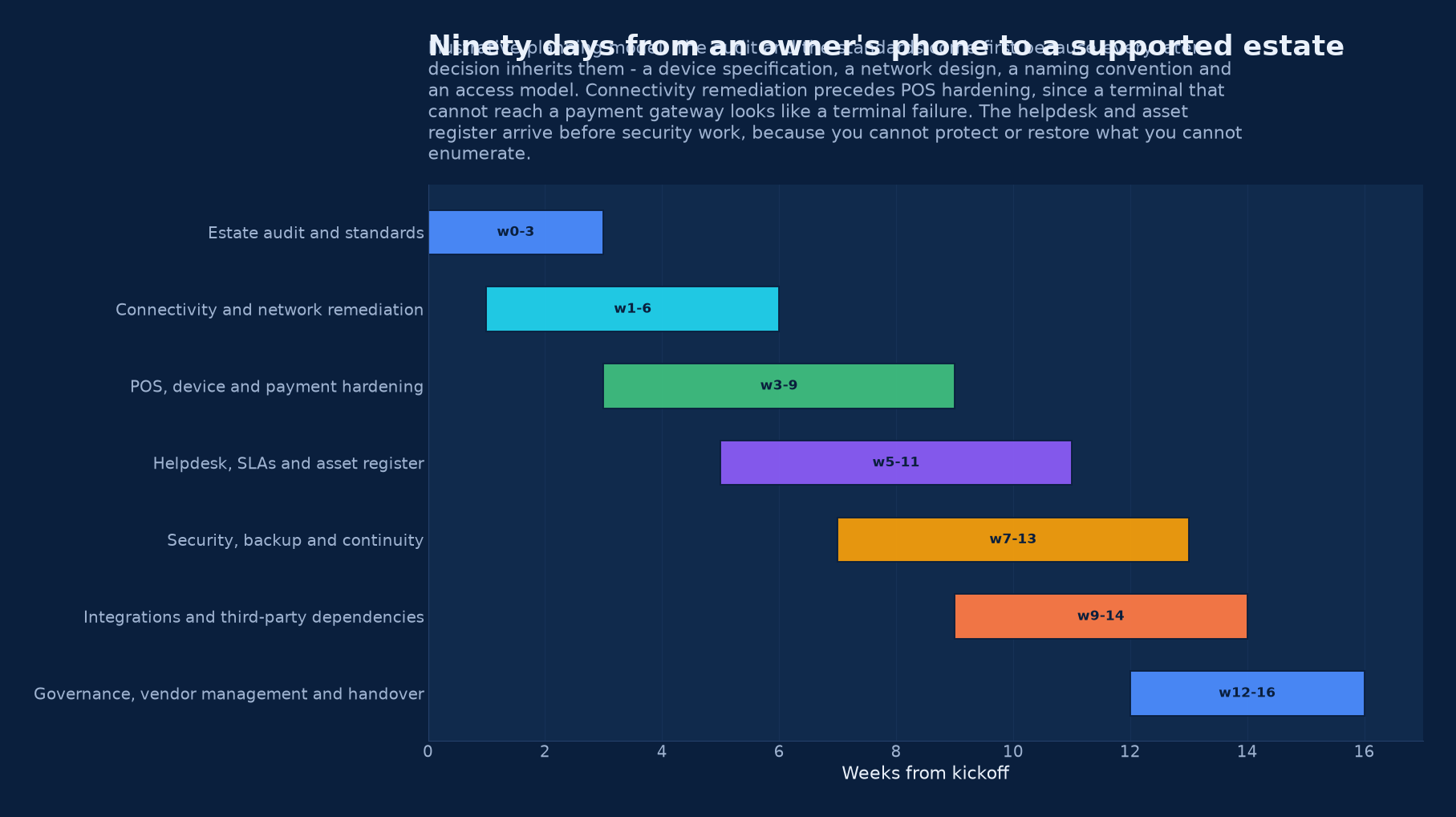
Chart values are an illustrative planning model based on typical UMC engagements and published industry benchmarks. They are not a guarantee of results on any specific project.
| Weeks | Workstream | Deliverable | Decision it enables |
|---|---|---|---|
| Zero to three | Estate audit and standards | A per-outlet inventory, a dependency and vendor register, a device specification per format, a network standard, an access model, a severity framework | What exists, what is unsupported, and what the standard is |
| One to six | Connectivity and network remediation | Primary and fallback links, segmentation, UPS on the critical path, monitoring and alerting, a configuration baseline per outlet | Whether an outage can be survived without stopping trade |
| Three to nine | POS, device and payment hardening | Offline capability verified, spares kits placed, item mapping and reason codes standardised, payment fallback and daily reconciliation, asset register live | Whether a single device failure stops a service |
| Five to eleven | Helpdesk, SLAs and asset register | A rota covering service hours, severity definitions tied to revenue impact, first-line knowledge base, outlet runbooks, monthly reporting | Who fixes what, how fast, and with what evidence |
| Seven to thirteen | Security, backup and continuity | MFA and least privilege everywhere, endpoint protection and patching, leaver process, backups with tested restores, an incident plan and a tabletop exercise | What is exposed, what is recoverable, and who acts |
| Nine to fourteen | Integrations and third-party dependencies | Monitored interfaces between POS, purchasing, labour, aggregators, booking, loyalty and reporting, with exception queues and escalation contacts | Which dependencies fail silently and how they are caught |
| Twelve to sixteen | Governance, vendor management and handover | Contract and licence register with renewal dates and export rights, per-outlet IT cost model, change control, new-outlet build checklist, documentation and training | What things cost, how changes happen, and how a new outlet opens |
- What we need: site access or a remote route to every outlet, the current vendor and subscription list with contracts, POS, payment gateway, aggregator, booking and loyalty account access with an administrative contact, network details and floor plans per outlet, twelve months of incident history if it exists, the opening calendar including festival peaks, and one decision-maker who will approve the device standard, the access model and the severity framework.
- What you keep regardless: the estate inventory and asset register, the device and network standards, the vendor and licence register with export rights, the helpdesk model with severity definitions and runbooks, the security baseline and incident plan, the backup and restore evidence, the integration documentation and the new-outlet build checklist. They are yours.
- What we will tell you plainly in week three: which outlets cannot survive a link failure today, which accounts are held in an employee’s name, which vendor contracts have no exit terms, and which devices are past end of support while taking payments.
Restaurant IT by city, and worked examples
Restaurant IT varies with the estate and the city: broadband reliability, vendor coverage, payment mix, aggregator density, outlet scale and franchise structure all change the standard. The engagements below are hospitality, food-service and multi-site projects where infrastructure, support and continuity were built as one service rather than as separate fixes.
- Get more restaurant customers in Lucknow
- Digital marketing company for restaurants in Lucknow
- Website development company for restaurants in Lucknow
- Services across Indian cities
- Case study: social media advertising for a green hotel and resort
- Case study: The Fern hotel, Hyderabad
- Case study: Marriott hotel, Hyderabad
- Case study: WordPress development for a green hotel and resort
- The restaurants and food service industry hub – all eight disciplines
- Hotels and hospitality: property systems, PMS and outlet infrastructure
- Retail and e-commerce: store networks, POS fleets and payments
- Showrooms and dealerships: branch IT, DMS and workshop systems
- All industry verticals we build programmes for
- All digital marketing services
- All technology services
- All business consulting services
- About Unified Management Consulting
- Contact us about IT support for restaurants
Where this page sits in our restaurants programme
IT support is the seventh discipline of our restaurants and food service programme. The hub page explains how the eight disciplines fit together, each discipline has its own page as it is published, and the generic service page for every discipline stays listed below alongside the vertical pages. A discipline that is not listed is not published yet – the list is generated from live pages and refreshes automatically as each spoke lands.
- Restaurants – the vertical main page
- Website development for restaurants
- SEO for restaurants
- Google Ads for restaurants
- Social media marketing for restaurants
- Guest CRM, reservations and loyalty for restaurants
- Business intelligence for restaurants
- AI for restaurants
- Website development services – the generic service page
- SEO services – the generic service page
- Google Ads management – the generic service page
- Social media management – the generic service page
- Custom CRM development and integration – the generic service page
- BI dashboards and executive reporting – the generic service page
- AI agent deployment and automation – the generic service page
Frequently asked questions about IT support for restaurants
What IT does a single restaurant actually need?
A POS with offline capability, a payment path with a fallback, a kitchen display or printer that routes correctly, a router with segmentation and a UPS, a monitored broadband link with a second link behind it, a back-office device with backup and endpoint protection, a website and booking path that somebody maintains, and a named person to call. That is a small list, and most single venues are missing three items on it.
How fast should IT support respond during service?
Fifteen minutes for anything that stops trading – payments, orders or kitchen output – with a workaround inside two hours; thirty minutes for a degraded service; two hours for a single back-office user. Coverage must span evenings, weekends and declared festival peaks, because that is when everything fails.
What happens if the internet goes down mid-service?
The outlet should fail over to a second link automatically, and the POS should continue in offline mode for a stated period while orders are captured locally and synced later. If neither exists, the outlet needs a printed manual procedure – paper orders, manual bills, a cash or QR fallback – and it needs rehearsing before the night it is used.
Is our POS data backed up?
Ask for evidence rather than assurance: a backup schedule, a retention period, and a restore test with a date and a row-count comparison. A cloud POS vendor’s own backup is not your backup, and an on-premise terminal with no export is a single point of failure.
Who should own our aggregator and platform accounts?
The company, never an individual. Aggregator logins, payment gateway accounts, social profiles, business profiles and the WhatsApp number must be held in company-owned email and phone numbers with MFA, a named administrator and a leaver process. A manager resigning should not be able to take a listing with them.
Do we need separate guest and operations Wi-Fi?
Yes. Guest Wi-Fi that shares a network with POS and payment devices is a security finding, not a convenience. Separate SSIDs or VLANs with client isolation, a managed firewall, and a documented configuration baseline per outlet – reviewed whenever the layout or the equipment changes.
What is an AMC and is it worth it for a restaurant?
An annual maintenance contract transfers responsibility for the estate: coverage per outlet, response and resolution targets by severity, spares, monitoring, patching, vendor management and monthly reporting. It is worth it from about three outlets, or from one outlet if that venue cannot tolerate a service stoppage – provided the contract states coverage hours that match your service hours.
How do we stop card and payment data problems?
Tokenise rather than store, segment the payment path from guest and office traffic, harden terminals to a documented baseline, ban writing card numbers down for refunds, use company-owned device IDs, and check physical QR codes in the opening routine. Then have the arrangement reviewed against the standard your gateway, insurer or brand partner expects.
How should we handle IT for a new outlet?
With a standard build: the device specification for the format, the network baseline with two links, payments configured and reconciled, integrations tested, access created by role, monitoring enabled, spares placed, and a pre-opening checklist signed off before the first service. Building an outlet bespoke is why the sixth site is harder to support than the second.
What about a franchise estate – who supports what?
Write it into the agreement: the group holds the standards, the contracts, the access model, the security baseline and the guest data; the franchisee buys within the standard, runs the outlet runbook and produces local evidence. Everything else gets renegotiated during an incident, which is the worst possible moment.
How much should we budget for IT per outlet?
As a comparable per-outlet figure covering connectivity, POS and devices, payments, security and backup, helpdesk and AMC, software subscriptions and a share of head-office systems. The ratio changes with format and with estate size – support, security and head-office systems grow faster than device count – so a single-venue budget does not survive the fifth outlet.
Can IT help us grow rather than just fix things?
That is the point of doing it properly. A monitored estate lets you open outlets faster, a standard build removes a week from each opening, reliable integrations make the reporting trustworthy, and continuity planning means a festival peak is a commercial opportunity rather than a technical risk. The fix-it version of IT is what you get when none of that exists.
Start with the estate audit and the standards
Give us three weeks with site or remote access to every outlet, your current vendor and subscription list with contracts, POS, payment gateway, aggregator, booking and loyalty account access with an administrative contact, network details and floor plans per outlet, twelve months of incident history if it exists, your opening calendar including festival peaks, and one decision-maker who will approve the device standard, the access model and the severity framework, and we will return a per-outlet inventory with an asset register, a vendor and dependency register with renewal dates and data export rights, a device specification and network standard per format, a connectivity remediation plan with failover tests, a POS and payment hardening list with an offline procedure per outlet, a helpdesk model with severity definitions tied to revenue impact and coverage across service hours, a security baseline with MFA and a leaver process, backups with tested restores and an incident plan, monitored integrations with exception queues, and a new-outlet build checklist – including which outlets cannot survive a link failure today and which accounts are held in an employee’s name. Yours to keep either way.
Contact Unified Management Consulting to arrange a confidential first conversation.