
Hotel IT is a strange discipline: it runs a 24x7x365 operation on a staff roster that sleeps, across systems chosen by three different vendors and two previous owners, in a building where the guests outnumber the employees fifty to one and every one of those guests carries two devices and an opinion about Wi-Fi. The booking engine, the PMS terminals, the POS in the restaurant, the key-card locks, the IPTV, the cameras, the building management system and the guest wireless network all fail in different ways at the worst possible hour – check-in on a compression night, service on a Saturday, checkout on a conference departure. IT support for hotels is therefore not a helpdesk bolted onto an office pattern; it is an availability discipline organised around the guest day, with segmentation that keeps a compromised guest device away from the folio system, monitoring that notices the POS printer before the guest does, and a recovery playbook rehearsed before it is needed.
We deliver hotel IT support remotely and on-site through partners: managed IT and annual maintenance with named response times, network design and segmentation, guest Wi-Fi that survives a full house, monitoring and on-call cover aligned to your occupancy calendar, backup and disaster-recovery that gets tested, and a security baseline that respects PCI scope and camera law. This page is the depth page for the infrastructure discipline; the systems it keeps alive feed our business intelligence page and our CRM page, and the vertical overview is the hotels and hospitality main page.
What hotel IT support covers, at a glance
| Component | What We Deliver |
|---|---|
| Managed IT and AMC | Named response times by priority, a patching calendar and an owner on call, priced per property or per group. |
| Network segmentation | Guest, corporate, POS, IoT and locks on separate paths, so a compromised laptop cannot reach the folio. |
| Guest Wi-Fi as a product | Design, captive portal, consent, bandwidth policy and the review impact measured. |
| Systems support | PMS terminals, POS, locks, IPTV, BMS and cameras – with vendor escalation owned by us, not by you. |
| Monitoring and on-call | Alerts on the things that bleed, routed to a named human by hour of day and occupancy. |
| Backup and DR | Restore tests on a calendar, with the front-desk offline procedure printed and rehearsed. |
| Security baseline | PCI scope, vendor access, camera retention, MFA on everything administrative. |
| Runbooks and training | Shift-level procedures so the night manager is not alone at 2am. |
What hotels ask IT support to fix
The requests that start an IT engagement are almost never about technology in the abstract; they are about a moment that went wrong in front of a guest, or a vendor invoice for a system nobody owns. Naming the moment maps to a workstream, and that mapping is the proposal.
| What we hear | The real problem | The workstream that answers it |
|---|---|---|
| “Wi-Fi is the number one complaint on reviews” | Access points sized for 2019 occupancy, one flat network, no portal | Guest Wi-Fi redesign with segmentation and consent |
| “The POS went down on a Saturday service” | No monitoring, no spare path, vendor escalation owned by nobody | Monitoring, on-call and vendor management with SLAs |
| “Front desk cannot check anyone in when the line drops” | Single WAN path, no offline procedure | Redundancy plus rehearsed offline check-in |
| “Somebody’s laptop was mining crypto on our guest network” | Flat network, no isolation between guest and corporate | Segmentation with per-device isolation |
| “We failed a PCI question and don’t know why” | POS on the same segment as guest wireless | PCI scope reduction and evidence pack |
| “The cameras recorded over the incident” | Retention never specified, storage never checked | Retention policy with monthly verification |
Note that five of the six are design failures discovered under pressure. The programme below moves them from discovery to design, on a calendar, before the compression night.
The cost of an hour down, by system
Support priorities should follow the cost of downtime, not the volume of tickets, and in a hotel those two rankings are almost inverted: Wi-Fi generates the most tickets while the booking engine generates the most loss. We price the hour for each system – lost direct bookings and metasearch clicks during a booking-engine outage, walked guests and comped stays during a PMS outage, unserved covers during a POS outage – and we set response targets and redundancy spend against that ranking. It is the single most useful page in the whole support contract, because it ends the argument about what “urgent” means at two in the morning.
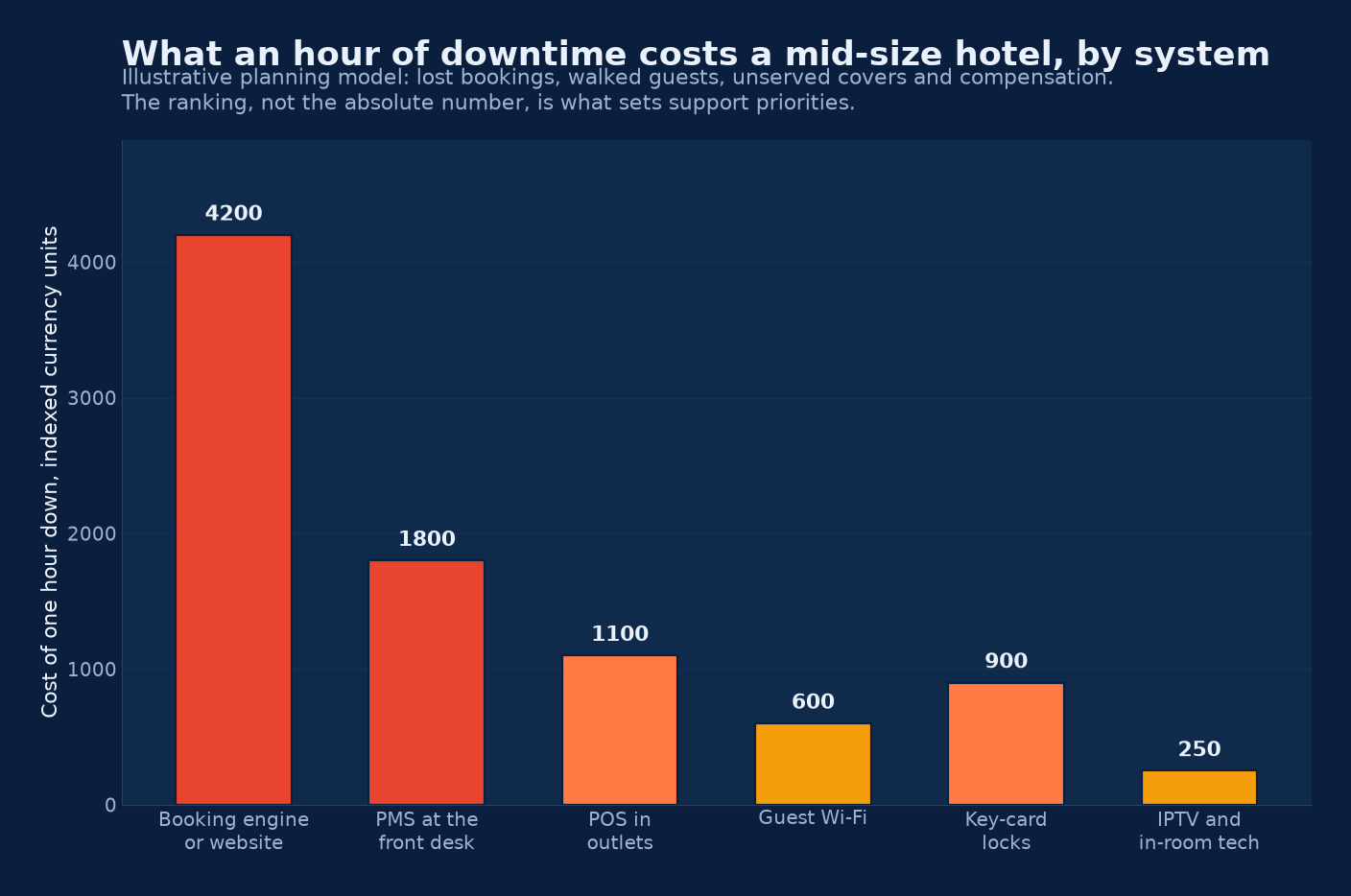
Chart values are an illustrative planning model based on typical UMC engagements and published industry benchmarks. They are not a guarantee of results on any specific project.
| System | One hour down means | Response target | Redundancy worth buying |
|---|---|---|---|
| Booking engine and website | Lost direct bookings and paid clicks | 15 minutes, 24×7 | Failover path and status monitoring |
| PMS at the front desk | Walked arrivals, manual folios, comped friction | 15 minutes, 24×7 | Offline procedure plus terminal spares |
| POS in outlets | Unserved covers, lost revenue, kitchen chaos | 30 minutes in service hours | Spare terminal and printer, offline mode |
| Key-card locks | Guests locked out or doors open | 30 minutes, 24×7 | Battery and encoder spares, vendor SLA |
| Guest Wi-Fi | Review damage and support load | 1 hour, waking hours | AP density and controller failover |
| IPTV and in-room tech | Complaints, rarely revenue | Next service window | None beyond spares |
The table is revisited annually, because a property that adds events or outlets changes its own ranking.
Guest Wi-Fi is a product, not a courtesy
Guests judge a hotel’s Wi-Fi the way they judge its beds: silently, and in the review afterwards. A guest network that works in the lobby and dies in room 412 was designed from a floor plan, not from a survey; a portal that asks for a surname and a room number before granting access converts connectivity into friction; and a network with no consent capture turns a utility into a privacy liability in half the markets you sell into. We treat guest Wi-Fi as a product with a spec: predictive survey per floor and wall type, access-point density sized for two devices per guest plus staff, a portal that authenticates in one tap against the PMS reservation where possible, bandwidth policy that protects video calls without punishing streaming, and analytics that report coverage complaints by room so fixes go to the right ceiling tile.
- Predictive and on-site survey per floor, wall type and outdoor area
- AP density for two devices per guest at full occupancy, not at average
- One-tap portal: room and surname validated against the PMS where the integration exists
- Consent capture and retention aligned to market privacy law
- Per-device isolation on the guest segment as a default, not an option
- Coverage complaint analytics by room and device type, reviewed monthly
- Event-space profiles: saved configurations per ballroom, lawn and boardroom, applied before each event and reverted after
Segmentation: five networks, one building
A hotel that runs one flat network is running one breach domain: the compromised guest laptop, the POS that cards traverse, the lock controller, the camera recorder and the finance laptop all share a broadcast space and, eventually, an incident report. Segmentation is the cheapest security control in the building and the one most often deferred, because its value is the breach that does not happen. We design five segments with explicit crossing rules: guest wireless with per-device isolation; corporate for staff and back office; POS and payment devices in PCI scope; IoT and building systems – locks, BMS, cameras, IPTV head-end – on their own path with vendor access via jump host; and management for the network itself, reachable only from defined addresses.
| Segment | Residents | Crossing rules | Failure it prevents |
|---|---|---|---|
| Guest wireless | Guest devices, isolated per device | Internet only; portal to services | Lateral movement from a guest device |
| Corporate | Staff devices, back office, PMS terminals | To PMS and services; never to POS raw card data | Folio exposure from office malware |
| POS and payments | Terminals, pin pads, payment gateways | To processor only; jump host for support | PCI scope blow-out |
| IoT and building | Locks, BMS, cameras, IPTV head-end | Vendor jump host with session recording | Camera or lock takeover |
| Management | Switches, controllers, firewalls | Defined admin sources with MFA only | Network-wide compromise |
The design document names what may talk to what in one table, because a segmentation scheme nobody can read is a segmentation scheme nobody will maintain through the next refurbishment.
The systems inventory: what a hotel actually runs
Support begins with an inventory, and hotel inventories are longer than offices expect: PMS terminals and printers at the desk, POS terminals and kitchen printers, payment devices, lock encoders and door controllers, IPTV head-end and set-top boxes, camera recorders, BMS and energy controllers, conference AV, digital signage, staff radios and telephony, plus the booking engine, channel manager and CRM that live in the cloud but depend on the same WAN. Each entry carries an owner, a vendor, a contract end date, a spares position and a downtime cost from the table above, because an asset register without those five fields is a list, not a control.
| Class | Examples | Support model | Spares position |
|---|---|---|---|
| Guest-facing transactional | Booking engine path, PMS terminals, POS | 24×7 with 15-30 minute response | Terminal and printer spares on site |
| Access and safety | Locks, controllers, cameras, BMS | 24×7 vendor-backed with our escalation | Encoders, batteries, door spares |
| Guest experience | Wi-Fi, IPTV, signage, conference AV | Waking-hours response, event cover on request | AP and set-top spares |
| Back office | Finance, HR, email, file services | Business hours with same-day critical | Imaged spare laptop |
| Cloud dependencies | PMS SaaS, channel manager, CRM | Status monitoring plus vendor liaison | Offline procedures instead of spares |
The register is the first deliverable of the engagement and the document every later decision cites; it is also the artifact a new owner or manager inherits, which is usually the moment its value becomes obvious.
Tickets, SLAs and the on-call shape
Hospitality ticket desks show a stable shape: guest Wi-Fi leads by volume because every guest is a user, POS follows because every cover is a transaction, and the long tail – locks, IPTV, back office – carries the incidents that hurt reputation rather than revenue. Response targets therefore differ by priority and by hour: a PMS outage at check-in is a fifteen-minute conversation, a signage fault at midnight is a morning task. We publish the SLA matrix with the contract and report against it monthly, including the misses, because an SLA report without misses is a marketing document. The mix below is what sizes the desk, the spares shelf and the rota, and it is remarkably stable across properties of very different size, which is what makes a shared support model across a group possible at all.
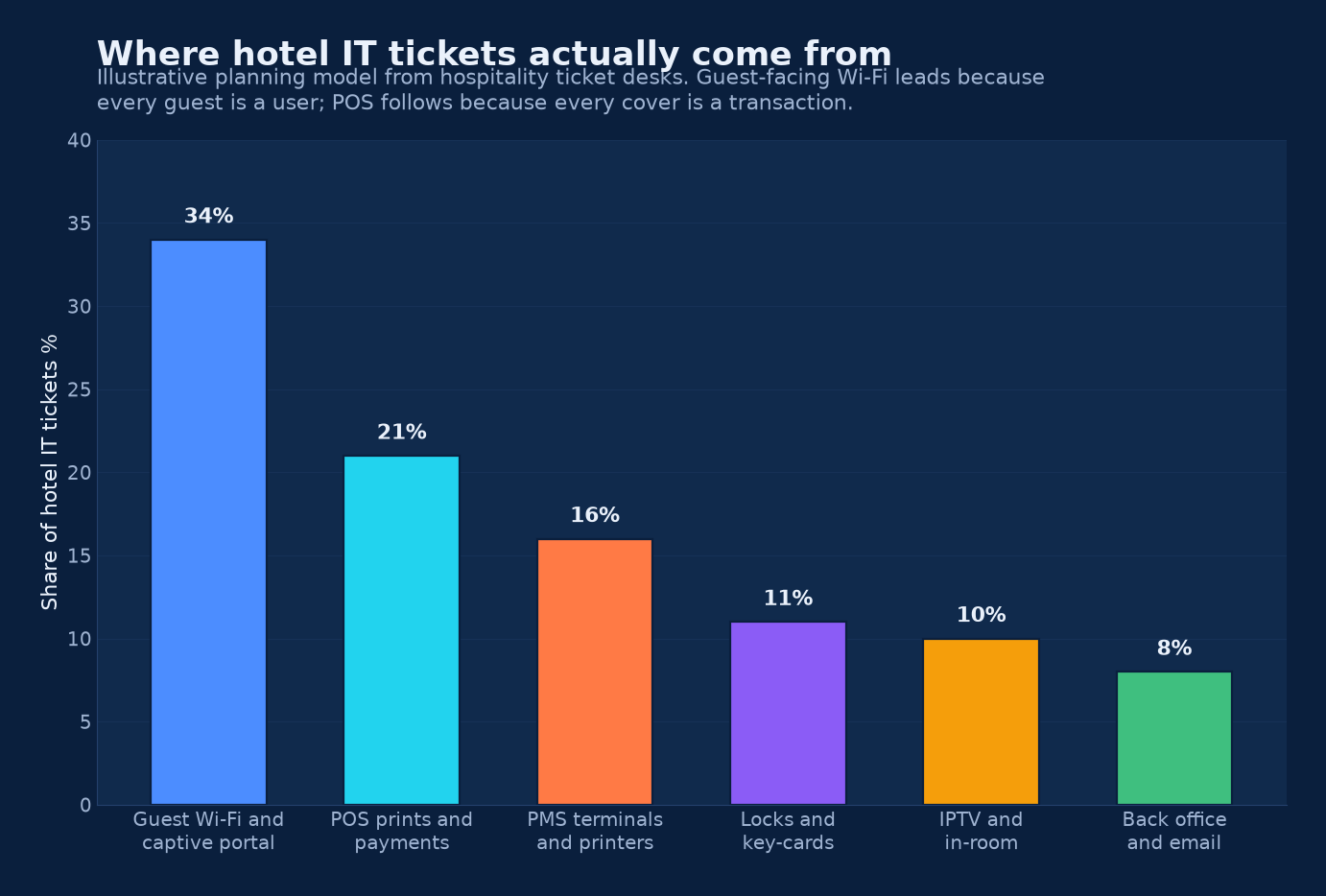
Chart values are an illustrative planning model based on typical UMC engagements and published industry benchmarks. They are not a guarantee of results on any specific project.
| Priority | Definition | Response | Update cadence |
|---|---|---|---|
| P1 | Revenue or safety stopped: booking engine, PMS, POS in service, locks | 15 minutes, 24×7 | Every 30 minutes until resolved |
| P2 | Degraded service: Wi-Fi partial, one terminal down, IPTV outage | 1 hour waking, 4 hours overnight | Every 2 hours |
| P3 | Single-user or non-guest-facing fault | Same business day | Daily |
| P4 | Requests, moves, changes | Scheduled window | At scheduling |
The rota itself follows your occupancy calendar: conference departure mornings and compression nights carry senior cover, quiet Tuesdays do not, and the calendar is agreed quarterly with the GM rather than assumed by us.
Monitoring: notice it before the guest does
The difference between an incident and a ticket is detection time. We monitor the paths that carry money and safety – WAN and ISP health per path, booking-engine reachability from outside, PMS and POS service heartbeats, lock controller connectivity, camera recorder health and retention depth, Wi-Fi controller and AP status with per-AP client counts, certificate and domain expiries, backup job outcomes – and we route each alert to a named human by hour of day, with the runbook link attached so the first response is informed rather than improvised.
- WAN and ISP per path with automatic failover testing monthly
- External reachability of booking engine and website, distinct from internal checks
- Service heartbeats for PMS, POS and payment path, per terminal where possible
- Lock controller and encoder connectivity, battery health where reported
- Camera recorder health plus retention-depth verification, monthly evidence
- Wi-Fi controller, AP up-state and client-count anomalies by floor
- Backup outcomes with restore-test calendar and certificate expiry watch
Alert volume is governed like everything else: an alert that fires without action for a quarter is retuned or retired, and the tuning log is part of the monthly report.
Backups, DR and the printed offline procedure
Hotel disaster recovery has one requirement office DR never faces: the front desk must be able to check a guest in, take payment and open a door with every network path dead. That is a procedure, not a technology – printed night-letter reports, offline folio forms, manual card encoding or mechanical override knowledge, and a rehearsed sequence for restoring order when the path returns. We test restores on a calendar (quarterly for PMS and POS data, monthly for back office), we rehearse the offline procedure twice a year with the actual shift team, and we keep the DR document versioned next to the asset register so the two never disagree about what exists.
| Asset | Backup | Restore test | Offline procedure |
|---|---|---|---|
| PMS data | Per vendor model; local cache where offered | Quarterly, timed | Night letter plus offline folio forms |
| POS and kitchen | Transaction journal per vendor | Quarterly | Manual chits with reconciliation sheet |
| Back office | Daily image and files | Monthly sample restore | Cloud access from spare laptop |
| Locks | Controller config export | After every config change | Mechanical override map by floor |
| Cameras | Recorder redundancy, not backup | Retention check monthly | None – evidence continuity is the control |
The restore test report carries one number management remembers: minutes to a working front desk from a cold start, measured, not estimated. Management remembers that number through every budget conversation, which is exactly why we publish it.
Security baseline: PCI, cameras, vendors and MFA
A hotel’s security baseline is mostly scope discipline: keep card data inside the POS segment and the processor’s path so PCI assessment stays small; keep cameras on their own segment with retention set by law and verified monthly; give every vendor a jump-host account with session recording and an expiry date instead of a permanent password; put MFA on every administrative surface including the Wi-Fi controller and the lock encoder; and log enough to answer “who touched it” for the systems that carry money or evidence. None of this is exotic; all of it is skipped under pressure, which is why it belongs in a contract with a calendar rather than in a memo. The wider programme is our cybersecurity practice and the assessment route our IT audit and compliance practice; this page is the hospitality-shaped slice of both. The baseline is re-attested twice a year and after every refurbishment or ownership change, because those are the moments when a segmented network quietly becomes flat again and a retained camera policy quietly becomes somebody’s personal discretion.
Sixteen weeks to support that survives a full house
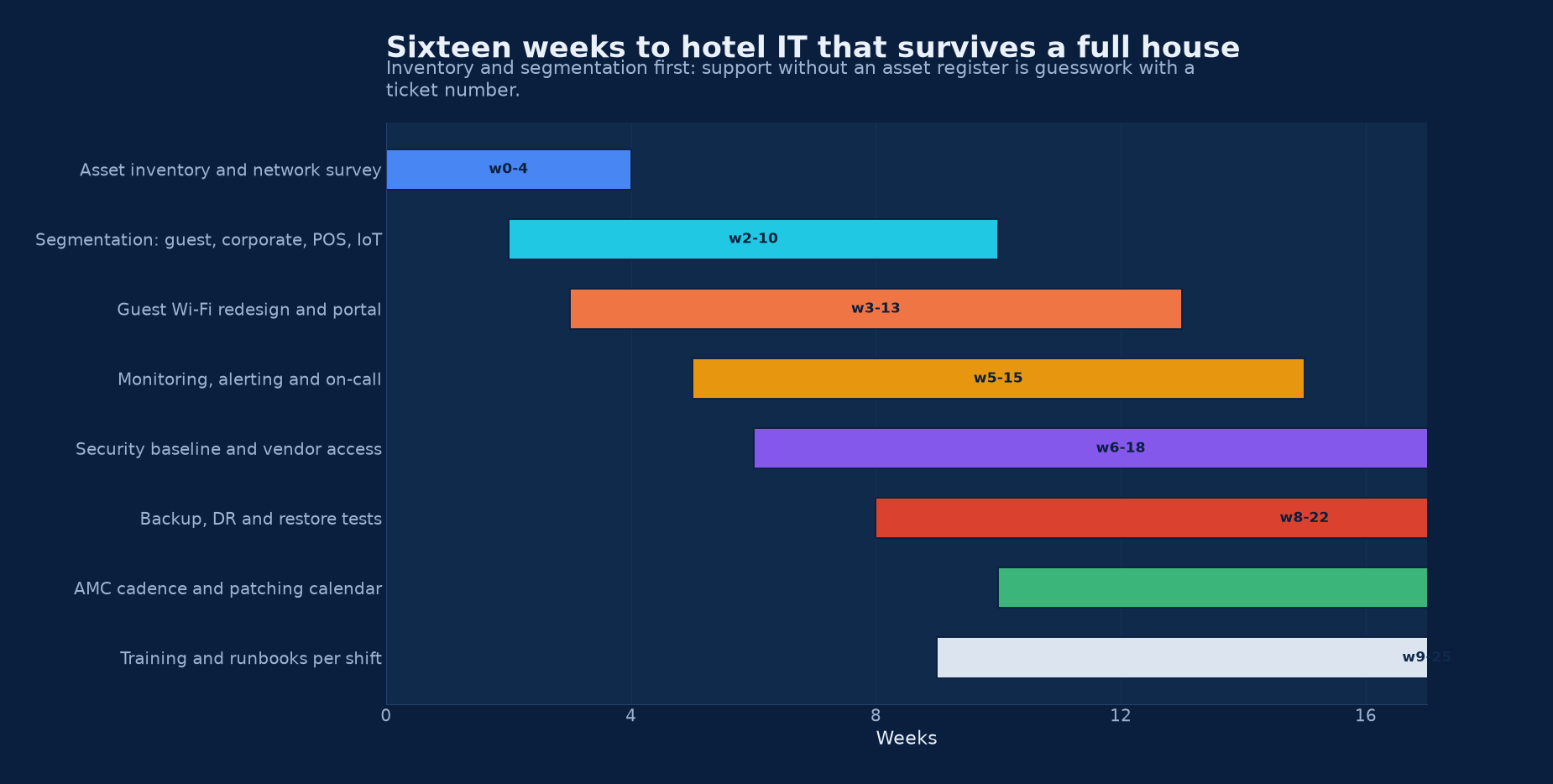
Chart values are an illustrative planning model based on typical UMC engagements and published industry benchmarks. They are not a guarantee of results on any specific project.
Weeks one to four inventory every asset and survey the network and wireless estate, including the outdoor and basement corners previous surveys forgot. Segmentation lands by week eight with the crossing-rules table signed by whoever owns risk; the guest Wi-Fi redesign follows with portal and consent; monitoring and on-call go live at week ten against the SLA matrix; the security baseline and vendor access model complete by week twelve; backup, DR and the printed offline procedure are tested by week fourteen; and the AMC cadence – patching windows, firmware calendar, spares review – plus shift training close the programme at week sixteen.
| Deliverable | Week | Evidence you receive |
|---|---|---|
| Asset register v1 | 4 | Register with owner, vendor, contract, spares, downtime cost |
| Network and wireless survey | 4 | Heatmaps and cabling remediation list |
| Segmentation live | 8 | Crossing-rules table plus verification tests |
| Guest Wi-Fi product live | 10 | Portal flow, consent record, coverage report |
| Monitoring and on-call | 10 | Alert catalogue with rota and runbook links |
| Security baseline | 12 | Baseline checklist with PCI scope note |
| Backup, DR and offline test | 14 | Timed restore report and rehearsed procedure |
| AMC cadence and training | 16 | Patching calendar, spares review, recorded training |
Multi-property and remote delivery
Groups need one support model that respects property differences: a standard baseline every property meets, a local hands-and-eyes partner per market for cabling and spares, and a central desk that owns vendors, monitoring and the calendar. We run that shape remotely – the desk, the monitoring, the vendor management and the documentation are ours; the physical touches are partner-run against our runbooks – and we say plainly in the proposal which markets have partner coverage today and which we would recruit during onboarding, because a support promise without hands in the building is a monitoring promise wearing a larger hat. The group baseline also carries the version discipline: one firmware and patch calendar across properties, with exceptions recorded and expiry-dated, because a group whose properties drift apart on versions is a group that discovers incompatibilities during an incident rather than during a window.
Event and conference cover: the days the building doubles
A conference departure morning or a wedding of four hundred turns a hotel’s IT load into something the everyday design never sized for: check-in queues at triple rate, conference Wi-Fi for eight hundred devices in one ballroom, AV paths nobody tests between events, and POS volume that exposes every printer weakness. Event cover is therefore a scheduled state of the support model, not an overtime favour: a pre-event check of Wi-Fi density in the event spaces, AV and screen paths tested end to end, a temporary bandwidth policy for the organiser, senior cover on the departure morning, and a post-event note recording what strained so the next event of that shape starts better informed. Properties that host regularly keep an event runbook per room type – ballroom, lawn, boardroom – because each fails differently.
The commercial point is as plain as the technical one: an event that runs smoothly rebooks next year, and an event whose Wi-Fi died in the opening keynote does not, whatever the banqueting team served afterwards. The runbook per room type is the deliverable organisers ask to see at rebooking, and the properties that show it win the repeat event against venues with better carpets.
Vendor management: one throat to choke
A hotel’s IT estate arrives with a vendor per system – PMS, POS, locks, IPTV, cameras, BMS, telephony – and each contract names a support path that assumes the property has an IT manager to walk it. Most do not. We take the vendor relationships into the support model: one escalation owner on our side, contract and renewal dates in the asset register, escalation trees tested annually by calling them, and firmware or upgrade windows coordinated across vendors so the lock controller and the PMS terminal are never both mid-upgrade on a compression night. Where a contract binds support to the installer, we manage the escalation and the evidence trail rather than pretending to own the fix, and we say so in writing before signature, because a support promise that contradicts a vendor contract fails at the worst possible hour.
Renewals get the same treatment: ninety days before any contract end, the register raises the question – renew, replace or absorb – with the downtime cost and the spares position attached, so decisions happen in a meeting with options rather than in a panic with one invoice. Vendor health is reported quarterly alongside the SLA misses, because a support model is only as strong as the slowest vendor inside it, and management deserves to know which one that is before the compression night does the explaining.
Proof and related capability
Managed IT and infrastructure programmes we run span managed IT and AMC, helpdesk and end-user support, network services and backup and disaster recovery; in hospitality the case studies include infrastructure management engagements where the uptime table above was written with the GM and reported against monthly.
Related Services
The practices this programme draws on:
Where this page sits in our hotel programme
This spoke covers the infrastructure layer. The vertical’s other intents each have their own page, and the hub ties them together:
- Hotels and hospitality – the vertical main page
- Website development for hotels – the booking path this layer keeps alive
- SEO for hotels – organic demand the uptime protects
- Google Ads for hotels – paid clicks that need a live site to land on
- Social media marketing for hotels – where guests decide before they book
- Hotel CRM and loyalty – guest data on infrastructure we monitor
- Hotel business intelligence – the extracts this layer feeds
- AI for hotels – guest copilots, forecasting and governance
- Digital marketing company for hotels in Lucknow – the local-intent page
If your property trades in Lucknow or elsewhere in India, the local page carries the regional detail; this page carries the programme.
Frequently asked questions about hotel IT support
Do you provide on-site engineers?
The desk, monitoring, vendor management and documentation are remote and ours; physical touches run through vetted local partners against our runbooks. Markets without partner coverage today are named in the proposal.
What response times do you commit to?
Fifteen minutes for P1 revenue and safety systems, 24×7; one hour waking for P2; same-day for P3. The matrix ships with the contract and the monthly report includes the misses.
Our PMS is a SaaS. What do you support?
The path to it: WAN, terminals, printers, browser estate, plus vendor liaison and status monitoring, and the offline procedure for when the path or the vendor fails.
Can you fix Wi-Fi without a refurbishment?
Often yes: AP repositioning, density additions, channel and power tuning, portal and policy changes. The survey says honestly where cabling or wall types force capital work.
Is guest Wi-Fi consent really necessary?
In most markets you sell into, some form of it is. We implement the minimum lawful capture per market and keep the record, because the alternative is a utility that became a liability.
How do you handle PCI scope?
By segmentation and evidence: POS isolated, card data never traversing shared segments, and a scope document your assessor can read in one sitting.
What about cameras and privacy law?
Retention set by market law, verified monthly with evidence, access logged, and signage requirements checked per jurisdiction during the baseline.
Do you take over existing vendor contracts?
Yes, with a contract review first: some lock and IPTV contracts bind support to the installer, and we manage the escalation rather than pretend otherwise.
How is an AMC priced for a hotel?
Per property by asset count and coverage hours, with group rates across properties sharing one baseline. Spares and capital are quoted separately, never buried.
Can the night manager really handle 2am alone?
With the runbooks, the printed offline procedure and a rehearsed escalation chain, mostly yes – and the rota puts a human on call behind them, which is the point of both.
What happens during a refurbishment?
Survey before, staging during, and a re-baseline after: refurbishments silently undo segmentation and coverage more often than breaches do.
How quickly can onboarding start?
Inventory and survey inside two weeks of access; monitoring live by week ten of the standard programme, sooner where the register already exists.
Start with the asset register and one full-house night
Give us access for a survey and a seat on one compression night, and we will return the register, the downtime-cost table and the SLA matrix – yours to keep either way.
Contact Unified Management Consulting to arrange a confidential first conversation.