
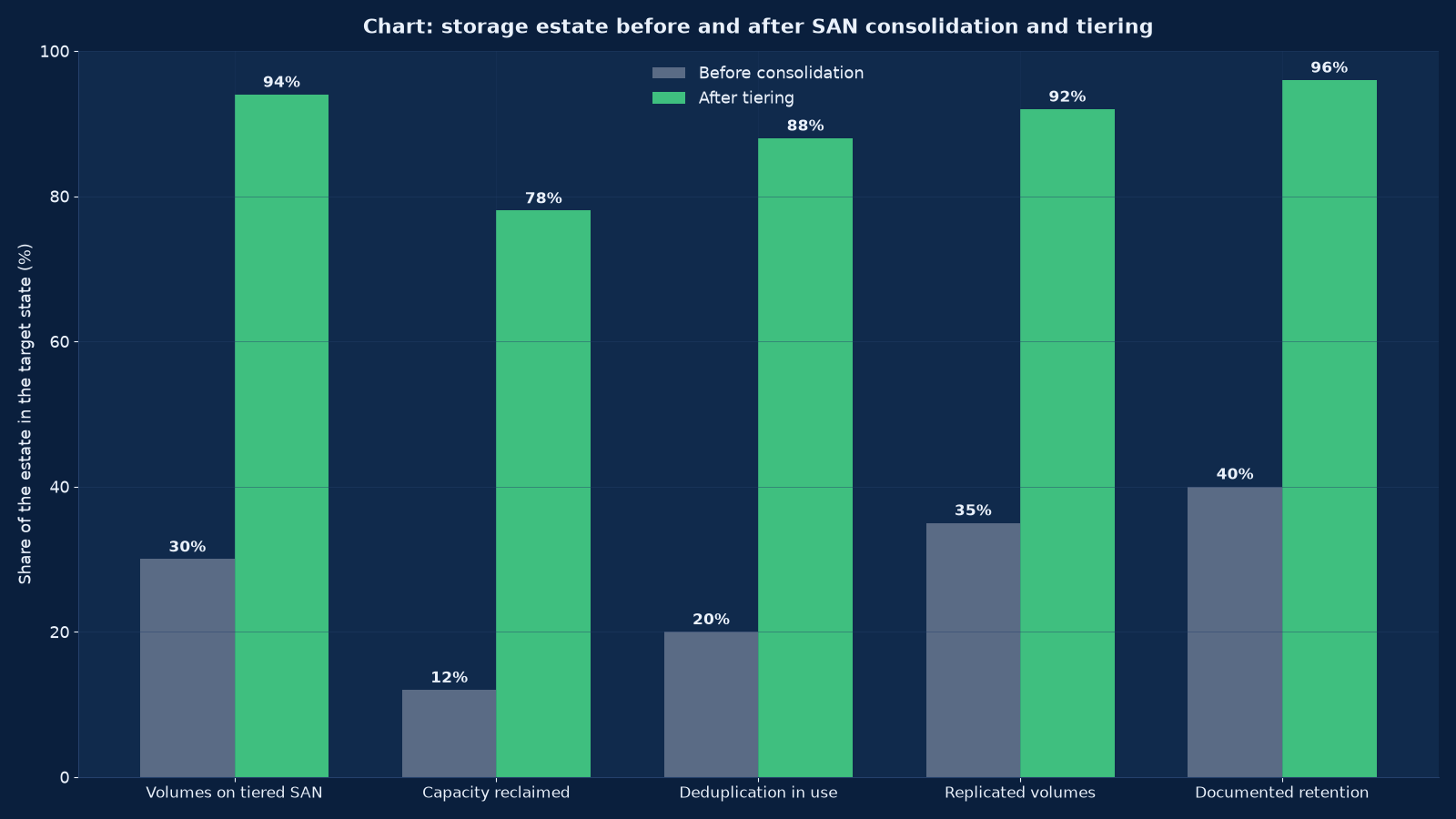
Chart values are an illustrative planning model based on typical UMC engagements and published industry benchmarks. They are not a guarantee of results on any specific project.
Storage is the only part of the infrastructure estate that never gets thrown away. Servers are replaced, networks are rebuilt, applications are retired — but the data stays, and it stays on whatever media somebody bought in a hurry six years ago. Which is why storage decisions are the ones that are still being paid for in 2032, and why “we will migrate it later” is the most expensive sentence in infrastructure.
Storage and SAN engineering at Unified Management Consulting is the work of making an estate’s data live on the right media, reachable by the right protocols, at a latency the workload can tolerate, with a capacity cost somebody can forecast and a recovery property somebody has tested. That is five separate problems that are usually solved by buying one array and hoping. We solve them as a design: measured workload profiles, a tiering policy with an economic argument behind it, a fabric and protocol architecture that survives a component failure, data reduction that is real rather than quoted, replication matched to an agreed recovery point, and a lifecycle that decides where data goes when it stops being hot.
We work across the platforms enterprises actually run: Fibre Channel and iSCSI SANs, NVMe and NVMe-over-Fabrics flash arrays, scale-out NAS for file workloads, S3-compatible object stores for archives and immutable backup targets, hyperconverged storage where compute and capacity are bought together, and tape where the economics or the retention obligation still justify it. The recommendation depends on the workload, and the most common finding in our assessments is not that a client bought the wrong array but that everything was put on the same one.
🗄️ Storage & SAN Engineering — Quick Summary
| Component | What We Deliver |
|---|---|
| Workload profiling | Measured IOPS, throughput and latency requirement per workload, with the peak week identified rather than the annual average — the only basis on which a tier decision can be defended. |
| Capacity and growth model | Usable capacity per tier, growth rate, data-reduction assumptions tested against your data rather than the vendor’s, and the date each tier exhausts. |
| Tiering architecture | Which data lives on flash, which on capacity disk, which in object and which on tape, with the policy that moves it and the cost per usable terabyte for each. |
| SAN fabric and protocol design | Fibre Channel or Ethernet fabric, zoning, multipathing policy, and the protocol per workload — block, file or object — chosen against latency and failure behaviour. |
| Performance engineering | Queue depth, latency budget, throughput ceilings and the bottleneck that actually binds, established by measurement rather than by datasheet. |
| Data reduction | Deduplication and compression configured per workload where they help and disabled where they cost performance, with thin-provisioning reclaim working rather than theoretical. |
| Replication and snapshots | Synchronous or asynchronous replication matched to an agreed RPO, snapshot policy with expiry, and a clear statement of what a snapshot is not. |
| Object storage and immutability | S3-compatible targets with object lock or equivalent immutability, erasure coding and a retention policy that survives an administrator credential being compromised. |
| Backup integration | Storage presented to the backup platform as an immutable target, with isolation from the production network and restore performance measured, not assumed. |
| Lifecycle and decommissioning | Retention schedules implemented as policy, archive migration planned, and end-of-life media sanitised with certificates. |
What Storage Engineering Actually Decides
Storage engineering decisions are usually presented as a choice of product, and they are not. They are a set of trade-offs between latency, capacity cost, durability, recoverability and operational complexity, and each workload wants a different point on those curves. A database wants latency and will pay for it. An archive wants durability and cost and does not care about latency at all. A virtual desktop estate wants throughput at boot time and almost nothing otherwise. Putting all three on one array buys one of them what it needs and overpays for the other two.
| Decision | What it really chooses | What it costs if chosen wrongly |
|---|---|---|
| Media tier | Latency and cost per terabyte | Flash spent on data nobody reads, or spinning disk under a database that queues |
| Protocol: block, file or object | How applications address data, and how it can be shared | A file protocol used for a database, or an object store used where positional writes are needed |
| Fabric: Fibre Channel or Ethernet | Determinism, skills and cost per port | An Ethernet fabric carrying storage traffic with no isolation and no lossless configuration |
| Data reduction on or off | Effective cost per terabyte versus CPU and latency | Deduplication on a database that gains nothing and loses latency |
| Replication: sync or async | Recovery point objective versus write latency and distance | Synchronous replication over a link that cannot carry it, which turns a network blip into an outage |
| Snapshot policy | How far back you can go, and at what capacity cost | Snapshots kept indefinitely until the array is full, or kept for a day and therefore useless |
| Object and archive strategy | Where cold data goes and what it costs to retrieve | Archive held on primary storage at ten times the necessary cost |
| Immutability | Whether a compromised administrator can delete the recovery copy | A backup estate that is deleted by the same ransomware that encrypted the primary |
| Lifecycle policy | Whether data moves automatically or by project | A migration project every three years, funded from capital rather than from policy |
The table above is the design conversation. Everything else — the products, the quotations, the migration plan — follows from it, and getting it wrong at this level is the reason storage projects are revisited so expensively.
Assessment: Measuring the Estate Before Buying Anything
We measure before we recommend, and storage measurement is more subtle than it looks. The numbers that matter are not averages: they are peaks, and they are per-workload, because an array that is comfortable at the annual average will queue at the month-end close.
| What we measure | How | Why the obvious alternative is wrong |
|---|---|---|
| IOPS and throughput per workload | Array and host-level counters collected over at least four weeks including the worst week | Aggregate array statistics hide the workload that is starving |
| Latency distribution, not average | Percentiles — median, 95th, 99th — per volume | An average of 2 ms can conceal a 99th percentile of 90 ms, which is what users experience |
| Read/write ratio and block size | Per workload, since they decide tier and protocol | A workload assumed to be random-read is often sequential-write, and the tier choice inverts |
| Queue depth and concurrency | Host and array counters during peak | Capacity that looks adequate at low queue depth saturates at high queue depth |
| Capacity growth rate and churn | Historical usage with deletion and reclaim accounted for | Growth measured without reclaim overstates the requirement substantially |
| Actual data reduction achieved | Measured ratio on your data, per workload class | Vendor ratios are achieved on datasets that look nothing like yours |
| Snapshot and clone consumption | Space held by snapshots, with ages | Snapshot sprawl is the most common cause of a “sudden” capacity shortage |
| Recovery performance | A timed restore of a representative volume | A backup that restores at 40 MB/s is a plan for a very long outage |
The last row is the one that changes budgets. Most estates have never measured a restore at volume, so the recovery time objective the business believes it has is an assumption rather than a property. We time a representative restore during the assessment and report the number, because it frequently revises what the storage design has to deliver.
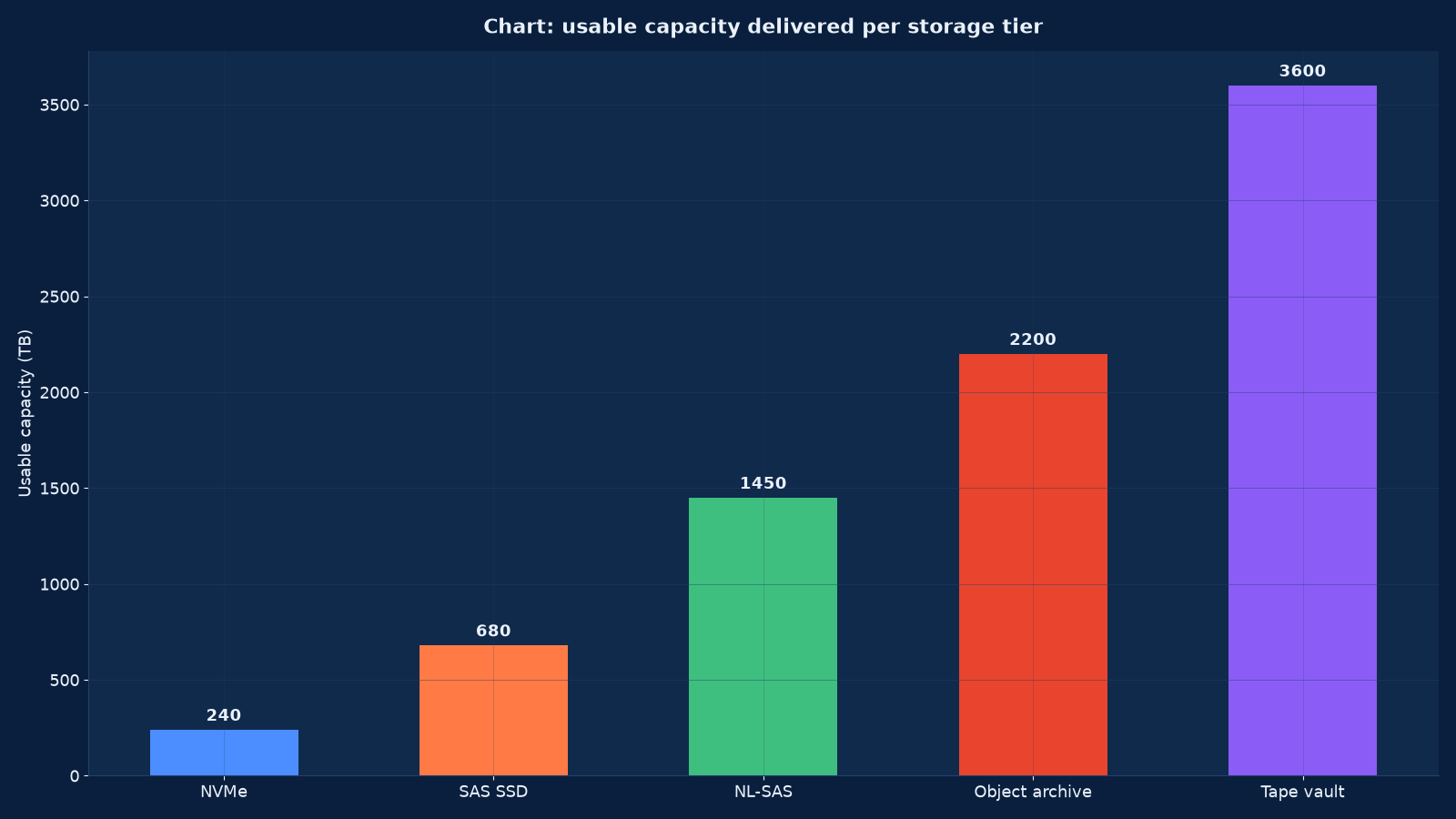
Chart values are an illustrative planning model based on typical UMC engagements and published industry benchmarks. They are not a guarantee of results on any specific project.
Tiering: The Only Real Lever on Cost per Terabyte
Tiering is the only real lever on cost per usable terabyte, and it works by moving data rather than by buying cheaper disks. The economics are stable enough to state plainly: flash costs an order of magnitude more per terabyte than capacity disk, and object or tape costs an order of magnitude less again. A workload that does not need flash and sits on flash is a permanent subsidy; an archive that needs durability and sits on primary storage is the same error in the other direction.
| Tier | Indicative latency | Indicative cost per usable TB | What belongs here | What does not |
|---|---|---|---|---|
| NVMe flash | Sub-millisecond to low single-digit milliseconds | Highest | Databases with a latency budget, high-IOPS OLTP, boot volumes for large VDI pools | Anything with a sequential profile that flash cannot exploit |
| SAS SSD | Low single-digit milliseconds | High | General application volumes, mixed workloads, virtualisation datastores | Cold data that would sit untouched for months |
| NL-SAS capacity disk | Ten to twenty milliseconds | Moderate | File shares, development and test, near-line volumes, backup staging | Latency-sensitive databases, whatever the capacity saving |
| Object storage | Tens to hundreds of milliseconds | Low | Archives, unstructured data at scale, immutable backup targets, media libraries | Workloads needing positional writes or low-latency random access |
| Tape | Seconds to minutes, with retrieval latency | Lowest at scale | Long-retention archives, offline copies that must be physically separated | Anything whose recovery objective is measured in hours |
Automated tiering is a policy, not a feature
Sub-volume tiering that moves blocks automatically is genuinely useful and genuinely misunderstood. It optimises against a metric the array chooses — usually recent access frequency — which may not be the metric the business cares about. A volume that is read once a quarter for a regulatory report will be promoted to flash every time that report runs, and demoted slowly. We set tiering policy explicitly per workload class, with the promotion and demotion behaviour documented, and we review the effective cost per terabyte after three months rather than trusting the datasheet figure.
The cost per terabyte that gets quoted is rarely the one you pay
Usable capacity is raw capacity after RAID or erasure-coding overhead, after spares, after the headroom an array needs to operate, and after the space consumed by snapshots and clones. A 500 TB raw purchase commonly delivers 320 to 380 TB of usable capacity that can actually be allocated. We quote designs in usable terms with every deduction itemised, because the difference between raw and usable is where storage budgets go to be surprised.
SAN Architecture: Fabrics, Zoning and Multipathing
A SAN is a network whose only job is to make remote storage look local, and it fails in ways that look like storage failures. Most “array” problems we are called to investigate are fabric, zoning or multipathing problems, and almost all of them are configuration problems that were invisible until a component failed.
| Element | Design rule | The failure it prevents |
|---|---|---|
| Fabric topology | Two independent fabrics, A and B, with no shared switch, cable or port; hosts attach to both | A switch or cable fault taking both paths to a volume |
| Zoning | Single-initiator, single-target soft zoning by WWN, with aliases maintained as documentation | An initiator seeing storage it should not, and a fabric whose configuration nobody can read |
| Multipathing policy | Policy matched to the array’s ALUA behaviour — active/optimised paths preferred, round-robin only where the array supports it | I/O sent down a non-optimised path, which presents as unexplained latency |
| Queue and timeout settings | Host queue depth, LUN queue limits and SCSI timeouts set deliberately per workload | A path failover that takes minutes instead of seconds because a timeout was left at default |
| iSCSI where used | Dedicated VLANs or physical NICs, jumbo frames consistent end to end, CHAP authentication enabled | Storage traffic sharing a production VLAN, and an unauthenticated target |
| NVMe over Fabrics | Lossless Ethernet configuration or FC transport, with the end-to-end latency budget verified | A protocol chosen for its latency and then run on a fabric that cannot deliver it |
| Cable and port discipline | Documented per port, with spares held and optical cleanliness observed | A fault diagnosed by swapping cables at random during an outage |
| Fabric monitoring | Port errors, buffer credits and latency monitored with thresholds below failure | A degrading optic discovered when the volume goes offline |
The single-initiator zoning rule deserves emphasis because it is the one most often broken for convenience. Zoning two hosts to the same volume so that they can share it looks like a shortcut and is an unsupported configuration for most arrays: it bypasses the clustering software that is supposed to arbitrate access, and it produces filesystem corruption that presents weeks later with no obvious cause.
Protocols and the Workloads They Suit
Protocol choice follows from how the application addresses data and how many clients need to see it at once. It is not a preference.
| Protocol | How data is addressed | Suits | Constraints |
|---|---|---|---|
| Fibre Channel block | Block device presented to one host or a cluster | Databases, high-IOPS applications, virtualisation datastores | Fabric cost and skills; one initiator per volume unless clustered |
| iSCSI block | Block over TCP/IP | Where FC is unjustified and Ethernet skills exist | Needs network discipline: isolation, jumbo frames, authentication |
| NVMe over Fabrics | Block with a parallel, low-overhead command set | The most latency-sensitive workloads, all-flash estates | Requires a fabric that can deliver the latency, or the benefit is lost |
| NFS file | File and directory tree, shared concurrently | Virtualisation datastores, Linux estates, shared application data | Metadata performance and the network’s sensitivity to latency |
| SMB/CIFS file | File shares with integrated access control | Windows estates, user home and departmental shares | Locking behaviour and the performance cost of small-file workloads |
| S3 object | Flat namespace of immutable objects with metadata | Archives, backups, media, analytics data lakes | No positional writes; retrieval latency; eventual consistency in some designs |
A common and expensive mistake is choosing a protocol because the array supports it rather than because the workload suits it. Databases on file protocols pay a metadata and locking overhead for no benefit; archives on block storage pay a latency premium they will never use; and object storage used for a workload that needs random writes will fail in a way that looks like an application bug.
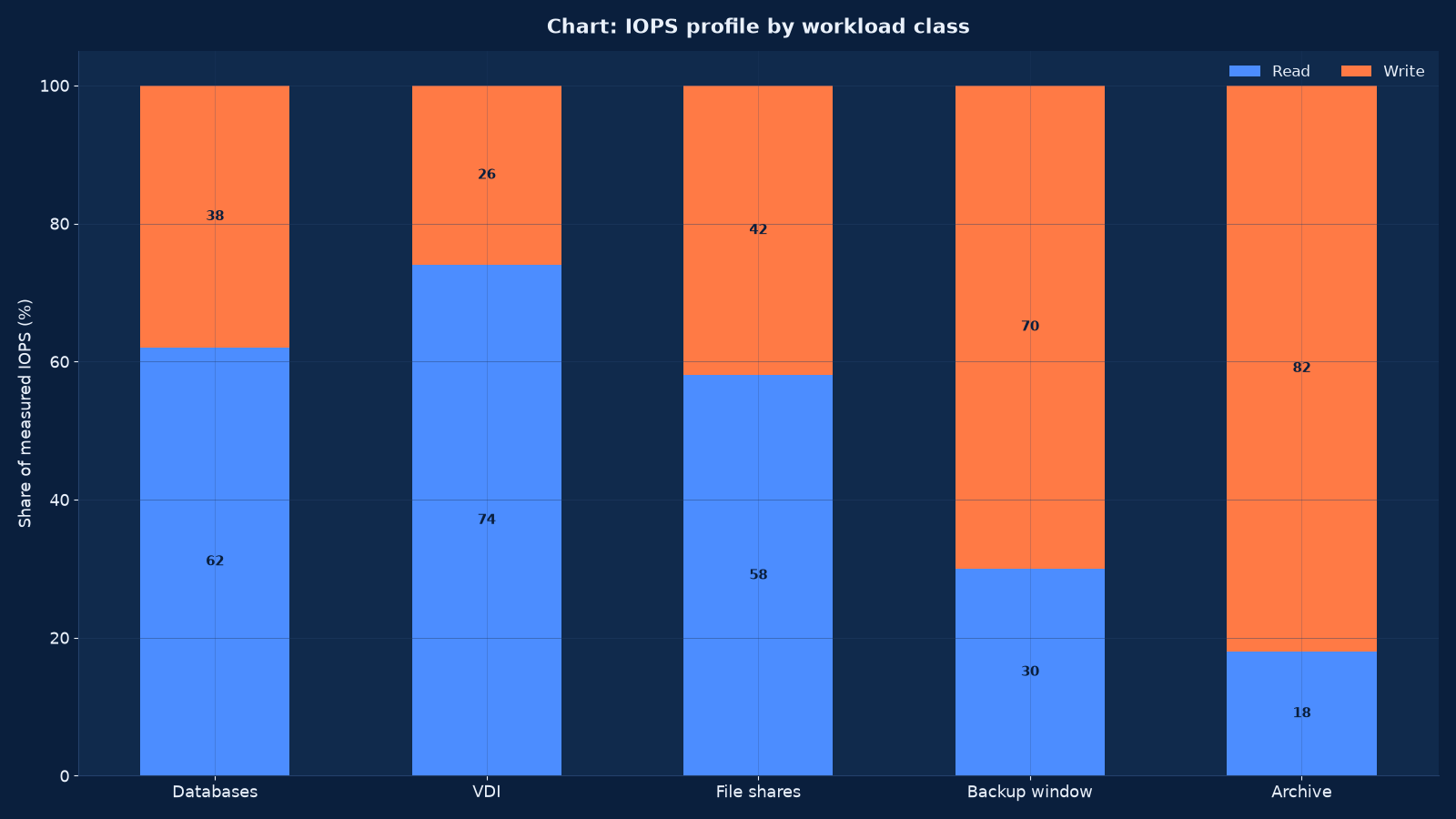
Chart values are an illustrative planning model based on typical UMC engagements and published industry benchmarks. They are not a guarantee of results on any specific project.
Performance Engineering: Which Number Actually Binds
Performance engineering is the discipline of finding which number actually binds. Every storage conversation eventually involves three numbers — IOPS, throughput and latency — and the constraint is different for every workload. Optimising the wrong one is how estates end up with fast arrays and slow applications.
| Workload | Binds on | Typical profile | Design consequence |
|---|---|---|---|
| OLTP database | Latency at moderate IOPS | Random read/write, small blocks, sustained | Flash tier, low queue depth, and a replication mode that does not add write latency |
| Data warehouse and analytics | Throughput | Large sequential scans, high concurrency | Capacity or object tier with parallelism, not flash |
| Virtual desktop pool | IOPS at boot and logon, latency otherwise | Extreme read burst, then near idle | Read cache or flash for the boot volume, capacity tier for profiles |
| File shares | Metadata operations and small-file throughput | Many small reads and writes with heavy locking | A design that measures metadata performance, which datasheets rarely show |
| Backup target | Sustained write throughput | Large sequential writes in a window | Isolation from production traffic, and a network that can carry the window |
| Archive and object | Durability and cost, not latency | Write once, read rarely | Erasure coding, immutability, and the cheapest tier that meets the retention obligation |
| Media and imaging | Sustained throughput with large files | Sequential, high bandwidth | Capacity planning in terabytes per second rather than IOPS |
Latency percentiles, or nothing at all
An average latency of two milliseconds is compatible with a terrible experience. Storage latency is reported as a distribution, and the numbers that predict user complaints are the 95th and 99th percentiles. We design against a percentile budget agreed with the application owner — for example, 99th percentile below five milliseconds for the transaction volume — and we measure against it after delivery rather than accepting the average as evidence.
Queue depth is where designs fail under load
An array can deliver its rated IOPS at a queue depth nobody runs in production. Host queue limits, LUN queue limits, fabric buffer credits and the array’s own concurrency all constrain the depth actually achieved, and the result is an estate that performs in a benchmark and queues at month end. We set and verify queue parameters per workload as part of the design, and we test at the measured peak rather than at a convenient load.
Data Reduction: What Is Real and What Is Quoted
Data reduction is real and it is routinely overestimated. Deduplication ratios depend entirely on the data: virtual desktop images deduplicate spectacularly, databases barely at all, and already-compressed media not at all. Compression costs CPU and sometimes latency. Thin provisioning defers allocation and creates an obligation to monitor it. Configured blindly, all three produce a capacity model that is wrong in the direction that matters.
| Technique | Where it helps | Where it hurts | What we configure |
|---|---|---|---|
| Inline deduplication | Virtual desktop pools, general file shares, backup targets | Databases, encrypted volumes, already-compressed media | Enabled per volume class with the expected ratio stated and then verified |
| Post-process deduplication | Backup and archive estates where latency is irrelevant | Primary volumes that need space back immediately | Scheduled outside the production window, with reclaim measured |
| Compression | Text-heavy file data, logs, some application volumes | Latency-sensitive database volumes where CPU is contended | Per volume, with the latency impact measured before and after |
| Thin provisioning | Estates with good capacity monitoring and honest growth forecasts | Estates where nobody watches free space, because it converts a capacity problem into an outage | With alerting at 70 and 85 per cent and a documented escalation |
| Space reclaim (UNMAP) | Where deleted data must actually return capacity | Nowhere — but it is frequently left disabled, so reclaim never happens | Verified end to end: host, fabric and array, with a measured reclaim |
| Snapshot space reservation | Where snapshots must not consume the parent volume | Where an unbounded snapshot tree silently eats the array | Reservation or expiry per policy, with age alerting |
We report data reduction as a measured ratio per workload class after three months of operation, not as a quoted figure at purchase. The difference between the two is commonly 30 to 50 per cent of the expected capacity, which is the difference between a comfortable estate and an emergency purchase.
Snapshots, Replication and Backups Are Three Different Things
Three mechanisms are routinely conflated, and the conflation is why recovery plans fail. A snapshot is a point-in-time view on the same array. A replica is a second copy on a second system, updated continuously or periodically. A backup is an independent copy, on separate media, under separate credentials, that can be restored when the primary system is destroyed or its administrators are compromised. Only the third survives an adversary.
| Mechanism | What it protects against | Recovery point | What it does not protect against |
|---|---|---|---|
| Snapshot | Accidental deletion, corruption, a bad change | Minutes to hours, on the same array | Array failure, ransomware with administrator access, site loss |
| Asynchronous replication | Array failure, partial site loss | Seconds to minutes of data loss, depending on link and window | A destructive change, which replicates faithfully to the target |
| Synchronous replication | Array and site failure with zero data loss | Zero, within the supported distance and latency | Write latency if the link degrades, and the same destructive-change problem |
| Immutable backup copy | Ransomware, malicious or compromised deletion, site loss | The backup schedule’s interval | Nothing — but it is the only one of the four that an attacker cannot delete |
| Offline or air-gapped copy | Total compromise of the online estate | The last offline copy taken | Retrieval time, which must be planned for rather than discovered |
The design we deliver states, per workload, which of these apply and what recovery point and recovery time each provides. Where the business has agreed a recovery point objective that the architecture cannot meet, that is documented as a decision with a cost attached rather than left as an assumption in a runbook nobody tests.
Object Storage, Immutability and the Archive Question
Object storage has moved from an archive curiosity to a load-bearing part of enterprise design, for two reasons: it is the cheapest way to hold data at scale, and it is the only practical way to make a copy that cannot be deleted. Both properties matter more now than they did when object stores were first deployed.
| Property | How it is delivered | What to verify |
|---|---|---|
| Durability | Erasure coding across nodes and failure domains, with the scheme stated in terms of how many simultaneous failures it survives | That the coding width matches your durability requirement, and that a rebuild does not degrade production |
| Immutability | Object lock or write-once-read-many retention, with a mode that even an administrator cannot override inside the retention period | That the retention is enforced by the store, not by a filesystem permission |
| Cost at scale | Capacity tiers, erasure coding efficiency and retrieval costs | Retrieval and request pricing, which are invisible until an archive is restored |
| Namespace and metadata | Flat namespace with searchable metadata and versioning | That versioning is enabled where immutability depends on it |
| Access model | S3-compatible API with per-bucket policies and signed access | That credentials are scoped, and that no bucket is public by default |
| Migration path | Ingest rate from the source tier, verified end to end | How long the initial archive migration takes, which is usually longer than expected |
Tape remains relevant for exactly one reason and it is a good one: an offline copy in a vault cannot be reached over a network. Where the retention obligation is long, the data volume is large and the recovery objective is measured in days, tape is still the cheapest answer and the only genuinely air-gapped one. We design hybrid estates where object storage carries the operational archive and tape carries the copy that survives everything else.
Security and Ransomware Resistance of the Storage Layer
Storage is a tier-zero system by the same argument as the hypervisor: whoever controls it controls every workload above it, and whoever can delete from it can delete the recovery copy too. The controls below are the ones that decide whether a ransomware incident is a restore or a closure.
| Control | What we implement | Why it matters |
|---|---|---|
| Administrative separation | Storage administration split from backup administration, with no single credential able to destroy both primary and recovery copies | A single compromised administrator account is how whole estates are lost |
| Immutable recovery copies | Retention enforced by the storage layer with a non-overridable mode for the agreed period | Deletes issued by an attacker simply fail, rather than succeeding and being discovered later |
| Network isolation | Management interfaces and backup targets on isolated segments, not reachable from production or user networks | Reduces the paths an attacker has to the recovery estate |
| Encryption | At rest with keys held outside the storage platform, and in flight for replication and backup | Prevents media theft from becoming a data breach, and keeps replication from leaking in clear |
| Access review | Share, export and bucket permissions reviewed against a schedule with evidence | Permission creep on file shares is universal and is an audit finding every time |
| Restore testing | Timed restores of representative volumes on a published cadence | The only control that proves the others work |
| Change control and logging | Configuration changes logged to an immutable store with attribution | Establishes what happened, when, and with which credential |
| Firmware currency | Advisories tracked with a defined window for security fixes | Storage controllers are networked appliances with the same vulnerability profile as any other |
We will say plainly that immutability and restore testing are not optional in a current threat environment. An estate whose recovery copies can be deleted by the same credential that can delete the primary has no recovery capability, only a recovery habit.
Lifecycle, Retention and Decommissioning
Data does not stay hot, and an estate without a lifecycle policy accumulates primary storage full of data nobody reads. Lifecycle is the discipline that moves data down the tiers on a schedule, and eventually off them, with retention obligations implemented as policy rather than as institutional memory.
| Stage | What happens | The decision that must be explicit |
|---|---|---|
| Classification | Data labelled by owner, sensitivity and retention requirement | Who owns each dataset, because unowned data is never deleted |
| Retention schedule | Periods agreed with legal and compliance and implemented in the platform | Whether retention is a floor, a ceiling, or both |
| Tier movement | Automated policy moves cold data to capacity, object or tape | The access pattern that triggers movement, and the retrieval cost when it is wrong |
| Archive migration | Planned movement between media generations before end of support | The migration is funded from policy, not discovered as an emergency |
| Legal hold | Hold overrides deletion, with a register of what is held and why | That holds are released, which is where most registries fail |
| Deletion and sanitisation | Cryptographic erasure or physical destruction with certificates | Evidence that satisfies an auditor and a data-protection request |
| Media end of life | Array and tape retirement planned against support dates | Support expiry, not capacity exhaustion, usually decides the date |
The archive migration row is the one organisations most often leave unfunded. Media generations end, formats become unreadable, and support contracts expire — so an archive written in 2014 that has never been migrated is not an archive, it is a risk with a barcode. We plan migrations as a recurring programme with a budget line, which is cheaper than the emergency alternative every time.
How This Differs From Our Neighbouring Pages
Our Computing, Server, Storage and Data Centre Engineering page covers the estate as a whole, including storage as one component of it. This page is the storage architecture itself: the tiering economics, the fabric and protocol design, the performance engineering and the recovery properties. Where the question is what the whole estate should look like, start there; where the question is why the array queues at month end or what an archive should cost, this is the engagement.
| Your question | Right starting point | What it produces |
|---|---|---|
| Why is storage slow, and what should the tiers be? | This page | A measured workload profile, a tiering design and a costed capacity plan |
| Our recovery cannot meet the agreed RPO and RTO | Backup, Disaster Recovery & Business Continuity Services | A recovery architecture and the test regime that proves it — which usually changes what the storage layer must provide |
| What should the whole compute and storage estate look like in three years? | Computing, Server, Storage and Data Centre Engineering | An estate roadmap across servers, storage, virtualisation and the facility |
| We want compute and storage converged | Our hyperconverged infrastructure offering, built in this same programme | A converged design with the failure-domain and usable-capacity arithmetic modelled before purchase |
| The facility cannot power or cool the arrays we have | Our data centre design and build offering, built in this same programme | A facility design whose power and cooling budget matches the measured storage load |
| Storage traffic is contending with production traffic | Routing, Switching, Firewall and Network Engineering | A fabric and network design with storage traffic isolated and lossless where the protocol needs it |
| The storage estate should partly move to cloud | Cloud Services & Migration — AWS, Azure and Google Cloud | A hybrid design with the retrieval cost modelled rather than assumed |
| An auditor wants evidence about our data controls | IT Audit, Compliance & ISO 27001 / SOC 2 Readiness | The control evidence a properly designed storage estate can actually produce |
| Who operates the estate once it is designed? | Managed IT Infrastructure & IT AMC Services | A managed service with published SLAs against the design we delivered |
Evidence From Our Work
Storage work is the least publishable kind of infrastructure engagement — the volumes, capacities and workloads are client-confidential — but the surrounding engagements show the same measurement-first discipline applied to estates where data was the constraint.
- Global Hospitals — Case Study — a multi-location healthcare network whose server room build had to carry clinical data with retention obligations and no tolerance for a storage outage. Healthcare estates are where tiering and immutability stop being theoretical.
- IT Infrastructure Management for an IT Company — Case Study — a twenty-four month renewable contract covering twenty-four-by-seven monitoring, preventive maintenance and operations for a media and broadcasting company, where media volumes grow continuously and the throughput profile is nothing like a database.
- Marriott Hotel Hyderabad — Case Study — managed services and monitoring across multi-property operations, where each property holds data that must be retained centrally and recoverable locally.
- Apollo Hospitals — Case Study — an eight-to-twelve week measured feasibility assessment across multiple campuses, which is the same method we apply to a storage estate: measure, model, recommend, publish the assumptions.
- AI Infrastructure Capacity and Capital Intensity: What the Nscale Story Reveals — why data volumes are growing faster than capacity budgets, and what that does to tiering economics.
- Tech Stack Consolidation: The Business Case for Unified Systems — the consolidation argument that usually drives a storage programme, and the capacity forecast error it introduces if nobody re-measures.
- Enterprise Computer Networks: Trends, Operations, and Careers — the fabric and operations context a SAN depends on.
- our Technology archive — further writing on infrastructure, capacity planning and operations.
Frequently Asked Questions About Storage and SAN Engineering
How do we know which tier our data belongs on?
By measuring the workload rather than by guessing from its name. We collect IOPS, throughput, block size, read/write ratio and latency percentiles per volume over at least four weeks including the worst week, and we compare the measured latency requirement against what each tier delivers at that queue depth. Data whose access pattern is once a quarter does not belong on flash however important it is; importance decides durability and retention, not tier.
What is the difference between raw, usable and allocated capacity?
Raw is what the disks add up to. Usable is raw minus RAID or erasure-coding overhead, spares and the headroom an array needs to operate — commonly 25 to 35 per cent less. Allocated is what has been presented to hosts, which under thin provisioning can exceed usable, and that gap is an obligation to monitor rather than a saving. We quote designs in usable terms with every deduction itemised.
Will deduplication halve our capacity requirement?
It depends entirely on the data, and any supplier who answers without seeing it is quoting a marketing ratio. Virtual desktop images and general file shares deduplicate well; databases, encrypted volumes and already-compressed media barely at all. We enable reduction per workload class with an expected ratio stated, then verify the achieved ratio after three months and report the difference.
Is a snapshot a backup?
No. A snapshot is a point-in-time view held on the same array, so it survives an accidental deletion and nothing else: not an array failure, not a site loss, and not an attacker with storage administrator credentials. Snapshots are an excellent recovery tool for a bad change and a useless one for a destructive event. A backup is an independent copy, on separate media, under separate credentials, ideally immutable.
Synchronous or asynchronous replication?
Synchronous gives a zero recovery point within a distance and latency budget, and adds write latency that grows as the link degrades. Asynchronous gives a recovery point measured in seconds to minutes and no write penalty. The decision follows from the recovery point objective the business has actually agreed and from what the link between sites can carry — a synchronous design over an inadequate link converts a network blip into a storage outage.
Can we use our existing Ethernet network for storage traffic?
For iSCSI or NFS, yes, with discipline: dedicated VLANs or dedicated NICs, consistent jumbo frames end to end, and no contention with production traffic. For NVMe over Fabrics the fabric has to be configured lossless or the protocol’s latency advantage disappears. What we will not recommend is storage sharing a production VLAN with default settings, which is a common configuration and a common cause of intermittent latency nobody can explain.
Why does our array perform in the benchmark and queue at month end?
Because benchmarks run at convenient queue depths and month end runs at the measured peak. Array performance is a function of IOPS, throughput, latency and concurrency together, and the binding constraint changes with the workload. We diagnose this by collecting latency percentiles and queue depth during the peak rather than the average, and the usual findings are a non-optimised multipathing policy, an unset queue limit, or a tier that was sized from an annual average.
Should we move our archive to object storage?
Usually yes, with two conditions. The first is that retrieval cost and latency are acceptable for the access pattern — object stores are cheap to hold and expensive to read frequently. The second is that immutability is enforced by the store rather than by a permission, because the main reason to hold an archive is that nobody can delete it. Where the retention obligation is very long, we keep an offline tape copy alongside the object archive.
How do we protect storage from ransomware?
With separation and immutability, in that order of importance. Separate the credentials that can destroy primary data from those that can destroy recovery copies. Make the recovery copies immutable at the storage layer with a retention period that cannot be overridden. Isolate management and backup networks from production. Encrypt at rest with keys held outside the platform. And test restores on a published cadence, because every other control is an assumption until a restore has been timed.
What happens when the array goes out of support?
A migration, planned and funded in advance. Media generations end, formats stop being readable and support contracts expire, so an array kept running past its support date is carrying risk that nobody has priced. We plan archive and platform migrations as a recurring programme with a budget line, and we schedule them against support expiry rather than against capacity exhaustion, because support usually expires first.
Can you work with the array we already own?
That is most of our work. We assess the installed estate against measured workload profiles, find the configuration that is causing the symptom, and produce a remediation plan that uses what you have before recommending anything new. The most common findings are a single tier serving every workload, data reduction configured blindly, snapshots with no expiry, and multipathing left at default — none of which requires a purchase to fix.
What evidence do we get at the end of an engagement?
The measured workload profile with latency percentiles, the tiering design with cost per usable terabyte and every capacity deduction itemised, the fabric and protocol design with zoning and multipathing settings, the replication and snapshot policy mapped to agreed recovery objectives, the security and immutability configuration, the lifecycle and retention policy, timed restore results, and the operating runbooks with the monitoring thresholds we set.
Start With a Measured Profile of What You Already Own
Almost every storage problem we are called to is a configuration or tiering problem on equipment the client already owns, and almost every storage purchase we are asked to justify turns out to be solving a symptom. We will measure the estate, find which number actually binds, and tell you whether the answer is a policy change, a tier migration, a fabric correction or a purchase — in that order, because the first three are cheaper.
Contact Unified Management Consulting to arrange a confidential first conversation.
Related Services
Storage work rarely stands alone. These are the engagements it most often runs alongside:
- Computing, Server, Storage and Data Centre Engineering — the estate whose data this architecture holds, and the servers that consume it.
- Backup, Disaster Recovery & Business Continuity Services — the recovery architecture the storage layer exists to support, and the restore tests that prove it.
- Routing, Switching, Firewall and Network Engineering — the fabric that carries storage traffic, and the isolation that keeps it from contending with production.
- Managed IT Infrastructure & IT AMC Services — operating the estate afterwards, with the capacity and latency reporting this page describes.
- Cloud Services & Migration — AWS, Azure and Google Cloud — for the archive and cold tiers that are cheaper off-premises, with retrieval cost modelled rather than assumed.
- IT Audit, Compliance & ISO 27001 / SOC 2 Readiness — the retention, encryption and access evidence an auditor tests on a storage estate.
- Site Reliability Engineering (SRE) & Observability Services — the latency-percentile monitoring that shows a tier is saturating before users do.
- Backup & Disaster Recovery Infrastructure — backup estates, immutability, replication, documented RPO and RTO and the restore tests that prove them
- Data Centre Design & Build Services — design and build for halls, racks, power, cooling and the acceptance tests that prove them
- Hyperconverged Infrastructure (HCI) Services — hyperconverged clusters where compute, storage and availability are one licensing and one failure domain
- Server Virtualisation (VMware / Hyper-V) Services — VMware and Hyper-V clusters, host sizing, cluster policy and the runbook that survives a host failure