
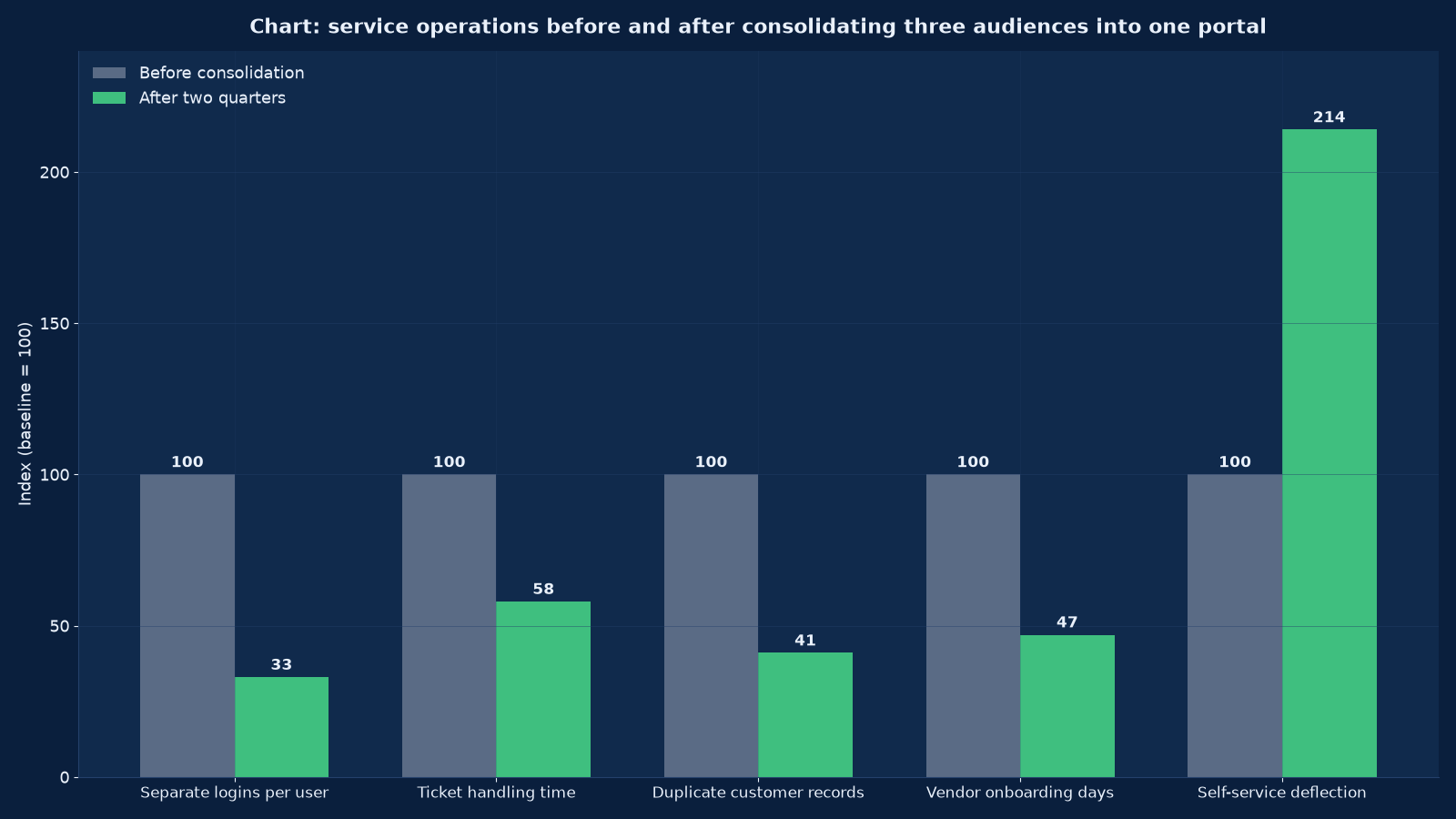
Chart values are an illustrative planning model based on typical UMC engagements and published industry benchmarks. They are not a guarantee of results on any specific project.
A portal is not a website with a login. It is a contract with three parties — the person using it, the system it reads from, and whoever is accountable when the two disagree.
Portal development at Unified Management Consulting covers the authenticated digital surfaces that carry real service relationships: customer portals, vendor and supplier portals, dealer and distributor portals, employee and HR self-service, patient and student portals, member and policyholder portals, and partner or franchise portals. We design the entitlement model, build the interface and the service layer, integrate with the systems that own the data — ERP, CRM, accounting, ticketing, HR, warehouse, hospital or examination systems — and operate the result under measured service levels.
The reason portals fail is rarely the interface. It is that nobody decided who owns a field, what a user is entitled to see when two source systems disagree, how an organisation with several users and roles maps onto a customer record, or what happens when the source system is unavailable. Those decisions are made in the first three weeks of our programme, in writing, before any screen is designed — which is why Figure 1 shows operating metrics improving rather than only a new login page appearing.
🔐 Portal Development — Quick Summary
| Component | What We Deliver |
|---|---|
| Portal assessment and business case | The service cost being addressed quantified: contact volumes, handling times, duplicate records, onboarding delays, and the deflection the portal must achieve to pay for itself. |
| Audience, role and entitlement model | Every audience, role, organisation relationship and data entitlement defined, including the hard cases: multiple users per account, delegated access, temporary contractors, and group structures. |
| Identity, authentication and access | Single sign-on, multi-factor authentication, federation with an existing identity provider, passwordless options, session policy, and account lifecycle from invitation to deactivation. |
| Data ownership and source contracts | Master data decided per field, with synchronisation direction, latency tolerance, conflict rules and a reconciliation report the business can read. |
| Service-layer and API design | The APIs between portal and source systems: versioned, authenticated, rate-limited, idempotent on writes, and observable end to end. |
| Portal interface engineering | A component-based, accessible, mobile-first interface built on a design system, with the performance budgets and states — empty, loading, error, partial — designed rather than improvised. |
| Self-service journeys | The transactions that produce deflection: status tracking, document access, invoicing and payments, requests and approvals, profile and preference management, and knowledge retrieval. |
| Workflow, approvals and audit trail | Multi-step processes with states, approvals, escalations, notifications and a complete audit log suitable for internal and statutory review. |
| Notifications and communication | Email, SMS and WhatsApp notifications tied to real events, with preference control, templates, delivery tracking and a rule against notifying for the sake of it. |
| Security, privacy and compliance | Threat modelling, authorisation testing, encryption, secrets management, consent and retention, data-protection obligations, and the audit evidence a certification requires. |
| Pilot, phased rollout and adoption | A pilot cohort per audience, feedback instrumentation, training and communication, adoption tracking and a support model sized to the real contact volume. |
| Operate and improve | Monitoring across portal and source systems, incident management, retainer support, and a backlog measured against deflection, handling time and satisfaction rather than against features. |
Why portals exist: the cost they remove
A portal is justified by service cost and by relationship quality, not by modernity. We quantify the cost being addressed in week one, because the number determines the scope, the deflection target and whether a portal is the right instrument at all.
| Cost driver | How it shows up | What a portal changes | How we measure the gain |
|---|---|---|---|
| Repeat status enquiries | “Where is my order, ticket, application, report, result or payment?” consuming agent time on questions the systems already answer | Status visible to the person entitled to see it, at any hour, without an agent | Contact volume by reason code, before and after; deflection rate per journey |
| Duplicate and inconsistent records | The same customer, vendor or employee recorded differently across systems, because each channel creates its own | One identity and one record per relationship, with the portal writing to the master rather than to a copy | Duplicate rate in the master data, matched and merged counts |
| Manual document exchange | Invoices, statements, certificates, contracts, prescriptions, marksheets and compliance documents sent by email and re-keyed by hand | Documents available on demand, versioned, with an access log and a download trail | Documents served digitally versus by email; handling time per document request |
| Slow onboarding | Vendor, dealer, employee or patient onboarding taking days or weeks of email, forms and chasing | A guided self-service onboarding journey with validation, document upload, approval workflow and status | Median days from invitation to active, and the share completed without agent intervention |
| Agent handling time | Every contact requiring a lookup across two or three systems before an answer is possible | A consolidated view for the agent as well as the user — the internal half of a portal programme, frequently forgotten | Average handling time and first-contact resolution |
| Compliance and audit burden | Access decisions, approvals and data disclosures evidenced in spreadsheets and email threads | An audit trail generated by the system rather than assembled afterwards | Time to produce an audit extract; findings per internal review |
| Channel inconsistency | The same request handled differently by phone, email, WhatsApp and a branch, with different outcomes | One journey with one set of rules, regardless of the channel that starts it | Variance in outcome and handling time by channel |
Note the agent-facing row. The most common omission in a portal business case is the internal view: a customer portal that deflects contacts but leaves agents switching between three systems to handle the rest produces a smaller gain than projected and a frustrated team. We scope both halves or we say so in the business case.
The entitlement model: the decision everything rests on
Entitlements are the hardest part of portal development and the part most often prototyped incorrectly. A model that handles one user per account will not survive contact with a distributor with forty outlets, a hospital group with delegated administrators, or a vendor whose staff change monthly.
| Relationship pattern | Example | What the model must express | What breaks if it does not |
|---|---|---|---|
| One person, one account | A retail customer, a patient, a student | A single identity with personal data entitlements | Little — which is why prototypes stop here |
| Many people, one organisation | A dealer, a corporate customer, a vendor company, a franchise | An organisation entity with users attached, organisation-level data visibility and organisation administrators who can invite and remove their own people | Every user request routes to your support team; leaving staff retain access; organisation-level reporting is impossible |
| One person, many organisations | A consultant serving several clients, a doctor across hospitals, an agent across brands | An identity with memberships, and a context switch that changes what is visible | Duplicate accounts per relationship, with data leakage risk between them |
| Delegated and temporary access | An external auditor, a contractor, a locum, a seasonal worker, a family member acting for a patient | Time-boxed, scope-limited grants with an expiry and an approver, recorded in the audit trail | Permanent accounts created for temporary needs — the most common source of orphaned privileged access |
| Hierarchical visibility | A regional manager sees all outlets in a region; a group head sees all regions | Entitlements derived from the organisation hierarchy rather than enumerated per user | Manual entitlement maintenance that drifts within a quarter of launch |
| Role-based function access | A finance user sees invoices but not contracts; a warehouse user sees stock but not pricing | Roles as data with a permission matrix, tested including negative cases | Authorisation implemented in the interface, so a direct API call reveals what the screen hid |
| Data sensitivity within a record | A salary field, a diagnosis, a credit limit, a personal identifier | Field-level entitlements, not just record-level, with masking rules and a reason for access | Whole records withheld because a single field is sensitive, or the field exposed to everyone who can see the record |
| Cross-system identity | The same person exists in the ERP, the CRM and the HR system with three identifiers | An identity resolution rule with a survivorship policy, and a documented handling for unmatched records | Two portal accounts for one person, or one account showing another person’s data — the failure that ends programmes |
We build the entitlement model as an explicit artefact — entities, relationships, roles, permission matrix, hierarchy rules and edge-case decisions — and we test it with negative cases: a user attempting to see a sibling organisation’s data, a temporary grant after expiry, an API call bypassing the interface. The tests are the deliverable, not a formality.
Identity, authentication and the account lifecycle
Authentication is where a portal’s security posture is decided, and it is also where its adoption is decided: an onerous login loses users, and a weak one loses data. Both outcomes are avoidable with the same design work.
| Decision | Options | Our default | Why |
|---|---|---|---|
| Identity provider | Build in the portal, use the source system’s, federate with an existing provider, or a dedicated identity service | A dedicated identity layer that federates with what already exists, rather than embedding authentication in the portal application | It survives a portal rebuild, serves multiple audiences, and centralises the security controls worth auditing |
| Multi-factor authentication | SMS one-time password, authenticator app, email magic link, passkeys, hardware keys for privileged access | Multi-factor for every account by default, with passkeys or authenticator apps preferred over SMS, and hardware keys for administrators | Credential compromise is the dominant portal threat, and SMS-based factors are the weakest commonly deployed option |
| Passwordless and recovery | Password reset flows, recovery channels, helpdesk-assisted reset with identity verification | Passwordless where the audience supports it; otherwise a reset flow that does not leak whether an account exists, and a documented helpdesk verification procedure | Recovery is the bypass around every authentication control; it must be designed as carefully as the login |
| Session policy | Idle timeout, absolute timeout, concurrent session limits, remember-device behaviour, forced logout on entitlement change | Timeouts matched to data sensitivity, remember-device limited in duration, and immediate session termination when entitlements change | Shared and unattended devices are common in dealer, hospital and branch environments |
| Invitation and registration | Self-registration, invited registration, imported accounts with first-login verification, administrator-created accounts | Invitation-based with verification for organisational audiences; self-registration only where the identity can be verified against a source system | Open registration on a portal with sensitive data creates an entitlement problem you cannot test your way out of |
| Deactivation and offboarding | Manual removal, source-system-driven deactivation, scheduled expiry, immediate revocation on incident | Deactivation driven by the source system where possible, with immediate revocation available and audited | Orphaned accounts are the finding that appears in every access review |
| Accessibility of authentication | Multi-factor methods usable with assistive technology, alternatives where a method is inaccessible, session timing that does not exclude | Accessible authentication designed in, meeting current WCAG requirements for authentication processes | An inaccessible login excludes users from everything behind it, whatever the portal’s own conformance |
| Audit and monitoring | Authentication events, privilege changes, failed attempts, impossible travel, export volumes, administrator actions | Full audit trail with alerting on anomalies, retained per policy and exportable for review | It is the evidence for an audit, an investigation and a customer dispute |
Where the estate already has an identity provider or an access-management investment, we federate with it rather than replacing it. Where it does not, we recommend the smallest identity layer that meets the requirements, and we deliver the security design with our cybersecurity practice so the controls are verified rather than assumed.
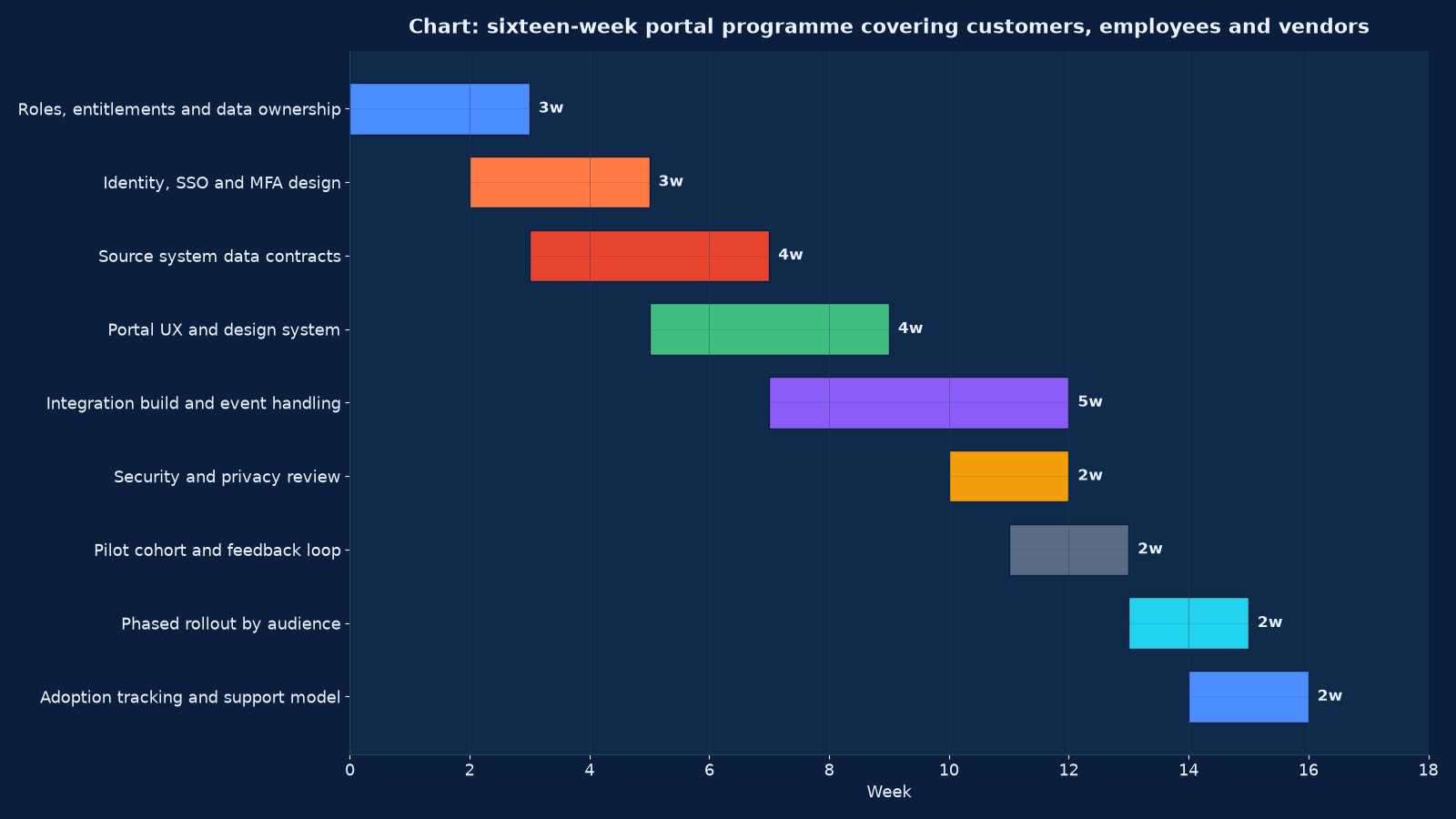
Chart values are an illustrative planning model based on typical UMC engagements and published industry benchmarks. They are not a guarantee of results on any specific project.
Integration: reading from systems you do not own
A portal is a view over data owned elsewhere. The integration design therefore decides whether the portal is trusted: a portal that shows a stock position, a balance or a result that the source system contradicts loses its users permanently, however good the interface is.
| Design decision | What we specify | Consequence of leaving it implicit |
|---|---|---|
| Master data per field | One owning system per field, with consumers listed; a survivorship rule where sources disagree | Two systems writing the same field, and a reconciliation project that never ends |
| Synchronisation pattern | Read-through at request time, cached with an event-driven refresh, or replicated on a schedule — chosen per data type | Either a portal that is slow because every view queries the ERP, or one that is fast and wrong |
| Latency tolerance | An explicit tolerance per data type: stock and balances tight, profile and history relaxed | A customer seeing an order status the warehouse has already changed, and a support contact that costs more than the integration saved |
| Failure behaviour | What the portal shows when a source system is unavailable, slow or returning partial data — degraded states designed, not defaulted | A blank screen or an error page during a source-system outage, which users read as the portal being broken |
| Writes and idempotency | Every write operation repeatable safely, with an idempotency key, optimistic locking where needed, and a defined conflict resolution | Duplicate requests, double payments, and updates that silently overwrite each other |
| Correlation and observability | A correlation identifier carried from the portal action through every service and back, with flow-level monitoring | An incident that cannot be attributed, and an argument between three vendors instead of a fix |
| Bulk and batch operations | Reconciliation jobs, bulk uploads, statement generation and reporting extracts designed separately from interactive flows | A nightly batch that overloads the source system, or a report that queries production during peak |
| Versioning and change control | Versioned contracts with consumer notification, contract tests in the pipeline, and a rule that a source-system upgrade cannot break the portal silently | An ERP upgrade changing a field, discovered through user complaints |
| Legacy and undocumented interfaces | Where the source system exposes only a database, a file drop or an undocumented endpoint, an explicit anti-corruption layer with a documented contract | Portal logic entangled with legacy internals, making both unmaintainable |
We deliver this layer with our systems integration practice and the pipeline with DevOps engineering. Where the source data is dirty — and it usually is — we profile it in week four and publish the size of the problem, because a portal launched over unreconciled duplicate records shows every one of them to the customer. CRM data migration describes the same discipline on the CRM side.
Self-service journeys that actually deflect
Deflection is earned by journeys that are faster than phoning, not by publishing a login. Each journey needs a completion measure, a fallback and an honest assessment of whether the user will prefer it.
| Journey | What must be true for it to work | Fallback when it cannot be completed | Measure |
|---|---|---|---|
| Track a request, order or application | Real-time or near-real-time status from the source system, with the next step and the expected date stated plainly | A contact route that carries the reference, so the agent does not re-ask what the portal already knows | Status views per contact avoided; contact volume by reason code |
| Access documents | Versioned documents available on demand, with an access log and a retention rule | A document request that generates the same audit trail as a direct download | Documents served digitally versus by email |
| View and pay invoices | Accurate balances from the accounting system, payment initiation with reconciliation back, and dispute raising inside the same view | An offline payment path recorded in the same reconciliation | Invoices paid digitally; days sales outstanding; dispute handling time |
| Raise and manage a request or ticket | Categories that match how users describe problems, required fields that do not exceed what is needed, and visible progress with notifications | Phone and email intake writing into the same queue rather than a separate one | Share of tickets raised by self-service; first-contact resolution |
| Approvals and delegated actions | A clear approval chain, mobile-friendly approval, reminders with escalation, and a complete audit trail | An in-person or email approval recorded into the same workflow | Median approval cycle time; approvals completed on mobile |
| Profile, preferences and consent | Users able to correct their own data, manage notification preferences and control consent, writing back to the master record | A supported change request where self-editing is restricted by regulation or contract | Data correction contacts avoided; consent record completeness |
| Onboarding and registration | A guided journey with validation, document upload, verification steps and visible progress, completable in one sitting | Assisted onboarding by an agent into the same workflow, not a parallel process | Median days from invitation to active; abandonment points |
| Knowledge and answers | Searchable, current, entitlement-aware help content that answers the questions agents actually receive | A contact route from the article that carries what the user was reading | Article views per deflected contact; search zero-result rate |
The last row is the one most programmes under-invest in. Self-service without usable help content deflects the easy contacts and leaves the expensive ones, which produces a modest gain and a disappointing business case. The content is written from the contact reasons in your own queue, not from a product manual.
Designing for the people who must use it
Portal adoption is a design and change-management outcome, not a launch outcome. The curves in Figure 3 are produced by decisions taken in the design and rollout phases.
| Audience characteristic | Design consequence | Rollout consequence |
|---|---|---|
| Low digital confidence or first-time users | Plain language, one task per screen, visible progress, forgiving validation, no jargon, and a help route on every screen | Assisted onboarding, printed quick guides, and a support channel staffed for the first weeks |
| Mobile-first and mid-tier devices | Responsive or mobile-native layouts, small payloads, minimal JavaScript, offline-tolerant behaviour and large touch targets | Testing on the actual devices and networks the audience uses, not on an office connection |
| Multiple roles within one organisation | Context switching, clear labelling of which organisation and role is active, and organisation administrators who can manage their own people | Briefing the organisation administrators first; they are your distribution channel |
| High-frequency, task-focused users | Keyboard support, saved views, bulk actions, deep links to specific records, and a fast path for the repeat task | Measuring task time with experienced users, not only first-time completion |
| Users with accessibility requirements | Accessible authentication, screen-reader-compatible flows, sufficient contrast, target sizes and no time-limited interactions without control | Assistive-technology testing with the audience, and an accessible alternative route published |
| Internal agents and staff | A consolidated case view, fewer system switches, copy-ready summaries and the ability to act on behalf of a user with an audit trail | Training on the changed workflow, and measuring handling time rather than only satisfaction |
| Users who will resist | A channel that remains available for those entitled to it, with a reason recorded rather than a forced migration | A parallel-running period, and honest reporting of the share still using the old channel |
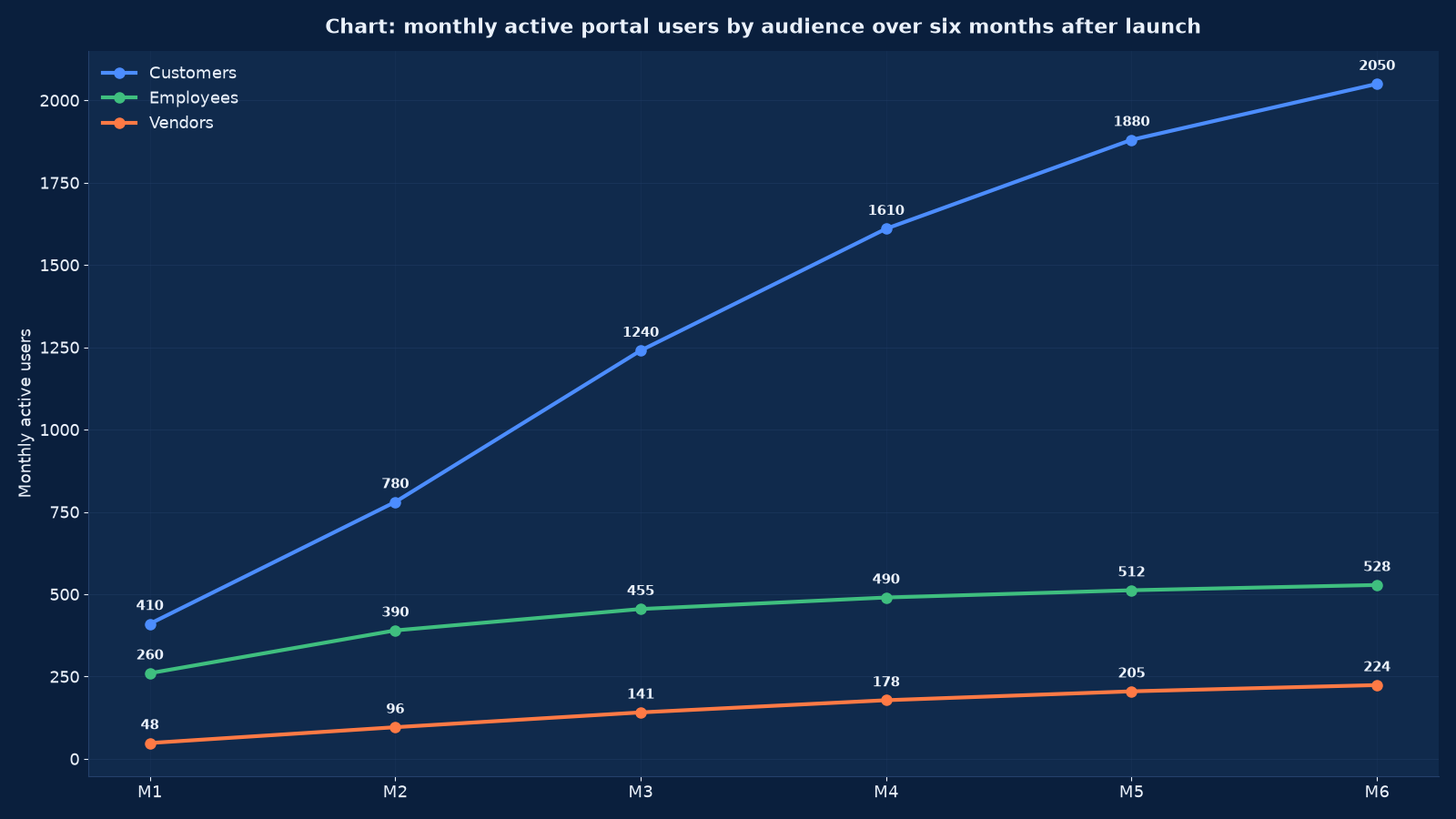
Chart values are an illustrative planning model based on typical UMC engagements and published industry benchmarks. They are not a guarantee of results on any specific project.
Security, privacy and the evidence an auditor wants
Portals concentrate sensitive data behind an internet-facing interface, which makes them a deliberate target. Security and privacy are designed in the first three weeks alongside the entitlement model, reviewed formally before pilot, and evidenced continuously afterwards.
| Area | Control | Evidence produced |
|---|---|---|
| Threat modelling | An explicit model of the portal’s attack surface: authentication bypass, entitlement escalation, injection, insecure direct object references, data exposure through APIs, and account takeover | A threat model document with mitigations mapped to controls and tests |
| Authorisation testing | Negative test cases for every role and organisation boundary, at interface and API level, including attempts to access a sibling organisation’s records by guessing identifiers | A permission matrix with test results per cell, including the failures |
| Application security | Input validation, output encoding, parameterised data access, secrets in a managed store, dependency auditing, secure configuration and a hardened deployment | Static and dynamic analysis reports with triage recorded, and a patching service level |
| Data protection and privacy | Lawful basis per data type, purpose limitation, retention schedule, consent records, data subject request handling, cross-border transfer considerations and processor agreements | A data map with retention per field, a consent record design, and a subject-request procedure with tested timings |
| Encryption | TLS in transit with a current configuration, encryption at rest for sensitive stores, and field-level protection for identifiers, financial data and health information where required | Configuration baselines and key-management documentation |
| Audit and logging | Authentication events, entitlement changes, record access on sensitive data, exports, administrator actions and integration failures, retained per policy | Audit extracts produced on demand during the security review, with the retrieval time measured |
| Third-party and supply chain | Assessment of every service the portal depends on: identity, payments, messaging, analytics, hosting, with contractual security obligations | A processor and vendor register with assessment status per entry |
| Independent review | A security and privacy review before pilot, and vulnerability assessment or penetration testing before general availability | A review report with findings, severity, remediation and retest results |
Where certification is the objective — ISO 27001, SOC 2, a sector requirement or a customer audit — the portal’s evidence is produced in the format the auditor needs, and we deliver it with IT audit and compliance services rather than retrofitting a control set afterwards.
Technology choices, made on evidence
Portal technology decisions follow from the entitlement model, the source systems and the team that will maintain it. We are stack-neutral and we publish the reasoning, including when the boring choice is the right one.
| Decision | What drives it | Common choices and when each fits |
|---|---|---|
| Application platform | Integration depth, team capability, hosting constraints, licence posture and expected lifespan | Laravel or another PHP framework where cost and hiring dominate and integration is conventional; .NET where the enterprise estate is Microsoft and identity federation is expected; Java where transactional scale and a regulated environment apply |
| Front end | Interactivity requirements, the design system, accessibility obligations and who maintains it | A server-rendered component approach for form and document-heavy portals; a React front end where interaction, saved views and bulk operations dominate |
| Identity | Existing providers, audience type, multi-factor requirements and how many applications will share it | A dedicated identity service federating with existing providers; the source system’s identity only where a single audience and a single application will ever exist |
| Data layer | Latency tolerance, source-system capability and reporting needs | Read-through APIs for tight data; a synchronised read model for heavy views and reporting; a warehouse where analytics across systems is required |
| Hosting | Data residency, compliance, peak behaviour, existing investment and cost | A managed cloud with defined residency and scaling; existing on-premises infrastructure where regulation or investment requires it |
| Notifications | Audience channels, delivery reliability needs and preference control | Email as the baseline with SMS and WhatsApp where the audience actually reads them, all behind one preference model |
| Reporting and analytics | Operational reporting versus strategic analysis, and who consumes each | Operational views inside the portal; strategic analysis in the warehouse and dashboard layer, delivered with BI dashboards and executive reporting |
| Build versus buy | How standard the workflow is, how much the entitlement model deviates, and the total cost of ownership over five years | A configured product where the workflow is standard and the deviation is marginal; a built portal where the entitlement model, integration depth or workflow is genuinely specific |
The build-versus-buy question deserves the most scrutiny, because a portal product that must be bent to an unusual entitlement model costs more over five years than building, and a custom build of a standard workflow costs more than configuring. We answer it with a five-year total cost of ownership for both routes and a recommendation, not with a preference. our buying-criteria method is the same reasoning applied to a related category.
Rollout, adoption and the support model
A portal launched to everybody at once is a portal whose problems are discovered by everybody at once. We roll out by audience and cohort, instrument adoption from day one, and size the support model on the measured contact volume rather than on an estimate.
| Stage | Activity | Success criterion | Risk if skipped |
|---|---|---|---|
| Pilot cohort | A representative group per audience, with instrumentation, a feedback channel and daily review of errors, deflection and completion | Journeys complete without agent intervention; defect rate falling; feedback themes addressed | Every defect and every confusing label is discovered by the whole user base simultaneously |
| Communication and training | Audience-specific communication, organisation-administrator briefing, short task-focused guides, and internal agent training on the changed workflow | Users arrive knowing what the portal is for and how to log in; agents can complete a contact in the new view | Adoption stalls and contacts rise, because the portal added a channel instead of replacing one |
| Phased rollout | Audience by audience, region by region or cohort by cohort, with a defined pause criterion | Each phase meets its criteria before the next begins; the pause criterion is real and used at least once in planning | A failure in one audience contaminates the reputation of the portal in all of them |
| Adoption instrumentation | Monthly active users by audience and role, journey completion and abandonment, deflection by reason code, satisfaction, and the share still using the old channel | The curves are read monthly and acted on, not reported annually | A portal whose real usage is unknown, defended or abandoned on the basis of anecdote |
| Support model | Sized from measured contact volume, with the portal as a support channel itself, and the escalation path to source-system owners defined | Contact volume falls as predicted; the residual contacts are the ones worth a human | Support cost rising after launch, which kills the business case retrospectively |
| Parallel running and sunset | The old channel kept available for a defined period with a dated sunset, and the reason for any exception recorded | Sunset achieved for the audiences where it was planned, with the exceptions documented | Two channels running indefinitely at the cost of both |
| Continuous improvement | A backlog prioritised against deflection, handling time, satisfaction and cost rather than against feature requests | The measures move in the second and third quarters, after the launch effect settles | A portal that plateaus at its launch capability and slowly stops being used |
Adoption is reported honestly, including the audiences that did not adopt and why. A vendor curve still rising at month six, as in Figure 3, is an opportunity; a flat customer curve is a defect in the journey or in the communication, and it is cheaper to fix in month two than in month twenty.
Engagement models and fees
Four models. Each begins with a paid assessment, because the entitlement model and the source systems determine the cost more than the number of screens does.
| Model | Duration | Included | Best for |
|---|---|---|---|
| Portal assessment and business case | Three to four weeks | Service cost quantification, audience and role analysis, draft entitlement model, source system and data quality assessment, integration approach, security and privacy constraints, build-versus-buy comparison and a costed plan | Deciding whether a portal is the right instrument, and what it must do to pay for itself |
| Portal build | Sixteen to thirty weeks depending on audiences and integrations | Entitlement model, identity and authentication, integration layer, interface, self-service journeys, workflow and audit, notifications, security review, pilot, phased rollout and adoption instrumentation | A defined service cost with a deflection target and the source systems available to integrate |
| Portal extension or rescue | Six to fourteen weeks | Assessment of an existing portal, entitlement or integration repair, journey redesign, adoption recovery, and a security review of what was built | A portal that launched and did not deliver: low adoption, data disagreements, security concerns or an unmaintainable integration layer |
| Operate and improve | Twelve months | Monitoring across portal and source systems, incident management, patching, entitlement administration support, adoption reporting and an improvement backlog against the measures | A live portal that needs an owner for the composition rather than for the code alone |
Fees are quoted after the assessment, driven by audience count, entitlement complexity, number and condition of source systems, security and compliance obligations, and the rollout scale. We publish the assumptions — particularly source-system API availability and data quality — because those two are what change. Where a source system cannot expose the data needed, we say so in the assessment with the cost of the workaround rather than discovering it during the build.
Why portal programmes disappoint, and the countermeasure
The disappointments are consistent enough to plan against. Each has a countermeasure that is cheap in the first three weeks and unavailable later.
| Disappointment | Root cause | Countermeasure |
|---|---|---|
| Adoption far below forecast | The portal was designed from the organisation’s structure rather than the user’s task, and the old channel remained easier | Journey selection driven by contact-volume data; the old channel’s cost made visible; assisted onboarding and organisation-administrator briefing |
| Data disagreements destroy trust | No master-data decision, so the portal shows a position the source system contradicts | Master data per field with a survivorship rule, latency tolerance per data type, and a reconciliation report the business reads |
| Support cost rises instead of falling | Deflection assumed rather than measured, and the internal agent view never built | Deflection measured per journey from the pilot, and the agent-facing consolidation scoped as part of the programme |
| Entitlement model cannot express reality | Prototyped on one user per account, then extended with special cases until it became unmaintainable | The full relationship pattern table completed in week three, with negative tests per pattern |
| Security findings at the worst moment | Security reviewed after general availability, or after a customer audit demanded evidence | Threat modelling in week one, a formal review before pilot, and penetration testing before general availability |
| Integration becomes unmaintainable | Point-to-point calls with no contracts, no correlation identifiers and no observable failure | Versioned contracts, contract tests, correlation end to end, flow-level monitoring and an anti-corruption layer for legacy sources |
| The project runs out of budget before rollout | Rollout, training, communication and adoption work unbudgeted because they are not engineering | Rollout planned and costed as a phase with its own criteria, from the assessment onwards |
| Nobody owns it after launch | The project team disbands; the portal has users but no owner for entitlements, data quality or improvement | An operating model named before launch, with the entitlement administration and data quality roles assigned |
The common thread is that portals are treated as software projects when they are service redesigns with software in them. The organisations that get value from them decided the entitlements, the data ownership and the service model first, and treated the interface as the last piece. the case for unified systems makes the same argument at enterprise level, and our infrastructure management case study shows what operating a service relationship to a measured standard looks like in practice.
Frequently Asked Questions About Portal Development
What kinds of portals do you build?
Customer, vendor and supplier, dealer and distributor, employee and HR self-service, patient, student and examination, member and policyholder, and partner or franchise portals. The common requirement is an authenticated relationship with entitlements, data from systems you do not control, and a service cost worth removing.
How is a portal different from a website with a login?
A portal is defined by its entitlement model, its integration contracts and its audit trail. A website with a login has an account area. The difference shows up in the hard cases: many users per organisation, one user across several organisations, delegated and time-boxed access, hierarchical visibility, and field-level sensitivity — all of which a login area handles badly or not at all.
How long does a portal take to build?
Sixteen weeks for a single-audience portal with two or three source systems; up to thirty weeks for three audiences with deep integration, workflow, approvals and a phased rollout. The variables are entitlement complexity and the condition of the source systems, not the number of screens.
Can you integrate with our ERP, accounting, HR or hospital system?
Yes — that is most of the work. Where the system has an API we use it; where it exposes only a database, a file drop or an undocumented endpoint we build an explicit anti-corruption layer with a documented contract. We assess API availability and data quality in week four and publish the findings, because they determine the plan.
What if our data is duplicated and inconsistent?
Then the portal will show it, and users will notice. We profile the source data early, quantify the duplication, and either remediate before launch or design the portal’s survivorship rules and disclose the limitation. Launching over unreconciled duplicates and hoping nobody notices is not an option we offer.
Do you handle single sign-on and multi-factor authentication?
Yes. We federate with an existing identity provider where one exists, and otherwise build the smallest identity layer that meets the requirements. Multi-factor is on by default for every account, with passkeys or authenticator apps preferred over SMS, hardware keys for administrators, and accessible authentication designed in from the start.
How do you make people actually use it?
By making the journeys faster than phoning, instrumenting adoption from the pilot, briefing organisation administrators as your distribution channel, keeping the old channel available for a defined period with a dated sunset, and reading the adoption curves monthly rather than annually. Adoption is a design and change-management outcome; a launch announcement does not produce it.
Can the portal serve internal staff as well as customers?
It should. The agent-facing consolidated view is where a large share of the saving sits, because it removes the system-switching that inflates handling time. Programmes that build only the external half consistently under-deliver against their own business case, and we scope both or record why we did not.
What does it cost?
The three to four week assessment is a fixed fee and is credited against a build if you proceed within ninety days. The build is quoted after the assessment, driven by audience count, entitlement complexity, source-system condition, security obligations and rollout scale. We do not quote a build against an unassessed entitlement model, because that number is a guess about the hardest part of the work.
Is it better to buy a portal product?
Sometimes. Where the workflow is standard and your entitlement model is conventional, a configured product is cheaper over five years. Where the entitlements, integration depth or workflow are genuinely specific, a product gets bent until it costs more than a build. We compare both routes with a five-year total cost of ownership and recommend whichever the numbers support.
How do you keep it secure and compliant?
Threat modelling in week one, a permission matrix tested with negative cases, a formal security and privacy review before pilot, penetration testing before general availability, encryption in transit and at rest, a complete audit trail, retention and consent designed per field, and continuous patching under a maintenance arrangement. Where certification is required, the evidence is produced in the auditor’s format with our compliance practice.
Who maintains it after launch?
Either your team, with our documentation, runbooks and training, or us under an operate-and-improve retainer with measured service levels. What we insist on is that somebody is named before launch, with responsibility for entitlement administration, data quality, monitoring and the improvement backlog — because an unowned portal decays into a login page nobody uses.
Commission a Portal Assessment and Business Case
Send us the service relationship you want to digitise, the systems that hold the data, and your current contact volumes if you have them. Within four weeks you will have the service cost quantified, a draft entitlement model covering the hard relationship cases, a source-system and data-quality assessment, an integration approach with latency and failure behaviour defined, the security and privacy constraints, a build-versus-buy comparison over five years, and a costed plan with a deflection target you can hold the project to.
Contact Unified Management Consulting to arrange a confidential first conversation.
Related Services
Portal development is delivered with the practices that own each layer:
- Custom CRM Development & Integration — the relationship data and the service workflows a portal usually sits beside
- Enterprise Systems Integration — ERP, accounting, HR, ticketing and warehouse contracts
- Full-Stack .NET Development and Full-Stack Java Development — the enterprise estates portals most often federate with
- Full-Stack React Development — interactive portal interfaces with saved views and bulk operations
- Cybersecurity Services — identity, threat modelling, penetration testing and incident response
- IT Audit, Compliance & ISO 27001 / SOC 2 Readiness — the audit evidence a portal’s controls must produce
- IT Helpdesk & End-User Support — the support model sized to real contact volume
- WhatsApp Marketing Services and SMS Marketing Services — the notification channels portal users in India actually read
- Website Strategy & Information Architecture — task analysis, full content inventory, card sorts and tree tests, content model, navigation and governance
- Accessibility (WCAG) Remediation & Compliance — WCAG 2.2 Level AA audits, severity-ranked defect registers, design-system remediation, assistive-technology verification and accessibility statements
- Core Web Vitals & Performance Engineering — field instrumentation, LCP, INP and CLS engineering, third-party governance, performance budgets and a pipeline regression gate
- Web Application Maintenance & Support — patching, monitoring, verified backups, defect management, committed change capacity and monthly service reporting
- PHP & Laravel Development — legacy assessment, domain modelling, strangler-fig modernisation, APIs, test automation and CI/CD on modern PHP
- Headless & Composable Commerce — readiness assessment, capability mapping, storefront engineering, integration layer, migration rehearsals and cost governance
- Website Migration & Replatforming — full estate inventory, one-to-one redirect maps, functional parity, dry-run rehearsals, staged cutover and tested rollback