Your website has exactly 3 seconds to load before a visitor leaves. Not 5 seconds. Not 10 seconds. Three seconds. In a city like Lucknow where mobile internet speeds vary and users have zero patience for slow websites, page speed is not just a technical metric. It is a revenue metric. Every second of delay costs you visitors, leads, and sales. Yet most business websites in Lucknow load in 5-10 seconds, silently losing half their potential customers before the page even appears.
This guide explains why website speed matters so much for your business, what causes slow loading, and how to fix it. Whether you have a hotel website, an e-commerce store, or a restaurant website, these optimisation strategies will improve your speed, your search rankings, and your conversion rates.
Why Website Speed Matters More Than You Think
The Business Impact of Slow Loading
Research consistently demonstrates that page speed directly impacts every business metric:
Speed Impact
Statistic
Business Consequence
1-second delay
7% reduction in conversions
Rs.7 lakh lost annually on Rs.1 crore revenue
2-second delay
40% increase in bounce rate
Nearly half your visitors leave immediately
3-second load time
53% of mobile users abandon
Majority of mobile visitors never see your content
5-second load time
Conversion rate drops by 70%
Only 3 in 10 visitors take any action
Slow site
79% will not return
Lost customers who go to faster competitors
The SEO Impact of Speed
Google explicitly uses page speed as a ranking factor. In 2021, Google introduced Core Web Vitals as official ranking signals, making speed even more critical for SEO performance:
Largest Contentful Paint (LCP): Measures how long the largest content element takes to load. Target: under 2.5 seconds
First Input Delay (FID): Measures how long the browser takes to respond to user interaction. Target: under 100 milliseconds
Cumulative Layout Shift (CLS): Measures visual stability (elements moving around during load). Target: under 0.1
Websites that fail Core Web Vitals thresholds rank lower than faster competitors, even if their content is better. This means a slow website undermines your entire digital marketing investment because even well-ranked pages lose visitors to poor user experience.
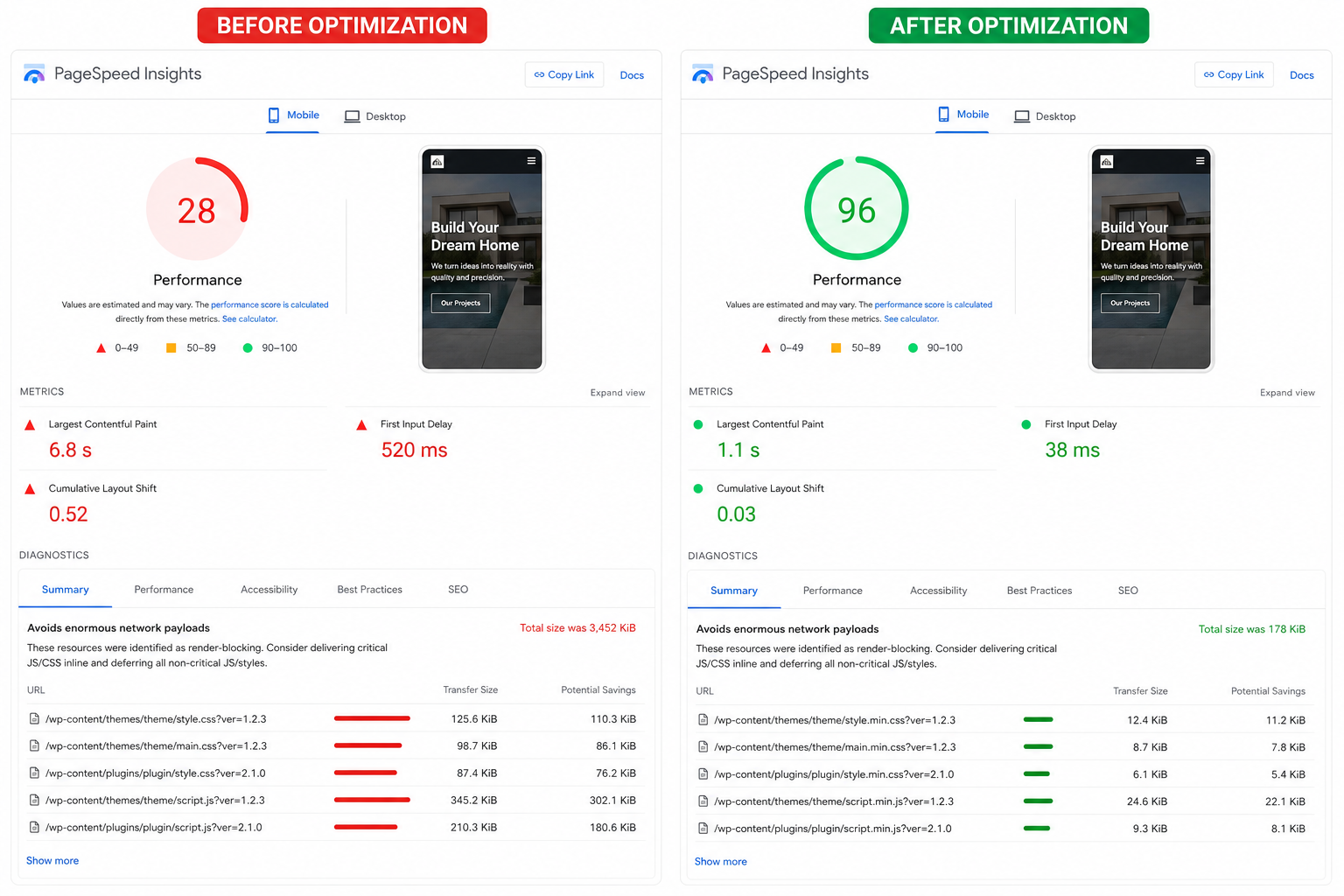
Google PageSpeed Insights comparison: before optimisation (28/100 in red) vs after optimisation (96/100 in green) — the dramatic difference that proper speed optimisation makes to your Core Web Vitals and user experience.
What Makes Websites Slow: The 10 Most Common Causes
1. Unoptimised Images
Images are the single biggest cause of slow websites. Most business websites use images that are 5-10x larger than necessary, in outdated formats, without compression or responsive sizing. A single unoptimised hero image can add 3-5 seconds to page load time.
The fix:
Compress all images using tools like TinyPNG or ShortPixel (aim for 70-85% quality)
Use modern formats: WebP for photographs, SVG for logos and icons
Implement responsive images with srcset so mobile devices load smaller versions
Lazy load images below the fold so they only load when the user scrolls to them
Specify image dimensions in HTML to prevent layout shift
2. Too Many Plugins (WordPress)
Each WordPress plugin adds its own CSS, JavaScript, and database queries. A website with 30+ plugins can be 3-5x slower than one with 10 well-chosen plugins. Many businesses install plugins for minor features without understanding the performance cost.
The fix:
Audit every plugin and remove those that are not essential
Replace heavy plugins with lighter alternatives
Use a single plugin for multiple functions where possible (e.g., one security + performance plugin instead of separate ones)
Deactivate plugins on pages where they are not needed
Consider custom code for simple features instead of full plugins
3. Poor Hosting
Shared hosting, which most small business websites use, places your website on a server with hundreds of other websites. When any of those sites gets traffic spikes, your website slows down. This is like sharing a single-lane road with hundreds of other vehicles.
The fix:
Upgrade to managed WordPress hosting (Cloudways, Kinsta, WP Engine) for 2-5x speed improvement
Choose hosting with servers in India (Mumbai, Bangalore, or Delhi data centres) for lower latency to Lucknow visitors
Ensure your hosting plan has adequate PHP workers and memory for your traffic level
Consider a VPS or dedicated server for high-traffic websites
4. No Caching
Without caching, your server must process every page request from scratch, running PHP code and database queries for every single visitor. With caching, the server delivers a pre-built HTML file in milliseconds instead of seconds.
The fix:
Implement page caching (WP Rocket, W3 Total Cache, or LiteSpeed Cache)
Enable browser caching with proper cache headers
Use object caching (Redis or Memcached) for database-heavy websites
Implement a Content Delivery Network (CDN) like Cloudflare for global speed
5. Render-Blocking Resources
CSS and JavaScript files that load in the head of your page prevent the browser from displaying any content until they are fully downloaded and processed. This creates a visible delay where visitors see a blank white screen before any content appears.
The fix:
Defer non-critical JavaScript to load after page content
Inline critical CSS (the minimum CSS needed for above-the-fold content)
Async load third-party scripts (analytics, chat widgets, social media embeds)
Combine and minify CSS and JavaScript files to reduce HTTP requests
Remove unused CSS and JavaScript using tools like PurgeCSS
6. No Content Delivery Network (CDN)
Without a CDN, every visitor downloads your website files from a single server location. A visitor in Lucknow accessing a website hosted in the US experiences significant latency. A CDN stores copies of your files on servers worldwide, serving them from the nearest location.
The fix:
Set up Cloudflare (free tier available) or a premium CDN like BunnyCDN
Configure CDN to serve all static assets (images, CSS, JavaScript, fonts)
Enable CDN-level caching and compression
Use a CDN with Indian edge servers for optimal Lucknow performance
7. Heavy Theme or Page Builder
Many WordPress themes and page builders load enormous amounts of CSS and JavaScript on every page, regardless of whether those features are used. Some popular page builders add 500KB+ of CSS and 300KB+ of JavaScript to every page.
The fix:
Choose a lightweight theme (GeneratePress, Astra, or custom-built) for new website development projects
If using a page builder, choose one that loads assets conditionally (only on pages that use them)
Disable unused theme features and modules
Consider a website redesign with a performance-first approach if your current theme is fundamentally heavy
8. Too Many HTTP Requests
Every element on your page (images, scripts, stylesheets, fonts, iframes) requires a separate HTTP request. A page with 100+ requests takes significantly longer to load than one with 30 requests, even if the total file size is similar.
The fix:
Combine CSS files and JavaScript files where possible
Use CSS sprites for small icons and images
Limit third-party embeds (social media feeds, maps, chat widgets)
Use system fonts or limit web fonts to 2-3 weights
Replace image-heavy elements with CSS or SVG where possible
9. Unoptimised Database
WordPress databases accumulate bloat over time: post revisions, spam comments, expired transients, and orphaned metadata. A bloated database makes every page request slower because queries take longer to process.
Every third-party script you add (Google Analytics, Facebook Pixel, chat widgets, heatmap tools, A/B testing tools) adds loading time. Many websites have 10-15 third-party scripts, adding 2-4 seconds to page load.
The fix:
Audit all third-party scripts and remove those that are not delivering measurable value
Load non-critical scripts after page content using defer or async attributes
Use Google Tag Manager to manage and control script loading
Consider server-side tracking to reduce client-side script load
Replace heavy tools with lighter alternatives where possible
How to Measure Your Website Speed
Before optimising, measure your current performance with these free tools:
Tool
What It Measures
Key Metrics to Watch
Google PageSpeed Insights
Core Web Vitals, performance score
LCP, FID, CLS, Performance Score (target: 90+)
GTmetrix
Detailed waterfall analysis, recommendations
Fully Loaded Time, Total Page Size, Requests
WebPageTest
Real-world loading from multiple locations
Time to First Byte, Start Render, Speed Index
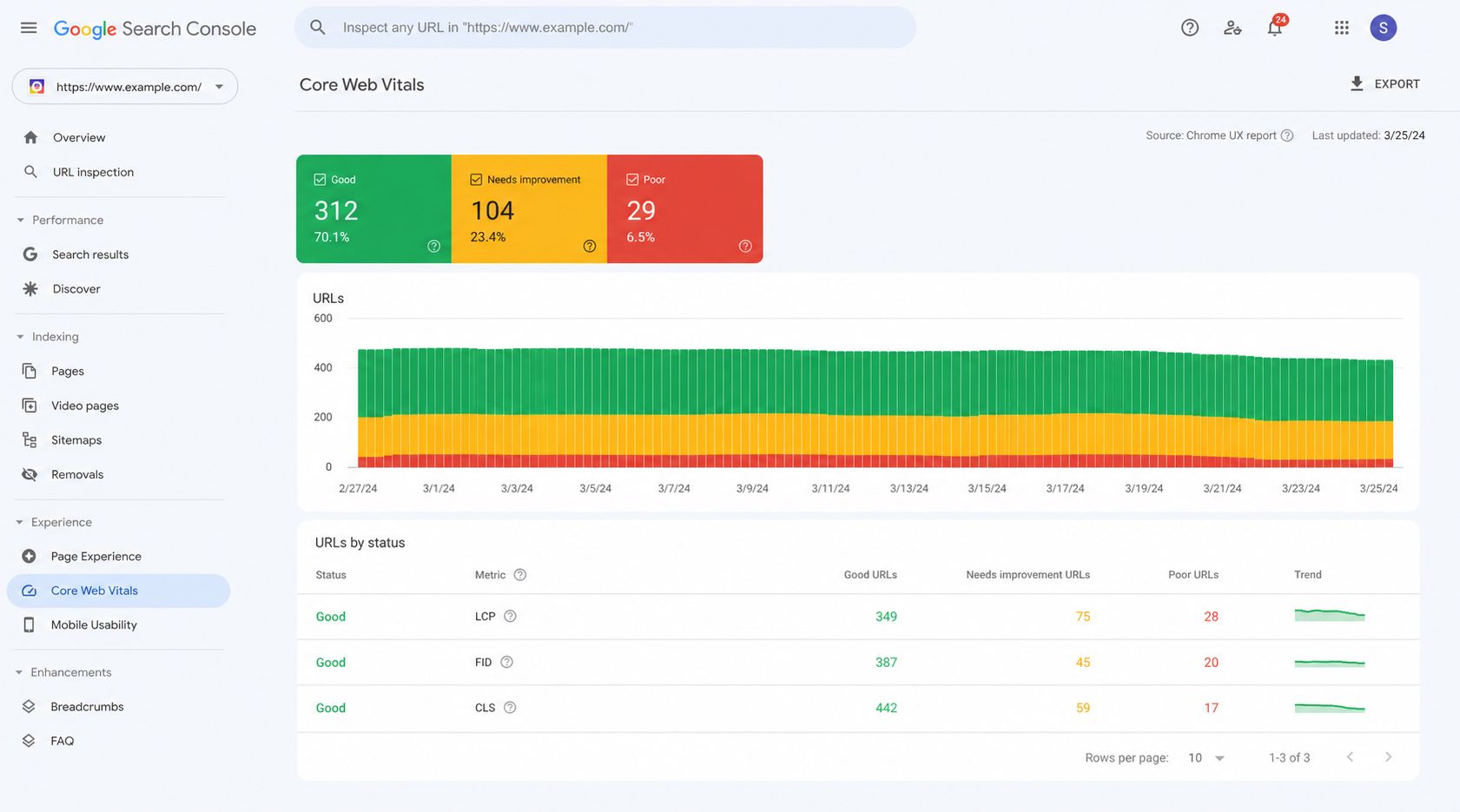
Google Search Console Core Web Vitals report: URLs grouped by performance status — Good (green), Needs Improvement (yellow), and Poor (red). Monitor this monthly to catch speed regressions early.
Google Search Console
Core Web Vitals across your real users
URL groups with Poor/Needs Improvement status
Chrome DevTools
Network analysis, rendering performance
Network waterfall, Lighthouse audit
Speed Optimisation Priority Matrix
Not all optimisations deliver equal results. Focus on high-impact, low-effort improvements first:
Optimisation
Impact
Effort
Priority
Image compression and WebP conversion
Very High
Low
Do First
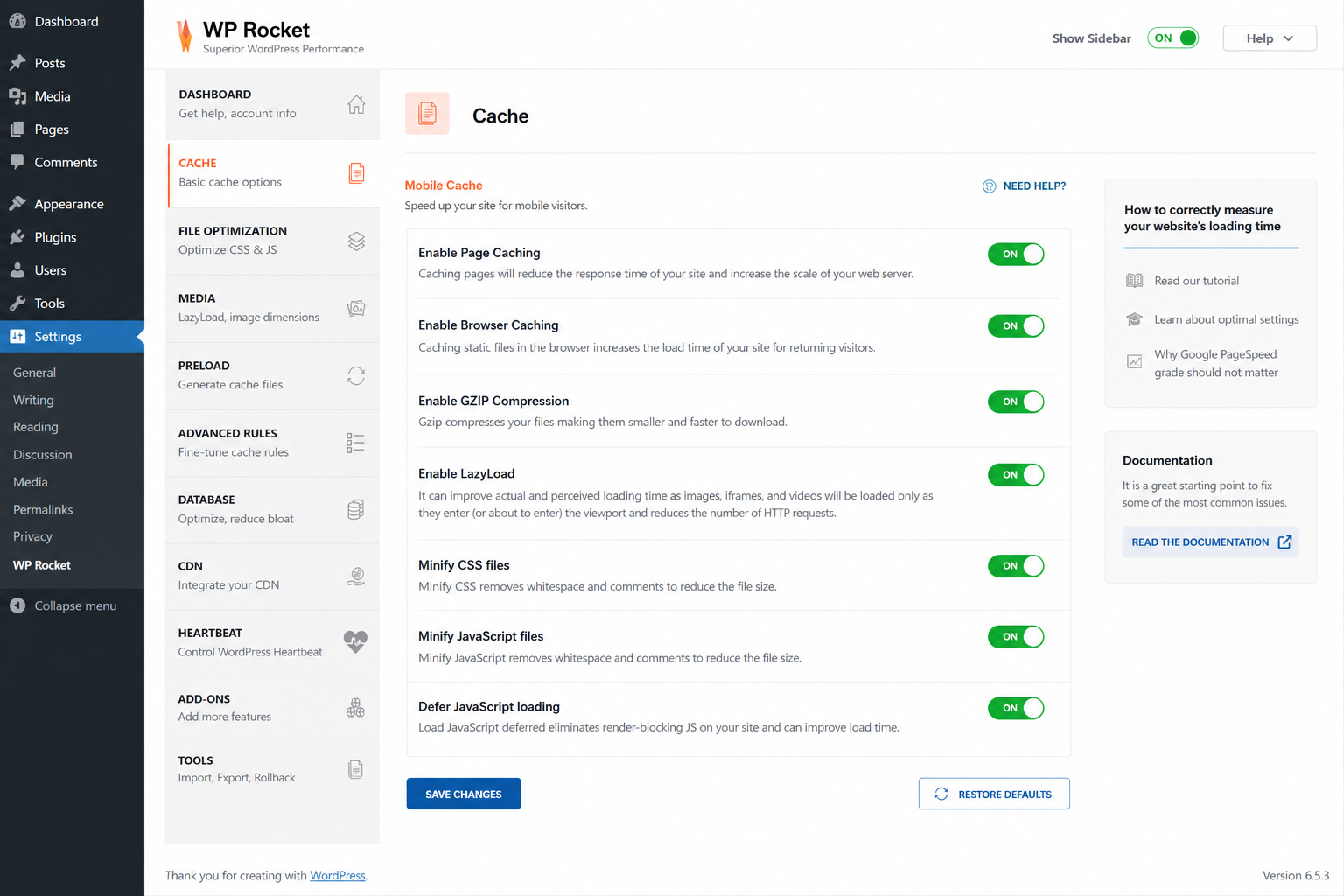
A properly configured caching plugin with page caching, browser caching, GZIP compression, lazy loading, and JavaScript deferral all enabled — the single highest-impact speed optimisation for WordPress websites.
Enable page caching
Very High
Low
Do First
Add CDN (Cloudflare)
High
Low
Do First
Lazy load images
High
Low
Do First
Remove unused plugins
High
Medium
Do Second
Defer JavaScript
High
Medium
Do Second
Upgrade hosting
Very High
Medium
Do Second
Minify CSS/JS
Medium
Low
Do Second
Reduce third-party scripts
High
High
Do Third
Switch to lightweight theme
Very High
Very High
Consider Redesign
Expected Results from Speed Optimisation
Before Optimisation
After Optimisation
Business Impact
Page load: 6-8 seconds
Page load: 1.5-2.5 seconds
60-70% faster loading
Bounce rate: 60-70%
Bounce rate: 35-45%
40-50% fewer visitors leaving
Conversion rate: 1-2%
Conversion rate: 2.5-4%
100-200% more conversions
PageSpeed score: 30-50
PageSpeed score: 85-95
Better SEO rankings
Mobile experience: Poor
Mobile experience: Good
Higher mobile conversions
When to Optimise vs When to Redesign
Speed optimisation works well for websites with a solid foundation that have accumulated performance issues over time. However, some websites have fundamental architectural problems that optimisation alone cannot fix. If your website scores below 20 on PageSpeed Insights even after basic optimisation, has an inherently heavy theme that cannot be replaced, or requires functionality that conflicts with performance, it may be time for a complete website redesign built with performance as a core requirement from the start.
Website speed is not a one-time fix. As you add content, install plugins, and update your website, performance can degrade over time. Include speed monitoring and optimisation in your regular website maintenance routine:
Monthly speed audits using PageSpeed Insights and GTmetrix
Image optimisation for every new image uploaded
Plugin audits to identify and remove unnecessary additions
Database cleanup and optimisation quarterly
Core Web Vitals monitoring through Google Search Console
Performance testing after every major update or change
Frequently Asked Questions
What is a good website loading speed?
A good website loads in under 2.5 seconds on mobile and under 1.5 seconds on desktop. Google PageSpeed Insights score should be 90+ on desktop and 80+ on mobile. Core Web Vitals should all be in the green zone: LCP under 2.5s, FID under 100ms, and CLS under 0.1.
How much does website speed optimisation cost?
Basic speed optimisation (image compression, caching, CDN setup) costs Rs.10,000-25,000 as a one-time project. Comprehensive optimisation including code-level changes, theme modifications, and ongoing monitoring costs Rs.25,000-75,000. Speed optimisation is often included in website maintenance plans at Rs.5,000-15,000/month.
Does website speed affect Google Ads performance?
Yes, significantly. Google Ads Quality Score includes landing page experience, which factors in page speed. Slow landing pages get lower Quality Scores, which means higher cost per click and lower ad positions. Improving landing page speed by 2 seconds can reduce your cost per click by 15-25%, directly improving your Google Ads ROI.
Will speed optimisation break my website?
When done properly by experienced developers, speed optimisation should not break your website. However, some aggressive optimisations (JavaScript deferral, CSS inlining) can cause issues if not implemented carefully. Always test on a staging environment first, and work with a professional website development company that understands the balance between performance and functionality.
How often should I check my website speed?
Check your website speed monthly as part of regular maintenance. Also check after every major change: new plugin installation, theme update, content additions, or design changes. Google Search Console provides continuous Core Web Vitals monitoring based on real user data, alerting you when performance degrades.
Is mobile speed more important than desktop speed?
Yes, for most businesses in Lucknow. Over 65% of website traffic comes from mobile devices, and Google uses mobile-first indexing, meaning your mobile speed directly impacts your search rankings. Mobile devices also have slower processors and connections, making optimisation even more critical for mobile performance.
Is Your Website Too Slow? Get a Free Speed Audit
Discover exactly what is slowing down your website and how to fix it. Our team will run a comprehensive speed audit and provide actionable recommendations. Contact UMC today for your free website speed audit.
A practical insight article on AI infrastructure capacity, capital intensity, neocloud growth, and the operational pressure created by AI compute demand.





3 comments