
Editorial note: This article supports UMC’s website strategy cluster by focusing on what happens after launch, when performance, security, and ongoing technical upkeep become business-critical.
Every business knows the cost of building a website. Few know the cost of keeping one running.
You invest lakhs in design, development, and launch — then shift your attention elsewhere. Six months later, pages load slower. Plugins break. Security patches pile up. And suddenly, your biggest digital asset is quietly becoming your biggest liability.
Website maintenance isn’t an afterthought. It’s an ongoing investment — and one that most businesses severely underestimate when planning their annual budgets. In fact, a 2025 survey by HubSpot found that 63% of small and mid-size businesses have no dedicated website maintenance budget. They operate on the assumption that once a website is built, it should simply keep working.
That assumption is expensive.
In this guide, we’ll break down exactly what website maintenance involves, the real costs of neglecting it, and how to build a maintenance budget that protects your investment and your bottom line.
Why Website Maintenance Is More Than Just “Keeping It Running”
Think of your website like a car. You wouldn’t drive 1,00,000 kilometres without an oil change and expect it to perform like new. Your website is no different. It runs on software, integrates with third-party services, and faces constant security threats — all of which demand regular attention.
But unlike a car, your website faces threats that evolve daily. New security vulnerabilities are discovered constantly. Google updates its search algorithm thousands of times per year. Browser standards change. Third-party APIs deprecate. And your competitors are always improving their own digital presence.
Website maintenance is not a single task — it’s a comprehensive discipline that covers multiple areas:
Software Updates and Compatibility
WordPress core, your theme, and every plugin you’ve installed all receive regular updates. These aren’t cosmetic — they include critical security patches, performance improvements, and compatibility fixes. When WordPress releases a major update, some plugins may break. When a plugin updates, it may conflict with your theme. Managing these dependencies requires testing and expertise.
Frequency needed: Weekly checks, with immediate action for critical security patches.
Security Monitoring and Protection
WordPress powers over 43% of all websites, making it the most targeted CMS for hackers. Security maintenance includes:
- Malware scanning and removal
- Firewall rule updates and configuration
- Login attempt monitoring and brute force protection
- SSL certificate monitoring and renewal
- File integrity monitoring to detect unauthorized changes
- User access audits to ensure only authorized people have admin access
- Vulnerability scanning for known plugin and theme exploits

Frequency needed: Continuous monitoring with weekly deep scans.
Performance Optimization
Website speed directly impacts user experience, conversion rates, and search rankings. Performance maintenance involves:
- Regular speed audits using tools like Google PageSpeed Insights and GTmetrix
- Image optimization and compression for new content
- Database cleanup — removing post revisions, spam comments, and transient data
- Cache configuration and management
- CDN (Content Delivery Network) monitoring
- Server resource monitoring to detect memory or CPU bottlenecks
- Core Web Vitals monitoring and optimization (LCP, FID, CLS)
Frequency needed: Monthly audits with ongoing monitoring.
Content Updates and Quality Assurance
Your website content isn’t static. It needs regular attention:
- Fixing broken links (both internal and external)
- Updating outdated information, statistics, and case studies
- Refreshing old blog posts for SEO
- Testing all forms, buttons, and interactive elements
- Ensuring contact information and business hours are current
- Checking that all downloadable resources (PDFs, brochures) are current
Frequency needed: Monthly content audits with immediate fixes for critical errors.
Backup Management
Backups are your insurance policy against data loss, hacking, and human error. A proper backup strategy includes:
- Automated daily backups of both files and database
- Off-site storage (separate from your hosting server)
- Regular backup testing — a backup you can’t restore is worthless
- Version history so you can roll back to any point
- Documented restoration procedures for emergencies
Frequency needed: Daily automated backups with monthly restoration tests.
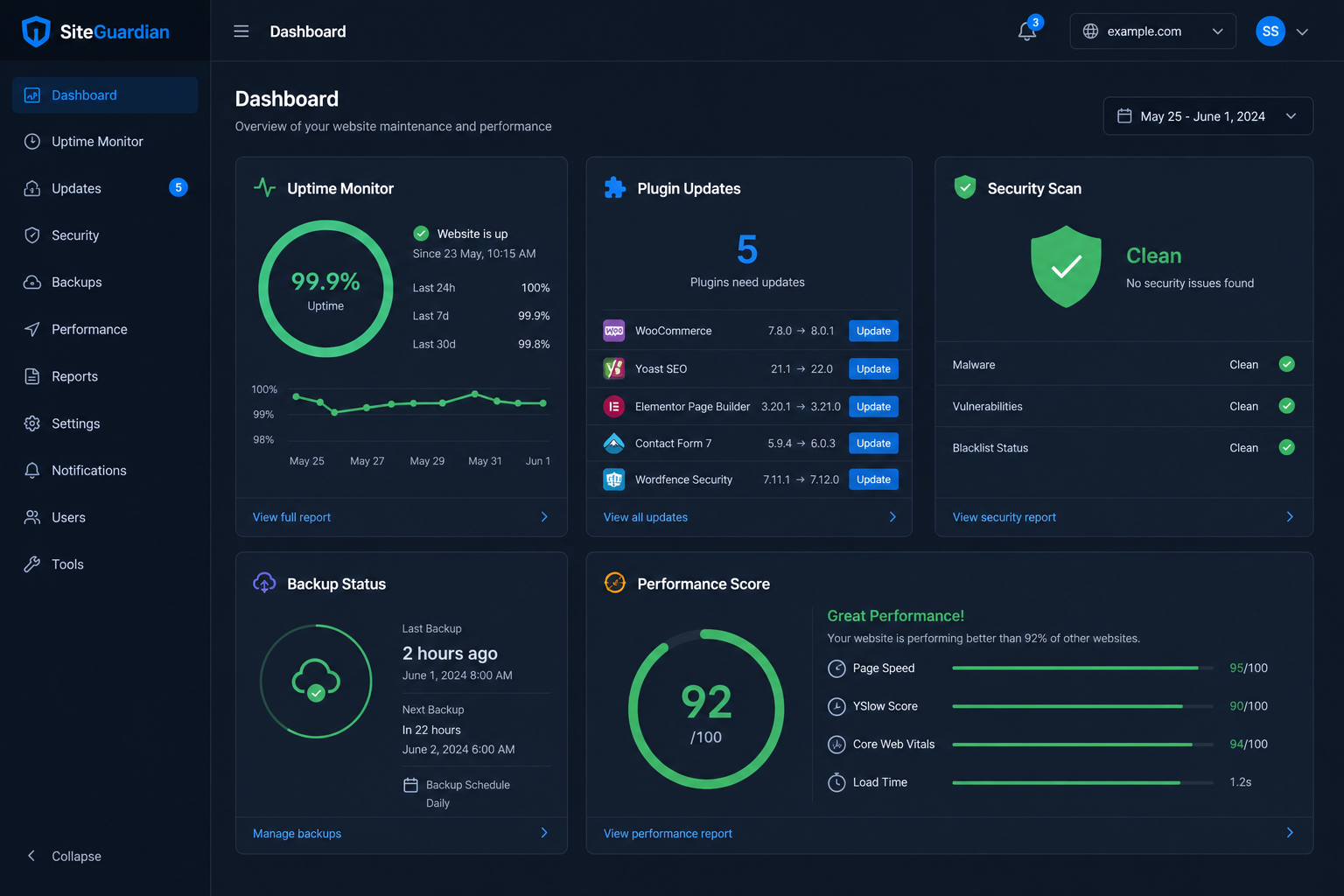
SEO Health Monitoring
Search engine optimization isn’t a one-time project. It requires continuous monitoring:
- Crawl error monitoring via Google Search Console
- Index coverage tracking
- Mobile usability checks
- Structured data validation
- Keyword ranking tracking
- Competitor benchmarking
- Algorithm update impact assessment
Frequency needed: Weekly monitoring with monthly reporting.
The True Cost of Ignoring Website Maintenance
Skipping maintenance doesn’t save money. It defers cost — often with interest. Here are the four major areas where neglect becomes expensive:
1. Security Breaches — The Costliest Consequence
A hacked website can cost anywhere from ₹50,000 to ₹5,00,000+ to clean up — not to mention the reputational damage and lost revenue during downtime.
Consider these statistics:
- Over 30,000 websites are hacked every day globally
- 43% of cyber attacks target small businesses
- The average cost of a data breach for a small business is ₹25 lakh
- 60% of small businesses that suffer a cyber attack go out of business within six months
- WordPress sites account for 90%+ of all CMS hacks — primarily due to outdated plugins
When your website is hacked, you face:
- Emergency cleanup and malware removal costs
- Downtime revenue loss (every hour your site is down costs you money)
- Google blacklisting your site (showing a “This site may be hacked” warning to visitors)
- Loss of customer trust and reputation
- Legal liability if customer data is compromised
- SEO ranking losses that can take months to recover
Real-world example: A mid-size consulting firm in Mumbai discovered their website had been injected with spam links. Google flagged the site, organic traffic dropped 85% overnight, and it took three months and ₹2,00,000 in cleanup and recovery efforts to restore their rankings. A ₹5,000/month maintenance plan would have caught the vulnerability before it was exploited.
2. Lost Revenue from Slow Loading Speeds
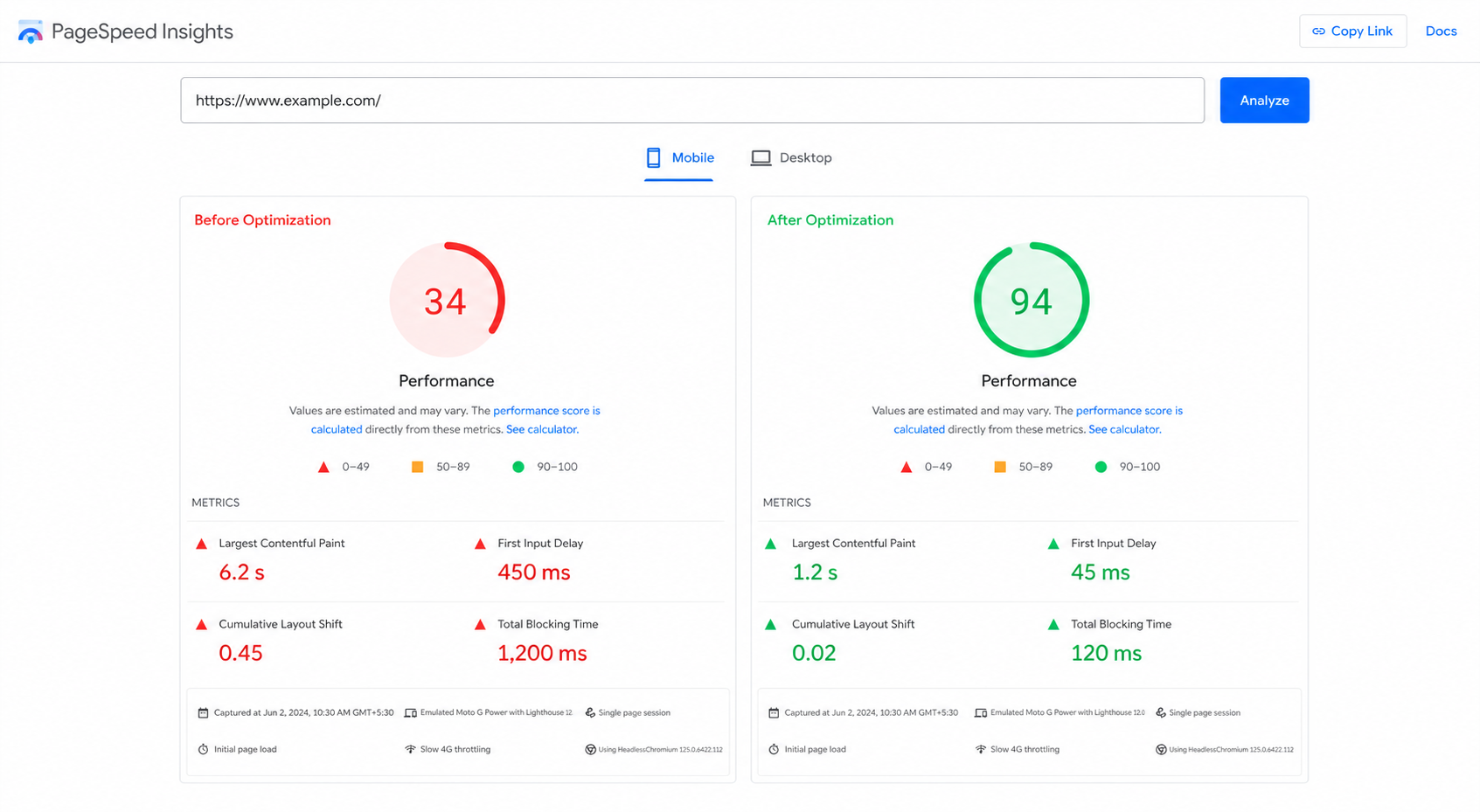
Website speed isn’t just a technical concern — it’s a revenue driver. Research consistently shows:
- A 1-second delay in page load time reduces conversions by 7%
- 53% of mobile users leave a site that takes longer than 3 seconds to load
- 79% of online shoppers who experience performance issues won’t return to the site
- Pages that load in 1 second have a conversion rate 3x higher than pages that load in 5 seconds
Let’s put this in business terms:
| Monthly Revenue | Current Load Time | Revenue Lost per Second of Delay | Annual Revenue Loss |
|---|---|---|---|
| ₹5,00,000 | 4 seconds (vs. ideal 2s) | ₹35,000/month | ₹4,20,000/year |
| ₹10,00,000 | 4 seconds (vs. ideal 2s) | ₹70,000/month | ₹8,40,000/year |
| ₹25,00,000 | 4 seconds (vs. ideal 2s) | ₹1,75,000/month | ₹21,00,000/year |
Without regular performance maintenance, websites inevitably slow down as content accumulates, plugins add overhead, and databases grow. What loaded in 2 seconds at launch may take 5 seconds within a year — silently bleeding revenue every single day.
3. SEO Penalties and Ranking Losses
Google rewards fast, secure, and well-maintained websites. This is especially critical for local SEO, where your Google Business Profile ranking depends on website health. Neglect maintenance and you’ll face:
- Crawl errors — Broken pages and 404 errors waste Google’s crawl budget and signal a poorly maintained site
- Duplicate content — Without proper maintenance, duplicate pages can proliferate (www vs non-www, HTTP vs HTTPS, trailing slashes, pagination issues)
- Mobile penalties — Google’s mobile-first indexing means a poor mobile experience directly hurts rankings
- Security warnings — Google flags hacked sites and may remove them from search results entirely
- Core Web Vitals failures — Google now uses page experience signals (LCP, FID, CLS) as ranking factors
- Stale content — Google prefers fresh, updated content over outdated pages
Recovering lost rankings can take 3–6 months of consistent effort. During that time, your competitors capture the traffic and leads that should be yours.
4. Emergency Repair Costs — The Most Expensive Kind
When something breaks on an unmaintained website, it’s always urgent and always expensive. Here’s the cost comparison:
| Scenario | With Maintenance | Without Maintenance (Emergency) |
|---|---|---|
| Plugin breaks after WordPress update | ₹0 (caught during testing) | ₹15,000–₹50,000 (emergency developer + downtime) |
| Website goes down at 2 AM | ₹0 (monitoring catches it instantly) | ₹25,000–₹75,000 (emergency response + lost revenue) |
| Database corruption | ₹0 (restored from backup in minutes) | ₹50,000–₹2,00,000 (data recovery specialist) |
| Security breach | ₹0 (prevented by security monitoring) | ₹50,000–₹5,00,000+ (cleanup + recovery + reputation) |
| SSL certificate expires | ₹0 (auto-renewal monitored) | Lost trust + browser warnings until fixed |
The pattern is clear: routine maintenance costs a fraction of emergency repairs. Every rupee spent on prevention saves ₹10–₹50 in crisis response.
What Should You Budget for Website Maintenance?
The honest answer: it depends on your website’s complexity, traffic volume, business criticality, and the technology stack you’re using. Here’s a comprehensive framework to help you plan:
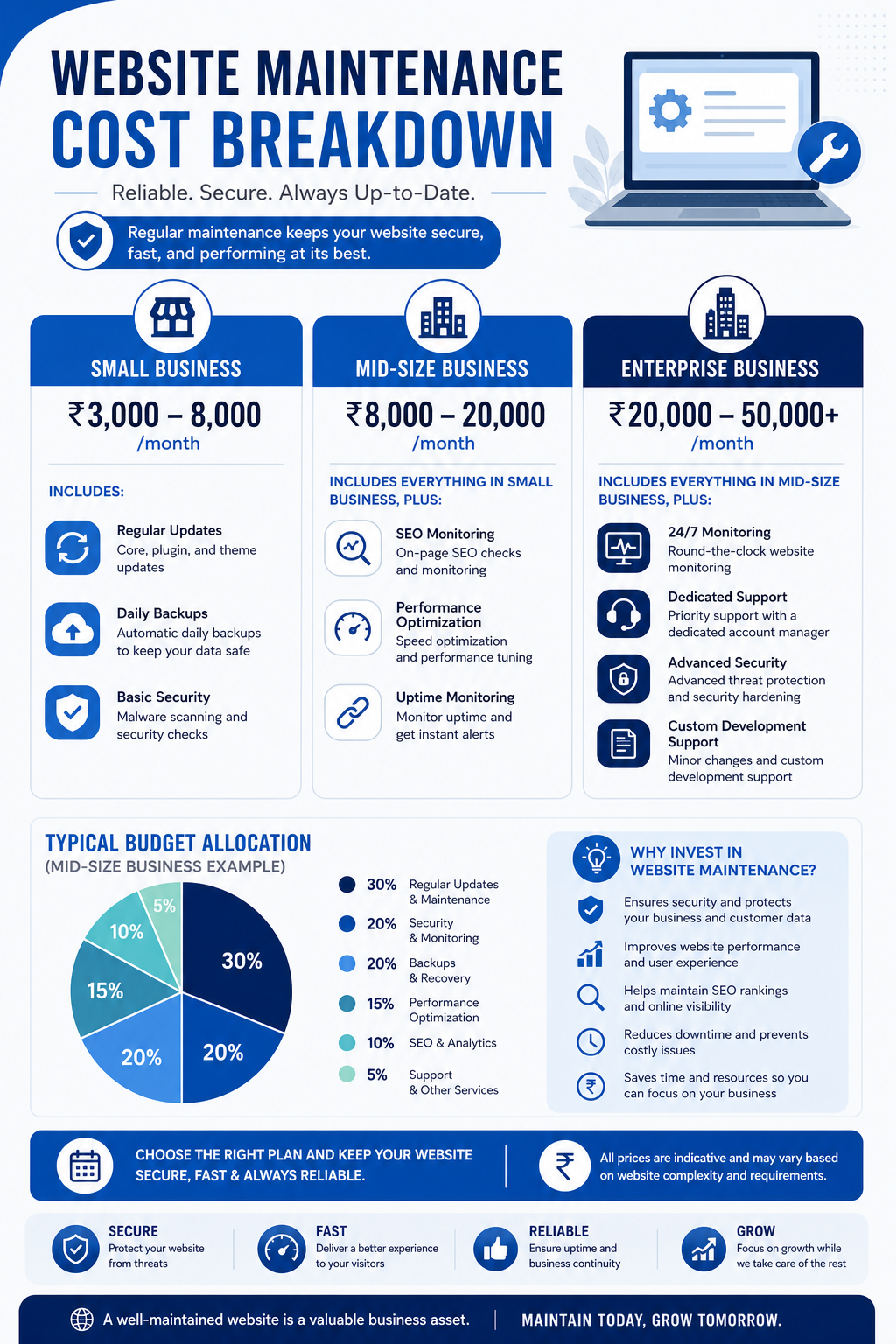
Budget Tiers by Business Size
| Website Type | Monthly Budget | What’s Included | Annual Cost |
|---|---|---|---|
| Basic Business Site (5–15 pages, contact form, blog) |
₹3,000 – ₹8,000/month | WordPress updates, daily backups, security scans, uptime monitoring, monthly reports, minor content edits (2–3/month) | ₹36,000 – ₹96,000 |
| Mid-Size Business (Blog + services + lead gen) |
₹8,000 – ₹20,000/month | All above + performance optimization, SEO monitoring, regular content updates (5–10/month), plugin management, staging environment | ₹96,000 – ₹2,40,000 |
| E-commerce / High Traffic (WooCommerce, custom features) |
₹20,000 – ₹50,000+/month | All above + 24/7 uptime monitoring, database optimization, A/B testing, priority support, load testing, PCI compliance checks | ₹2,40,000 – ₹6,00,000+ |
| Enterprise / Custom (e.g. hotels, hospitals, e-commerce) (Multiple integrations, high traffic) |
₹50,000 – ₹2,00,000+/month | All above + dedicated support team, custom development, SLA guarantees, disaster recovery, compliance audits | ₹6,00,000 – ₹24,00,000+ |
The 15–20% Rule
A widely accepted industry rule of thumb: allocate 15–20% of your original website development cost per year for ongoing maintenance.
For example:
- Website cost ₹5,00,000 to build → Budget ₹75,000 – ₹1,00,000/year for maintenance
- Website cost ₹15,00,000 to build → Budget ₹2,25,000 – ₹3,00,000/year for maintenance
- Website cost ₹50,00,000 to build → Budget ₹7,50,000 – ₹10,00,000/year for maintenance
This covers routine maintenance, security, performance, minor improvements, and the inevitable fixes that arise. It does NOT include major redesigns or new feature development — those are separate projects.
Hidden Costs to Include in Your Budget
When building your maintenance budget, don’t forget these often-overlooked expenses:
- Hosting costs — Quality hosting is the foundation. Budget hosting (₹200–500/month) often leads to more maintenance issues. Managed WordPress hosting (₹2,000–10,000/month) reduces your maintenance burden significantly.
- Premium plugin licenses — Many essential plugins require annual licenses (₹5,000–₹50,000/year total). Letting these expire means losing updates and support.
- SSL certificate — Free options exist (Let’s Encrypt), but extended validation certificates cost ₹10,000–₹50,000/year.
- CDN services — Content Delivery Networks like Cloudflare Pro (₹1,500/month) improve speed and security globally.
- Domain renewal — ₹800–₹2,000/year, but forgetting to renew can be catastrophic.
- Email services — Professional email hosting (Google Workspace, Zoho) costs ₹200–₹1,000/user/month.
- Third-party integrations — CRM connections, payment gateways, analytics tools — all may have costs and require monitoring.
DIY vs. Professional Maintenance: Which Is Right for You?
When DIY Makes Sense
You might handle maintenance yourself if:
- You have technical knowledge of WordPress, hosting, and security
- You have 4–8 hours per month to dedicate to website maintenance
- Your website is simple (basic brochure site with a blog)
- You’re comfortable troubleshooting issues when they arise
- You understand the risks and accept them
When Professional Maintenance Is Essential
You should hire a professional maintenance provider if:
- Your website generates revenue (directly or through lead generation)
- You don’t have in-house technical expertise
- Downtime would significantly impact your business
- Your website has e-commerce functionality
- You’ve invested significantly in your website and want to protect that investment
- You’d rather spend your time on your core business than managing technology
What to Look for in a Maintenance Provider
Not all maintenance services are created equal. Here’s what separates a quality provider from a basic one:
✅ What a Good Provider Delivers
- Proactive monitoring — They catch problems before you notice them, not after you call
- Regular updates with testing — Updates are applied in a staging environment first, tested for compatibility, then pushed to production
- Comprehensive backups — Daily automated backups stored off-site with tested restoration procedures
- Transparent reporting — Monthly reports showing what was done, performance trends, security status, and recommendations
- Response time guarantees — Clear SLAs for different types of issues (critical, high, medium, low priority)
- Security expertise — Firewall management, malware scanning, vulnerability assessment, and incident response
- Performance optimization — Regular speed audits with measurable improvements
- Strategic guidance — Recommendations for improvements that drive business results, not just technical fixes
❌ Red Flags to Avoid
- No clear scope of work or service agreement
- No regular reporting or communication
- No staging/testing before applying updates
- No backup verification or testing
- Unusually cheap pricing (often means corners are being cut)
- No dedicated point of contact or support channel
- No security monitoring or incident response plan
Building Your Maintenance Plan: A Practical Checklist
Whether you handle maintenance yourself or hire a provider, here’s a comprehensive checklist organized by frequency:
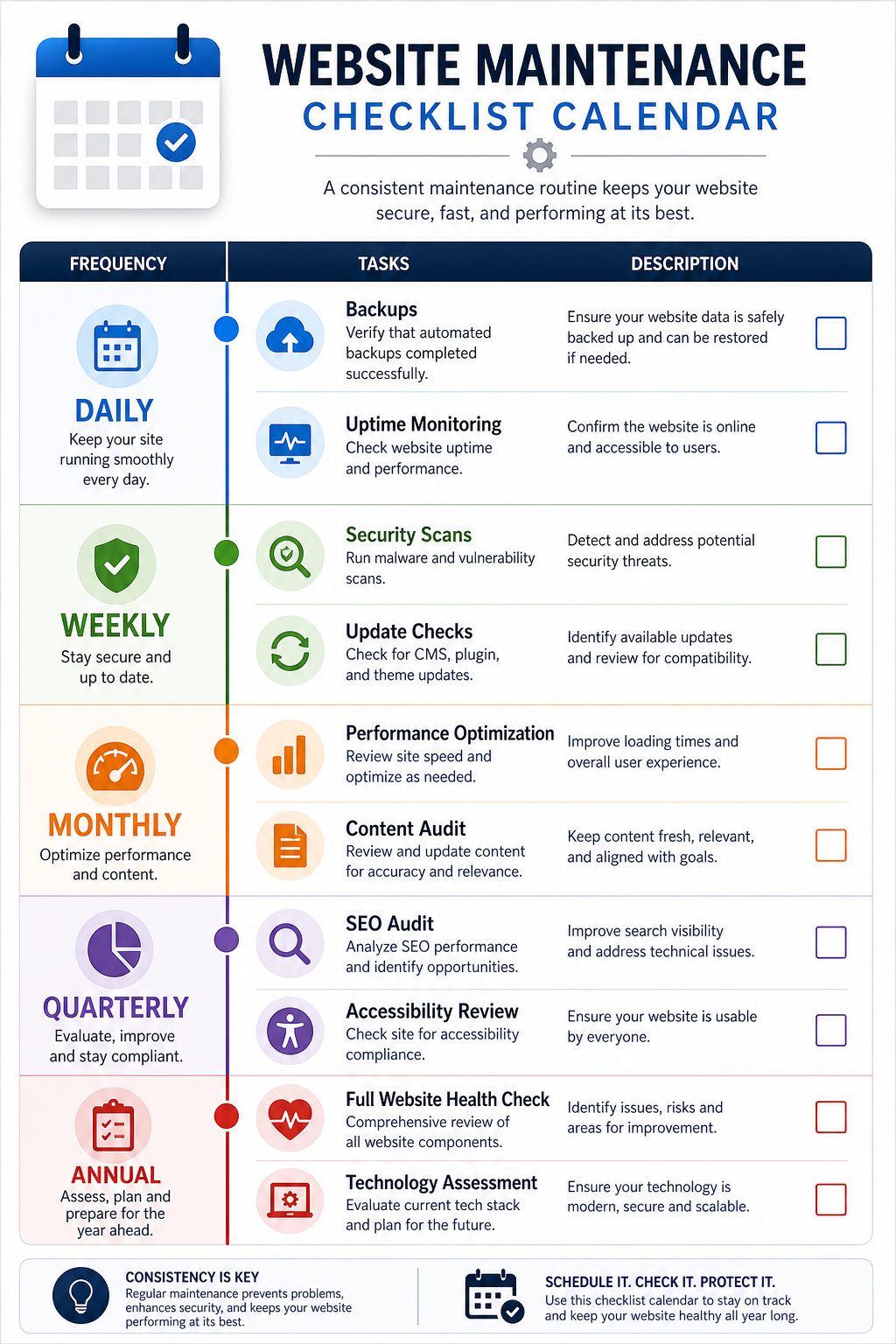
📅 Daily
- Automated backups running and verified
- Uptime monitoring active
- Security scan alerts reviewed
📅 Weekly
- Check for WordPress core, theme, and plugin updates
- Review security logs for suspicious activity
- Test all forms and interactive elements
- Check Google Search Console for crawl errors
- Review website speed scores
📅 Monthly
- Apply tested updates to production
- Full security audit and vulnerability scan
- Performance optimization review
- Broken link check across all pages
- Content review and updates
- Database optimization (clean revisions, spam, transients)
- Review and update user access permissions
- Test backup restoration
📅 Quarterly
- Comprehensive SEO audit
- Mobile experience testing across devices
- Accessibility audit (WCAG compliance)
- Content strategy review and planning
- Analytics review — traffic trends, conversion rates, user behaviour
- Competitor website comparison
- Technology stack assessment — is anything outdated or due for replacement? If your website is more than 3-4 years old, it may be time to consider a full website redesign rather than continued maintenance.
📅 Annually
- Full website audit and health check
- Domain and SSL certificate renewal review
- Premium plugin license renewal
- Hosting plan review — still appropriate for your needs?
- Disaster recovery plan testing
- Budget planning for the coming year
- Strategic review — does the website still align with business goals?
The ROI of Website Maintenance: A Business Case
Let’s look at the return on investment with a concrete example:
Scenario: A consulting firm with a website generating 500 leads per month at a 3% conversion rate, with an average client value of ₹2,00,000.
| Metric | Without Maintenance | With Maintenance |
|---|---|---|
| Monthly leads | 350 (30% lost to slow speed/poor UX) | 500 |
| Conversion rate | 2% (poor performance hurts trust) | 3% |
| New clients/month | 7 | 15 |
| Monthly revenue | ₹14,00,000 | ₹30,00,000 |
| Annual maintenance cost | ₹0 | ₹1,80,000 (₹15,000/month) |
| Annual revenue | ₹1,68,00,000 | ₹3,60,00,000 |
| Net difference | ₹1,90,20,000 more revenue with maintenance | |
In this example, every rupee spent on maintenance returns over ₹100 in additional revenue. That’s not an expense — that’s one of the highest-ROI investments a business can make.
Common Myths About Website Maintenance
Myth 1: “My website is simple, it doesn’t need maintenance”
Reality: Even a simple WordPress site runs dozens of software components that need regular updates. Simplicity doesn’t mean immunity from security threats or performance degradation.
Myth 2: “My hosting provider handles maintenance”
Reality: Most hosting providers manage the server infrastructure — not your WordPress installation, plugins, themes, or content. Managed WordPress hosting covers more, but still doesn’t include content updates, SEO monitoring, or strategic improvements.
Myth 3: “I’ll just fix things when they break”
Reality: By the time something breaks visibly, the damage is often already done. Security breaches, for example, can go undetected for months while hackers use your site for spam or steal data. Proactive maintenance catches issues before they become visible to your visitors.
Myth 4: “Maintenance is too expensive for a small business”
Reality: Basic maintenance plans start at ₹3,000–₹5,000/month — less than most businesses spend on coffee. Compare that to the cost of a single security breach or a week of downtime, and maintenance is the obvious choice.
Myth 5: “We just rebuilt the website, it’s fine for years”
Reality: A newly built website is at its peak on day one. From that point forward, software ages, security threats evolve, and user expectations change. Without maintenance, even a brand-new website will degrade within 6–12 months.
The Bottom Line
Your website is your hardest-working employee. If it is struggling despite maintenance, it might be time to consider a complete website redesign.. It never sleeps, never takes a holiday, and represents your brand to every potential customer who finds you online. In many cases, it’s the first — and only — impression a prospect has of your business before deciding whether to engage.
But like any employee, it needs support to perform at its best. Budgeting for regular website maintenance isn’t an expense — it’s protection for the investment you’ve already made and a multiplier for the returns that investment generates.
The businesses that treat their website as a living, evolving asset — rather than a one-time project — consistently outperform those that build and forget. They rank higher in search, convert more visitors, and present a more professional image to prospects. Combined with social media marketing and consistent branding, a well-maintained website becomes your most powerful sales asset.
Don’t wait for something to break. Start maintaining your website today — before the hidden costs become visible ones.
Related Services by UMC in Lucknow
Website maintenance is just one part of a comprehensive digital strategy. At Unified Management Consulting in Lucknow, we offer a full range of services to keep your business growing online:
Core Services
- Website Development Company in Lucknow — Professional websites built for performance, speed, and conversions
- SEO Company in Lucknow — Ongoing SEO management to maintain and improve your search rankings
- Digital Marketing Company in Lucknow — Full-service digital marketing for sustained business growth
- Local SEO Services in Lucknow — Dominate local search results and Google Maps
- Google Ads Agency in Lucknow — Performance-focused PPC campaigns that generate qualified leads
- Meta Ads Agency in Lucknow — Facebook and Instagram advertising that drives brand awareness and conversions
- Social Media Marketing in Lucknow — Strategic social media management across all platforms
- AI Consulting in Lucknow — Leverage AI tools to automate processes and enhance marketing
- Business Consultant in Lucknow — Strategic consulting for business growth and digital transformation
Website Development for Your Industry
We build and maintain websites for businesses across every industry in Lucknow:
- Website Development for Hotels — Booking engines, virtual tours, and direct booking systems
- Website Development for Restaurants — Online menus, ordering systems, and reservation platforms
- Website Development for Hospitals — Patient portals, appointment systems, and department directories
- Website Development for Schools — Admission portals, student dashboards, and fee management
- Website Development for Real Estate — Property listings, search filters, and CRM integration
- Website Development for E-commerce — Conversion-optimised online stores with full automation
- Website Development for Doctors — Professional profiles and patient booking systems
- Website Development for Manufacturers — Product catalogues and B2B enquiry systems
Further Reading
- Signs Your Website Needs a Redesign (Not Just a Refresh) — How to know when maintenance is no longer enough and a full redesign is needed
At Unified Management Consulting, we help businesses build digital strategies that last — including the maintenance plans that keep those strategies performing at their peak. Whether you need a comprehensive maintenance plan, a website audit, or strategic guidance on your digital presence, get in touch to learn how we can help.
Frequently Asked Questions About Website Maintenance Costs
How much should a small business spend on website maintenance?
A small business should budget between Rs.3,000 and Rs.8,000 per month (Rs.36,000 to Rs.96,000 per year) for website maintenance. This covers WordPress updates, security monitoring, daily backups, performance optimization, and minor content changes. The exact amount depends on your website complexity, traffic volume, and how critical your website is to generating revenue.
What happens if you do not maintain your website?
If you do not maintain your website, you face four major risks: (1) Security breaches that can cost Rs.50,000 to Rs.5,00,000+ to fix, (2) Lost revenue from slow loading speeds where a 1-second delay reduces conversions by 7 percent, (3) SEO penalties from Google for broken links, slow speeds, and security issues, and (4) Emergency repair costs that are 2-3x more expensive than routine maintenance.
How often should a website be maintained?
A website should be maintained on multiple schedules: daily automated backups and uptime monitoring, weekly security scans and update checks, monthly performance optimization and content audits, quarterly SEO audits and accessibility reviews, and annually comprehensive website health checks and technology stack assessments.
Is website maintenance a one-time cost or recurring?
Website maintenance is a recurring, ongoing cost and not a one-time expense. Websites run on software that requires regular updates, face evolving security threats, and need continuous performance optimization. Think of it like maintaining a car: regular servicing prevents costly breakdowns. Budget 15-20 percent of your original development cost per year for maintenance.
Can I maintain my WordPress website myself?
Yes, you can maintain your WordPress website yourself if you have technical knowledge of WordPress, hosting, and security, and can dedicate 4-8 hours per month. However, for revenue-generating websites, professional maintenance is recommended because it includes 24/7 monitoring, staging environment testing before updates, and expert security management that most business owners cannot provide.
What does website maintenance include?
Website maintenance includes six key areas: (1) Software updates for WordPress core, themes, and plugins, (2) Security monitoring including malware scans, firewall management, and vulnerability patching, (3) Performance optimization with speed audits, image compression, and caching, (4) Content updates for fixing broken links and refreshing outdated pages, (5) Backup management with automated daily backups and tested restoration, and (6) SEO health checks for crawl errors, Core Web Vitals, and rankings. Our SEO services in Lucknow keep your site ranking consistently.
What is the ROI of website maintenance?
The ROI of website maintenance is typically very high. For example, a business generating Rs.10 lakh per month in revenue that invests Rs.15,000 per month in maintenance can prevent a 30 percent loss in leads due to slow speeds and poor UX, potentially recovering Rs.16 lakh per month in additional revenue. That is a return of over Rs.100 for every Rs.1 spent on maintenance.
How do I know if my website needs maintenance?
Your website needs maintenance if you notice any of these signs: pages loading slower than 3 seconds, WordPress update notifications piling up, broken links on your pages, Google Search Console showing crawl errors, no recent backups, security scan warnings, or if it has been more than a month since any updates were applied.
Key Takeaway
Website maintenance is not optional. It is an essential business investment. Budget Rs.3,000 to Rs.50,000+ per month depending on your website complexity, and treat it as protection for the investment you have already made in your digital presence.
Related website strategy resources
- Why Every Small Business Needs a Professional Website — the broader business case for website investment.
- Signs Your Website Needs a Redesign (Not Just a Refresh) — when maintenance is no longer enough.
- Website Speed Optimization Guide: Why It Matters and How to Fix It — performance issues that often surface during maintenance cycles.
- Website Development Services — implementation support for maintenance-heavy, unstable, or outdated websites.
