Editorial note: This article serves as a practical Google Business Profile guide within UMC’s local SEO cluster, focusing on one of the highest-impact visibility assets for local businesses.
Your Google Business Profile is the single most important digital asset for any local business in Lucknow. It appears in Google Maps, local search results, and the Knowledge Panel when people search for your business or services in your area. A fully optimised profile can generate more calls, visits, and enquiries than your website, social media, and paid advertising combined. Yet most businesses in Lucknow have barely scratched the surface of what their Google Business Profile can do.
This comprehensive guide covers everything you need to know about optimising your Google Business Profile for maximum visibility, engagement, and conversions. Whether you run a restaurant, clinic, salon, school, or any business serving customers in Lucknow, these strategies will transform your profile into a lead generation machine.
Why Google Business Profile Is So Powerful
Google Business Profile (formerly Google My Business) is powerful because it appears at the most critical moments in the customer journey:
Map Pack: The top 3 local results with map that appear above organic results for local searches
Knowledge Panel: The business information box that appears on the right side of desktop search results
Google Maps: Your listing when people search for businesses on Google Maps
Local Finder: The expanded list of local results when users click “More places”
Brand searches: When someone searches your business name directly
These placements receive extraordinary engagement:
GBP Feature
User Action
Impact
Phone number
Direct call to your business
Highest-intent leads (ready to buy now)
Directions button
Navigation to your location
Physical visits and foot traffic
Website link
Visit to your website
Detailed research and online conversions
Booking button
Direct appointment/reservation
Immediate conversions without leaving Google
Reviews and ratings
Social proof influencing decisions
Trust building and competitive differentiation
Photos
Visual evaluation of your business
Desire and confidence in choosing you
Complete Google Business Profile Setup Guide
Step 1: Claim or Create Your Profile
If you have not already claimed your Google Business Profile, do it now:
Go to business.google.com and sign in with a Google account
Search for your business name; if it exists, claim it; if not, create a new listing
Verify your business through postcard, phone, email, or video verification
Ensure you use a Google account that your team can access (not a personal account)
Step 2:
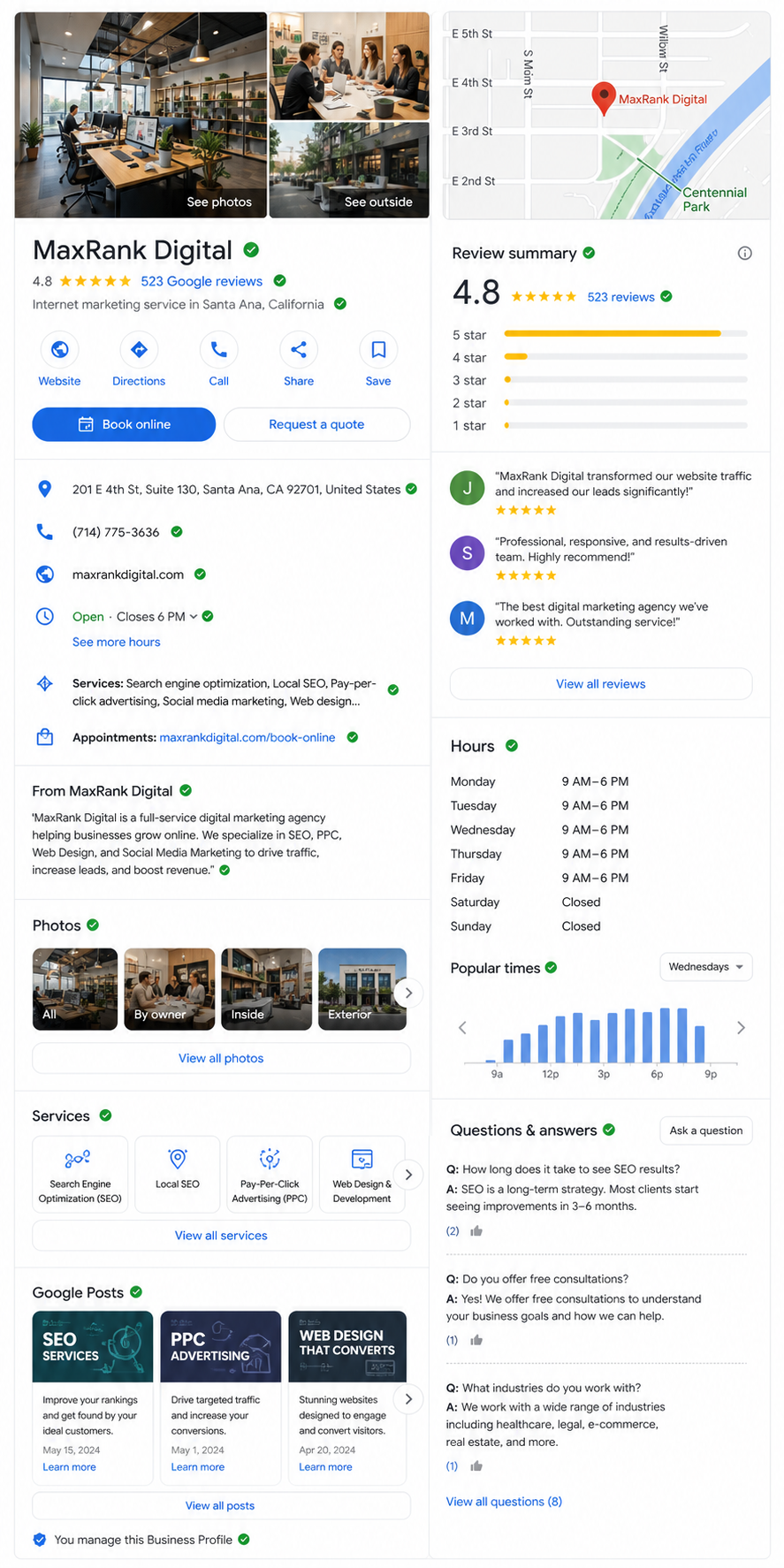
A fully optimised Google Business Profile with every section completed: 4.8-star rating, 523 reviews, complete business information, photo gallery, Google Posts, Q&A, and booking button — this is what a top-ranking local profile looks like.
Complete Every Field
Google rewards complete profiles with better visibility. Fill in every available field:
Business name: Use your exact legal business name as it appears on signage. Do not add keywords or location modifiers (this violates Google’s guidelines).
Primary category: Choose the single most accurate category for your business. This is the most important ranking factor. For example, a dental clinic should choose “Dental Clinic” not just “Dentist”.
Secondary categories: Add up to 9 additional relevant categories. A restaurant might add “Indian Restaurant”, “Family Restaurant”, “Fine Dining Restaurant”, “Takeout Restaurant”.
Address: Exact physical address with accurate pin placement on the map. If you serve customers at their location (like plumbers), set up a service area instead.
Phone number: Local Lucknow number that connects directly to your business. Avoid toll-free numbers as primary (they can reduce local relevance).
Website: Link to your homepage or a location-specific landing page on your website.
Hours: Accurate operating hours for every day of the week. Update for holidays using special hours.
Business description: Use all 750 characters to describe what you do, who you serve, and what makes you different. Include relevant keywords naturally.
Product/service photos: Professional images of your key products or services in action
Team photos: Professional headshots and group photos that humanise your business
At-work photos: Your team serving customers, working on projects, or in action
Upload 5-10 new photos monthly to signal an active, current business to Google.
Step 5: Publish Google Posts Regularly
Google Posts are like mini social media updates that appear directly in your profile. They signal activity to Google and provide additional engagement opportunities:
Post Type
Best For
Frequency
What’s New
General updates, news, announcements
Weekly
Events
Upcoming events, workshops, open days
As needed
Offers
Limited-time promotions, discounts, special deals
Monthly
Products
Product highlights, new arrivals
Bi-weekly
Each post should include a compelling image, concise text (150-300 characters), and a clear call-to-action button (Learn More, Book, Call, Order Online).
Review Strategy: The Engine of Local Rankings
Reviews are the most powerful ranking factor you can actively influence. They affect both your position in the Map Pack and customer trust simultaneously.
How Reviews Impact Rankings
Review quantity: More reviews signal popularity and trust to Google
Review rating: Higher average ratings (4.5+) rank better than lower ratings
Review velocity: Consistent new reviews signal an active, current business
Review recency: Recent reviews carry more weight than older ones
Review text: Keywords in review text help Google understand your services and match you to relevant searches
Review responses: Responding to reviews signals engagement and professionalism
Building a Review Generation System
Send review requests via WhatsApp within 2-4 hours of service (highest conversion timing)
Include a direct link to your Google review page (not just “search for us on Google”)
Display QR codes at your premises linking directly to your review page
Train staff to verbally request reviews from satisfied customers at checkout
Follow up with customers who have not reviewed after 48 hours
Include review requests in email signatures and receipts
Never offer incentives for reviews (this violates Google’s policies and can result in review removal)
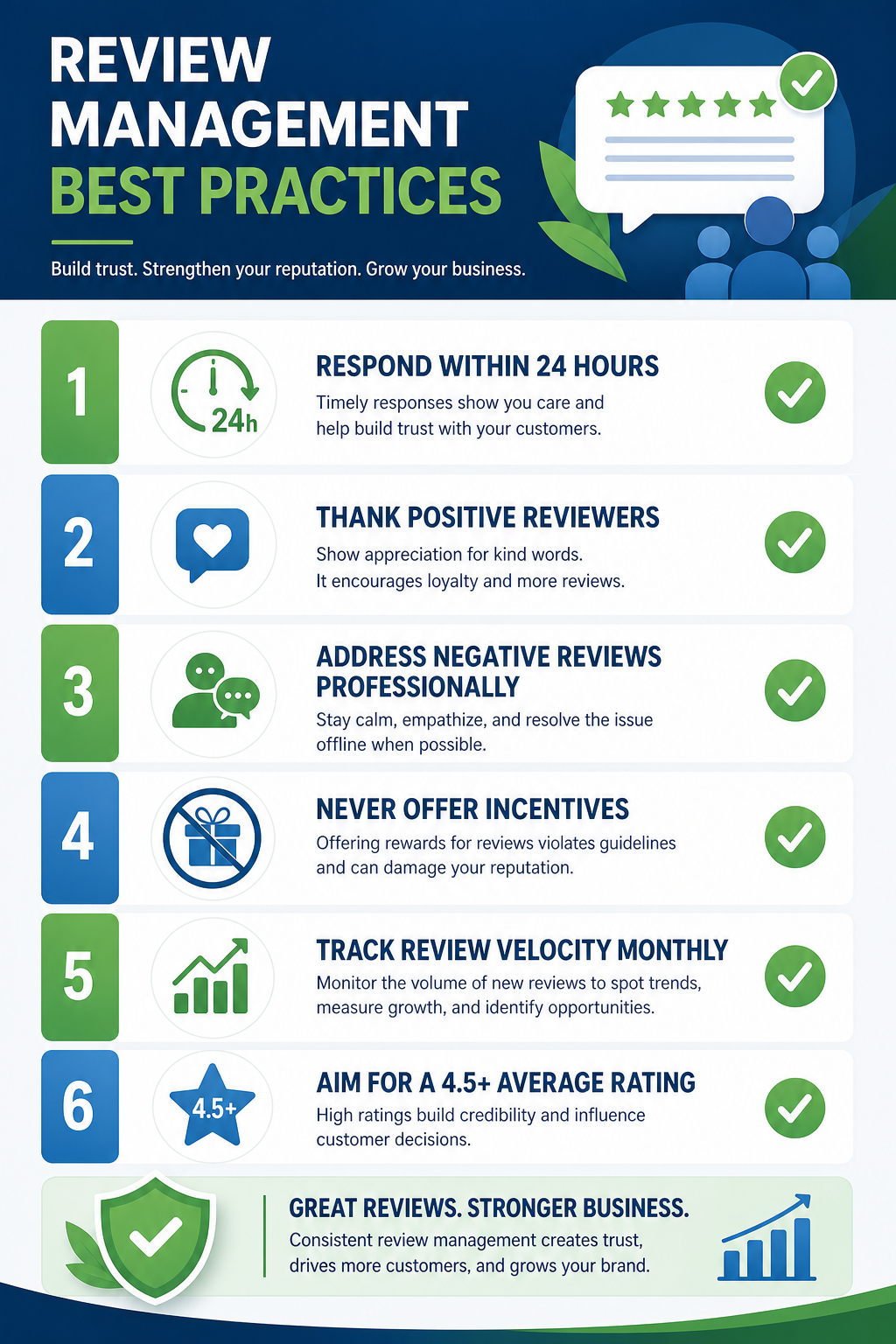
Review management best practices: respond within 24 hours, thank positive reviewers, address negatives professionally, never offer incentives, track review velocity monthly, and aim for 4.5+ average rating.
Responding to Reviews
Respond to every review, positive and negative, within 24 hours:
Positive reviews: Thank the reviewer by name, mention specific details from their review, and invite them back
Negative reviews: Acknowledge their experience, apologise for any shortcomings, explain what you are doing to improve, and offer to discuss privately
Neutral reviews: Thank them for feedback, address any concerns, and invite further conversation
Advanced Google Business Profile Strategies
Q&A Section Management
The Q&A section appears prominently in your profile and influences both rankings and customer decisions:
Pre-populate with 15-20 common questions and detailed answers (you can ask and answer your own questions)
Include relevant keywords naturally in both questions and answers
Monitor for new questions and respond within hours
Upvote the most helpful Q&A pairs to ensure they appear first
Report and flag spam or irrelevant questions
Booking and Appointment Integration
If your business takes appointments (clinics, salons, consultants, etc.), integrate booking directly into your profile:
Enable the “Book” button by connecting a supported booking provider
For clinics and doctors, connect Practo or your own booking system
Direct booking from Google reduces friction and increases conversion rates significantly
Messaging Feature
Enable Google Messaging to allow customers to chat directly from your profile:
Set up an automated welcome message that greets customers and sets expectations
Respond to messages within minutes during business hours
Use messaging for appointment bookings, enquiries, and quick questions
Disable messaging if you cannot respond within a reasonable timeframe (slow responses hurt your profile)
GBP Insights dashboard showing how customers find your business: search queries, Discovery vs Direct searches, customer actions (calls, directions, website visits), and photo view comparisons with competitors.
Google Business Profile Insights: Reading Your Data
Google provides detailed analytics about how people find and interact with your profile. Review these metrics monthly:
Metric
What It Tells You
Action to Take
Search queries
What people search to find your profile
Create content targeting top queries
Views (Search vs Maps)
How people discover your listing
Optimise for the dominant discovery channel
Customer actions
What people do (calls, directions, website visits)
Double down on the most common actions
Photo views
How your photos compare to competitors
Add more photos if views are low
Phone calls
Call volume and timing patterns
Ensure phone coverage during peak times
Direction requests
Where people are coming from
Understand your catchment area
Google Business Profile for Multi-Location Businesses
If your business operates from multiple locations in Lucknow, each location needs its own optimised profile:
Separate profiles with unique phone numbers for each location
Location-specific landing pages on your website linked from each profile
Individual review generation for each location
Location-specific Google Posts and updates
Consistent branding across all profiles with location-specific details
Keyword stuffing in business name: Adding keywords like “Best Restaurant in Lucknow” to your business name violates guidelines and risks suspension
Incorrect categories: Choosing broad or irrelevant categories reduces your visibility for specific searches
Inconsistent NAP: Different name, address, or phone across your profile and other directories confuses Google
No photos or outdated photos: Profiles with few or old photos receive dramatically less engagement
Ignoring reviews: Not responding to reviews or not generating new ones lets competitors overtake you
No Google Posts: Inactive profiles without regular posts signal a dormant business to Google
Not tracking insights: Failing to review analytics means missing opportunities to optimise
Frequently Asked Questions
Is Google Business Profile free?
Yes, Google Business Profile is completely free to use. There are no charges for creating, claiming, or managing your profile. However, optimising it effectively requires time and expertise. Many businesses hire a local SEO agency to manage their profile professionally for Rs.5,000-15,000/month, which typically delivers ROI far exceeding the investment.
How long does it take to see results from GBP optimisation?
Basic optimisation (completing all fields, adding photos) shows improved visibility within 1-2 weeks. Ranking improvements in the Map Pack typically appear within 4-8 weeks. Significant results including top 3 rankings and substantial increases in calls and visits usually take 2-4 months of consistent optimisation and review generation.
Can I manage multiple locations from one dashboard?
Yes, Google provides a Business Profile Manager dashboard where you can manage all your locations from a single account. You can bulk upload locations, manage them in groups, and view aggregated analytics. However, each location still needs individual optimisation with location-specific content and reviews.
What happens if my GBP gets suspended?
Suspension means your profile disappears from Google Maps and search results, causing immediate loss of calls, visits, and visibility. Common causes include guideline violations, suspicious activity, or user reports. If suspended, file a reinstatement request with documentation proving your business legitimacy. Prevention is far better than recovery: follow all guidelines strictly.
How do I get more Google reviews?
Implement a systematic review generation process: send WhatsApp review requests with direct links within 2-4 hours of service, display QR codes at your premises, train staff to verbally request reviews, and follow up with non-reviewers after 48 hours. Aim for 15-30 new reviews per month for consistent review velocity that signals an active business to Google.
Should I combine GBP optimisation with other marketing?
Absolutely. GBP optimisation works best as part of a comprehensive local SEO strategy that includes your website optimisation, citation building, and content marketing. Combine with Google Ads for immediate visibility while your organic rankings build, and Meta Ads for brand awareness and retargeting. This integrated approach delivers maximum local market dominance.
Ready to Dominate Google Maps in Lucknow?
Get a free Google Business Profile audit and discover exactly how to improve your local visibility. Contact UMC today and start generating more calls, visits, and enquiries from Google.
Editorial note: This article complements broader marketing automation planning by focusing specifically on buyer-side platform evaluation rather than channel execution alone.
Adobe Marketo Engage has long been the go-to for enterprise demand generation teams. But over the past few years, a growing number of marketing operations leaders have started asking a harder question: Is Marketo actually the best tool for us, or are there Marketo alternatives we should be aware of?





1 comment