
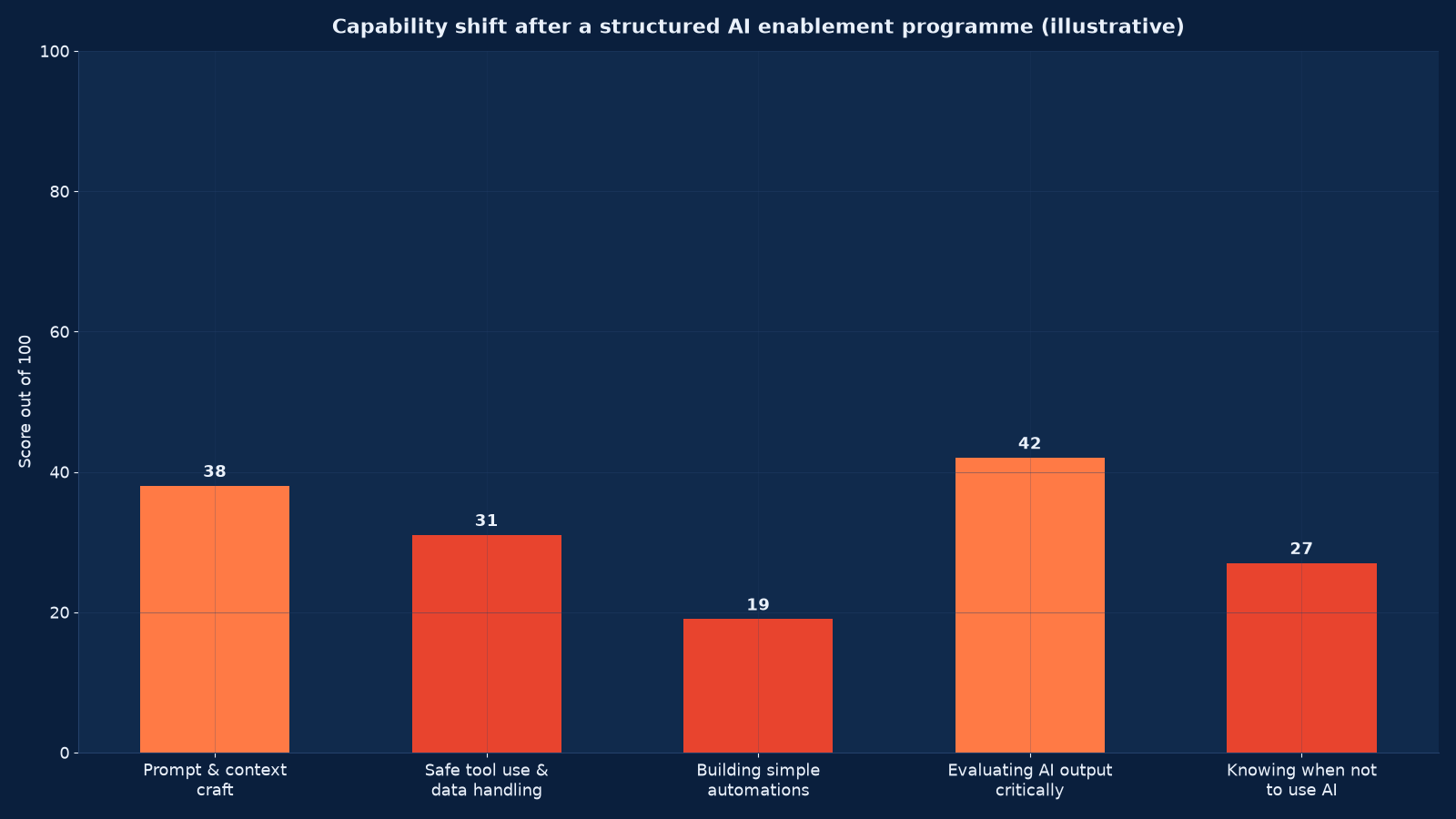
Chart values are an illustrative planning model based on typical UMC engagements and published industry benchmarks. They are not a guarantee of results on any specific project.
Buying an AI licence does not create AI capability. Capability is what happens when a specific person, doing a specific job, knows which tool to reach for, how to frame the request, how to tell when the answer is wrong, and what they are not allowed to put into it. None of that arrives with the software.
AI training and enablement is the programme that converts a deployment into adoption and adoption into measurable capability. Generic “intro to ChatGPT” sessions do not produce it, because they teach the tool rather than the job. Unified Management Consulting builds role-specific enablement around your actual processes, your approved toolset and your data rules, then measures the capability shift and the reduction in unsanctioned tool use afterwards.
🎓 AI Training & Enablement for Teams — Quick Summary
| Component | What We Deliver |
|---|---|
| Skill & role gap analysis | Per-role baseline across prompting, safe data handling, output evaluation, automation building and escalation judgement — measured, not assumed. |
| Approved-tool curriculum | Training built on the tools you have actually sanctioned, mapped to real tasks in each role, with the safe-use policy taught alongside the technique. |
| Leadership & decision-maker track | A short, separate programme for managers and executives covering what to fund, what to expect, how to read the metrics and how to set the boundaries. |
| Role-based team workshops | Hands-on sessions using your own documents, systems and workflows rather than generic examples. |
| Build clinics | Guided sessions where teams construct their own small automations and prompts with engineering support on hand. |
| Champion network | Identified and equipped internal champions per team, with a channel, a backlog and time allocated — the mechanism that sustains capability after we leave. |
| Safe-use policy & escalation | A practical, written policy on data handling, prohibited uses, disclosure and escalation, taught as part of the training rather than issued as a document. |
| Measurement & reinforcement | Post-programme capability re-assessment, adoption telemetry, incident tracking and a reinforcement schedule at 30, 90 and 180 days. |
Enablement is the delivery mechanism for everything else in the AI portfolio: AI Readiness Assessment & Roadmap identifies the capability gaps, AI Governance, Risk & Compliance supplies the policy content, and AI Agent Deployment & Automation produces the tools people are trained on. Background reading: How to Build AI Capability: Skills, Strategy and Competitive Advantage.
The Adoption Ladder: Where Your Teams Actually Are
Enablement design starts from an honest position on this ladder, per team, not per organisation. A finance team at stage 1 and a marketing team at stage 4 need completely different programmes, and running one generic session for both wastes the second group’s time and loses the first.
| Stage | Behaviour you observe | What it costs | What moves it on |
|---|---|---|---|
| Unaware | Staff do not know an approved tool exists | Duplicated effort, no benefit at all | Communication plus a named tool per role |
| Curious but unsanctioned | Personal accounts used for work tasks, nothing reported | Data exposure, inconsistent output, no audit trail | An approved alternative that is easier than the unsanctioned one |
| Occasional sanctioned use | Used for a few safe tasks when remembered | Low benefit, high variance between individuals | Role-specific workflows embedded in the job, not optional |
| Routine use with judgement | Standard tasks default to AI; output is checked | Real benefit, some supervision overhead | Automation building and prompt libraries owned by the team |
| Team-owned capability | The team builds and maintains its own automations | Sustained benefit, reduced central dependency | Champion network, allocated time, and measurement of what is built |
Most organisations discover they are further down the ladder than they assumed, and that stage 2 is far more populated than stage 3. Our guide to shadow AI in the workplace explains how to measure that hidden middle rather than guess at it.
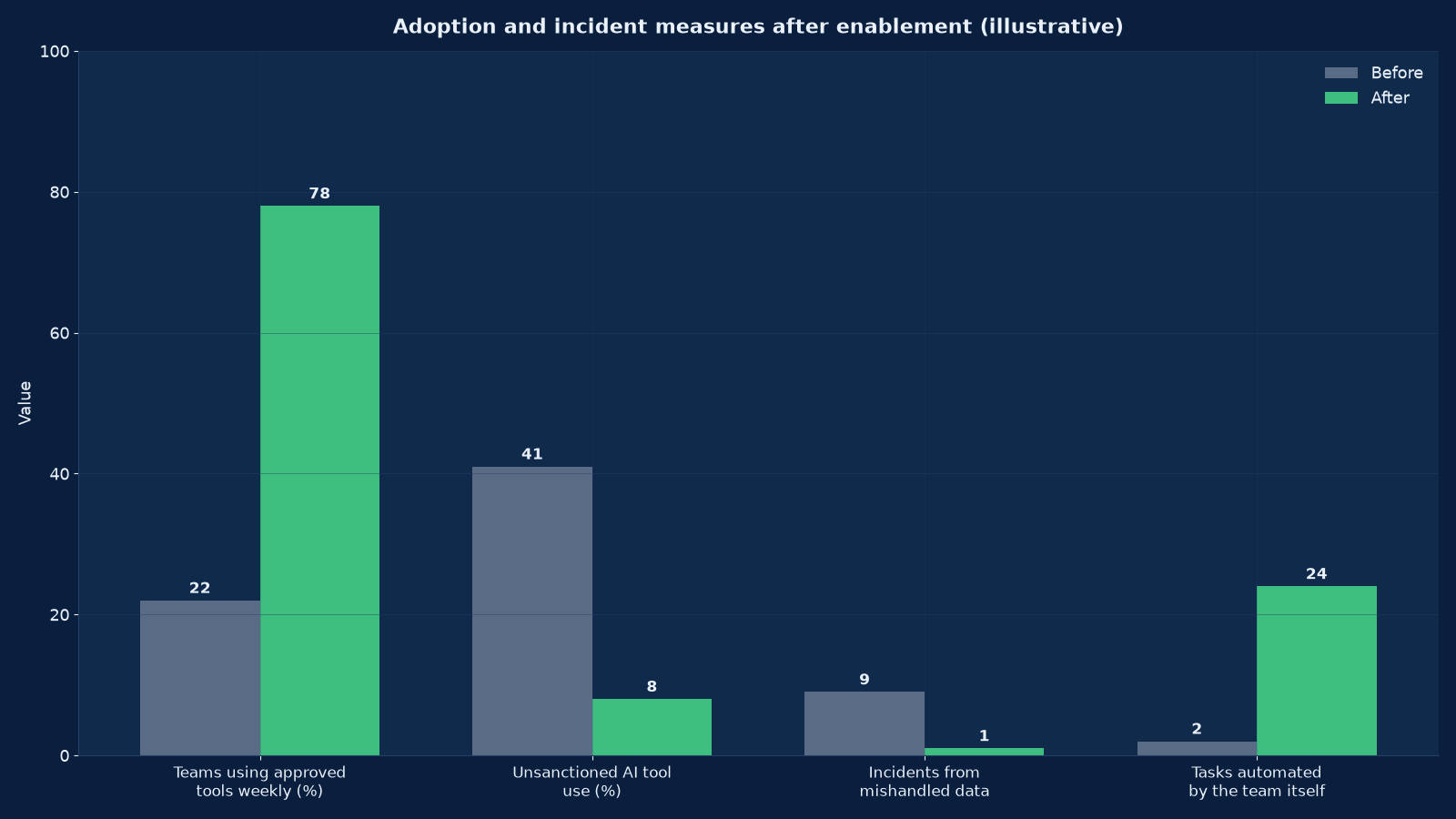
Chart values are an illustrative planning model based on typical UMC engagements and published industry benchmarks. They are not a guarantee of results on any specific project.
Why Generic AI Training Does Not Work
Off-the-shelf AI awareness training teaches what a large language model is, shows a few impressive examples, and lists prohibitions. Participants rate it well and change nothing, because nothing in it touched their Tuesday afternoon.
Effective enablement has four properties that generic training lacks. It is role-specific: a claims handler and a demand planner get different content because their tasks differ. It uses your data and your systems: practising on a real redacted case produces transfer, practising on a sample poem does not. It teaches judgement alongside technique: how to recognise a plausible wrong answer is a skill that has to be trained deliberately, and it is the one most often skipped. And it is reinforced: a single session decays within weeks without follow-up, a champion and a reason to return.
| Generic training | Role-based enablement |
|---|---|
| Teaches the tool | Teaches the task, using the tool |
| Examples from public datasets | Examples from your own redacted records |
| One audience, one curriculum | Separate tracks by role and by maturity stage |
| Policy handed out as a document | Policy taught as part of the workflow |
| Assessed by attendance | Assessed by capability re-test and adoption telemetry |
| Ends at delivery | Runs a 30 / 90 / 180-day reinforcement schedule |
| Owned by L&D | Co-owned by L&D and the process owner |
The Capability Model: What We Measure
Six skills, each with a behavioural definition and an assessment method. Measuring them before and after is what turns training from an activity into a result, and it gives you a number to put on the executive scorecard.
| Skill | What competent looks like | How we assess it | Common gap |
|---|---|---|---|
| Task framing & prompting | States the objective, the constraints, the output format and the audience; iterates on failure rather than accepting the first answer | Practical exercise on a real role task, scored against a rubric | One-shot prompting with no constraints, then abandoning the tool when the result is poor |
| Context provision | Supplies the right source material, knows what may and may not be shared, uses approved retrieval where available | Observed handling of a sensitive-document scenario | Pasting confidential content into an unapproved tool |
| Output evaluation | Checks citations, tests numbers against source, recognises confident fabrication, knows when to escalate | Seeded-error exercise: an output containing a plausible mistake must be found | Accepting fluent output as correct — the highest-risk gap |
| Automation building | Creates and maintains a reusable prompt, template or small workflow for a recurring task | Build clinic deliverable, reviewed for reuse and safety | Never attempted; usually the largest available gain |
| Tool selection | Chooses the approved tool for the task and knows the alternatives’ boundaries | Scenario questions across five to eight real tasks | Defaulting to one tool for everything |
| Escalation judgement | Recognises the cases where AI must not decide and routes them correctly | Scenario-based assessment with a clear right answer | Escalating everything, or nothing |
Designing the Curriculum by Role
Curriculum design follows the work, not the tool catalogue. For each role we list the recurring tasks, mark which are AI-suitable, which are AI-assisted and which are out of scope, and build the training around the first two.
| Role family | High-value AI tasks | Typical depth | Priority skills |
|---|---|---|---|
| Sales & account management | Pre-call research, proposal drafting, CRM hygiene, meeting summaries, objection preparation | Assist to draft | Task framing, output evaluation, CRM data handling |
| Marketing | Content drafting, campaign variation, brief-to-asset workflow, performance narrative | Draft to automation | Brand-safe prompting, evaluation, automation building |
| Finance & accounting | Narrative reporting, variance explanation, invoice and statement extraction support, policy lookup | Assist, tightly bounded | Data handling, escalation judgement, verification discipline |
| Operations & supply chain | Exception triage, SOP lookup, demand narrative, incident summarisation | Assist to supervised automation | Context provision, tool selection, automation building |
| Customer service | Response drafting, knowledge lookup, sentiment triage, after-call work | Draft to supervised automation | Evaluation, tone control, prohibited-content judgement |
| HR | Policy answering, job description drafting, onboarding content, document summarisation | Assist, with personal-data limits | Data protection, escalation, lawful-basis awareness |
| Engineering & IT | Code assistance, documentation, incident analysis, test generation | Automation and build | Secure handling of source and credentials, review discipline |
| Executives & managers | Briefing preparation, scenario analysis, reading AI metrics, setting boundaries | Decision support | Interpreting the scorecard, funding judgement, risk tolerance |
The engineering track differs in kind rather than degree, which is why the Loveholidays approach to making everyone a builder is worth reading alongside it: the constraint there was not tooling but permission to experiment safely.
Delivery Formats and How to Combine Them
No single format is sufficient. The combination that works is a short executive track, a role-based practical workshop, a build clinic series, and a standing champion community — with self-paced material as reinforcement rather than as the main event.
| Format | Duration | Best for | Limitation |
|---|---|---|---|
| Executive briefing | 90 minutes | Alignment on what to fund and what to expect; boundaries and risk appetite | Too short to change behaviour — pair it with a decision workshop |
| Decision-maker workshop | Half day | Use-case selection, gate criteria, reading the scorecard | Requires pre-work on the use-case list |
| Role-based workshop | Half day to full day | Hands-on practice on real tasks with a rubric | Needs redacted data prepared in advance |
| Build clinic | Two hours, repeated | Teams constructing their own automations with support present | Requires a champion or engineer per eight participants |
| Embedded coaching | Two to six weeks part-time | A team changing how it works, not just what it knows | Highest cost; reserve for the highest-value process |
| Self-paced with assessment | Ongoing | Baseline coverage and reinforcement between sessions | Completion is not capability — always pair with a practical test |
| Champion community | Standing | Sustaining capability after formal delivery ends | Dies without allocated time and a real backlog |
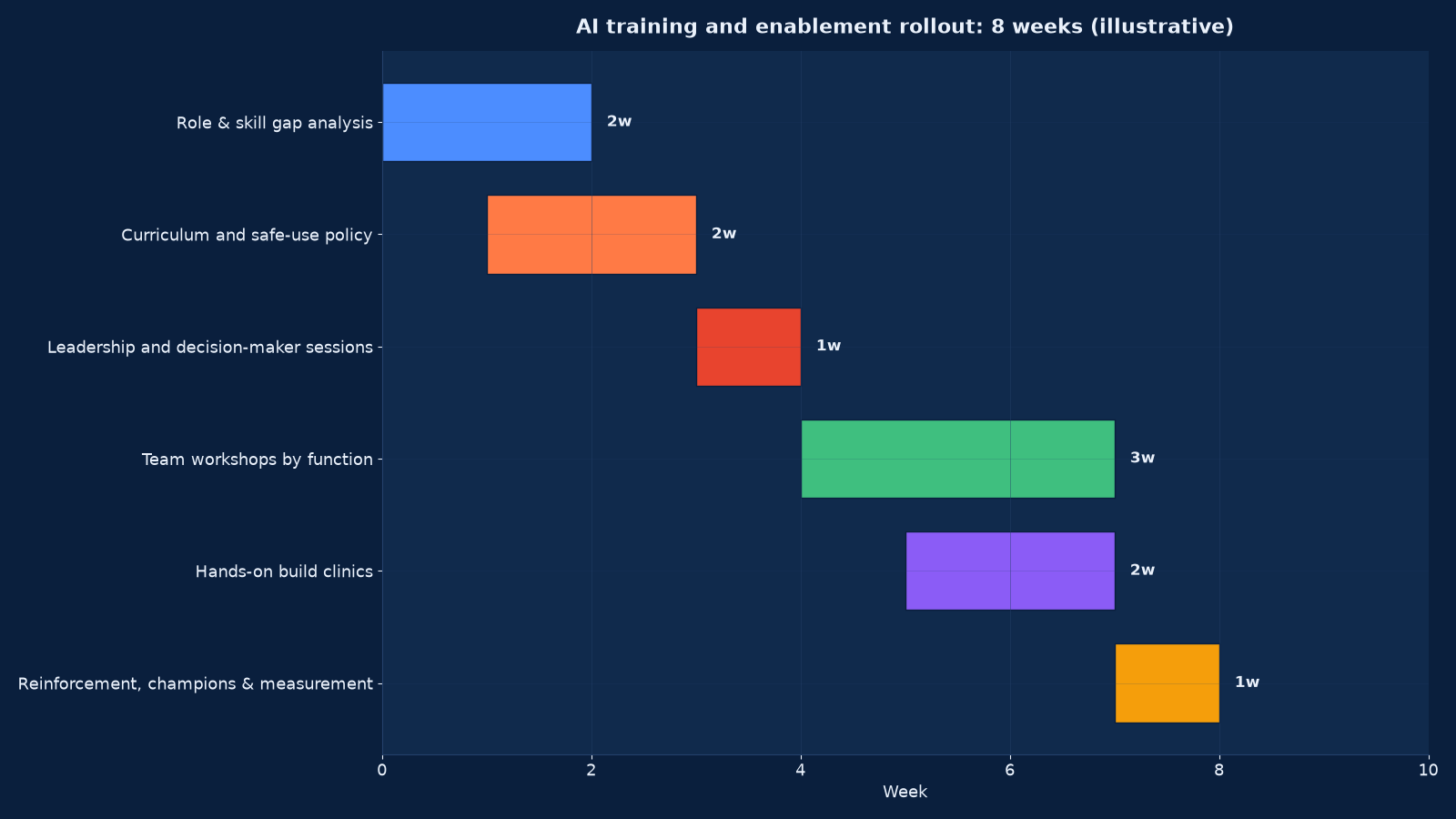
Chart values are an illustrative planning model based on typical UMC engagements and published industry benchmarks. They are not a guarantee of results on any specific project.
An Eight-Week Rollout
| Week | Activity | Output |
|---|---|---|
| 1 | Role inventory, tool audit, baseline capability assessment, shadow-use survey | Baseline report with per-team maturity stage |
| 2 | Curriculum design per role, redacted practice data prepared, safe-use policy drafted with security and HR | Curriculum pack and a policy people will actually follow |
| 3 | Executive and decision-maker sessions; champion identification | Funded use-case list and named champions per team |
| 4–5 | Role-based workshops delivered by function, in small groups, on real tasks | Post-workshop practical assessment per participant |
| 6 | Build clinics: teams create their first reusable automation with support | A working artefact per team, added to a shared library |
| 7 | Reinforcement: clinic follow-up, library consolidation, manager briefing on what changed | Shared prompt and automation library with owners |
| 8 | Capability re-assessment, adoption telemetry baseline, 30/90/180-day plan agreed | Measured capability shift and a reinforcement schedule with named owners |
The Safe-Use Policy People Actually Follow
Most AI policies fail because they are written as prohibitions by people who do not use the tools, and then ignored by people who do. A policy that works is short, task-shaped, and taught as part of the training.
- Name the approved tools per role. A list people can act on beats a principle they have to interpret.
- State the data rule in one line per classification. Public, internal, confidential, restricted — and what may be put into an external tool for each.
- Give the easier approved path. Prohibition without an alternative produces hidden use. If the sanctioned tool is harder than the unsanctioned one, the policy will lose.
- Require disclosure where output is customer-facing. Define when AI assistance must be declared and when it need not be.
- Define the escalation cases explicitly. Legal, medical, financial advice, personal data decisions, safety-critical output — named, with the route.
- Make verification a duty, not a suggestion. The person who submits the output owns its accuracy. Say so plainly.
- Keep it to two pages. Longer policies are not read, and an unread policy provides no defence in an incident review.
The policy should be issued jointly by security, HR and the business rather than by IT alone, and it should be reviewed against incidents quarterly. Our AI governance policy framework contains the full document structure; the training version is the same content reduced to what a person needs at the moment of use.
Measuring Whether the Programme Worked
Attendance and satisfaction scores are not results. The measures below are what we report at the end of a programme and at each reinforcement point, and they feed directly into the adoption column of the executive scorecard.
| Measure | Before / after | Source | Target movement |
|---|---|---|---|
| Capability score per role | Assessed twice, same rubric | Practical assessment | +25 to +40 points on a 100-point scale |
| Sanctioned tool adoption | Weekly active users among eligible staff | Tool telemetry | From under a quarter to three quarters within six months |
| Unsanctioned tool use | Self-reported plus network and expense signals | Survey, security monitoring | Substantial fall; the aim is migration, not detection |
| Verification behaviour | Share of AI-assisted output edited or checked before use | Sampling and system logs | Rising, and stable above an agreed floor |
| Incidents from mishandled data | Count and severity per quarter | Incident register | Fall to near zero with no rise in severity |
| Automations built by teams | Count in the shared library, with usage | Library register | At least one working artefact per team by week six |
| Time to first successful use | Days from enrolment to first productive use | Telemetry | Under five working days |
| Manager confidence | Managers able to explain what their team uses AI for | Manager survey | Majority able to answer specifically rather than generally |
Note the direction of the unsanctioned-use measure. The objective is not to catch people; it is to migrate them. A programme that reports zero shadow AI because it stopped asking has failed, and the honest signal is a falling share alongside rising sanctioned use.
Building the Champion Network
Champions are the mechanism that keeps capability alive after the consultants leave, and they fail for predictable reasons: no allocated time, no channel, no recognition and nothing to own.
- Select for credibility, not enthusiasm. The person the team already asks for help is the right champion, even if they are not the most vocal volunteer.
- Allocate real time. Four to eight hours a month, agreed with their manager and visible in their objectives. Unallocated champion duties are the first thing dropped under pressure.
- Give them a backlog and a route to engineering. A champion who cannot get a technical question answered becomes a bottleneck and then a sceptic.
- Equip them beyond the standard curriculum. Advanced prompting, automation building, evaluation technique and the safe-use policy in enough depth to answer questions rather than escalate everything.
- Meet on a fixed cadence. Fortnightly, thirty minutes, with a standing agenda: what is working, what is blocked, what to add to the shared library.
- Recognise the contribution. Named in the scorecard, credited for library artefacts, and considered in performance review. Recognition is cheap and its absence is expensive.
Where the champion network has to carry genuine build work rather than peer support, that is a different resourcing question and belongs with AI Forward-Deployed Engineering Services.
Handling Resistance and Scepticism
| Objection | What is really behind it | How to handle it |
|---|---|---|
| “We have no time for training” | The programme is not visibly connected to the workload problem | Train on the tasks consuming the time, in the workflow, and show the reclaim in week four |
| “Our data is too sensitive” | A legitimate constraint treated as a blanket refusal | Classify the data, route sensitive tiers to approved or private tools, train on redacted material |
| “The output is not good enough” | Usually poor task framing rather than model weakness | Demonstrate the same task framed properly; then teach the framing |
| “This will be replaced in six months” | A reasonable observation about tools, wrongly applied to skills | Agree: tools churn, so train judgement, evaluation and workflow design rather than button locations |
| “Some people will just refuse” | Often a legitimate concern about quality or accountability | Give the refuser a defined role in evaluation; sceptics make the best red-team |
| “We already ran awareness training” | Awareness was delivered and capability was not measured | Run the capability assessment; the result usually settles the question either way |
Reinforcement: The Part That Determines Whether It Sticks
Capability decays without use, and use decays without a reason. Three reinforcement mechanisms, scheduled rather than hoped for.
Thirty days. A short session per team reviewing what people actually tried, what failed, and one improvement to the shared library. This is where the gap between the workshop and reality is closed.
Ninety days. Capability re-test on a sample, adoption telemetry review, and a second build clinic aimed at the tasks where automation has not yet happened. Managers get a specific readout on their team rather than an organisation-wide average.
One hundred and eighty days. Full re-assessment against the baseline, incident review, policy revision against what has actually gone wrong, and a decision on which roles move to a deeper track. This is the point at which the programme either becomes business as usual or quietly ends.
Reinforcement also has to survive tool change. Because models and interfaces are replaced roughly annually, the durable content is judgement, evaluation, data handling and workflow design. Train those as the spine and treat specific tool walkthroughs as perishable material that is refreshed on release. Learning never stops: how AI makes learning continuous makes the same argument from the learner’s side, and our review of the current AI tool landscape is what we refresh the perishable layer against.
Engagement Models
| Model | Duration | Deliverables | Best when |
|---|---|---|---|
| Capability assessment only | 2–3 weeks | Per-role baseline across the six skills, maturity mapping, shadow-use findings, prioritised enablement plan | You need evidence before committing to a programme |
| Full enablement programme | 8 weeks | Curriculum, leadership track, role workshops, build clinics, policy, champion network, measured capability shift, reinforcement plan | A deployment is live or imminent and adoption is the bottleneck |
| Leadership track only | 1–2 weeks | Executive briefing plus a decision workshop producing a funded use-case list and gate criteria | The constraint is at the top rather than in the teams |
| Build clinic series | Ongoing, monthly | Teams constructing and maintaining their own automations with engineering support, into a shared library | Capability exists but nothing reusable is being produced |
| Policy and safe-use design | 2–4 weeks | A two-page operational policy, classification rules, escalation cases, disclosure requirements and a training version of each | Usage is growing faster than the rules |
What Good Looks Like Twelve Months On
The programme has worked when the conversation stops being about AI. Teams describe what they do, mention the tool in passing, and argue about output quality rather than about whether to use it. Managers can say specifically what their team uses AI for and what it has changed. The shared library has artefacts built by the teams themselves and someone owns maintaining it.
Concretely, twelve months after the baseline you should see: sanctioned adoption above three quarters of eligible staff; unsanctioned use down to a residual that is monitored rather than feared; capability scores up by a measurable margin on the same rubric; at least one team-built automation per function in regular use; data-handling incidents near zero and none severe; and a champion network that still meets without being chased.
Where those numbers are not moving, the cause is almost always one of three things: the approved tool is harder to use than the unapproved one, nobody allocated time for the champions, or the training taught the tool instead of the task. All three are fixable, and all three are visible in the measurement rather than in the feedback forms. How industries must operate in the AI era places this capability shift in the wider operating-model change it belongs to.
Frequently Asked Questions About AI Training & Enablement
How long does an enablement programme take?
Eight weeks for a full rollout across a mid-sized organisation, including assessment, curriculum design, leadership sessions, role workshops, build clinics and the first re-assessment. Larger or more distributed organisations extend the workshop phase rather than the design phase. An assessment on its own takes two to three weeks.
Do we need to train everyone at once?
No, and it is usually counter-productive. Sequence by maturity stage and by value: start with the teams that have a live deployment and a measurable task, then extend. Training a team before it has an approved tool and a use case produces enthusiasm with nothing to apply it to, which decays into cynicism.
What if some teams refuse to participate?
Find out whether the refusal is about time, about data sensitivity or about quality, because each needs a different answer. Time objections are resolved by training on the tasks consuming the time. Sensitivity objections are resolved by classification and redacted practice material. Quality objections are best resolved by giving the sceptic a defined role in evaluating output — they usually become the most rigorous users.
How do we measure whether training worked?
Assess the same six skills with the same rubric before and after, and combine that with adoption telemetry, unsanctioned-use signals, incident counts and the number of team-built automations. Satisfaction scores and attendance are not results. The capability delta plus the adoption curve is what belongs on the executive scorecard.
Should we train people on tools we have not approved?
No, but you should acknowledge them. Most organisations have significant unapproved use already, and a programme that pretends otherwise loses credibility in the first ten minutes. Cover the risks of unapproved tools explicitly, explain why the approved alternative exists, and make the approved path genuinely easier — that last part is what actually changes behaviour.
How do you handle roles with strict data protection obligations?
Classify the data first, then design the training around what is permitted for each classification. Sensitive tiers are trained on redacted or synthetic material, and routed to private or single-tenant tools where an external service is not permitted. The training covers the boundary explicitly, because knowing what not to share is as much a skill as knowing what to ask.
Is executive training really necessary?
It is the highest-leverage hour in the programme. Executives set the boundaries, fund the use cases and interpret the metrics; without a shared understanding of what AI can and cannot reliably do, they either over-promise to the board or block sensible experiments. A 90-minute briefing plus a half-day decision workshop is usually sufficient.
How do we keep capability current as the tools change?
Train the durable skills as the spine — task framing, output evaluation, data handling, escalation judgement and workflow design — and treat specific tool walkthroughs as perishable material refreshed on release. The champion network is what carries those refreshes into the teams without a formal programme each time.
Can we run this internally instead of buying it?
Yes, once you have run it once externally or have an internal team with the right mix of process knowledge and technical depth. What is hard to reproduce internally is the capability rubric, the seeded-error assessment material and the cross-industry view of which tasks actually work. Many clients run the first programme with us and the second one themselves.
What does it cost relative to the software?
Enablement is typically a fraction of first-year licence and integration cost, and it is the line item most often cut. That is a false economy: a deployment adopted by a quarter of eligible staff returns a quarter of the modelled benefit while carrying the full run-rate. Figure 2 shows the size of the adoption gap that enablement is closing.
How do we stop it becoming a one-off event?
Schedule the 30, 90 and 180-day reinforcement points at the start with named owners, give the champions allocated time in their objectives, put the adoption and capability numbers on the monthly scorecard, and treat the shared library as a maintained asset with an owner. Programmes that end at delivery decay within a quarter; programmes with a reinforcement owner do not.
Book a Capability Baseline
We will assess two or three of your teams against the six-skill capability model, survey actual tool use including the unsanctioned kind, and show you where the gap between your deployment and your adoption actually sits. Most organisations find the gap is larger and more specific than they expected, and that specificity is what makes the training worth running.
Contact Unified Management Consulting to book an initial working session on your AI programme.
Related Services
Enablement is what makes the rest of the AI portfolio pay:
- AI Readiness Assessment & Roadmap — identifies the capability gaps the programme targets
- AI Governance, Risk & Compliance — supplies the policy content taught in the safe-use module
- AI Agent Deployment & Automation — the tools and automations teams are trained to use and extend
- AI Forward-Deployed Engineering Services — embedded engineers who run build clinics alongside your champions
- Business Strategy Consulting — connecting capability investment to competitive position
- Global Advertising & Promotional Campaigns — an example of a marketing function where enablement produces immediate output gains
- How to Build AI Capability: Skills, Strategy and Competitive Advantage — the strategic framing behind this service
- AI ROI Measurement & Executive Scorecard Services — baseline capture, bottom-up benefit and cost models, instrumentation, the executive scorecard itself and the gate criteria that make AI spend auditable
- Data Engineering for AI: RAG & Knowledge System Services — source audit, ingestion connectors, cleaning and metadata, permission-aware retrieval and the evaluation harness that proves every answer is grounded
- AI Integration Services for ERP, CRM & Operations — embed AI into ERP, CRM and operational systems with mapped permissions, supervised writes, immutable action logging and a tested rollback path
- AI Product Engineering Services for Production-Ready Intelligent Products — the product engineering that turns a working prototype into a system that survives real users, real volume and real failure modes