
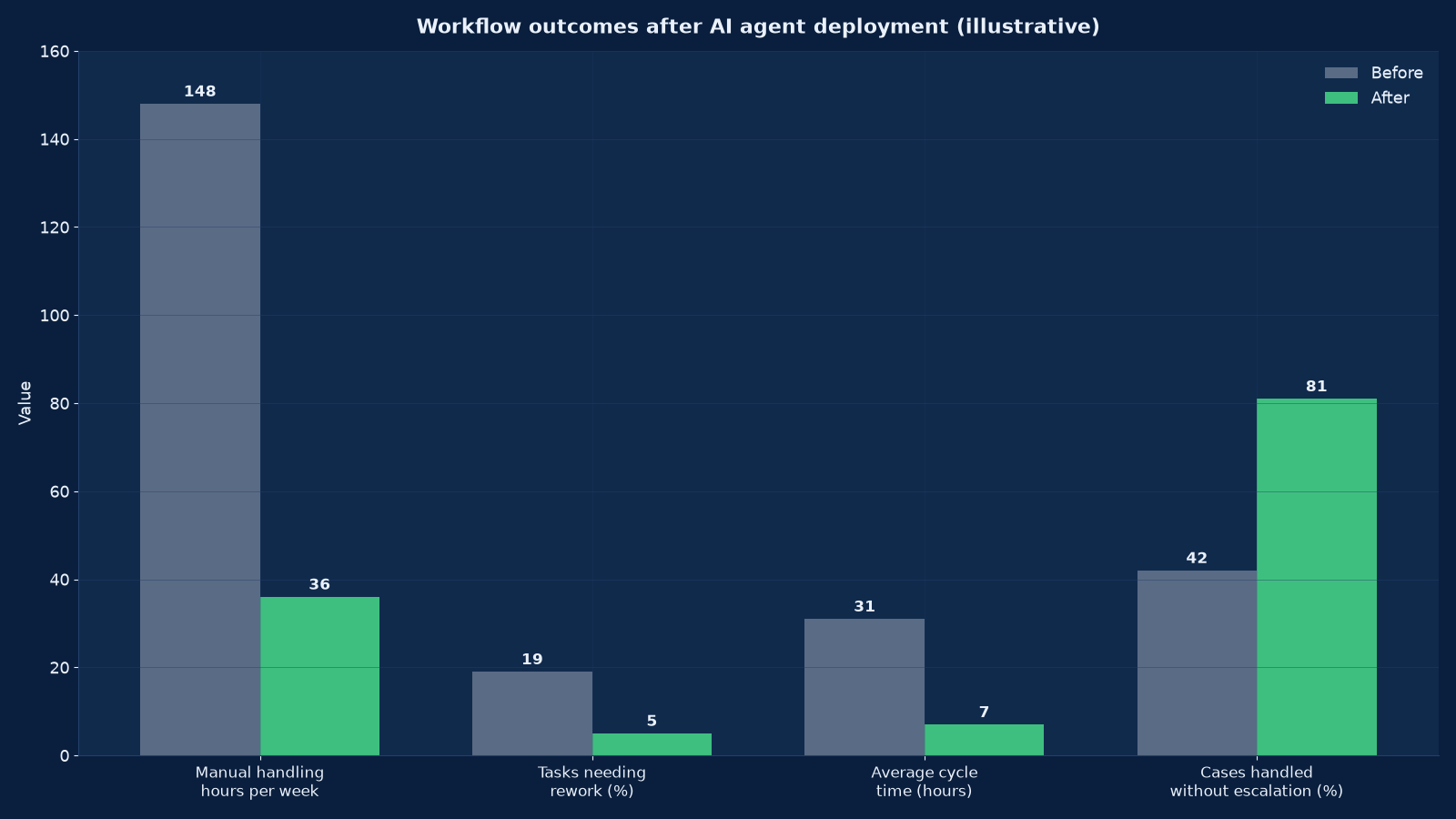
Put AI agents into real workflows — with permissions, approval gates, logging and a measured return. Unified Management Consulting designs, builds and operates AI agents and automated workflows in production: process selection, tool permissions, human-in-the-loop controls, system integration, evaluation harnesses, shadow-mode piloting and the monitoring that keeps the return provable after launch.
An AI agent is useful in exactly one situation: when a task has enough volume, enough structure and enough tolerance for a probabilistic step that automation pays for itself, and when the failure modes are contained. Outside that situation an agent is an expensive way to introduce variability into a process that was working. Our job is to tell you which of your processes is inside it, and to build the ones that are so they survive contact with production.
That means treating an agent as a system with a permission boundary, not as an autonomous assistant. We define which tools it may call, which fields it may write, what it must never do, when a human approves, what is logged, how output quality is evaluated before and after every release, and how it is switched off. Our analysis of AI agents in production workflows, tooling and ROI realities sets out the economics that determine whether a candidate is worth building at all.
🤖 AI Agent Deployment & Workflow Automation — Quick Summary
| Component | What We Deliver |
|---|---|
| Process selection | Task-level analysis of volume, variability, error cost and reversibility to identify candidates that will actually hold in production |
| Guardrail design | Tool permissions, write scopes, prohibited actions, spend and rate limits, and the human approval gates per step |
| System integration | Connections to CRM, ERP, ticketing, data warehouse, document stores and messaging channels with least-privilege credentials |
| Agent build | Retrieval, tool-calling, orchestration, retries, escalation and state handling engineered for the workflow rather than a demo |
| Evaluation harness | A versioned test set with pass thresholds, adversarial cases and regression checks run before every promotion |
| Shadow-mode pilot | The agent runs alongside the existing process, its decisions are compared, and it is promoted only on measured agreement |
| Production operations | Monitoring, drift detection, cost ceilings, incident response, rollback and periodic revalidation |
Chart values are an illustrative planning model based on typical UMC engagements and published industry benchmarks. They are not a guarantee of results on any specific project.
What an AI Agent Is, and What It Is Not
An AI agent is a program that perceives a state, decides on a next action using a language model, calls a tool to perform that action, observes the result, and repeats until a goal is met or a limit is reached. The model supplies judgement; the tooling supplies consequences. That combination is what makes agents powerful and what makes them dangerous when the tool boundary is loosely defined.
| Concept | What it means in practice | Common misconception |
|---|---|---|
| Autonomy | The agent chooses its next step within a defined action space and budget | That autonomy means unlimited scope; in production it must be bounded |
| Tool use | Calling an API, querying a database, writing a record, sending a message, reading a document | That any tool can be exposed; each one is an action with a consequence |
| Orchestration | Sequencing steps, managing retries, holding state, escalating when stuck | That a single prompt can carry a multi-step process reliably |
| Retrieval (RAG) | Grounding the model in your documents and records so answers reflect your data | That the model already knows your business; it does not |
| Human in the loop | A person approves, samples or corrects at defined points | That review is a temporary phase; for many tiers it is permanent |
| Evaluation | A test set with thresholds, run before every release and monitored after | That a successful demo is evidence of production quality |
We do not build agents that decide what they are allowed to do. Every deployment ships with an explicit action space, a written prohibited list, and a budget that stops the loop. Where a task genuinely requires open-ended judgement, we recommend an assistive design — the agent prepares, a human decides — rather than forcing automation that will generate rework.
Choosing the Right Processes to Automate
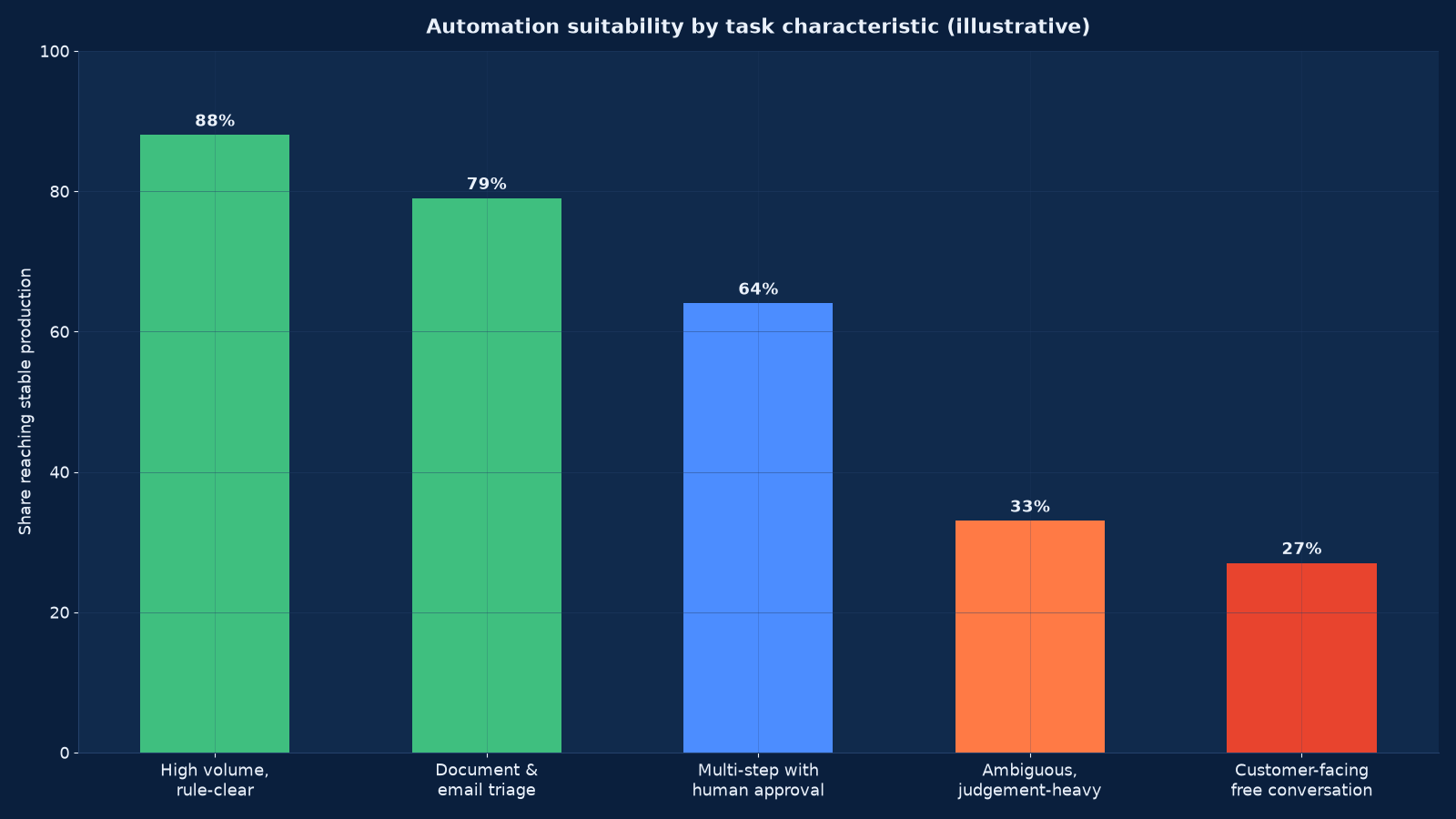
Chart values are an illustrative planning model based on typical UMC engagements and published industry benchmarks. They are not a guarantee of results on any specific project.
Figure 2 is the single most useful piece of evidence in an agent business case. The failure rate is not evenly distributed across task types, and the tasks that are hardest to automate are the ones executives most often nominate first, because they are the most visible and the most expensive. Selecting on visibility rather than on suitability is why so many first agent projects stall.
The selection criteria we apply
- Volume — enough occurrences per week that the build and run cost is recovered inside your payback horizon
- Structure — the decision rule can be written down, even if it is currently applied by intuition
- Error cost and reversibility — what a wrong action costs, and whether it can be undone
- Data availability — the inputs the agent needs exist in a system it can reach, with adequate quality
- Tool surface — the systems involved expose APIs or can be integrated without fragile screen-level automation
- Tolerance for variability — whether the process owner will accept a probabilistic step at all
- Baseline measurability — whether current volume, cycle time and error rate can be measured before we start
| Candidate profile | Recommended design | Why |
|---|---|---|
| High volume, clear rules, internal, reversible | Full automation with sampling review | Lowest error cost, fastest payback, builds the evaluation asset you reuse |
| Document and email triage, classification, extraction | Automation with confidence thresholds and a low-confidence queue | Errors are contained and cheap to correct; throughput gain is immediate |
| Multi-step process with approvals, some judgement | Agent prepares and recommends, human approves each stage | Keeps accountability where the consequence sits |
| Customer-facing conversation on a narrow topic | Assistive agent with scripted escalation and full logging | Free-form conversation is the highest-risk profile in Figure 2 |
| Ambiguous, judgement-heavy, low volume | Do not automate — improve the process or the tooling instead | Automation adds variability to work that cannot absorb it |
Guardrails, Permissions and Human Approval
Guardrails are designed before the agent is built, because retrofitting a permission boundary means re-engineering the integration. The design output is a written action space that engineering implements and that governance approves.
| Guardrail | What we define | Enforced by |
|---|---|---|
| Tool allow-list | Exactly which tools and endpoints the agent may call, and with which credentials | Least-privilege credentials and gateway policy |
| Write scope | Which records, fields and statuses the agent may create or modify | API-level scoping, not prompt instruction |
| Prohibited actions | Explicit list of things the agent must never do, including irreversible operations | Hard block in the tool layer |
| Approval gates | Which steps require a human decision, and the queue and SLA for that decision | Workflow state machine |
| Spend and rate limits | Maximum cost per run, per day and per case; maximum actions per session | Budget enforcement with automatic stop |
| Loop and step limits | Maximum iterations before the agent must escalate rather than continue | Orchestrator configuration |
| Confidence thresholds | Below what confidence the agent must defer to a human rather than act | Threshold routing plus a low-confidence queue |
| Input validation | Schema and sanity checks on tool results before the agent acts on them | Validation layer between tool and model |
| Logging and replay | Every step, prompt, tool call, result and decision recorded for the retention period | Structured trace store |
| Kill switch | How the agent is disabled, by whom, and how in-flight work is handled | Documented and tested operational procedure |
Prompt-level instruction is not a control. Telling a model not to do something reduces the probability; it does not prevent it. Every guardrail above is enforced in the tool layer, the credential scope or the workflow state machine, so that the boundary holds regardless of what the model attempts. This is the same distinction our AI governance, risk and compliance work applies at programme level, and the two should be designed together.
Integration: Where Agent Projects Actually Spend Their Time
The model is rarely the hard part. In our experience the majority of agent delivery effort goes into integration, data access and the operational wrapper. Budgeting for that honestly is what separates a project that ships from one that stalls at 80 per cent.
| Integration area | Typical work | Common blocker |
|---|---|---|
| CRM and sales systems | Read and write contacts, accounts, opportunities, activities; respect record ownership and sharing rules | Field-level permissions and duplicate records |
| ERP and finance systems | Read orders, invoices and stock; write within a controlled posting path | No sandbox environment; change windows |
| Ticketing and support | Ingest, classify, draft responses, update status, escalate | Historical data quality and inconsistent categorisation |
| Document stores and knowledge bases | Connectors, chunking, metadata, permission-aware retrieval | Permissions are not carried into the retrieval layer |
| Data warehouse and analytics | Query for context, write outcomes back for measurement | Query cost and access latency |
| Messaging channels | Email, WhatsApp, SMS and web chat for notification and conversation | Template approval, rate limits and opt-in rules |
| Identity and secrets | Scoped service accounts, rotation, environment separation | Shared credentials and no service-account policy |
Channel integrations carry their own compliance load. WhatsApp marketing services and email marketing and automation cover template approval, opt-in and deliverability requirements, and marketing automation on HubSpot and Marketo is the usual orchestration layer when an agent acts inside a customer journey. Custom CRM development and integration is where most commercial agent use cases ultimately land.
How We Deploy: Discovery to Production in 14 Weeks
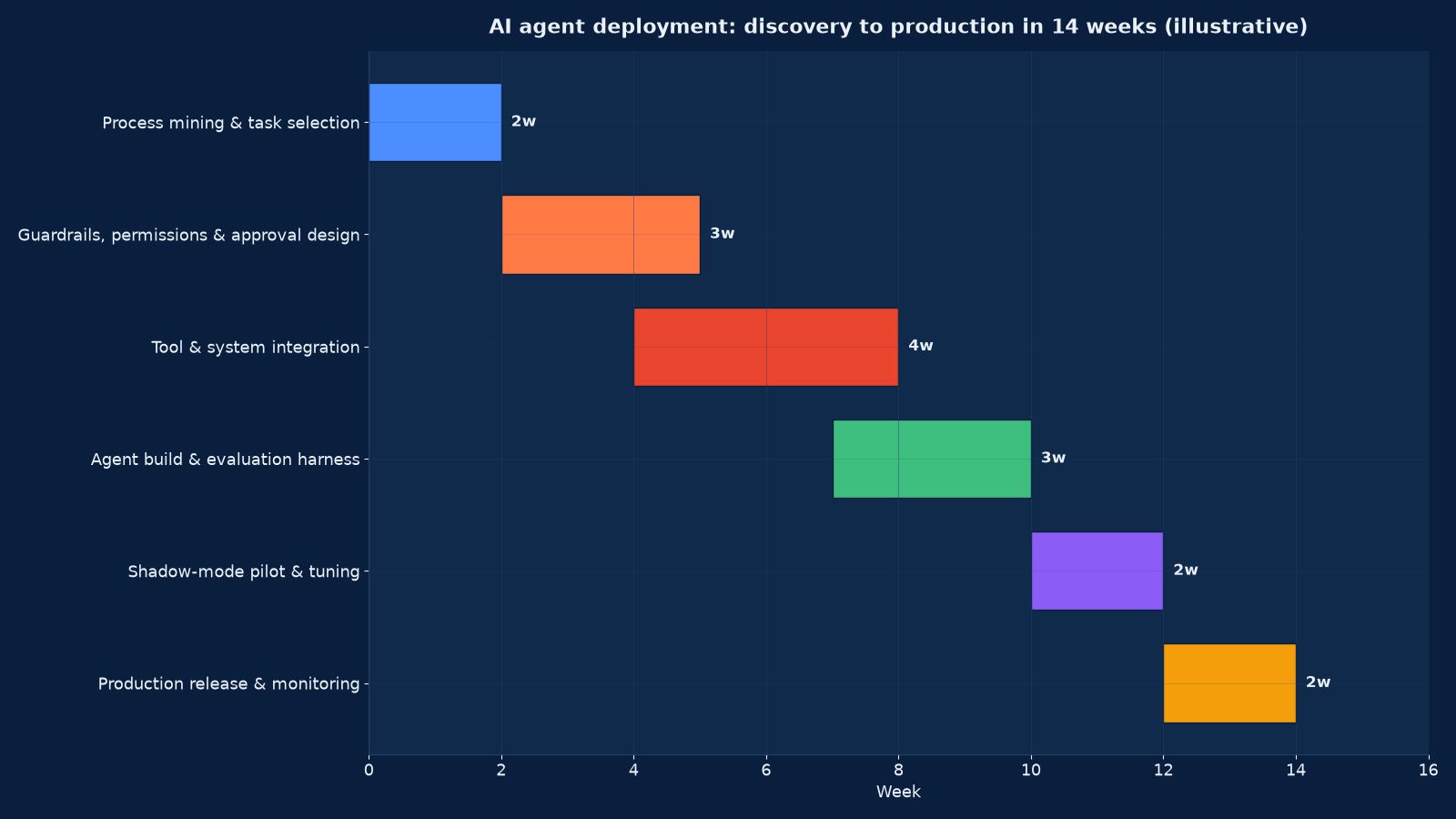
Chart values are an illustrative planning model based on typical UMC engagements and published industry benchmarks. They are not a guarantee of results on any specific project.
| Phase | Weeks | What happens | Exit gate |
|---|---|---|---|
| Process mining and task selection | 1–2 | Volume, variability, error cost and baseline measurement per candidate task | One candidate approved with a measured baseline and payback estimate |
| Guardrails, permissions and approval design | 2–4 | Action space, write scope, prohibited list, approval gates, limits, logging spec | Written control specification signed off by the process owner and risk |
| Tool and system integration | 4–7 | Scoped credentials, connectors, validation, error handling, environment separation | Every tool callable in a test environment with permissions verified |
| Agent build and evaluation harness | 7–9 | Retrieval, orchestration, retries, escalation, plus the versioned test set and thresholds | Evaluation pass rate at or above the agreed threshold on the test set |
| Shadow-mode pilot and tuning | 10–11 | Agent runs alongside the live process; decisions compared, disagreements analysed, thresholds tuned | Agreement and error rates inside tolerance over the full pilot window |
| Production release and monitoring | 12–13 | Phased rollout by volume, monitoring and alerts live, runbook and rollback tested | Stable at full volume with monitoring evidence and a tested rollback |
Shadow mode is the step most often skipped and most often regretted. Running the agent against live inputs without letting it act produces the only trustworthy estimate of production accuracy, because it uses real distribution rather than a curated test set. The disagreement log it produces is also the best available specification for what still needs fixing.
Evaluation: How We Know an Agent Is Good Enough to Release
An agent without an evaluation harness cannot be improved, only adjusted. We build the harness as a deliverable in its own right so it outlives the initial project and applies to every subsequent change.
- Golden test set — real historical cases with the correct outcome recorded, versioned and expanded over time
- Adversarial cases — malformed input, missing data, conflicting records, prompt injection attempts, out-of-scope requests
- Task-level metrics — accuracy, grounding, correct tool selection, step efficiency, escalation appropriateness
- Outcome metrics — the business measures that matter: rework rate, cycle time, cost per case, customer satisfaction
- Regression gates — a promotion is blocked if any metric moves outside tolerance, including model and prompt changes
- Live monitoring — drift in input distribution, refusal and escalation rates, latency, and cost per run against a ceiling
- Periodic revalidation — the golden set re-run on a schedule, because the underlying model and the data both change
This is the same discipline our AI product engineering service applies to customer-facing AI products, and it is the control that makes an agent auditable. Without it you cannot answer the question a risk committee will ask first: how do you know it is still working?
Measuring the Return on an AI Agent
Agent ROI is usually over-claimed because the cost side is incomplete. Run-rate inference, integration maintenance, human review time, evaluation effort and the internal time consumed during rollout are routinely omitted, and the benefit side is calculated at full adoption from day one.
| Benefit line | How we measure it | How we phase it |
|---|---|---|
| Handling capacity released | Hours per case before and after, multiplied by actual volume | Phased against the rollout curve, not assumed at 100% |
| Cycle-time reduction | Elapsed time from trigger to completion, measured per case | Measured from the shadow-mode baseline forward |
| Rework and error reduction | Defect or rework rate on the automated step versus the manual baseline | Only counted once monitoring confirms stability |
| Cost per transaction | Fully loaded cost per case, including inference and review time | Recalculated monthly as volume changes |
| Coverage extension | Cases now handled outside business hours or in additional languages | Counted only where demand actually exists |
| Revenue effect | Conversion, response speed or retention attributable to the change | Attributed conservatively, with the method agreed with finance |
We capture the baseline before the build starts and report against it monthly. Our AI ROI and executive scorecard guide provides the reporting structure, and the same scorecard is used at gate reviews so the decision to extend an agent to a second process is based on measured results from the first.
Why Agent Projects Fail, and What We Do About It
- The demo-to-production gap. A compelling demonstration on curated examples, then failure on real distribution. Prevented by shadow mode and a golden test set built from real cases.
- Unbounded tool access. An agent that can write anywhere eventually writes somewhere it should not. Prevented by least-privilege credentials and hard blocks in the tool layer.
- Automation of the wrong task. The most visible process is chosen rather than the most suitable. Prevented by scoring candidates against volume, structure, error cost and reversibility.
- No baseline. Benefit cannot be proven, so the project is judged on anecdote and loses its next funding round. Prevented by measuring before the build.
- Fragile integration. Screen-level or undocumented interfaces break silently. Prevented by API-first integration with validation and alerting on every tool call.
- Runaway cost. Loops, retries and unbounded context drive inference spend past the benefit. Prevented by budgets per run, per case and per day, with automatic stops.
- No owner after handover. The agent degrades and nobody is accountable. Prevented by naming the business and technical owner before release, not after.
- Governance discovered late. Controls retrofitted under audit pressure. Prevented by designing the guardrails in phase two, before integration begins.
AI Agent Deployment Engagement Models
| Model | Best suited to | Typical duration | What is included |
|---|---|---|---|
| Automation feasibility study | You have candidates but no evidence about which will work | 3–4 weeks | Task-level analysis, baseline measurement, ranked candidates, payback model, recommended design per task |
| Single agent to production | One approved process, clear owner, integration path known | 12–14 weeks | Guardrail design, integration, build, evaluation harness, shadow pilot, release, monitoring, runbook |
| Multi-process programme | Several processes across functions, shared platform and controls required | 5–9 months | Reusable orchestration, shared evaluation and monitoring, phased rollout per process, governance integration |
| Operations and improvement | An agent is live but degrading, unmonitored or unowned | Ongoing | Monitoring, revalidation, threshold tuning, cost control, evaluation set expansion, quarterly review |
Frequently Asked Questions About AI Agent Deployment and Workflow Automation
What is an AI agent?
An AI agent is a program that uses a language model to decide its next step, calls tools to act on systems and data, observes the result, and repeats until a goal is met or a defined limit is reached. In production it operates inside an explicit action space with permissions, budgets and approval gates rather than with open-ended autonomy.
How is an AI agent different from workflow automation or RPA?
Conventional automation and RPA follow a fixed rule: the same input always produces the same path. An agent handles variability — unstructured documents, ambiguous requests, situations the designer did not enumerate — by deciding the next step. That flexibility is the benefit and the risk, which is why agents need evaluation and monitoring that fixed automation does not.
Which of our processes should we automate first?
The one with high volume, a decision rule that can be written down, contained and reversible error cost, and data that already exists in a reachable system. We score every candidate on those criteria and recommend against automating tasks that are merely visible. Figure 2 in this page shows how sharply success rates differ by task type.
Can an agent act without human approval?
Yes, where the task is low-risk, reversible and monitored, and where the control specification allows it. For decisions with financial, legal, safety or employment consequence we design mandatory approval gates. The threshold is set by risk tier, not by preference, and it is enforced in the workflow rather than in the prompt.
How do you stop an agent doing something it should not?
With controls in the tool layer, not with instructions to the model. Tool allow-lists, scoped credentials, write limits, prohibited-action blocks, spend and step budgets, and a tested kill switch. Prompt instruction reduces the probability of an unwanted action; a hard block prevents it.
What is shadow mode and why does it matter?
Shadow mode runs the agent against live inputs without letting it act, then compares its decisions to what people actually did. It is the only way to estimate production accuracy on real distribution rather than a curated test set, and the disagreement log it produces is the most useful specification for what still needs fixing.
How long does deployment take?
A single agent with a known integration path typically takes 12 to 14 weeks from process selection to production, including guardrail design, integration, the evaluation harness, a shadow-mode pilot and a phased release. A feasibility study alone takes three to four weeks.
What does an AI agent cost to run?
Run-rate is driven by inference volume, context size, retries and tool calls, so it scales with usage rather than with headcount. We model cost per case before build and enforce budgets per run, per case and per day. Unmonitored loops are the most common cause of an unexpected bill.
Do you integrate with our CRM, ERP and support systems?
Yes, and integration is usually the largest share of the effort. We connect with least-privilege credentials, validate every tool result before the agent acts on it, and separate environments so a defect cannot reach production data. Where no API exists we assess whether the integration is viable at all before committing.
How do we know the agent is still working six months from now?
Through the monitoring and revalidation we install: drift detection on inputs and outputs, escalation and refusal rates against a baseline, cost per run against a ceiling, the golden test set re-run on a schedule, and a named owner reviewing the evidence at a defined cadence.
How does this relate to your other AI services?
AI forward-deployed engineering embeds engineers in your team to build the agent alongside your people. AI product engineering applies the same evaluation discipline to customer-facing AI products. Data science services covers the forecasting and analytics an agent may consume, and DevOps and CI/CD engineering provides the promotion and rollback path the release process depends on.
Deploy an AI Agent That Survives Production
If you have a process you want automated, start with evidence rather than a demo. We will measure the baseline, score your candidates against volume, structure, error cost and reversibility, and tell you plainly which one is worth building first — then deliver it with permissions, approval gates, an evaluation harness and monitoring that make the return provable.
Request an AI agent feasibility assessment and describe the process you have in mind. We will confirm the study scope, the baseline data we need and the deployment timeline before any build begins.
Related Services
Agent deployment sits between your AI engineering capability and your governance framework.
- AI Forward-Deployed Engineering Services — embedded engineers who build agents and RAG systems inside your environment
- AI Product Engineering Services — production AI products with evaluation, monitoring and sustainable unit economics
- Custom CRM Development & Integration Services — the system of record most commercial agents read from and write to
- Marketing Automation (HubSpot & Marketo) — the orchestration layer when an agent acts inside a customer journey
- DevOps & CI/CD Engineering Services — the promotion, rollback and monitoring path every release depends on
- Data Science Services for Business Analytics — forecasting, measurement and the analytics an agent consumes
- WhatsApp Marketing Services — channel delivery, template approval and opt-in handling for conversational agents
- Email Marketing & Automation Services — deliverability and lifecycle integration for agent-triggered messaging
- AI ROI Measurement & Executive Scorecard Services — baseline capture, bottom-up benefit and cost models, instrumentation, the executive scorecard itself and the gate criteria that make AI spend auditable
- Data Engineering for AI: RAG & Knowledge System Services — source audit, ingestion connectors, cleaning and metadata, permission-aware retrieval and the evaluation harness that proves every answer is grounded
- AI Integration Services for ERP, CRM & Operations — embed AI into ERP, CRM and operational systems with mapped permissions, supervised writes, immutable action logging and a tested rollback path
- AI Training & Enablement Services for Teams — role-based enablement, a measured capability baseline, build clinics and a champion network that makes adoption stick after delivery